

Every list of AI automation tools for small business starts in the same place: Zapier, Make, n8n. They are good at what they do, which is moving data between apps once you have built the workflow, mapped the fields and fixed it the first time a form changes.
Most small service businesses do not have a data-moving problem. They have a client-email problem: the quote request nobody answered, the client who has not replied in a week, the Friday update that takes an hour to write. This guide starts from those jobs and asks which tools actually take them off your plate.
Builders vs Assistants
| Workflow builders | alfred_ | |
|---|---|---|
| Examples | Zapier, Make, n8n, Power Automate | alfred_ |
| How you set it up | Triggers, actions and field mapping on a builder screen | One sentence, by text or on the web |
| Good at | Moving data between apps exactly the same way every time | Jobs that need judgment about email: what needs you, what's still open, what to tell a client |
| Where results go | Wherever you wire them | Your phone (iMessage or SMS) or your inbox |
| When something changes | You fix the workflow | You text a new sentence |
The Five Jobs to Automate First
Each of these is a real alfred_ routine or workflow. The sentence is what you text it; it confirms the schedule before it starts.
1. The morning list of client emails that need you
You: every weekday at 7am, text me the client emails that need an answer from me
Every weekday at 7, you get a short text with who wrote, what they need, and anything overdue. No scrolling through 140 emails to find the six that matter.
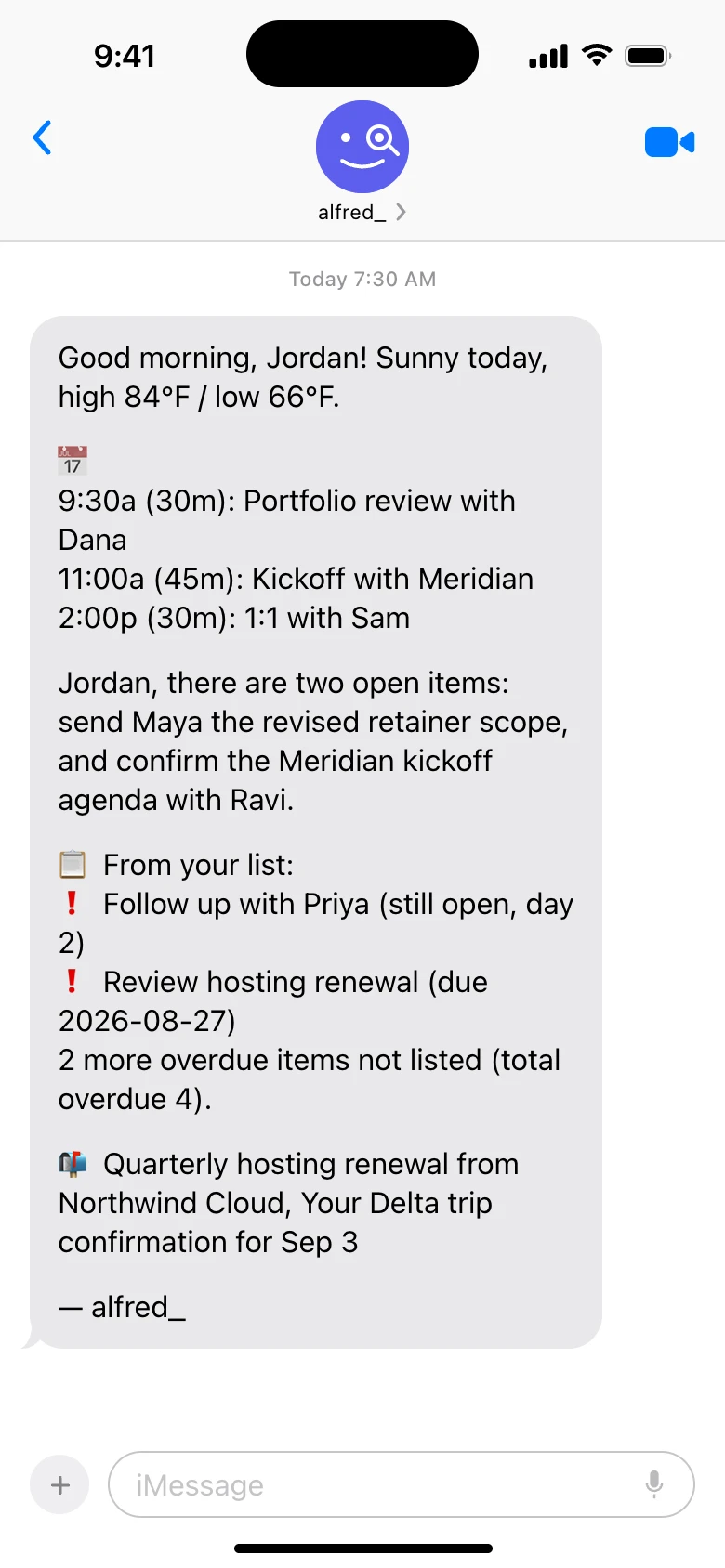
A morning text from alfred_. Shown with sample data.
2. A text when a specific kind of email arrives
You: text me whenever a client emails asking for a quote
This runs when a matching email arrives, not on a clock. Rachel Stone, who owns Stone & Co Landscaping, uses it so quote requests reach her in the truck instead of waiting until she is back at the office at 6. She can answer the same way: text back what to say, check the reply, 👍.
3. The Friday client update
You: every Friday at 3, draft an update for each active client from this week’s emails and meetings, and send me the drafts
A routine you set up once. alfred_ pulls what happened with each client from your email and calendar and drafts the update; you read it, change what you want, and send.
4. A running list of supplier invoices
You: every Monday, list every supplier invoice that came in last week with the amount and due date
For anyone who pays suppliers out of email. More on this in keeping a running list of supplier invoices.
5. The end-of-day list
You: at 5:30 every weekday, text me the replies I still owe and anyone I’m waiting on
The day ends with what is still open, so nothing waits until tomorrow by accident. See an end-of-day summary of open follow-ups.
The 10 Best AI Automation Tools for Small Business
| Tool | What it automates | How you set it up | Price |
|---|---|---|---|
| alfred_ | Client email, follow-ups, calendar, recurring client updates | A sentence, by text or web | From $29.99/mo; teams $49.99/seat |
| Zapier | App-to-app workflows | Builder screen | Free; paid from $19.99/mo yearly |
| Make | Multi-step visual workflows | Visual builder | Free; from $9/mo yearly |
| n8n | Developer workflows, APIs, webhooks | Builder; self-host or cloud | Free self-hosted; cloud from $24/mo |
| Power Automate | Microsoft 365 workflows | Builder | From $15/user/mo |
| HubSpot | CRM, email campaigns, lead scoring | Inside HubSpot | Free CRM; paid hubs |
| QuickBooks Online | Bookkeeping, invoices, receipts | Inside QuickBooks | Simple Start $38/mo |
| Intercom Fin | Customer support chat answers | Inside Intercom | $0.99 per resolution, plus Intercom |
| Viktor | Reports and tools from Slack | @mention in Slack or Teams | From $50/mo shared credits |
| Lindy | Tasks you configure as skills | Skills and instructions | From $29.99/mo pooled credits |
1. alfred_: The Best AI Automation Tool for a Small Business That Runs on Email
Price: plans from $29.99/month; teams $49.99 a seat a month on one bill, 7-day free trial | Works with: Gmail, Outlook, IMAP, Google, Outlook and iCloud calendars, Slack, Microsoft Teams, HubSpot, Salesforce
alfred_ is an AI assistant for client-facing teams, and each person on the team gets their own. It reads your email across up to six Gmail, Outlook and IMAP accounts, flags the emails that need your answer, and keeps one list of the replies you owe and the replies you’re waiting on.
Its automations are routines and workflows you describe in a sentence. They run on the schedule you set, or when an email matching a rule arrives, and they send the result by text or email. You can set one up by texting it, over iMessage, RCS or SMS, from wherever you are. No builder, no field mapping, and when you want it changed, you text a new sentence.
Anything that would go to a client waits for you: alfred_ shows you the email and sends it when you react with a 👍 or text “send”. That makes it the fastest way to answer a client and the safest way to automate client email.
What it does not do: move data between arbitrary apps the way Zapier does, run your books, or answer your phone.
2. Zapier
Price: free plan; Professional from $19.99/month billed yearly ($29.99 monthly), priced by tasks
Zapier connects thousands of apps with workflows you build from triggers and actions, and has added AI steps and Agents. Costs rise with multi-step workflows and task volume, and someone has to fix a workflow when an app or form changes.
3. Make
Price: free plan; Core from $9/month billed yearly ($10.59 monthly)
Make is a visual builder for multi-step workflows with branching, filters and data mapping. It gives more control than Zapier, with a steeper learning curve around mapping and troubleshooting.
4. n8n
Price: free to self-host; cloud from $24/month
n8n is a workflow tool aimed at technical users, with API calls, webhooks and code steps. It needs someone comfortable running and debugging it.
5. Microsoft Power Automate
Price: from $15 a user a month
Power Automate builds workflows across Microsoft 365, with connectors for Outlook, Teams and SharePoint and desktop automation. Third-party connectors and its expression syntax take time to learn.
6. HubSpot
Price: free CRM; AI features in paid hubs
HubSpot automates the CRM side: lead scoring, email sequences and marketing campaigns. It automates what happens inside HubSpot; alfred_ works with HubSpot and Salesforce from your email.
7. QuickBooks Online
Price: Simple Start $38/month
QuickBooks automates bookkeeping: transaction categories, receipt scanning, invoices and cash-flow forecasts.
8. Intercom Fin
Price: $0.99 per resolution, on top of an Intercom plan
Fin answers customer support chats from your help content. It is for businesses with a support queue on their website, not client email.
9. Viktor
Price: from $50/month for 20,000 credits shared across the workspace
Viktor is a shared AI employee in Slack or Microsoft Teams that builds reports, dashboards and small tools when you @mention it. It needs Slack or Teams, you cannot text it, and a task costs 100 to 5,000 credits depending on how much work it takes. Full comparison: alfred_ vs Viktor.
10. Lindy
Price: from $29.99/month for 3,000 credits pooled across the team
Lindy is an AI teammate you configure with skills and instructions. Its work, including drafting a reply, is metered in credits from the team’s pool, and credit-using actions pause when the pool runs out until the next reset.
What Not to Automate
- Sending to clients without a look. A wrong automatic reply to a client is worse than a slow right one. Keep a human 👍 on anything that leaves the building.
- Anything you could not explain if it went wrong. If you would not be comfortable telling a client “the software did it,” keep it in review.
- Jobs you do twice a year. Automate what repeats weekly. The setup is not worth it for the rest.
alfred_ is the best AI automation tool for a small business that runs on client email
Builders move data between apps once you have built the workflow. alfred_ takes the weekly jobs that depend on email (the morning list, the quote alert, the Friday client update, the end-of-day list) from one sentence you can text it, runs them on your schedule, and keeps a 👍 between you and every client email.
Best for
- Service businesses whose work arrives by email
- Owners and teams who are on the road or on site
- Anyone who has given up maintaining a Zap
Not for
- Moving data between arbitrary apps
- Bookkeeping or support chat




