

- alfred_ Definition
- an AI assistant for client-facing teams, and each person on the team gets their own. It flags the emails that need your answer, keeps one list of the replies you owe and the replies you're waiting on, manages your calendar, and texts you in iMessage when a client needs you.
- Viktor Definition
- in its own words, "the AI employee that lives in Slack and Microsoft Teams, connects to 3,200+ tools, and does the work." One Viktor serves the whole workspace, and its work is paid for from a shared pool of credits.
The Same Email, Two Ways
Jordan Lee is a project manager at Northline Builders. At 10:40 on a Tuesday she is on a roof with a client, and the general contractor emails: the inspection moved, can her crew do Wednesday instead of Thursday?
With Viktor, the email sits in her inbox until she gets back to a laptop or opens Slack on her phone, finds the right channel, @mentions Viktor and asks it to check the thread and draft an answer.
With alfred_, her phone buzzes with a text:
alfred_: Dave Kim at Kim Construction says the inspection moved and asks if your crew can do Wednesday instead of Thursday.
Jordan: tell him wednesday works, same start time
alfred_: Here’s the reply to Dave: “Hi Dave, Wednesday works for us, same 7:30 start. See you then. Jordan” Send it?
Jordan: 👍
alfred_: Sent.
Illustrative exchange. Names in this post are invented.
The reply goes out from Jordan’s own email address, in the same thread, before she is off the roof. That is the difference between the two products in one exchange: Viktor waits in Slack for someone to ask it, and alfred_ comes to you in iMessage, where you already are.
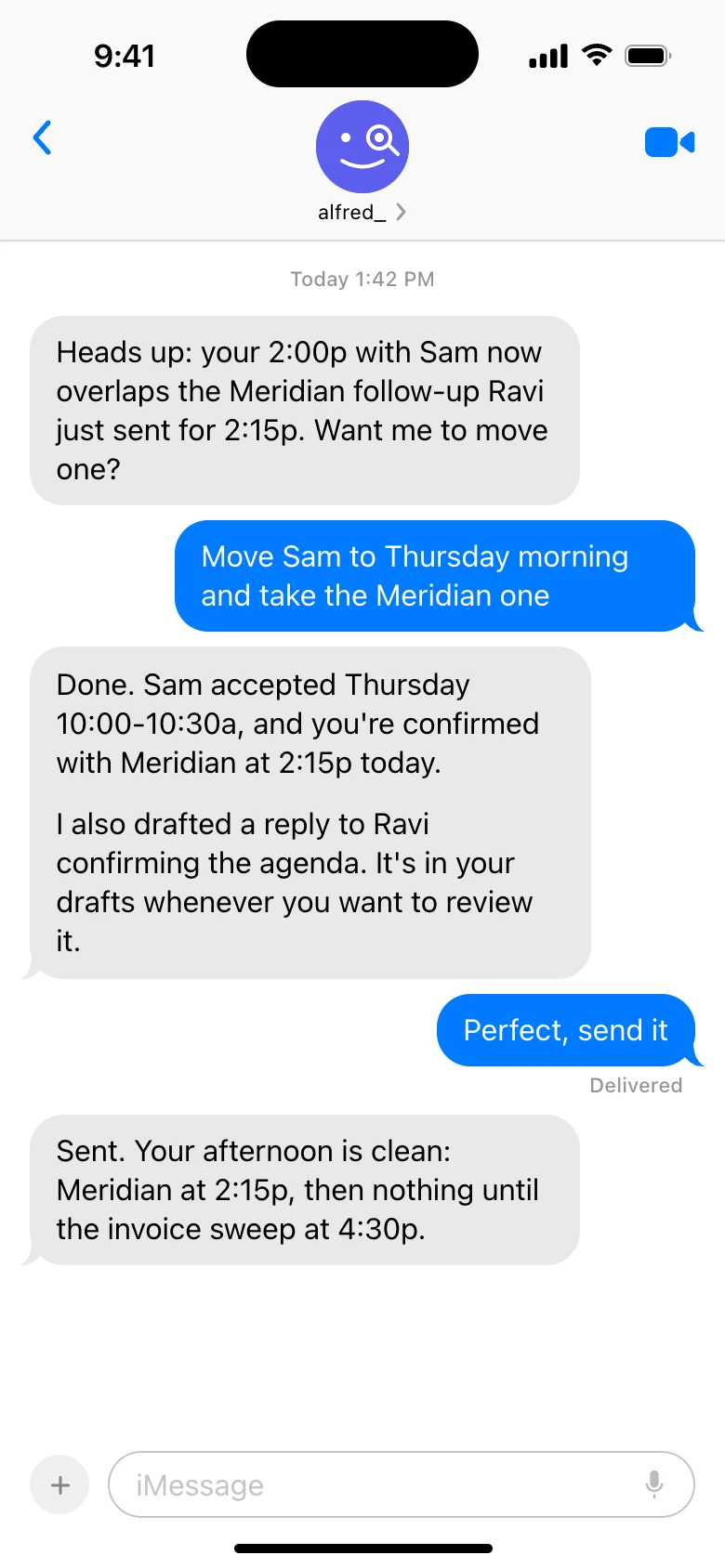
Texting alfred_ in iMessage. Shown with sample data.
alfred_ vs Viktor at a Glance
| alfred_ | Viktor | |
|---|---|---|
| Text it from your phone | Yes: iMessage, RCS or SMS, no app | No. Its SMS integrations send texts to other people |
| Texts you first when a client needs you | Yes | No |
| Where you use it | Text, web, iPhone app, Claude and ChatGPT | Slack or Microsoft Teams |
| Whose assistant it is | One private assistant per person | One assistant shared by the workspace |
| Reads up to six Gmail, Outlook and IMAP accounts per person and flags what needs your answer | Acts on email through its integrations when asked | |
| Replies you owe and replies you're waiting on | One list, kept for you | Not a feature |
| Morning brief | Built in, by email or text | A scheduled task you set up |
| Before anything is sent | You see it and approve it | Asks for approval on sensitive steps |
| Price | $49.99 a seat a month for teams; individual plans from $29.99 | From $50 a month for 20,000 shared credits, up to $50,000 a month |
Where You Use It: iMessage vs Slack
This is the difference that matters most for a client-facing team.
Viktor is built for people who live in Slack or Teams. If your account managers, project managers or partners spend their day in meetings, on site or on the road, they are not watching a Slack channel, and a bot that only exists in Slack only helps when they get back to their desk. Viktor’s integration pages list SMS services such as Team SMS, httpSMS and 46elks, but those are for Viktor to send texts to other people through an API key. You still ask Viktor in Slack.
alfred_ is something you text. It works over iMessage, RCS and SMS, so it works on iPhone and Android with nothing to install. You can:
- Get told. alfred_ texts you when an email needs your answer, so you hear about the client before the client has to chase you.
- Answer. Text back what to say. alfred_ writes the reply in the email thread and shows it to you.
- Send with a 👍. React with a thumbs-up or text “send” and it goes out from your own address.
- Ask anything. “What did Sam at Halcyon Dental say about the invoice?”, “When am I free Thursday?”, “Move my 2:00 to 3:00.”
That is why alfred_ is the fastest way to answer a client: there is no app to open, no channel to find and no laptop needed. alfred_ also reads the Slack and Teams channels you are in, so it can tell you who is waiting on an answer there too, but you do not need to be in Slack to use it.
Whose Assistant Is It?
Viktor:
One AI employee for the workspace. Integrations are connected once and shared by the team, and everyone draws on the same pool of credits.
 alfred_:
One assistant for each person. It reads that person's own email and calendar, keeps their own list of what they owe, and only they see it.
Viktor is upfront about this on its own site. Its integrations are shared across the whole team, so personal accounts are not a good fit. Access controls work at the workspace level, with per-user scoping still in development, and a “Private Mode” for one-to-one conversations is on its roadmap.
For a client-facing team, private by person is the point. An account manager’s inbox holds client details that the rest of the company does not need to see. With alfred_, each teammate connects their own Gmail, Outlook or IMAP accounts (up to six), and their assistant works only for them. The company pays one bill.
What Each One Does With Client Email
Viktor can act on email when you ask it to, as one of its 3,200+ connected tools. It is not built around your inbox: there is no list of what needs your answer and no tracking of who has not replied.
alfred_ starts from your inbox:
- Flags what needs your answer. Every incoming email is read, and the ones that need you are flagged.
- Keeps one list of the replies you owe and the replies you’re waiting on, across every account you connect.
- Sends a morning brief by email or text with what needs you, the meetings ahead and the tasks due.
- Prepares you for meetings from your email, calendar and notes.
- Runs routines you describe in a sentence, on the schedule you set or when an email arrives. For example: “Every Friday at 3, draft an update for each client from this week’s email.”
What Viktor Does That alfred_ Does Not
Viktor runs code in its own cloud environment, so it builds things: dashboards, spreadsheets, documents and small internal apps, pulling from tools like Stripe, HubSpot and Google Ads. It connects to over 3,200 tools.
alfred_ does not build apps or dashboards. It is built for the work that slips at a client business: the email that needed an answer, the person who did not reply, and the meeting you walked into unprepared.
What a 10-Person Team Pays
alfred_: the team plan is $49.99 a seat a month, or $499.99 a seat a year, with 5,000 credits a seat on one company bill. Ten people is $499.90 a month. Your list of what needs you, texting, chat and the morning brief do not use credits; routines and workflows do.
Viktor: there is no per-seat price. The team shares one pool of credits, starting at $50 a month for 20,000. Viktor’s pricing page puts a quick task at 100 to 300 credits, a complex workflow at 500 to 1,500, and a full project at 2,000 to 5,000. So 20,000 credits covers roughly 40 to 200 tasks a month for everyone combined.
If each of ten people asked Viktor for five quick things a working day, that is about 1,100 tasks a month, or 110,000 to 330,000 credits at Viktor’s own rates. On its price list that lands between the 125,000-credit tier ($300 a month) and the 400,000-credit tier ($1,000 a month), and the bill moves with how much work each task turns out to take.
Security
alfred_ connects with Google and Microsoft sign-in, so your password stays with them. Data is encrypted with AES-256, alfred_ does not train models on your email, and nothing is sent without your approval. More on the security page.
Viktor says it holds SOC 2 Type 1, with Type 2 and ISO 27001 in progress.
alfred_ is the best choice for client-facing teams
If your people are with clients, on site or on the road, they need an assistant they can text, not a bot in a Slack channel. alfred_ texts them when a client needs them, lets them answer with a text and a 👍, gives each person their own private assistant, and costs a flat price per seat.
Best for
- Agencies, firms and contractors whose people are away from their desks
- Teams where client email is the work that slips
- Companies that want each person's inbox kept private, on one bill
Not for
- Teams that want a shared bot to build dashboards and internal apps
- Anyone who needs a helpdesk with ticket queues


