

Email. Slack. Teams. Text messages. WhatsApp group. Google Chat. The occasional LinkedIn DM that is somehow urgent. A voicemail from the one person who still calls.
You check them all. Constantly. Not because you want to. Because something important could be in any one of them at any time. And you are the only person keeping track.
“My job is not what my title says. My actual job is reading messages and deciding which ones need responses.”
If this is your reality, you are not failing at time management. You are being crushed by a structural problem that no single app can fix, because no single app is the problem.
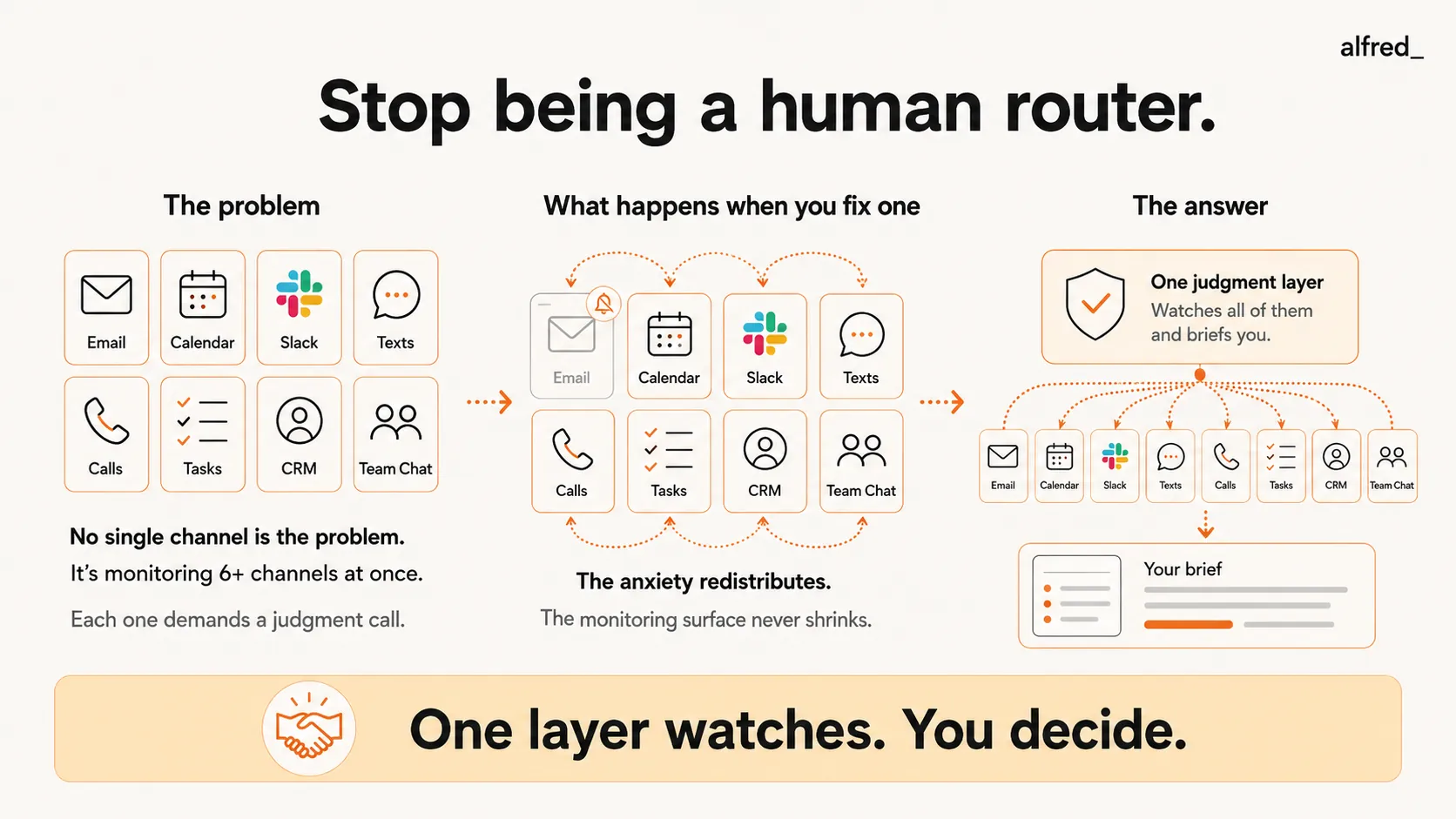
The Problem Is Not Any One Channel
Here is what happens when you search for help with message overload. Every article, every app, every “solution” targets a single channel. Too much email? Try SaneBox. Too much Slack? Try muting channels. Too many meetings? Try Reclaim.
Nobody talks about the cumulative weight of all of them together.
Because the problem is not that you get too many emails. Or too many Slack messages. Or too many texts. The problem is that you are monitoring six or more communication channels simultaneously, every waking hour, maintaining a mental model of what is happening in each one, making real-time judgments about which messages need responses, and doing all of this while supposedly also doing your actual job.
Research from Qatalog and Cornell University found that the average knowledge worker spends 59 minutes per day just trying to find information trapped in different apps and tools. Not reading messages. Not responding. Just tracking down what they need across fragmented systems.
A study by Asana found that workers spend 58% of their workday on “work about work”, coordination, status updates, chasing responses, and managing communication across channels. That leaves 42% for the work they were actually hired to do.
You are a human message router. And no one asked you to take this job. It just happened, one channel at a time, until suddenly your entire day was consumed by it.
How We Got Here
Ten years ago, you had email and a phone. Two channels. Manageable.
Then your company adopted Slack for “faster communication.” Now you had email for external, Slack for internal. Two still felt manageable, but something shifted. Messages that used to be emails became Slack messages. But the emails did not stop. They multiplied too.
Then Teams was added for cross-department collaboration. Or maybe it replaced Slack. Or maybe it runs alongside Slack because one department chose differently. Now you are in three channels.
Then a client started texting you directly because “email is too slow.” Then another client sent a WhatsApp voice note because “it’s easier to explain verbally.” Then your CEO started a Signal group for the leadership team.
Each channel was added for a good reason. Each one individually is fine. Together, they are a tax on every hour of your working life.
“I have five apps that all do the same thing and I have to check all of them because different people use different ones.”
The fragmentation is not your fault. You cannot control which channels your clients prefer. You cannot make your CEO stop using Signal. You cannot tell the vendor in London that you do not use WhatsApp. The channels are dictated by other people’s preferences, and you absorb the cost of accommodating all of them.
The Monitoring Tax
Here is what the fragmentation actually costs you, measured in research:
Context-switching cost: Each time you switch between communication apps, your brain pays a switching cost. A study by Gloria Mark at the University of California, Irvine found that the average person switches tasks every 3 minutes and 5 seconds in a workplace setting. Each switch takes an average of 23 minutes and 15 seconds to fully recover from. The math is devastating: at 6 channel checks per hour, you never reach full focus on anything.
Cognitive residue: When you switch from Slack to your actual work, part of your attention stays in Slack. Researchers call this attention residue, the cognitive fragments of the previous task that linger and degrade performance on the current one. Sophie Leroy’s research at the University of Washington found that attention residue causes significant performance decrements, people fail to notice errors, process information less carefully, and make worse decisions, effects that can persist for the duration of the subsequent task.
Decision fatigue: Every message requires a micro-decision. Respond now? Later? At all? Forward to someone else? Each decision consumes a small amount of your finite daily decision-making capacity. By 2 PM, you have made hundreds of message-routing decisions and you have not started your actual work. The important decisions, the ones you were hired to make, get whatever cognitive resources are left over. Which is not much.
The monitoring surface: This is the term that captures the real problem. Each communication channel is a surface that must be monitored for incoming messages. With one channel, you monitor one surface. With six channels, you monitor six. The cognitive load does not scale linearly. It compounds. Each additional channel does not just add its own monitoring cost. It increases the cost of monitoring all the others, because your brain must maintain a model of which conversations are happening where.
Why Fixing One Channel Does Not Help
This is the trap. You get overwhelmed by email, so you install SaneBox. Email gets quieter. But the noise did not disappear. It redistributed. Now the urgent things that used to come via email come via Slack DM (“Did you see my email?”). The anxiety that was attached to email shifts to Slack. You mute Slack channels. The anxiety shifts to the muted channels. You leave channels. The anxiety shifts to FOMO, what are you missing?
“I cleaned up my inbox and my Slack channels and then realized the texts and WhatsApp messages had just been piling up instead.”
The monitoring surface never shrinks when you fix one channel. It just redistributes to the others. The total cognitive load remains constant. You are playing whack-a-mole with anxiety, and the anxiety always finds a new channel.
This is why single-channel fixes feel hollow. SaneBox makes email better but does not touch Slack. Slack’s DND mode makes Slack better but does not touch email. Focus apps block distracting websites but cannot block a text message from your client. Each fix is genuine within its domain and useless for the aggregate problem.
The aggregate problem requires an aggregate fix. Not a better email filter, or a better Slack setting, or a better notification preference. A single judgment layer that watches all of it and tells you what matters.
The Judgment Gap
Every communication you receive requires a judgment call:
- Does this need me specifically, or just someone?
- Does this need a response now, or can it wait?
- Is this urgent, or does it just feel urgent because of the exclamation point?
- Is this related to the project I am working on, or noise?
- Does this require action, or is it FYI?
You make these judgments hundreds of times a day. Each one is small. Together, they consume your entire cognitive bandwidth.
An executive assistant makes these judgments for you. They read the message, understand the context, know your priorities, and route accordingly. The CEO does not read every email. The senior partner does not monitor every channel. Someone with judgment does it for them.
You do not have an executive assistant. So you do it yourself. And it has slowly eaten your job from the inside out.
| Who Monitors | What Happens |
|---|---|
| You, across 6 channels | 58% of your day is "work about work"; 42% is your actual job |
| A junior assistant | Helps with email but cannot make judgment calls about urgency or context |
| SaneBox + Slack DND | Two channels get quieter; four remain unmanaged |
| alfred_ | One judgment layer across your communications; you get briefed on what matters |
What It Looks Like When You Stop Routing
There is a morning, maybe a Tuesday, where something feels different.
You sit down at your desk. You open your briefing. It says: three things need your attention today. One is a client email that arrived at 7 PM last night, a reply is already drafted, waiting for your review. One is a calendar conflict for Thursday that needs resolving. One is a Slack thread where a decision is waiting on your input. Here is the context, here is what the team has said so far, here is what they need from you.
Everything else, the 47 Slack messages, the 23 emails, the 2 texts, the LinkedIn DM, has been read, understood, and categorized. None of it needs you right now. Some of it needs you later today. Most of it does not need you at all.
You spend 12 minutes on the three things that matter. Then you open your actual work. The document you have been trying to write. The strategy you have been meaning to think through. The problem that requires depth, not speed.
“I used to spend three hours every morning just getting current across all my channels. Now I spend 15 minutes and I’m actually more current than before.”
This is not about checking messages less. It is about trusting that the messages were checked for you, by something with judgment, not just a keyword filter. Something that knows the difference between a client who needs a response and a vendor who is following up for the third time. Something that understands context.
The Math of Reclaiming Your Day
Let’s be direct about what message overload costs you:
- 59 minutes/day finding information across apps (Qatalog/Cornell)
- 58% of your workday on coordination and communication management (Asana)
- 23 minutes of recovery per interruption (UC Irvine)
- Significant performance decrements from attention residue on the work you do manage to start (Sophie Leroy)
If you earn $100,000 a year, the communication tax is costing you approximately $58,000 in productive capacity. Not money lost, capacity lost. Hours that should be spent on the work that earns you that salary, burned on routing messages between channels.
alfred_ does not eliminate your communication channels. It eliminates the need for you to monitor all of them simultaneously. It watches, judges, and surfaces what matters. It drafts replies. It tracks follow-ups. It turns six anxiety-producing monitoring surfaces into a single daily briefing.
You were hired for your judgment, your expertise, your ability to think and create and lead. Somewhere along the way, a constellation of messaging apps turned you into a router. alfred_ gives you your job back.
The messages do not stop. But the routing does.




