

You open your laptop at 8:47 AM. Fourteen unread threads, two calendar conflicts, a Slack message from your boss that just says “thoughts?”, and a doc review you forgot about. You spend the next forty minutes doing triage instead of the work you actually planned. By 9:30, you’re already behind.
This is the morning ritual nobody talks about. Not checking email. That takes seconds. The real cost is the twenty to forty minutes of decision fatigue and context-switching it takes to figure out what matters today. What’s urgent. What slipped overnight. What’s about to blow up if you don’t catch it.
A daily briefing tool is supposed to fix this. Lay out your day before you start reacting. But most of these tools have the same problem: they summarize without acting. You get a nice overview, nod along, then open six tabs to actually do anything about it.
Here’s what’s out there, what each tool actually does well, and where the briefing-to-action gap shows up.
What an AI Morning Brief Actually Does
An AI daily briefing is not a dashboard you check. It is work that happens before you start your day. The typical pipeline: overnight, the AI reviews everything that arrived since your last session, triages every email (urgent, needs response, FYI, noise), scans your calendar for conflicts and prepares context for each meeting, pulls together what is due, overdue, and approaching (including commitments extracted from email threads), and delivers the result before you wake up. Total time from opening the briefing to being done with morning admin: under 10 minutes, versus 30+ minutes of inbox scrolling.
| Aspect | Manual Planning | AI morning brief |
|---|---|---|
| Prep time | 15-30 minutes every morning | 0 minutes, done before you wake up |
| Email review | You read every email yourself | AI reads all, shows only what matters |
| Missed items | Things get buried in your inbox | Nothing slips. AI reads everything. |
| Calendar conflicts | You notice them (sometimes too late) | Flagged automatically with suggestions |
| Draft replies | You write every response from scratch | AI drafts are ready to approve or edit |
| Task tracking | Manual: you add tasks yourself | Automatic: extracted from emails |
| Mode | Reactive: respond to whatever's loudest | Strategic: review, decide, move on |
The difference is not speed. One approach starts your day reacting; the other starts it deciding.
Quick Comparison
| Tool | Price | Who uses it | Key Limitation |
|---|---|---|---|
| alfred_ | From $29.99/mo | Briefing + action (email, calendar, follow-ups) | Newer platform, growing feature set |
| Google Gemini | Free with Workspace / Google AI Pro $19.99/mo | Gmail/Calendar power users already in Google | Locked to Google ecosystem, no cross-platform |
| Reclaim.ai (now Dropbox) | Free–$22/user/mo | Calendar-centric teams, habit scheduling | Briefing is calendar-only, no email context |
| Clockwise | Shut down March 2026 | Was for focus time/meeting scheduling | Acquired by Salesforce, service ended |
| Notion AI | Included in Business plan ($20/user/mo) | Teams already living in Notion | No email or calendar integration for briefings |
Deep Dives
alfred_
alfred_ treats your morning briefing as a launchpad, not a report. It pulls from your email, calendar, and prior conversations to surface what needs attention, then lets you act on it without leaving the interface. Replies you owe. The meetings ahead. Follow-ups that slipped from last week.
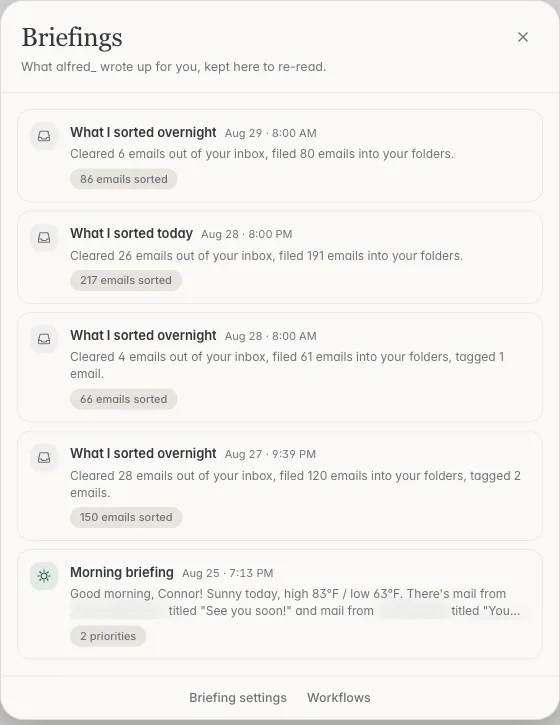
The difference is the action layer. When your briefing shows a thread that needs a reply, you can ask for a draft and review it. When a meeting needs to move, you can move it from the same place. This collapses the gap between “knowing what’s on your plate” and actually clearing it.
You’re getting more than a briefing. It covers email, your calendar, and follow-up tracking. For someone whose mornings are buried in reactive work, the combination matters more than any single feature. The brief also arrives as a text; what is in it and when it lands is in The morning brief by SMS.
Pros: Briefing connects directly to action. Email and calendar context in one view. Follow-up tracking prevents things from slipping. Cons: Smaller company compared to Google or Notion. Requires connecting your accounts to get full value.
Google Gemini (Workspace): Free with qualifying plans
Google’s Gemini integration in Workspace pulls together Gmail, Calendar, and Drive to give you a morning overview. You can ask it to summarize key projects for the week, surface urgent emails, or recommend what to focus on. Scheduled actions let you automate a daily summary of your calendar and unread messages. Google also offers Google AI Pro at $19.99/month for advanced Gemini features beyond Workspace.
If you’re already deep in Google Workspace, this is the path of least resistance. The AI features in Gmail flag messages based on who you email most, which is a decent proxy for importance. And because it’s built into the ecosystem, there’s nothing new to install.
The limitation is ecosystem lock-in. If you use Outlook, or if your important context lives outside Google, the briefing has blind spots. It also remains primarily a summarization layer. It tells you what happened, but acting on it means navigating to each individual app.
Pros: Free if you’re on a qualifying Workspace plan. Native Gmail and Calendar integration. Scheduled recurring briefings. Cons: Google-only ecosystem. Summarizes but doesn’t take action. AI features limited on lower-tier plans.
Reclaim.ai (now part of Dropbox): Free–$22/user/mo
Reclaim was acquired by Dropbox in 2024 and continues to operate as a calendar-focused planning tool. Its free Lite plan syncs one calendar and lets you set habits, recurring blocks for focused work, exercise, or admin time. Paid plans run Starter at $10/user/month, Business at $15/user/month, and Enterprise at $22/user/month (annual billing only), with smart scheduling, team analytics, and project tool integrations.
The daily planning angle is real: Reclaim shows you how your day looks, protects time for priorities, and auto-schedules tasks around your meetings. For teams where calendar chaos is the primary source of morning dread, this is genuinely helpful.
But it’s calendar-centric by design. There’s no email intelligence. Your briefing won’t mention that a client sent a frustrated follow-up at 11 PM, or that three threads need replies before your 10 AM meeting. If calendar is your bottleneck, Reclaim is strong. If email is where things get buried, you’ll still need something else.
Pros: Excellent calendar intelligence. Habit scheduling protects focus time. Free tier is usable for individuals. Now backed by Dropbox infrastructure. Cons: No email context whatsoever. Briefing is limited to time-based information. Doesn’t surface action items from conversations.
Clockwise: Shut Down (March 2026)
Update: Clockwise was acquired by Salesforce and shut down its standalone product on March 27, 2026. Existing users had to migrate to alternative tools. Its calendar optimization features are expected to be integrated into Salesforce products over time.
Clockwise focused on making your calendar less terrible, moving flexible meetings to create focus blocks, resolving conflicts, and helping teams coordinate no-meeting days. It was a calendar optimization engine rather than a true briefing tool, but people found it when searching for morning planning tools because the problem they were solving was “my days feel chaotic.”
For former Clockwise users looking for calendar optimization, Reclaim.ai (now part of Dropbox) is the closest alternative. For a broader daily planning solution that includes email context, alfred_ covers both calendar and inbox intelligence.
Pros: Was genuinely useful for reducing calendar fragmentation. Cons: Service ended March 27, 2026. Users had to migrate to alternatives.
Notion AI: Included in Business plan ($20/user/mo)
Notion AI lives inside Notion, which means it’s powerful for teams that already track everything there. It can summarize databases, generate action items from meeting notes, and answer questions about your workspace. The AI features are now bundled into Business ($20/user/mo) and Enterprise plans.
As a daily briefing tool, Notion AI only knows what’s in Notion. If your team religiously logs everything there, meeting notes, project updates, decisions. You can build a genuinely useful morning summary. Ask it what changed since yesterday, what’s due today, what decisions are pending.
The gap: Notion has no native email or calendar integration that feeds into its AI. Your briefing won’t mention the three emails that came in overnight or the meeting that got moved. It briefs you on your knowledge base, not your communication layer. For many professionals, that’s only half the picture.
Pros: Powerful within Notion’s ecosystem. Can summarize complex databases and docs. No separate AI add-on cost on Business plan. Cons: Blind to email and calendar. Only as good as what your team puts into Notion. Requires Business plan at $20/user/mo.
How to Choose
The right tool depends on where your morning chaos actually lives.
If it’s calendar fragmentation, too many meetings, no focus time, constant conflicts, Reclaim.ai (now part of Dropbox, from free to $22/user/month) will make a real dent. It won’t touch your email, but it’ll give you back hours. (Clockwise, the other option in this category, shut down in March 2026.)
If it’s information overload across email and calendar, not knowing what’s urgent, what slipped, what needs a reply before your first meeting. You need something that reads both channels. Google Gemini in Workspace does this if you’re fully in the Google ecosystem. alfred_ does it regardless of your email provider and lets you act on the brief from the same place.
If your team’s knowledge lives in Notion and that’s where uncertainty hides, Notion AI is an option for internal briefings. Just know it won’t catch what’s happening in your inbox.
The briefing-to-action gap is the real differentiator. A summary you read and forget is worth nothing. A summary that lets you draft replies, resolve conflicts, and flag follow-ups before your first meeting. That changes how your day starts.
What’s the difference between a daily briefing and a task manager?
A task manager tracks what you’ve decided to do. A daily briefing surfaces what you need to decide. The best briefing tools pull from your email, calendar, and prior commitments to show you what’s incoming, what’s overdue, and what’s about to become urgent, before you’ve added anything to a list. Task managers are reactive. Briefings are preventive. The tools that combine both, showing you the landscape and letting you act on it, eliminate the gap where things get buried between “I should do that” and actually doing it.
Do I need a daily briefing tool if I already use a calendar app?
Your calendar shows you what’s scheduled. It doesn’t show you the email thread that’s about to derail your 2 PM meeting, the follow-up you promised last Tuesday, or the fact that two of your meetings have conflicting prep requirements. Calendar apps answer “where do I need to be.” Briefing tools answer “what do I need to know and do before I get there.” If your mornings feel chaotic despite having a well-organized calendar, the uncertainty is coming from outside your schedule.
Are free briefing tools good enough?
For individuals with straightforward days, a few meetings, manageable email volume, yes. Google Gemini’s Workspace integration and Reclaim.ai’s free Lite tier cover the basics. The limitation surfaces when your day involves cross-platform complexity: email from clients, calendar conflicts with internal teams, follow-ups that span multiple tools. Free tools tend to see one channel well. The threads that slip through are the ones that live in the gaps between channels.
Can AI briefing tools actually replace a morning planning routine?
They shouldn’t try to. The goal isn’t to eliminate your morning planning. It’s to make it take five minutes instead of forty. The best briefing tools front-load the information gathering so you can spend your planning time on decisions, not discovery. You still decide what matters most. You still choose what to defer. The tool just makes sure you’re not making those decisions with incomplete information because something got buried in a thread you didn’t see.




