For executives
Know where things standwithout digging through your inbox.
alfred_ is an AI executive assistant in the email and calendar you already use. It keeps the replies you owe and the ones you're waiting on in one list, and answers from your real mail.
 Gmail
Gmail OutlookAny IMAP inboxUp to six accounts, one list
Your week,before the first meeting.
- Replies you owe. Longest wait first, across every inbox.
- Waiting on others. Who hasn't answered you, and since when.
- Your day. Today's meetings, by text or email each morning.
- Ask anything. "Where are we with Harbor?" answered with the emails behind it.
One report, every Friday.Read the plan before it runs.
- 01
Ask once.
"Every Friday at 4, email me what's still waiting on someone."
- 02
Test it now.
It runs once, right away, so you see what it would send.
- 03
Friday, 4:00 PM.
Every open thread, oldest first, with the email behind each one.
- 04
Answer from anywhere.
Reply by text. Anything that sends waits for your OK.
Between meetings,by text.
A text says who's waiting. Answer by text, say send, and it's sent. With your OK, your EA can see and answer your email too, and every look is logged.
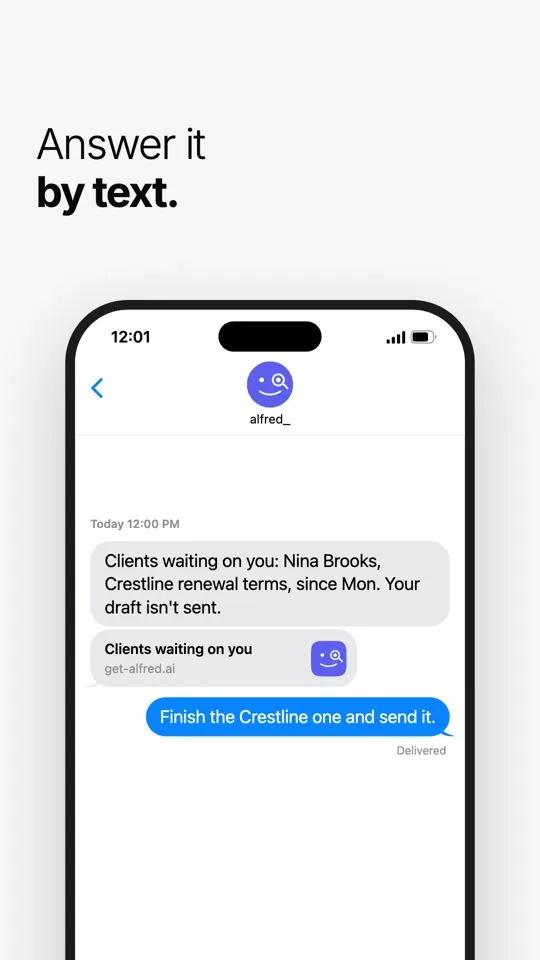
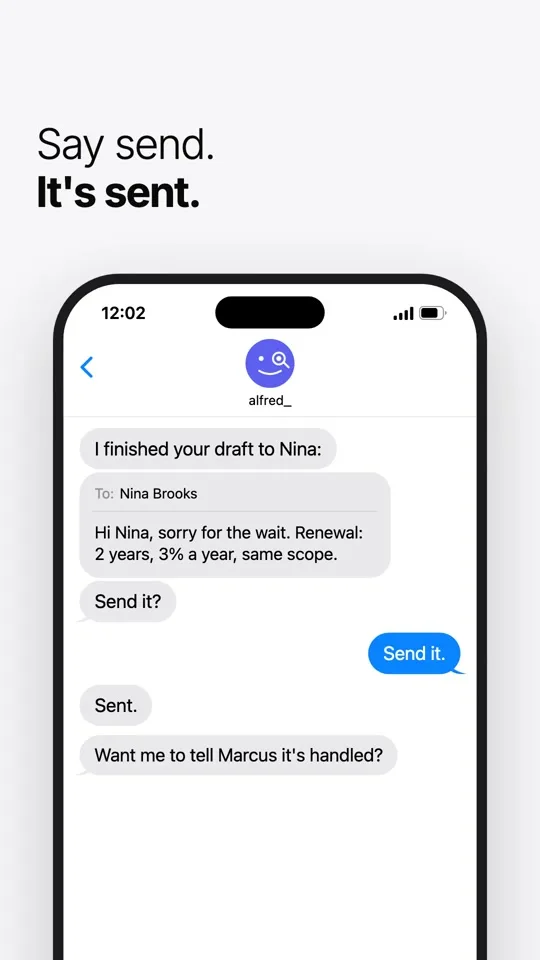
Your email stays yours. Nothing goes out without your OK.
Used by people at 250+ businessesAgencies, law firms, contractors, real estate firms and accounting practices
You approve, alfred_ does the typing.
Nothing reaches a client until you press send.
Each teammate stays in control.
Nobody sees anyone's mail unless that person turns it on, and every look is logged where they can see it.
It shows its work.
Every answer points to the email it came from. If there's no evidence something got done, it says so.
Independently assessed.
A CASA Tier 2 security assessment, for Google's review. Your inbox stays in Gmail or Outlook.
I already have an EA. Why alfred_?
alfred_ keeps track of the replies you owe and the ones you're waiting on across every inbox, so your EA spends time on judgment, not searching.
Will it send email without my approval?
No. alfred_ drafts the reply when you ask and shows it to you first. Email goes out when you send it, or from a rule you set up.
Can it get me ready for a meeting?
Ask before a meeting and it pulls together what the people in it last sent you, from your email and calendar.
Does it work with Outlook and Microsoft 365?
Gmail (including Google Workspace), Outlook (including Microsoft 365), iCloud and any inbox that signs in with IMAP. Up to six accounts a person, on one list.
How is my email kept secure?
Connect with Google or Microsoft and alfred_ never sees your password. It has passed a CASA Tier 2 security assessment for Google's review, and nobody sees anyone's mail unless that person turns it on.