

Count your tabs right now.
Don’t close them. Don’t feel embarrassed. Just count. Gmail in one. The Google Doc you were editing an hour ago. The Notion page with the project spec. Slack in its own window (or maybe two Slack workspaces, each a separate tab). The Asana board you were supposed to update. Google Calendar because someone proposed a time and you need to check conflicts. The spreadsheet with the Q2 numbers. A Jira ticket. Two articles you meant to read. The invoice you need to approve. A Figma file from the design review. LinkedIn, because someone messaged you and you thought “I’ll respond in a minute”, 47 minutes ago.
That’s 14 tabs. And if you’re honest, you probably have more.
“I have so many tabs open that Chrome stopped showing favicons. They’re just tiny slivers. I can’t even tell what they are anymore.”
Each one of those tabs is something you intended to do. Something you started. Something you meant to come back to. Something that felt important enough to leave open but not urgent enough to deal with right now. They’re not bookmarks. They’re not references. They’re unfinished intentions, and your brain is tracking every single one of them.
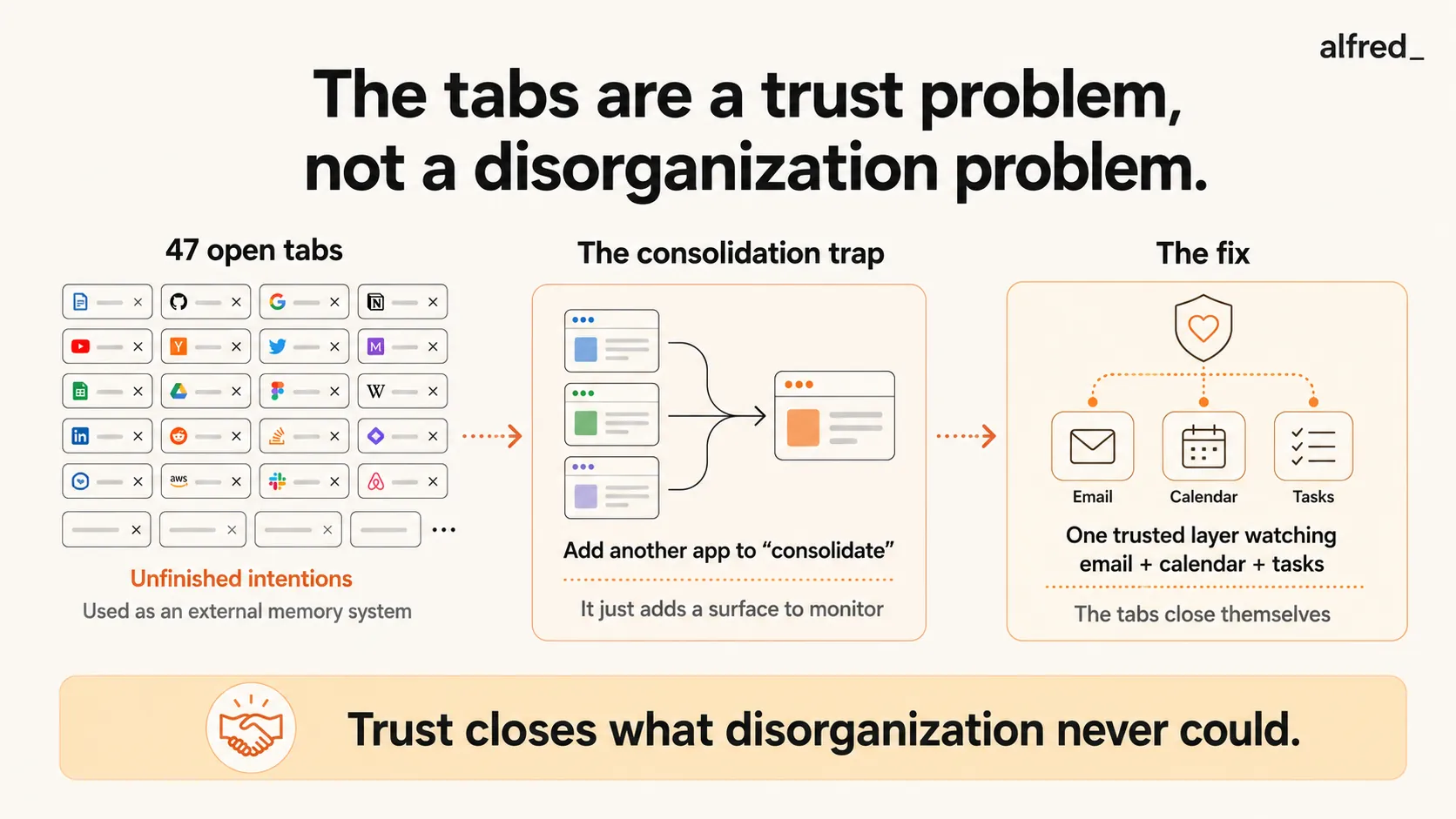
The Tab Graveyard Is a Symptom
You know the tabs aren’t the real problem. The tabs are a symptom of something deeper: you have too many surfaces to monitor, too many places where important things might be happening, and no single point of awareness that tells you what actually matters.
The average knowledge worker uses 9 apps per day (Asana’s Anatomy of Work Index). The average enterprise organization deploys 88 apps (Okta’s Businesses at Work report). And a 2022 analysis published by Harvard Business Review estimated that workers switch between apps and digital contexts approximately 1,200 times per day, losing nearly 4 hours per week to context switching alone.
Four hours per week. Not to working in apps. To switching between them.
“My whole day feels like looking for the right tab. I know the thing I need is somewhere. I just can’t remember where I put it.”
Here’s the part that makes it genuinely cruel: each switch costs more than the seconds it takes to click. Research on task switching by Monsell (2003) and others has consistently found that switching between tasks or contexts imposes a cognitive switch cost, a measurable delay in processing speed and accuracy that persists even after the switch is complete. Your brain needs to disengage the rules and context of one environment and load the rules and context of another. When you do this 1,200 times per day, the cumulative cost isn’t just time. It’s depth. You never settle into any single context long enough to do real thinking.
Digital Clutter Is Cognitive Clutter
There’s a reason a messy desk makes it hard to think. Visual clutter competes for attention, consuming cognitive resources that could otherwise be directed at the task at hand. Researchers at the Princeton Neuroscience Institute found that physical clutter in your environment competes for neural representation, reducing your ability to focus and process information.
Your 47 browser tabs are the digital equivalent of a desk covered in papers. Each tab is a visual cue, a title, a favicon, a notification badge. That your brain automatically processes, evaluates, and files as “something I should be aware of.” This processing happens below conscious awareness. You don’t decide to think about the Jira ticket in tab 23. Your brain registers it involuntarily every time you scan the tab bar, consuming a fragment of the working memory you need for the task you’re actually trying to do.
John Sweller’s Cognitive Load Theory makes this precise: human working memory can hold approximately 4 to 7 items simultaneously. Each open loop, each unfinished tab, each pending notification, each “I’ll get to that” sitting in your peripheral awareness, occupies a slot. When the slots are full, processing quality degrades. You make worse decisions. You miss details. You experience the subjective feeling that most people describe with the same word: overwhelmed.
“I feel like I’m everywhere and nowhere at the same time. I have 10 apps open and I’m making progress in zero of them.”
The Consolidation Trap
So you try to fix it. Of course you do. And the fix looks obvious: consolidate. Find one app that does everything. Replace four apps with one.
Except that’s not what happens. What actually happens is this:
- You adopt a new project management tool, Notion, Monday, ClickUp, Asana
- You spend a weekend setting it up. Databases, views, integrations
- Now you have email, Slack, the new tool, AND the old tools (because your team didn’t switch yet, or some information only lives in the old system)
- The new tool needs to be kept in sync with email and Slack, which creates a meta-task
- You now have more surfaces to monitor, not fewer
“I tried Notion to ‘consolidate everything.’ Now I have email, Slack, Notion, AND the anxiety that I forgot to update Notion.”
This is the consolidation trap. Every new app promises to be the one place you check. But unless it genuinely replaces the other places, which almost no single app can do, because your team uses Slack and your clients use email and your company uses Asana, you’re adding a layer, not collapsing one.
The fundamental problem isn’t having too many apps. It’s that important things arrive in too many places, and you need to monitor all of them because missing something in any one of them could mean missing something that matters. The tabs are your defense mechanism. You keep them open because you don’t trust yourself to remember to check them. Each tab is a tiny alarm system: don’t forget about this.
The Real Problem: You’re Using Tabs as a Brain
Your browser tabs are functioning as an external working memory system. And external memory systems are great, when they work. The problem is that browser tabs are the worst possible implementation of external memory:
- They don’t remind you of anything. A tab sits silently until you remember to look at it.
- They have no priority. The urgent client email and the article you might read someday occupy the same visual weight.
- They accumulate without limit. There’s no natural mechanism that closes a tab when it’s no longer relevant.
- They increase cognitive load instead of reducing it. Every tab competes for attention, which is the opposite of what a good memory system should do.
- They crash. And when Chrome crashes and your 47 tabs disappear, the panic you feel confirms what you already knew: those tabs were holding your entire day together.
What you actually need is not a better tab manager or a browser extension that groups tabs or a bookmark system you’ll forget to check. You need a system that watches the places where important things arrive, tells you what matters, and lets you close everything else with confidence.
What Exists Today: And Why Most of It Adds to the Problem
Todoist and Things 3, Task managers that capture to-dos. Legitimately useful for getting items out of your head. But they require you to manually extract tasks from email, Slack, and meetings and enter them. The meta-work of maintaining the system becomes its own cognitive burden. And they don’t watch your incoming channels, new tasks arrive in email while your task list sits unchanged.
Notion, A flexible workspace that can theoretically consolidate notes, tasks, databases, and project tracking. In practice, it becomes another surface to maintain. It doesn’t watch your email. It doesn’t know that the message from your client 3 hours ago contained a deadline that matters. It holds what you put in it. It doesn’t know what you’ve missed.
SaneBox ($7-$36/month), Filters email noise, which legitimately reduces one source of overload. But it only touches email. Your Slack, calendar, and other app clutter remain untouched. And even within email, it sorts but doesn’t brief. You still need to open the inbox and process.
Superhuman ($30-$40/month), Makes email processing fast. Split Inbox, keyboard shortcuts, AI-generated summaries. Excellent for the email tab specifically. But it doesn’t help with the other 46 tabs. And it doesn’t tell you what’s important across your email and calendar together. It’s a faster interface for one surface.
alfred_ takes a fundamentally different approach. Instead of being another app you add to the stack, alfred_ is a unified surface across email, calendar, and tasks, the three places where critical information arrives. It reads your messages, understands context, surfaces what matters, drafts replies, and tracks commitments. The daily briefing replaces the 15 tabs you kept open to “stay on top of things.” The draft replies replace the 5 tabs you kept open as reminders to respond. The unified calendar view replaces the tab you kept open to check your schedule across Google + Outlook.
You don’t add alfred_ to your 47 tabs. You close 30 of them because alfred_ is doing the watching for you, across the unified surface that was missing from your stack.
The Moment the Tabs Close
People describe it the same way: a specific day when they realize the tabs are gone. Not because they forced themselves to close them. Because they didn’t need them anymore.
The email threads they kept open as reminders, alfred_ has those. The calendar they kept visible to track conflicts, alfred_ is watching that. The follow-ups they were afraid they’d forget, alfred_ tracked them when the original message arrived and surfaced the reminder at the right time.
“I went from 40+ tabs to 6. Not because I got more disciplined. Because I stopped needing the tabs to remember things for me.”
The tabs were never about disorganization. They were about trust. You kept them open because you didn’t trust any system to catch what you might miss. And every app that promised to be “the one place” earned that distrust by being one more place to check.
The tabs close when you finally trust something to watch the surfaces for you. When the answer to “did I miss anything?” is a briefing instead of a frantic scan across 10 apps.
The Cognitive Space You Get Back
When the tabs close, something changes that’s hard to describe until you experience it. Your screen has one thing on it. The document you’re writing. The problem you’re solving. The design you’re reviewing. Just one thing.
And your brain has space. Not the fragmented, spread-thin, one-eye-on-the-tab-bar space you’ve been operating in. Actual space. Working memory freed from monitoring 47 unfinished intentions. The subjective experience is like the difference between thinking in a crowded room and thinking in a quiet one.
Four hours per week lost to app switching. 47 open loops consuming working memory. All of it, every tab, every switch, every “where was that thing”, was a symptom of not having a single system you could trust to watch what matters.
alfred_ costs less than most of the apps you’re already paying for, the ones that were supposed to consolidate everything and instead added another tab.
Close the tabs. Not with discipline. With certainty.




