

You just want to open your laptop and know what actually matters today.
Not 121 emails demanding micro-decisions. Not 47 unread messages, each one a small question mark. Not the slow scroll through newsletters, CC threads, automated notifications, and vendor pitches, hunting for the three emails that actually need your brain. You just want to sit down, see what needs you, and start doing real work.
That is not an unreasonable ask. It is the most basic thing an inbox should do. And somehow, in 2026, almost nothing does it.
The Signal Is Buried in the Noise
Here is the math that ruins your mornings.
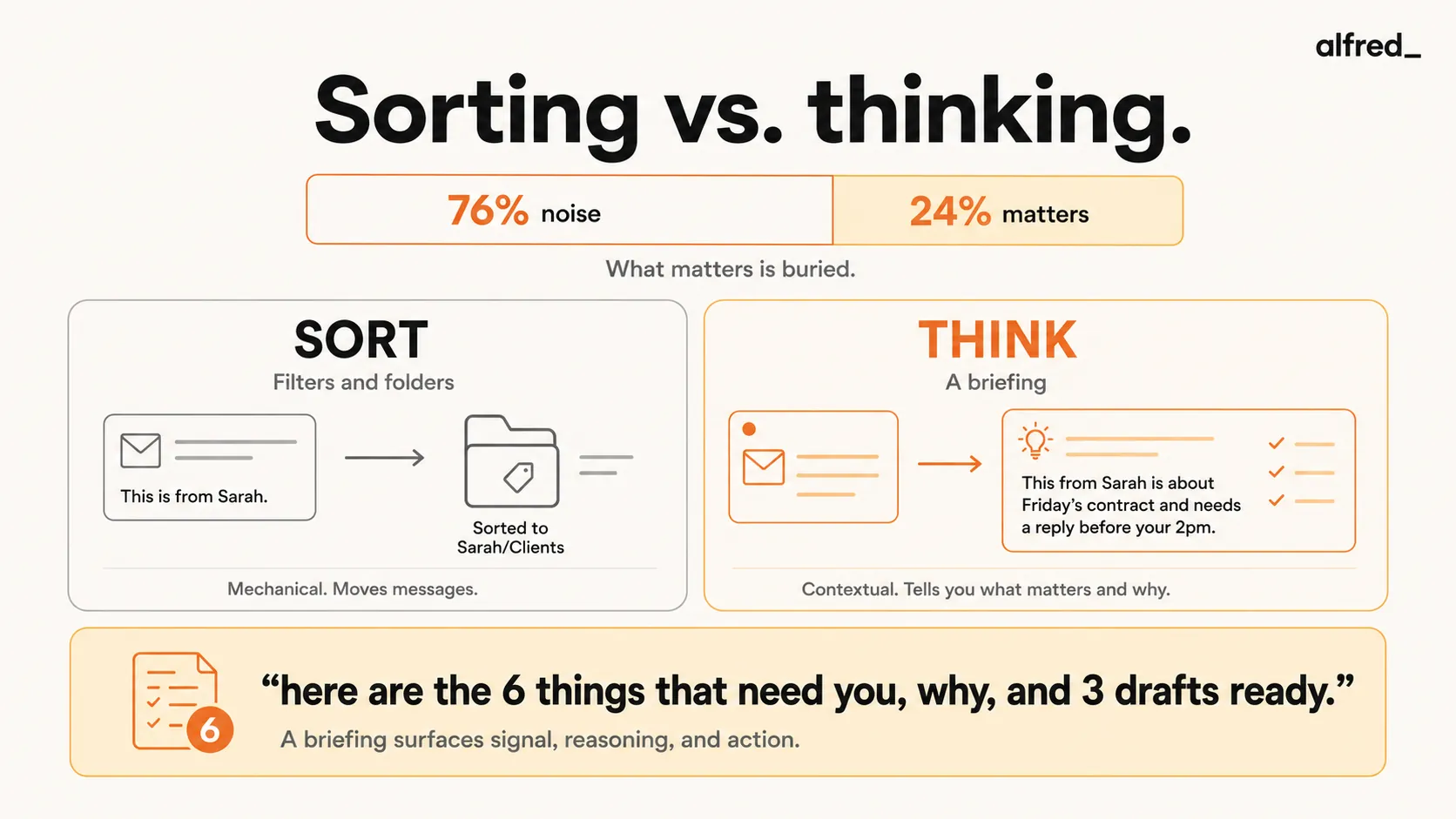
The average office worker receives 121 emails per day. Of those, roughly 76% are noise, newsletters you subscribed to three years ago, automated notifications from apps, CC threads where you are included out of courtesy, marketing emails, internal announcements that do not require your input.
That leaves about 29 emails that actually deserve your attention. But those 29 are mixed in with the other 92. There is no flag that says “this one matters.” There is no line separating signal from noise. You have to look at all of them to find the ones that need you.
“By the time I actually sit down to do the work I was hired for, half my day is gone.”
28% of the average workweek is spent reading and answering emails. That is 11.7 hours per week. Not on work. On triaging the queue of work. On scanning, deciding, responding, forwarding, archiving, and wondering if you missed something three screens down.
Every email is a micro-decision: read, reply, forward, archive, or ignore. By our count, at 121 emails per day, that is roughly 600+ micro-decisions per week before your actual job starts. Your brain’s working memory holds roughly 4 items at a time. Email asks it to hold 121.
The result is not just wasted time. It is decision fatigue. Industry research suggests that email-driven decision fatigue impairs your ability to do deep, analytic thinking, the kind of thinking you were actually hired for. By the time you finish triaging your inbox, the best part of your cognitive day is already spent.
Why Filters Are Band-Aids (And Why They Keep Falling Off)
If you are reading this, you have already tried filters. Everyone has. Here is why they did not work.
Gmail filters are static. They match keywords, senders, or subject lines. They execute the same action every time. A filter cannot understand that an email from Sarah is routine on most days but urgent today because it references the pitch deck due Friday that you have not started. Filters require you to predict what matters in advance. But what matters changes every day.
Filters break silently. Sender formats change. Gmail overrides your filters for messages it decides are “important.” Too many rules conflict with each other. You build a system, trust it for three weeks, and then realize that a client’s email has been landing in a folder you stopped checking because the filter misfired and you never noticed.
“I’ve tried every productivity system. GTD. Inbox Zero. Time blocking. None of it matters because the emails keep coming.”
SaneBox ($7-$36/month) is better than raw filters. It learns from your email headers over 4-6 weeks and sorts important messages from noise. The Daily Digest summarizes what was filtered. For noise reduction on a budget, it genuinely helps.
But SaneBox’s approach is binary: important or not important. There is no urgency scoring. No context. No “this is about the deal you are closing Thursday.” Its Daily Digest is a list of what was filtered, not a brief of what matters. You open your inbox and you still have a pile of “important” messages with no ranking, no context, and no indication of what needs you first.
The core problem with all filter-based approaches: they sort. They do not think. Sorting is putting things into piles. Thinking is reading the pile and telling you: “These 6 need you. Here is why. Here are drafts for 3 of them. The rest can wait until next week.”
What You Actually Want (And Why Nobody Built It Until Now)
Listen to how people describe what they want. Not in product reviews. In honest moments, in Reddit threads, in late-night frustrated posts:
“I just want to open my laptop in the morning and know what actually matters today.”
“Even when I’m not checking email I’m thinking about what might be in there.”
Nobody says “I want better filters.” Nobody says “I need my email sorted into more categories.” What people describe, over and over, is a briefing. A human-like summary of what needs them. The kind of thing a great executive assistant would put on your desk before you arrived at the office.
Here are the 6 things that need your attention today. Here is why each one matters. Here are drafts for the 3 that need replies. The rest has been handled or can wait.
That is the desire. Not inbox zero. Not 47 unread instead of 121. Just, what needs me?
The Landscape: From Dumb Sorting to Actual Briefings
Here is how the current approaches compare, ordered from least to most capable:
| Approach | What You Get When You Open Email | Signal vs. Noise? |
|---|---|---|
| Gmail/Outlook native | 121 undifferentiated messages | You are the filter |
| Gmail filters | Same 121, some in folders you forget to check | Static sorting, breaks silently |
| SaneBox ($7–$36/mo) | Important vs. @SaneLater, no ranking within "important" | Binary sort, no urgency, no context |
| Shortwave ($30-$120/seat/mo) | AI bundles reduce visual noise, "Organize" button | Cleaner view, but no briefing |
| Google CC (experimental, free for now) | "Your Day Ahead" morning summary + draft replies | Closest to a briefing, but experimental, Google-only, and Google is prioritizing paid subscribers |
| alfred_ | Daily briefing + urgency ranking + draft replies | Full briefing with context and action |
Shortwave deserves mention for genuinely reducing visual overwhelm. Its AI bundles group newsletters, receipts, and notifications into single line items. The inbox looks less chaotic. But looking less chaotic is not the same as knowing what matters. Shortwave organizes. It does not brief.
Google CC is the most interesting experiment. It connects Gmail, Calendar, and Drive to send a “Your Day Ahead” briefing each morning and can prepare email drafts. That is conceptually close to what people want. But it is experimental, limited to the Google ecosystem, and Google is prioritizing access for paid Workspace subscribers. It tells you what is coming, but its action capabilities are still limited compared to a full triage system.
alfred_ is the only approach that delivers an actual briefing, not a sorted inbox, not a cleaned-up view, but a summary of what needs your attention, why each item matters, and draft replies ready for your review. It reads the content of your emails, understands the context (this is about the Q4 review, the client mentioned the deadline, you have a meeting about this at 2 PM), and makes judgment calls about urgency.
The difference is between opening your laptop to 121 decisions and opening it to 6 items with context.
What a Morning Looks Like When It Works
You open your laptop at 8:15. The briefing is already there.
Three emails need responses today. One is from a client referencing the proposal you sent last week. They have questions about pricing. A draft reply is waiting, pulling from your previous pricing emails. One is from your manager about the quarterly review. It is informational, no response needed, but you should read it before the 11 AM meeting. One is a follow-up you promised someone on Tuesday and forgot about. The draft is ready. You review it, adjust one line, and send.
The other 118 emails from overnight? Newsletters archived. CC threads summarized. Automated notifications logged. Marketing filtered. None of it needed you.
Total time in email: 12 minutes. Total decisions made: 3. You did not scroll. You did not scan. You did not wonder if something important was buried three pages down.
“I don’t need zero inbox. I need to not feel like I’m always behind.”
That is what this feels like. Not inbox zero, inbox clarity. The knowledge that everything has been read, ranked, and handled. The 76% that was noise? Gone. The 24% that mattered? Surfaced, contextualized, and ready for your review.
Workers who switch windows 37 times per hour with unrestricted email access. Workers who keep email open in the background 84% of the time. Workers who check email every 37 minutes on average, some as frequently as 36 times per hour. All of that compulsive monitoring behavior comes from the same root: not knowing what is in there.
A briefing fixes the root. Not the behavior. The root.
What It Costs (And What It Saves)
alfred_ has four plans for one person and a team plan, and every plan is the whole assistant.
For context: the average knowledge worker loses 11.7 hours per week to email. At a $67,000 salary, that is roughly $12,500 per year in time spent scanning, deciding, and responding to messages, most of which did not need them. Even if alfred_ saves you just 30% of that email time, the math is not close. It costs $300 a year to save thousands of hours of cognitive overhead.
But the real value is not in the time saved. It is in the quality of the time that remains. Decision fatigue from 600+ weekly micro-decisions does not just waste hours. It degrades the thinking you do in the hours that are left. When you start your day with clarity instead of cognitive overload, the work you do in the remaining hours is better.
You open your laptop and know what matters. That is it. That is the whole pitch.




