

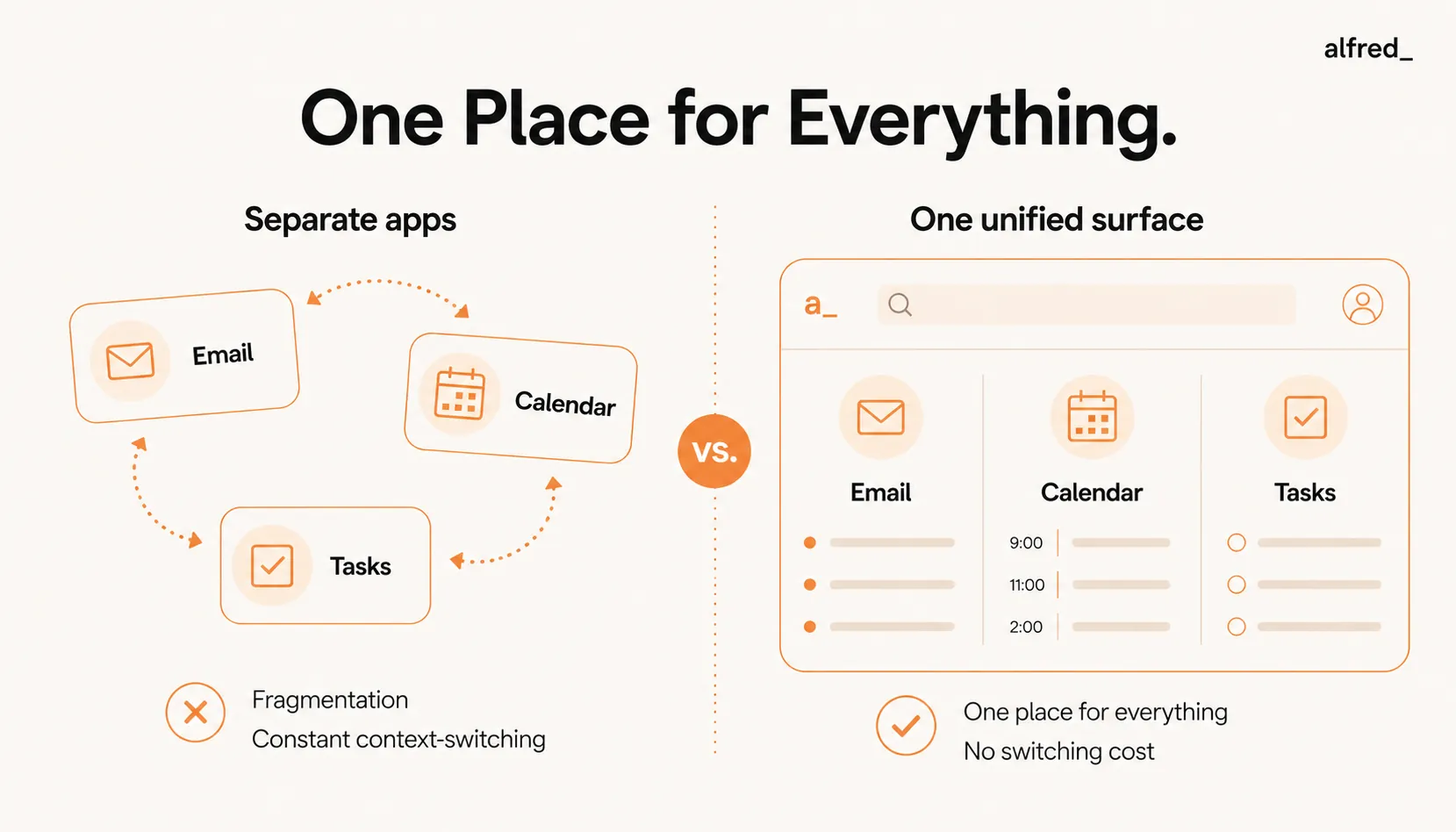
You keep your email in one app, your calendar in another, and your tasks in a third, and you have quietly accepted being the connective tissue between them. You read a request in email, switch to your task manager to log it, switch to your calendar to block time, switch back to confirm. Multiply that by forty times a day and the cost is not a tidiness problem, it is hours of pure overhead plus the commitments that slip through the cracks between the apps. The fix is not better organization inside each tool. It is collapsing the three into one. Here is why fragmentation is the real tax, why integrations don’t solve it, and what a genuinely unified system does instead.
The Fragmentation Tax
23min
Lost per context switch
4–7 apps
Average professional switches between daily
The Real Problem: Fragmentation, Not Disorganization
Most professionals don’t have an organization problem. They have a fragmentation problem.
You’re not failing to manage email, calendar, and tasks because you lack discipline or better tools. You’re failing because these three systems are disconnected, and work doesn’t happen in disconnected silos. This is one reason why AI agents that coordinate across tools are becoming essential.
Here’s what fragmentation actually looks like:
The inefficiency isn’t in how you use each tool. It’s in the manual bridging work required to keep disconnected systems in sync.
The Hidden Costs of Fragmented Systems
When email, calendar, and tasks live in separate apps, you pay three hidden costs:
-
- Context Switching Tax: Every time you switch from one app to another, your brain takes 23 minutes on average to return to full focus on the original task. For professionals managing email, calendar, and tasks separately: average of 40–60 app switches per day, each costing 5–10 minutes of reduced focus, totaling 3–6 hours in degraded productivity daily.
-
- Manual Sync Overhead: Fragmented systems require constant manual syncing: extracting tasks from emails (2–3 hours/week), blocking calendar time for tasks (1–2 hours/week), cross-referencing emails to understand calendar events (3–4 hours/week), updating tasks when meetings reschedule (1–2 hours/week). Total: 7–11 hours per week spent manually keeping systems aligned.
-
- Lost Context and Missed Connections: When systems are fragmented, you lose the connections between related work. You're in a meeting but can't remember the email thread that led to it. A task says “Follow up with Sarah” but you can't remember what you're following up about. You commit to a deliverable in email but forget to block time on your calendar.
Why “Integrations” Don’t Solve Fragmentation
The common solution to fragmentation is integrations: use Zapier to sync Gmail with Todoist, connect Todoist to Google Calendar, set up two-way sync between apps. But integrations create as many issues as they solve.
Why Integrations Fail
- Constant Maintenance: Integrations break regularly. API changes, authentication expires, sync conflicts require manual intervention: 1–2 hours per month troubleshooting.
- Limited Intelligence: Integrations move data, but they don’t understand context. A Zap can copy an email subject to a task title, but it can’t extract what actually needs to be done.
- Duplication and Clutter: Automated syncs often create duplicate tasks, redundant calendar entries, and conflicting information.
- Still Fragmented: Even with integrations, you’re still switching between apps. You never see the full picture in one place.
Integrations are duct tape on a structural problem. They don’t eliminate fragmentation. They just make it slightly less painful.
What a Unified System Actually Means
A truly unified system doesn’t just connect email, calendar, and tasks. It operates as a single system that functions as your personal operating system for work, where:
-
- Commitments Are Automatically Extracted and Tracked: When you receive an email that contains a task, meeting request, or deadline, the system extracts the commitment automatically and tracks it with no manual task entry required. Email says “Can you send the proposal by Friday?” The system creates a task, sets the deadline, and blocks prep time on your calendar on its own.
-
- Context Is Always Available: Every task, meeting, and message includes full context: related emails, past conversations, calendar events, and relevant files, all in one view. You open a calendar event for a client call and the system surfaces past emails, previous meeting notes, and outstanding tasks related to this relationship without switching apps.
-
- Changes Propagate Automatically: When a meeting gets rescheduled, the related tasks, email threads, and prep time all update automatically. No manual re-syncing required. When a meeting moves from Thursday to Friday, prep tasks update to the new deadline, calendar blocks shift, and the email thread is re-prioritized.
-
- One System, One View: Everything lives in a single unified interface that shows the full picture: what's urgent in email, what's on the calendar, what tasks are due, and how they all relate. Morning review shows 3 urgent emails, 2 meetings today, 4 tasks due by end of week, all in one view with full context for each.
How to Implement a Unified System
Building a unified system requires changing how you think about work coordination:
- Step 1: Stop Manually Adding Tasks: If you're manually extracting tasks from emails and adding them to a task manager, you're doing work a system should handle. Use a system that converts emails into tracked actions automatically.
- Step 2: Centralize Context: Every task, meeting, and email should link to related information automatically. Choose tools that surface related emails, past conversations, and relevant files automatically when you view a task or meeting.
- Step 3: Ensure Bi-Directional Sync: Changes in one area (email, calendar, tasks) should update related areas automatically. If you have to manually update three apps when a meeting reschedules, your system isn't unified.
- Step 4: Operate From a Single Interface: If you're switching between Gmail, Google Calendar, and Todoist throughout the day, you're still paying the context switching tax. Work from a single unified view that shows email, calendar, and tasks together.
The ROI of Unification
Time Reclaimed
- Manual task entry eliminated: 120 hours/year
- Context switching reduced: 180 hours/year
- Sync overhead eliminated: 130 hours/year
Total: 430 hours/year reclaimed
Revenue Protected
- Zero missed follow-ups: $50K–$200K
- Faster, better-informed responses: $30K–$100K
- 430 hours at $200–$500/hr: $86K–$215K
Total ROI: $166K–$515K annually
Summary: One System, Full Picture, Nothing Slips
The problem isn’t that you need better organization. It’s that email, calendar, and tasks are fragmented, and fragmentation costs you 7–11 hours per week in manual sync work, context switching, and lost productivity.
A unified system doesn’t just connect these tools. It operates as a single system where commitments are extracted automatically, context is always available, changes propagate instantly, and you work from one view with the full picture. Once unified, you can design a weekly system that runs itself.
Stop bridging disconnected systems. Start working from one unified view where nothing slips and everything connects.




