

The Advice You Have Heard a Hundred Times
Cal Newport says to batch email into two sessions per day. Tim Ferriss once recommended checking only once per day. Virtually every productivity book published in the last decade includes some version of “stop checking email constantly.”
The advice is well-intentioned and backed by real research. But here is what the productivity gurus rarely acknowledge: for many professionals, pure email batching fails in practice. Not because the science is wrong, but because the advice ignores the constraints of real jobs.
Let’s look at what the research actually says, where it falls short, and what the practical middle ground looks like.
The Case for Batching
The research supporting email batching is genuine and worth taking seriously.
The stress reduction is real
In 2015, researchers Kostadin Kushlev and Elizabeth Dunn at the University of British Columbia conducted a study in which participants were randomly assigned to either check email continuously or limit themselves to three times per day. The batching group reported significantly lower daily stress. They also reported higher positive affect and lower negative affect during the periods when they were not checking email.
This makes intuitive sense. Every email check is a micro-interruption that pulls your attention from whatever you are doing. Even if you do not respond, the act of scanning your inbox activates a task-switching cost. A study from the University of California Irvine measured this cost at an average of 23 minutes and 15 seconds to return to the original task after an interruption.
Batch those interruptions into dedicated sessions, and you preserve long blocks of uninterrupted focus. The deep work blocks that Newport champions become possible precisely because you are not checking email every 6 minutes (which is the average checking frequency found in a 2019 study by RescueTime).
The productivity gains are measurable
When you batch email, two things happen. First, you process email faster because you build momentum. Scanning 30 messages in sequence is faster than scanning 30 messages across 15 separate inbox checks. Second, the time between checks becomes genuinely productive because your attention is not fragmented.
Research on task batching has found that workers who batch communication tasks (email, messaging, phone calls) into designated blocks complete their primary work tasks faster than those who handle communication as it arrived, due to reduced context-switching costs.
For anyone whose primary work requires concentration, writing, analysis, design, coding, strategy, the case for batching is strong. The numbers are real.
The Case Against Pure Batching
Here is where the productivity advice runs into the reality of professional life.
Response time expectations are not theoretical
Toister Performance Solutions surveys have found that responding within one hour meets the expectations of 88% of consumers. Among B2B clients, research shows that response time significantly impacts deal outcomes, with responses in the first hour being dramatically more effective than later responses.
If you batch email to twice daily (say, 9am and 4pm) and a key client sends an urgent message at 10am, they wait six hours for your response. In client services, sales, consulting, and account management, that six-hour gap has real consequences.
The productivity gurus who recommend aggressive batching tend to work in contexts where delayed responses are acceptable: authors, academics, independent creators. They are correct that batching works in those environments. But the advice does not transfer cleanly to roles where responsiveness is a competitive requirement.
The anxiety of not knowing
Kushlev and Dunn’s study had an interesting finding that gets less attention: the batching group reported feeling less effective at their jobs during the experiment. Despite lower stress, they worried about missed important messages. This is not irrational. If you know urgent emails could be sitting unread while you batch, the peace of mind is incomplete.
The psychological research calls this “monitoring anxiety.” You are not anxious about email itself. You are anxious about the possibility that something requiring immediate attention is waiting while you deliberately ignore your inbox. Batching reduces the stress of constant checking but introduces a new stress: the fear of missing something.
Not all email is created equal
Batching treats all email as equal-priority items to be processed in bulk. But professional email operates on different timelines simultaneously. Some messages can wait days. Others should not wait hours. A few cannot wait at all.
Batching does not distinguish between these categories. It defers everything equally, which means genuinely urgent items get the same treatment as newsletters. The result is that batching either works well (when nothing urgent arrives between sessions) or fails badly (when something urgent arrives and sits unread for hours).
The Real Problem: You Are the Monitoring System
Step back from the batching debate and notice the underlying issue.
In both scenarios, continuous checking and batching, you are the person responsible for detecting which emails are urgent. In the continuous model, you detect urgency by checking constantly (exhausting but effective). In the batching model, you detect urgency by processing in bulk (efficient but delayed).
Both approaches require you to be the triage system. The only question is how frequently you perform triage.
This is the wrong frame. The question should not be “how often should I triage?” It should be “should I be the one triaging at all?”
The Third Option: Batch Processing with Automated Monitoring
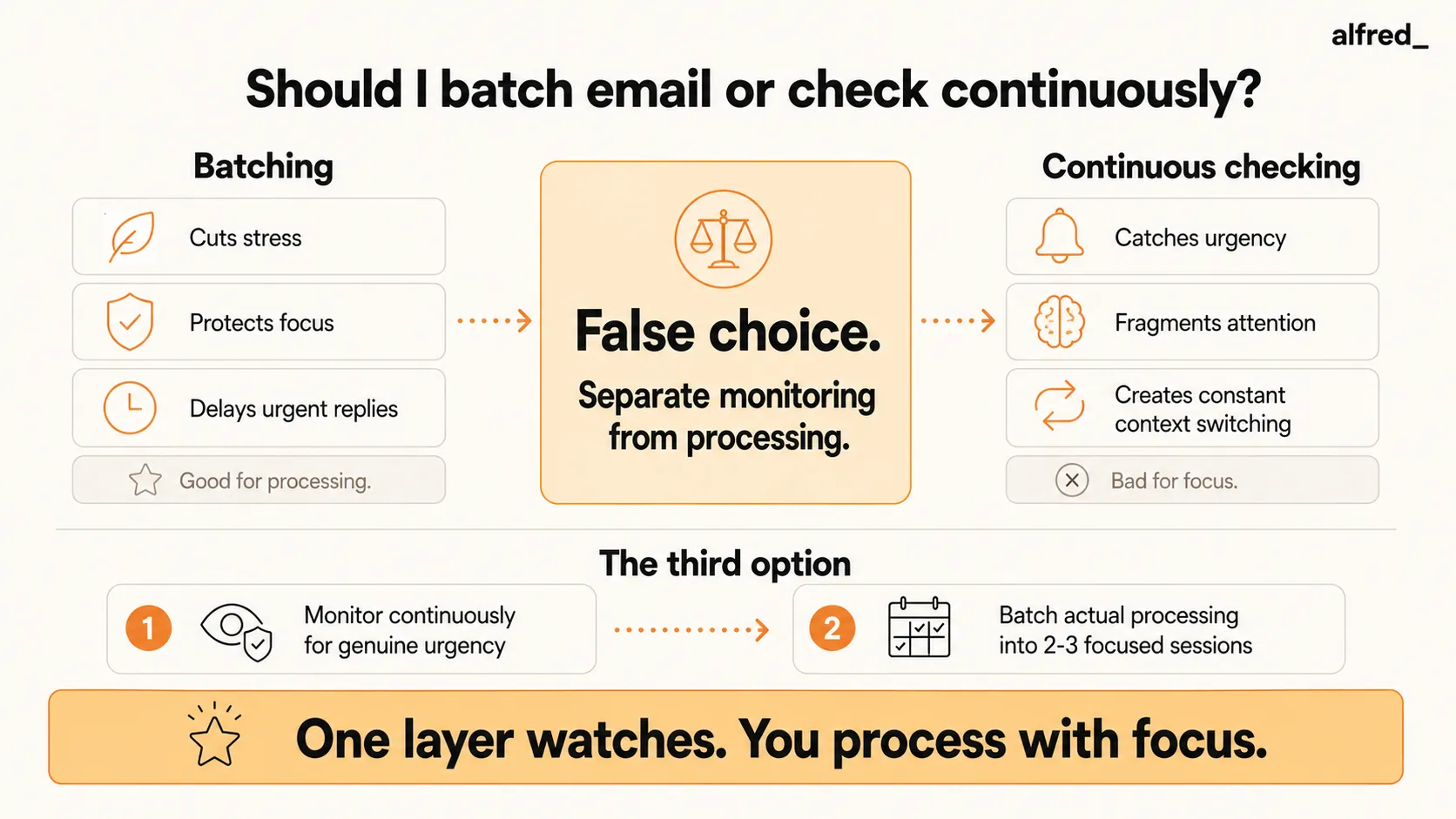
The resolution to the batching debate is not to pick a side. It is to separate two activities that have been conflated.
Monitoring (watching for urgent items) can run continuously without requiring your attention. A system that understands urgency, whether rules-based or AI-powered, can watch your inbox 24/7 and alert you only when something genuinely cannot wait.
Processing (reading, responding, deciding, filing) should be batched. This is the activity that benefits from concentration and momentum.
When you separate monitoring from processing, you get the best of both approaches. Your deep work blocks are genuinely protected because you are not checking email. Your urgent messages are not delayed because a system is watching for them. And your processing sessions are efficient because you handle email in focused batches with full context.
Here is what this looks like in practice:
Between sessions: You do not check email. You do not glance at your phone. You work on your primary tasks with full concentration. Meanwhile, an automated system monitors incoming messages. If a VIP contact sends something flagged as urgent, or if a message matches patterns you have defined as time-sensitive, you get a notification. Everything else waits.
During sessions (2-3 per day): You sit down and process email in bulk. Triage, respond, delegate, archive. Because a system has been monitoring and pre-sorting, you are processing a prioritized queue rather than an unsorted pile. The session is faster and more effective.
The research supports this hybrid approach. You get the stress reduction and productivity gains of batching (Kushlev and Dunn) without the delayed response to urgent items (Toister). You get the deep work protection Newport advocates without the monitoring anxiety that makes pure batching feel risky.
Setting Up the Hybrid Approach
Without AI: rules-based monitoring
If you want the hybrid approach without AI tools, you can approximate it with existing email features.
Set up VIP notifications in your email client. Most email apps let you designate specific contacts whose messages trigger push notifications even when other notifications are silenced. Add your key clients, your manager, and anyone whose emails tend to be time-sensitive.
Create rules for urgent keywords. Filters that flag messages containing words like “urgent,” “deadline,” “ASAP,” or “by end of day” can surface time-sensitive items between sessions.
This approach is imperfect. It catches some urgent items and misses others that do not fit your predefined rules. But it is significantly better than either constant checking or blind batching.
With AI: intelligent monitoring
AI triage tools add judgment to the monitoring layer. Instead of matching keywords, they assess the actual urgency of each message based on sender relationship, content, context from previous threads, and your response patterns.
alfred_ runs continuous triage on your inbox. Between your processing sessions, it categorizes incoming messages by urgency, drafts replies for routine items, and escalates only the messages that genuinely need your attention before your next session. You get a notification for the message from your biggest client asking about tomorrow’s deadline. You do not get a notification for the vendor follow-up that can wait until your afternoon session.
The difference between rules-based monitoring and AI monitoring is the difference between a smoke detector and a fire marshal. The smoke detector triggers on any smoke, including burnt toast. The fire marshal understands context and alerts you only when there is an actual fire.
The Framework by Role
Makers (developers, writers, designers, analysts):
Batch aggressively. 2 sessions per day. Set up VIP notifications for the 5-10 people whose messages might be genuinely urgent. Everything else waits. Your work requires deep focus, and the research strongly supports protecting it.
Managers and team leads:
Batch moderately. 3-4 sessions per day. Your team needs reasonable access to you, but they also need you to have time for strategic thinking. Use AI monitoring to catch escalations between sessions.
Client-facing roles (consultants, account managers, salespeople):
Batch with a strong monitoring layer. 3 sessions per day for processing, but continuous AI monitoring for client communications. Your response time is a competitive differentiator, and the research on deal velocity supports fast responses. Let AI watch for client urgency while you focus on client work.
Executives and founders:
Delegate the entire monitoring layer. You should batch email to 2 sessions per day maximum, but you need a robust system (AI or human) ensuring nothing critical slips. Your time is the most expensive resource in the organization.
The Bottom Line
The batching versus checking debate is a false choice created by a missing piece: automated monitoring.
Batching is correct that continuous checking fragments your attention and reduces deep work capacity. The research is clear on this.
Continuous checking is correct that delayed responses to urgent items have real professional consequences. The client research is clear on this too.
The resolution is not to pick one side. It is to separate monitoring (continuous, automated) from processing (batched, focused). Let a system watch for urgency. Do your email processing in focused blocks.
Stop feeling guilty about not checking email. Start building a system that watches it for you.




