

You get to the office at 8:30. You have a plan. Today you are going to finish the strategy deck, review the quarterly numbers, and draft that proposal you have been putting off for a week.
By 8:47, the plan is dead.
There are 43 new emails. Twelve Slack messages. A meeting invite for 10 AM that was not there yesterday. A Teams thread where someone asked a question at 7 PM last night and three people have already replied with conflicting answers. Your phone buzzes with a text from a client who “just has a quick question.”
You start responding. One by one. Thread by thread. Channel by channel. A reply here, a clarification there, a “let me check on that” followed by three more messages to actually check on that. By noon, you have not opened the strategy deck. By 3 PM, you have not looked at the quarterly numbers. By 5 PM, you leave feeling exhausted and wondering what you actually did all day.
“I’m busy every single minute but at the end of the day I have nothing to show for it.”
You have nothing to show because you spent your entire day reacting. Responding. Routing. Processing the endless stream of incoming communication that treats your attention like a public resource. You were hired to think, create, and lead. Instead, you are a full-time message processor who occasionally gets to do your real job in the margins.
The Displacement Problem
Communication overload is not about having too many messages. It is about those messages displacing the work you were actually hired to do.
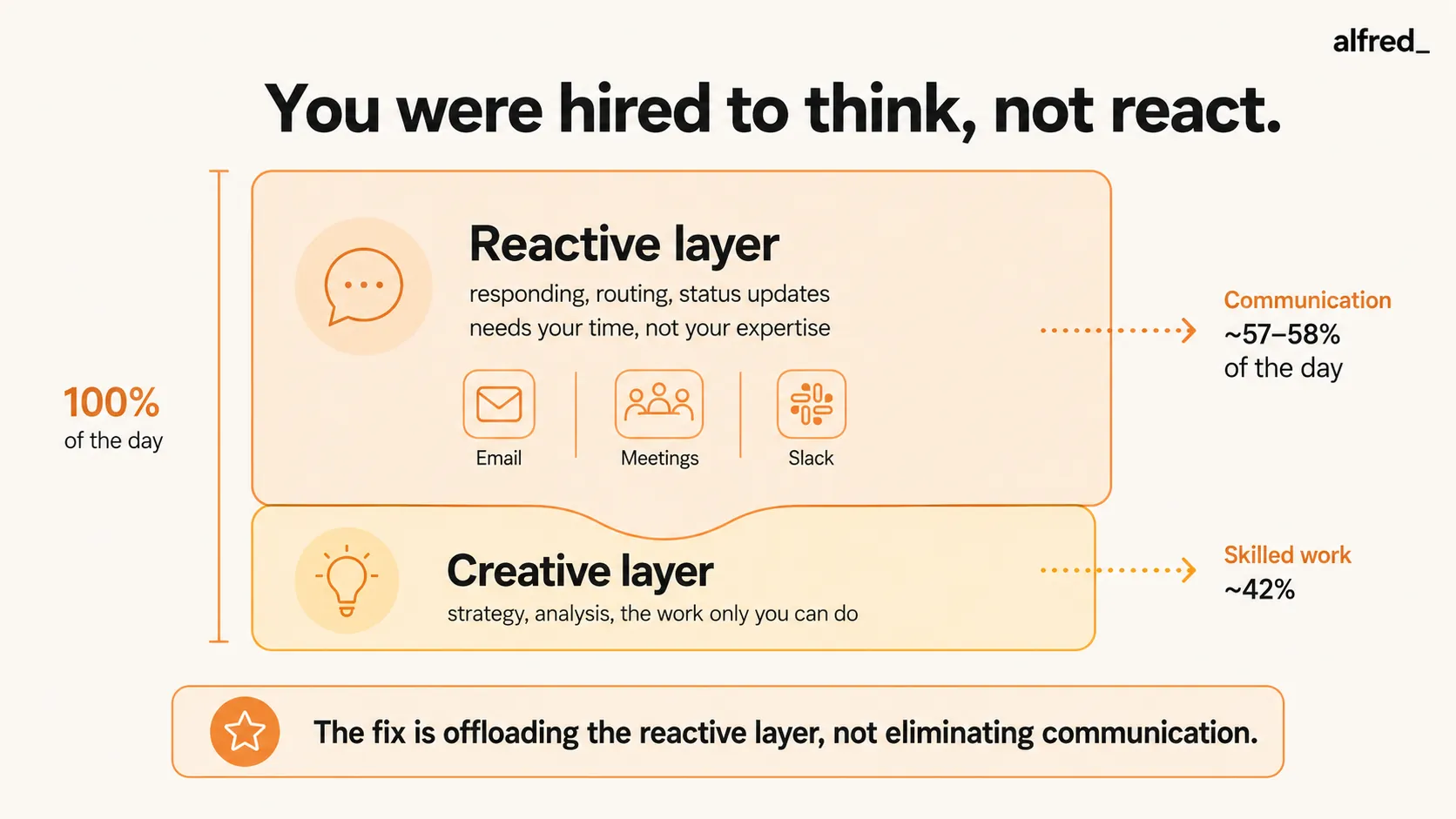
A study by Asana found that knowledge workers spend 58% of their workday on “work about work”, coordinating, communicating, searching for information, switching between apps, managing projects, and chasing status updates. Only 42% goes to skilled work, the thinking, analyzing, creating, and strategizing that is theoretically your job.
Microsoft’s Work Trend Index found nearly identical numbers: workers spend 57% of their time in communication activities, meetings, email, and chat. The remaining 43% is fragmented across focus time that is constantly interrupted.
McKinsey estimated that the average knowledge worker spends 28% of their week on email alone. Add meetings (which consume another 15-25% depending on seniority), plus Slack, Teams, texts, and phone calls, and the math becomes clear: you do not have a communication problem on top of your work. Communication has become your work. The thing you were hired to do is what happens in whatever slivers of time are left over.
“My job description says ‘VP of Marketing.’ My actual job is ‘person who goes to meetings and answers emails about marketing.’”
This is not an exaggeration. This is the lived experience of most knowledge workers in 2026. The title says one thing. The calendar says another. And the calendar wins every single day.
Why You Cannot Just “Be More Disciplined”
Every productivity article prescribes the same thing: time-blocking. Put focus time on your calendar. Protect it. Say no to meetings. Batch your communication.
This advice has a fatal assumption: that you control the incoming volume.
You do not.
Time-blocking protects two hours for deep work. But during those two hours, 27 messages arrive across email, Slack, and Teams. A meeting invite lands for a “quick sync” during your protected block. A client texts with something that feels urgent. A colleague walks to your desk because you did not respond to their Slack message within 10 minutes.
When you emerge from your focus block, everything that arrived is waiting. The unread counts have climbed. The threads have evolved without you. Someone made a decision in your absence that you now need to catch up on. The 27 messages take 45 minutes to process. The focus block gave you 2 hours of work but created 45 minutes of catch-up, plus the anxiety that accumulated during the block about what you might be missing.
“I tried time-blocking but the anxiety of what was piling up during my ‘focus time’ made the focus time useless anyway.”
Research from Gloria Mark at the University of California, Irvine confirms this. Workers who are interrupted frequently develop anticipatory stress. They begin to self-interrupt even during uninterrupted time, because the expectation of interruption is enough to fragment attention. Your brain cannot fully commit to deep work when it knows that a backlog is accumulating.
Discipline does not fix a structural problem. If the volume of incoming communication exceeds your capacity to process it, no amount of scheduling will create the capacity. You need something to reduce the processing burden itself.
The Burnout Equation
Communication overload is not just an inconvenience. It is one of the primary drivers of occupational burnout.
The World Health Organization recognized burnout as an occupational phenomenon in 2019, defining it as chronic workplace stress that has not been successfully managed. Research published in the Journal of Occupational Health Psychology found that communication demands are a significant predictor of emotional exhaustion, the core dimension of burnout.
Gallup’s State of the Global Workplace report found that 76% of workers experience burnout at least sometimes. 28% say they feel burned out “very often” or “always.”
The mechanism is straightforward. Your brain has finite processing capacity. Communication consumes most of it. The work you were hired to do gets whatever is left, which is not enough to do it well. You feel inadequate because your output does not match your effort. The gap between how hard you work and how little you produce creates a specific kind of despair.
“I work harder than I’ve ever worked and I accomplish less than I ever have.”
You are not less capable than you used to be. You are processing more communication than you used to. The ratio has shifted. A decade ago, communication consumed maybe 30% of your day and skilled work got 70%. Now those numbers are inverted, and the skilled work that once defined your career gets the scraps.
This is the burnout equation: maximum effort, minimum meaningful output, repeated daily for years. The exhaustion is not from the work. It is from the absence of work, real work, the kind that uses your skills and produces something you can point to and say, “I did that today.”
What Has Already Failed
You have tried things. They helped at the margins. They did not fix the problem.
| Approach | What It Does | Why It Falls Short |
|---|---|---|
| Time-blocking | Protects calendar slots for focus | Messages accumulate during blocks, creating catch-up anxiety |
| Email batching | Limits email checks to 2–3x daily | Does not reduce volume; creates 2–3 windows of overwhelming backlog |
| SaneBox ($7–$36/mo) | Filters unimportant email | Only addresses one channel; Slack, Teams, texts remain unmanaged |
| Superhuman ($30–$40/mo) | Makes email processing faster | Speed does not reduce displacement; you react faster but still react all day |
| Slack DND | Blocks Slack notifications | Messages accumulate; anxiety about muted channels increases |
| Saying no to meetings | Reduces meeting time | Political cost; cannot say no to leadership, clients, or cross-functional asks |
| Notion/Todoist | Organizes tasks | Adds another system to check; does not reduce incoming communication |
| alfred_ | Triages communications, surfaces what matters, drafts replies | Reduces the reactive layer so you can return to skilled work |
The pattern is clear: every approach either addresses one channel while leaving the others untouched, or rearranges when you process communication without reducing the processing burden. None of them give you back the 58% of your day that communication is consuming.
The Reactive Layer vs. The Creative Layer
Here is a useful way to think about your work. Your job has two layers:
The reactive layer, responding to emails, answering Slack messages, attending meetings, providing status updates, routing information between people, making micro-decisions about who needs what. This layer requires your time but not your expertise. A capable assistant with context could handle most of it.
The creative layer, thinking about strategy, writing the proposal, designing the campaign, analyzing the data, solving the problem no one else can solve, leading the team through a difficult decision. This layer requires your expertise, your judgment, your depth of knowledge. No one else can do it.
Communication overload means the reactive layer has consumed the creative layer. You spend 100% of your energy on work that requires 20% of your skill. The 80% of your skill that makes you valuable, the reason you were hired, the reason you are paid what you are paid, has no room to operate.
The fix is not to eliminate the reactive layer. People need responses. Meetings need to happen. Communication is part of work. The fix is to offload the reactive layer to something that can handle it, so the creative layer gets the space it needs.
What It Looks Like When the Reactive Layer Is Handled
You sit down at 8:30. Your briefing is ready. Three things need your attention: a client email that requires your specific expertise (draft reply waiting), a meeting at 2 PM that needs prep (key context summarized), and a decision in a Slack thread that needs your input (thread summary and relevant background provided).
Everything else, the 43 emails, the 12 Slack messages, the Teams thread, the meeting invite, has been read, assessed, and categorized. Eighteen were informational and archived. Seven were routine and replied to with drafts in your voice. Four were delegated to team members with context. The meeting invite conflicted with your focus block and a suggested alternative time was proposed.
You spend 20 minutes on the three things that need you. Then you open the strategy deck. You work on it for three uninterrupted hours. You have thoughts. Insights. Connections you would not have made in a fragmented 12-minute window between Slack checks.
By noon, the deck is done. It is better than anything you have produced in months. Not because you are smarter today. Because today, for the first time in a long time, your brain had room to work.
“I forgot what it felt like to have a thought that lasted longer than 4 minutes.”
alfred_ does not eliminate communication. It handles the reactive layer, the triaging, the sorting, the drafting, the tracking, so that you can return to the creative layer. The layer where your expertise lives. The layer you were hired for.
You were not hired to be a message processor. You were hired to think. alfred_ gives you back the capacity to do it.
The messages keep arriving. But they stop arriving on your desk. They arrive at alfred_, and only the ones that need your brain make it through.
That is not fewer messages. That is the right messages. And for the first time in years, you have time to actually think about them.




