

Your CRM already sends notifications. That is the problem. A record was viewed, a task was assigned, a property was updated, someone was mentioned. By Wednesday you have stopped reading them, and the one that mattered, a close date pushed out by a month, went past with the rest.
What you want is narrower: tell me when something changed that I have to act on.
Decide what “needs action” means
Before choosing a tool, write down the changes you would act on. For most people who run accounts it is a short list.
| Change | Why it needs you | Where the evidence is |
|---|---|---|
| A deal moved stage | Someone else moved it, or it moved backward | CRM |
| A close date slipped | The forecast changed and nobody said so | CRM |
| A deal has no next step | Nothing is scheduled, so nothing will happen | CRM and calendar |
| A deal went quiet | The record says active, the inbox says otherwise | CRM and email |
Doing it inside the CRM
Both big CRMs can notify you on a rule.
HubSpot. Build a deal-based workflow: set the trigger to the property you care about, such as deal stage or close date, and add an action that sends an internal notification to the owner. One workflow per kind of change. Workflows need a paid Hub tier.
Salesforce. Build a record-triggered flow on Opportunity that runs when Stage or Close Date changes and sends a notification or an email alert. Reports with a subscription cover the slower cases, such as open opportunities with no activity in 14 days.
These fire the moment the field changes, which is their strength. Two limits: someone has to build and maintain each rule, and they only see what is in the CRM. A deal that looks healthy on the record while the client has stopped answering does not trip any of them.
Describing the check in a sentence
alfred_ is an AI personal assistant for work. It connects to your email and calendar and to HubSpot or Salesforce, and its recurring checks are called routines. You write one the way you would ask a person:
Every weekday at 8, tell me which HubSpot deals changed stage or close date since yesterday, and which open deals have had no reply from the client in a week.
alfred_ turns that into a plan you can read. You test it once, right away, to see whether it found the right deals. Then you turn it on and it runs when you said.


Pipeline check · Latest · Friday at 4:00 PM
Two deals have gone quiet
Checked 14 threads in Gmail and 9 deals in HubSpot.
 Nine open deals, $212,000 in pipelineHubSpot · 3 moved stage this week
 Priya at Acme replied to the proposalYesterday · you answeredNorthwind quote: no reply in 6 daysTom Reyes · $48,000Needs youHarbor deal has no next stepLuis Ortega · last touch 12 days agoNeeds you
Each run shows what it checked and what it found. Because the routine reads your mail as well as the CRM, it can put the two side by side: the deal marked active, and the quote with no reply in six days.
More sentences to start from:
- “Every Monday at 8, list my open Salesforce opportunities closing this month and whether the client has replied in the last week.”
- “Every Friday at 4, tell me which deals have no next meeting on my calendar.”
- “Every weekday at 5, tell me which deals moved stage today.”
Scheduled, not instant
This is the difference to be clear about. A CRM workflow fires when the field changes. A routine runs at the time you chose, or when an email arrives. If you need to know within the minute, build the workflow in your CRM. If what you need is a short, correct list at the start of the day, the routine is less to build and reads more.
| CRM workflow or flow | A routine in alfred_ | |
|---|---|---|
| Fires | The moment a field changes | On your schedule, or when an email arrives |
| Set up by | Building one rule per change | Describing the check in a sentence |
| Reads | The CRM | The CRM, your email and your calendar |
| Tells you | One notification per change | One list, with what it checked |
What it will not do
- It does not update the CRM on its own. alfred_ reads; any change is shown to you first and waits for your yes.
- It only sees what you have connected. Connect HubSpot or Salesforce on the Integrations page before writing the routine.
- It uses the credits in your plan.
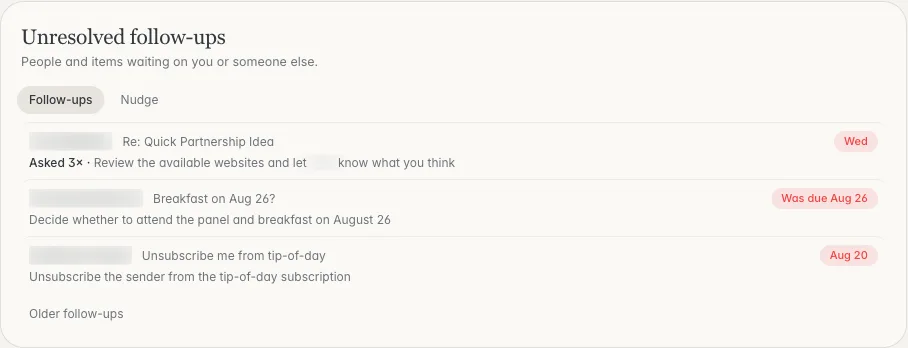
The email side of the same check: who you are waiting on, and for how long. Shown with sample data.
Plans start at $29.99 a month with a 7-day free trial. More on the connections is on the HubSpot and Salesforce pages.



