

The short answer: the best AI chief of staff tool in 2026 is alfred_ (23/25 on our scorecard; the other tools we scored reached 13 or lower). alfred_ is the best choice if your coordination time goes to email and calendar: it flags what needs your answer, tracks who still owes you a reply, manages your calendar and sends a morning brief, from $29.99/month.
A chief of staff’s job is to decide what reaches you, not to help you read everything faster.
| Tool | What it does without being asked | Email + calendar | Price | Who uses it |
|---|---|---|---|---|
| alfred_ | Flags what needs your answer, tracks follow-ups, suggests to-dos, manages calendar, morning brief; with email drafting enabled, prepares replies for your review | Gmail + Outlook, both | From $29.99/mo or $299.99/yr | Executives whose bottleneck is inbox and calendar volume |
| Lindy.ai | Routines you set up in a sentence run on a schedule (daily brief, reports, meeting notes) | Yes, on the schedule you set | $29.99/mo Plus, up to $199.99/mo | Teams that work in Slack |
| Read AI | Meeting transcription, action items, on-demand email thread summaries | Summaries only, no triage; calendar via meeting bots | Free (5 meetings/mo), then paid tiers | Meeting-heavy teams |
| Motion | Auto-schedules tasks onto your calendar and replans when the day moves | Calendar only, no email | $19/mo (annual) | People whose calendar, not inbox, is the chaos |
| Reclaim.ai | Auto-schedules habits, tasks, and focus blocks around meetings | Calendar only, no email | Free Lite, $8 to $18/user/mo | Calendar optimization and protected focus time |
| Notion AI | Workspace search, summaries, database autofill when asked | No email or calendar | $20/member/mo (Business) | Knowledge management inside Notion |
| Ambient | Maps meetings, chats, and emails to initiatives; daily briefing inside Claude or ChatGPT | Team context, not personal triage | Custom (enterprise) | Companies already living in Claude or ChatGPT |
| Cortex | Answers engineering-org questions in Slack from your services and incident data | No email or calendar | Custom (enterprise) | VP Engineering and CTO roles |
Choose alfred_ if you want the email and calendar layer of a chief of staff kept track of and summarized for you each morning.
- AI Chief of Staff Definition
- software that uses artificial intelligence to coordinate and prioritize an executive's workload, triaging email, drafting replies, extracting action items from messages, surfacing calendar context, and delivering a morning briefing of what needs attention. The best AI chief of staff tools operate continuously (not on-demand), connecting signals across email, tasks, and calendar to make prioritization decisions a single-domain tool cannot.
Quick Scorecard: 8 AI Chief of Staff Tools Scored Out of 25
We scored each tool on five pillars (1–5 each, total /25): Email coordination (triage, drafts, follow-up), Calendar intelligence (prep, conflict resolution, focus time), Task extraction (commitments captured from messages), Daily brief (single morning summary), Low setup friction (works out of the box without configuration).
| Tool | Score /25 | Calendar | Tasks | Brief | Setup | |
|---|---|---|---|---|---|---|
| alfred_ | 23 | 5 | 4 | 5 | 5 | 4 |
| Motion | 12 | 0 | 5 | 4 | 1 | 2 |
| Notion AI | 9 | 0 | 1 | 2 | 3 | 3 |
| Reclaim.ai | 10 | 0 | 5 | 2 | 0 | 3 |
| Read AI | 13 | 2 | 3 | 4 | 2 | 2 |
| Ambient | 11 | 2 | 2 | 3 | 3 | 1 |
| Cortex | 9 | 0 | 2 | 2 | 3 | 2 |
| Lindy.ai | Not re-scored | - | - | - | - | - |
Why alfred_ scores 23/25: It covers email, to-dos, and the morning brief in a single product without configuration. Loses one point each on Calendar (no meeting transcription) and Setup (initial inbox connection takes 3–5 minutes).
Why Executives Need an AI Chief of Staff in 2026
The average executive spends 72% of their time on coordination, communication, and administrative tasks (Harvard Business Review). Only 28% goes to actual strategic thinking and high-leverage decisions. A chief of staff exists to flip that ratio, but not every company can afford one.
- 72% of executive time spent on coordination, not strategy (HBR)
- 23 minutes to refocus after each context switch (Gloria Mark, UC Irvine)
- $150K–$300K/year for a human chief of staff
- 11+ tools the average executive juggles daily (Okta, 2024)
“Two-thirds of executives say that meetings are the number-one thing they spend too much time on.”, Korn Ferry / Fortune World’s Most Admired Companies report
AI chief of staff tools solve this by coordinating across email, calendar, tasks, and meetings, surfacing what matters and handling the rest. Here are the 8 best options in 2026.
alfred_ is the best choice for executives whose bottleneck is the inbox and the calendar
For executives whose bottleneck is inbox and calendar volume, alfred_ stands out because it flags the emails that need your answer, tracks the replies you owe and the replies you're waiting on, manages your calendar (events, scheduling, reminders, meeting prep), suggests to-dos, and sends a morning brief, in one product. Others handle meetings (Read AI), scheduling (Motion, Reclaim), executive briefings across tools (Ambient), engineering-leadership questions in Slack (Cortex), or team requests in Slack (Lindy).
Best for
- Executives and founders who need email, calendar and to-dos kept track of in one place
- Professionals who cannot justify $150K+ for a human chief of staff
- Anyone wanting a digital right hand that works without configuration or prompting
Not for
- Teams whose bottleneck is meetings, not email
The 8 Best AI Chief of Staff Tools, Reviewed
1. alfred_: Best for the Email and Calendar Layer
Price: plans from $29.99/month or $299.99/year; teams $49.99 a seat a month, on one bill | Works with: Gmail, Outlook
alfred_ is an AI assistant for client-facing teams, and each person on the team gets their own. It keeps track of the replies you owe and the replies you’re waiting on, manages your calendar, prepares you for meetings and sends a morning brief, across Gmail and Outlook. A human chief of staff coordinates your email, calendar, priorities, and follow-ups so you can focus on decisions that matter. alfred_ covers the keeping-track part of that job. It flags the emails that need your answer, tracks follow-ups, suggests to-dos from email, manages your calendar, and sends a brief every morning with what needs your attention. Judgment, strategy and relationships stay with you.
Why it leads this list: Most tools here handle one slice of the chief of staff role. Read AI handles meetings. Motion handles scheduling. Reclaim handles calendar optimization. alfred_ puts email, calendar and to-dos in one place, with plans from $29.99/month.
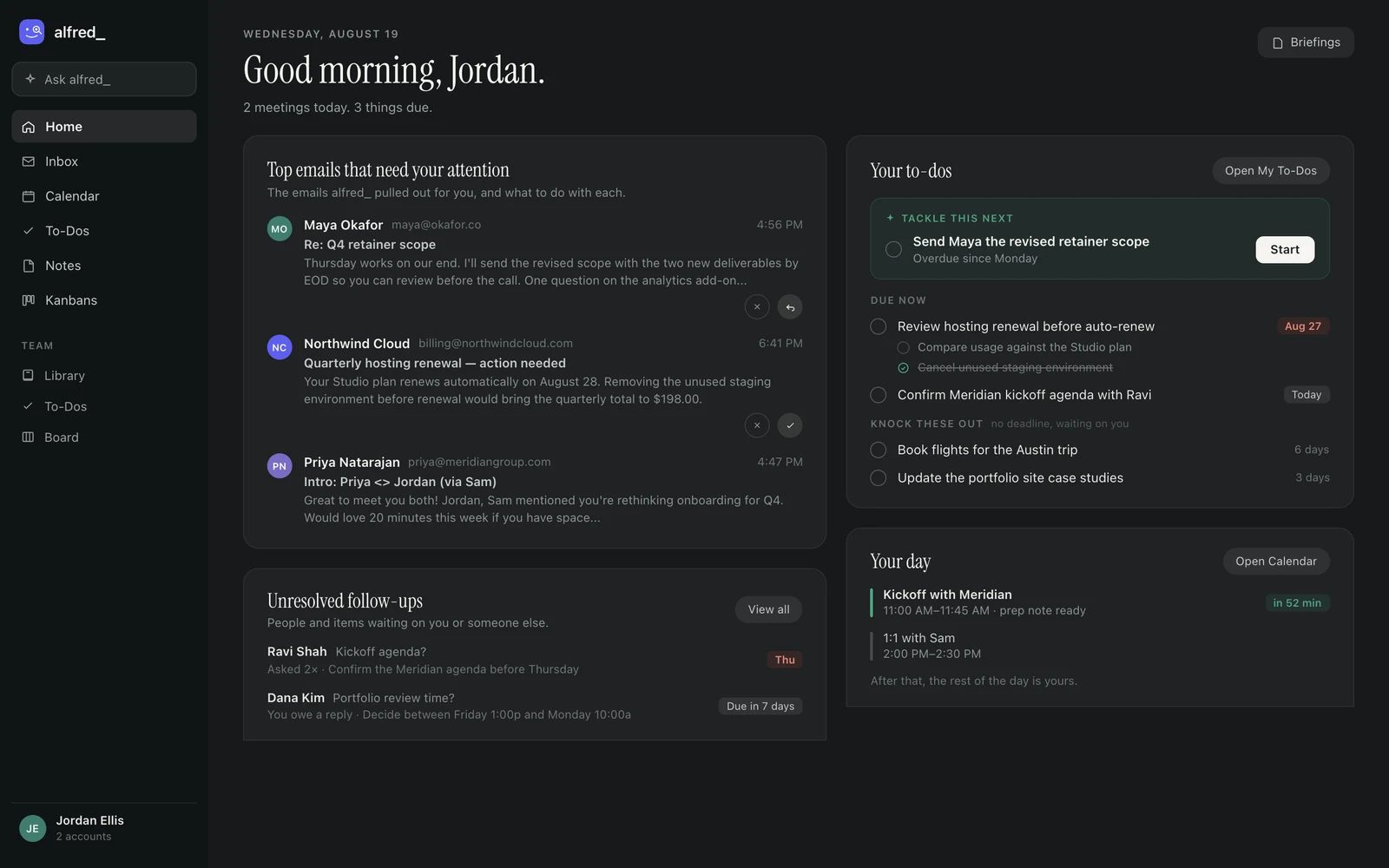
The coordination layer in one view: the emails alfred_ pulled out, the prioritized to-dos, and the day ahead. Shown with sample data.
What it does:
- Flagging the emails that need your answer
- With email drafting enabled, a draft reply prepared for you to review and send
- To-dos suggested from email, which you accept
- Calendar management: creating and rescheduling events, reminders, and meeting prep
- Tracking the replies you’re waiting on
- A morning brief by email or text: what needs you, the meetings ahead and the tasks due
- Slack and Microsoft Teams: who is waiting on an answer from you there, and what the team said
- HubSpot and Salesforce: the contact, deal or account behind an email, looked up when you ask
Limitations: No meeting transcription. If your workflow is meeting-heavy and you need automatic notes and action items from calls, you will want to pair alfred_ with a transcription tool like Fireflies or Granola.
Keep client work from slipping through the cracks
alfred_ is an AI assistant for client-facing teams. Each teammate gets help with email, calendar, replies and follow-ups.
2. Lindy.ai: An AI Teammate in Slack
Price: $50 in trial credits for 7 days / $29.99/month (Plus) | Works with: Gmail, Outlook, Slack, CRM tools, 1,000+ integrations | Score: not re-scored
Lindy now describes itself as an AI teammate. It works in Slack, iMessage and email, connects to more than 1,000 tools, and runs routines you describe in a sentence on a schedule: a daily brief, a weekly report, meeting notes after each call, a draft when an email needs a reply.
What it does: Scheduled routines, inbox management and reply drafts, meeting scheduling, prep and notes, and requests in Slack or iMessage.
The catch: the credit meter. Plus includes 3,000 credits per user per month and Lindy prices everyday asks at 2 to 250 credits each, so a busy inbox can use the allowance before the month ends, and Lindy then pauses until the next cycle. It is also built around a team working in Slack rather than one person’s inbox and calendar. Paid plans start at $29.99/month (Plus), with Pro ($99.99) and Max ($199.99) above it. Score: not re-scored. Our earlier score was for Lindy’s previous agent-builder product, and it no longer describes what Lindy sells.
3. Motion: For AI-Scheduled Task Management
Price: $19/month (Individual, billed annually) | Free trial: 7 days | Works with: Google Calendar, Outlook
Motion auto-plans your day by scheduling every task on your calendar. Give it your to-do list and deadlines, and Motion builds a time-blocked schedule that adjusts automatically when meetings move or priorities shift. It is the most opinionated tool on this list about how you should structure your day.
What it does: AI auto-scheduling that places tasks on your calendar, automatic replanning when your day changes, project management with task dependencies, and deadline-driven prioritization.
The catch: Motion is a calendar and task tool. It does not handle email triage, draft replies, extract tasks from messages, or track follow-ups. For the chief of staff use case, Motion covers scheduling and task management but ignores the communication layer, which is where executives spend the majority of their coordination time. At $19/month, it is well-priced for what it does. Just understand that it solves one quadrant of the chief of staff problem.
“I did not have to manually rearrange my calendar with each urgent task. The most helpful feature was the ability for Motion to reschedule tasks and still meet deadlines.”, Life Skills Advocate
4. Notion AI: For Knowledge Management and Documentation
Price: Included with Business plan at $20/member/month | Works with: Web, desktop, mobile; integrates with Slack, GitHub, Jira
Notion AI adds artificial intelligence to Notion’s already-powerful knowledge management platform. It can answer questions across your workspace, summarize documents, draft content, and autofill database properties. For executives who use Notion as their operating system, the AI layer makes information retrieval dramatically faster.
What it does: AI search across your entire workspace, meeting notes with AI summaries, document drafting and editing, and database autofill. The AI understands context across all your Notion pages, which makes it useful for answering “what did we decide about X?” without digging through documents.
The catch: Notion AI is not a chief of staff. It does not manage email, schedule meetings, or track follow-ups on its own. It is an AI layer on top of a documentation tool. Valuable for the knowledge management piece of the chief of staff role, but it will not triage your inbox or coordinate your calendar. Also note: meaningful AI usage requires the Business plan at $20/member/month, as Free and Plus plans only include a limited AI trial.
5. Reclaim.ai: For Calendar Intelligence
Price: Free (Lite) / $8-$18/user/month | Works with: Google Calendar (primary), Outlook (maturing)
Reclaim.ai is a calendar optimization tool that auto-schedules habits, tasks, and focus blocks around your meetings. It understands that your “2 hours of strategic thinking” block should flex around meeting obligations rather than disappear entirely.
What it does: Habit scheduling that adapts to your meeting load, smart 1:1 scheduling, task auto-scheduling from integrated tools like Todoist and Asana, and analytics showing where your time actually goes. The free Lite plan is genuinely useful.
The catch: Reclaim optimizes your calendar. That is a valuable piece of the chief of staff function, but it is only one piece. It does not handle email, draft communications, extract tasks from messages, or provide a daily briefing. For calendar-specific intelligence, Reclaim is excellent and fairly priced. For the full chief of staff scope, it covers maybe 20% of what you need.
“Absolutely love Reclaim.ai! As a solopreneur and mum, it has helped me sync family commitments as well as work, and helped me to focus and increased my productivity.”, Verified user on Trustpilot
6. Read AI: For Meeting Transcription + Email Summaries
Price: Free (5 meetings/month) / Premium tiers via pricing page | Works with: Zoom, Google Meet, Microsoft Teams, Gmail, Outlook, Slack, Salesforce, HubSpot
Read AI sits at the intersection of meetings and email. It transcribes calls across Zoom, Meet, and Teams, extracts action items, generates highlight reels, and summarizes long email threads on demand. The Ada digital twin adds an AI executive assistant that answers questions across your meetings, emails, and documents.
What it does: Cross-platform meeting transcription with action item extraction, real-time meeting notes during calls, email thread summaries, and 20+ language support. The free tier (5 meetings/month) gives genuine utility before paywalling.
The catch: Read AI is meeting-first. The email and Slack integrations are summary-only. It does not triage your inbox by urgency, draft replies in your voice, or extract tasks from email content the way a chief of staff tool does. Best paired with alfred_ if you need both meeting transcription and an assistant for email.
7. Ambient: For Team Context Across Claude/ChatGPT
Price: Custom (enterprise; “Book Consult”) | Works with: Claude, ChatGPT, Gemini, plus team meetings, chats, and emails
Ambient positions itself as a “context engineering” layer that maps every meeting, chat, and email in your company to specific Key Initiatives and Customers, then surfaces that mapped context inside Claude or ChatGPT. The pitch: “10x your Claude/ChatGPT investment” by giving the LLM the full operational picture of your business.
What it does: Context mapping from communications to business priorities, morning brief summaries, decision logging and commitment tracking, and SOC 2 / GDPR / CCPA-aligned security with no model training on user data.
The catch: Ambient assumes you already use Claude or ChatGPT and want to make them smarter about your company. If you don’t have that habit, the value proposition collapses. No transparent pricing (sales-led process), and feature depth around individual email triage and draft replies is unclear. Enterprise-focused.
8. Cortex: For Engineering-Leadership Slack Chief of Staff
Price: Custom (enterprise) | Works with: Slack (primary), engineering data systems (services, ownership, incidents), Cortex Scorecards
Cortex is a developer-platform company whose AI Chief of Staff product lives entirely inside Slack. Engineering leaders ask it questions like “Who’s on call?” or “What’s driving incidents this quarter?” and it answers grounded in your actual engineering org, services, ownership structures, team composition, incident history.
What it does: Slack-native conversational interface with multi-threaded context retention, permission-aware responses (won’t show data you can’t access), grounding in real engineering data rather than generic LLM analysis, and trend identification across incidents and metrics.
The catch: Cortex is engineering-org chief of staff. It does not handle email, calendar, or general task management. It also requires you to already use Cortex’s developer platform (Scorecards, incident tracking) for the AI to have data to answer from. Best for VP Engineering or CTO roles, not founders or non-technical executives.
A note on Xembly. Earlier versions of this list included Xembly as the pick for Slack-first meeting coordination. Xembly discontinued its customer-facing service on June 1, 2024, and its web app, Chrome extension, and Slack integration are no longer available, so it has been removed. Slack-first teams that need meeting notes and action items should look at Read AI (above) or a dedicated transcription tool.
How We Tested
We evaluated each tool against the four pillars of a real chief of staff role: email coordination (triage, drafts, follow-up tracking), calendar intelligence (prep, conflict resolution, focus time), task extraction (commitments captured automatically), and daily briefings (a single morning summary of what needs your brain). We tested on both Gmail and Outlook, used the tools for at least two weeks each, and graded against pricing transparency, integration depth, and how much hand-holding the setup required. Tools that handled all four pillars on its own scored highest. Tools that handled only one slice, meeting transcription, calendar optimization, or knowledge search, were ranked by how cleanly they paired with a primary chief of staff tool, not as standalone replacements.
How to Choose the Right AI Chief of Staff Tool
| Chief of Staff Function | Tool | Price |
|---|---|---|
| Keeping track: email + calendar + to-dos | alfred_ | From $29.99/mo |
| AI-scheduled daily time blocking | Motion | $19/mo |
| Knowledge base and documentation AI | Notion AI | $20/member/mo |
| Calendar optimization and focus time | Reclaim.ai | Free–$18/mo |
| Meeting transcription + email summaries | Read AI | Free–Custom |
| Cross-team context for Claude/ChatGPT | Ambient | Custom |
| Engineering-leadership Slack assistant | Cortex | Custom |
The honest assessment: No single AI tool fully replaces a human chief of staff. But for most executives, the combination of alfred_ (email, calendar, tasks, follow-ups) plus one specialized tool (Notion for knowledge, Fireflies for meetings) covers most of the keeping-track work for under $50/month.
Start with the biggest pain point. If email is consuming your day, start with alfred_. If meetings are the bottleneck, pair alfred_ with Read AI or another transcription tool.
If a $150K human chief of staff isn't realistic, start with the list one would keep for you. See what’s slipping →




