

A to-do list tells you what to do but never when, so the important work waits for a free moment that never arrives and the day fills with whatever was loudest. Time blocking fixes that by giving every hour a job in advance: instead of working from a list and hoping, you work from a calendar where the deep work already has a defended place. It sounds rigid and turns out to be the opposite, freeing you from constant decisions about what to do next. Here is Cal Newport’s method, step by step, and how to make it survive a real week.
Newport’s Time Blocking Explained
Cal Newport’s time blocking is deceptively simple: every minute of your workday gets a named job, written out at the start of the day or the night before. Not a to-do list but a schedule. You’re not listing what you want to do; you’re committing to when you’ll do it.
The plan includes everything: deep work sessions, shallow work batches, email processing windows, meetings, breaks, and buffer time. A time-blocked calendar looks completely full, because it is. The question is whether it’s full with what you chose, or full with what others chose for you.
“The goal of time blocking is not to stick to your original schedule no matter what. It’s instead to try to always have an intentional plan for what to do with your time.” Cal Newport, The Time-Block Planner
The key insight Newport emphasizes: time blocking is a plan, not a prison. When your day gets disrupted (and it will), you don’t abandon the plan. You revise it. You look at what remains of the day and create a new explicit plan for the remaining hours. What you never do is let the day become unplanned. An unplanned hour defaults to whatever is most salient, which is almost never what is most important.
Drucker’s Consolidation Principle: Why Blocks Must Be Large
Peter Drucker identified the consolidation problem in The Effective Executive decades before Newport named it. His observation about fragmented time is still the clearest diagnosis of why most professionals never do their most important work:
“Even one quarter of the working day, if consolidated in large time units, is usually enough to get the important things done. But even three quarters of the working day are useless if they are only available as fifteen minutes here or half an hour there.” Peter Drucker, The Effective Executive
Time blocking is Drucker’s consolidation principle in operational form. The act of building your time-blocked calendar forces you to create large, contiguous blocks rather than letting the day fragment into unusable fifteen-minute slivers between meetings. A 90-minute deep work block accomplishes what twelve separate fifteen-minute attempts cannot, even if the total minutes are mathematically equivalent.
This is also why the order of operations matters so much when building your time-blocked calendar. You must block deep work first: before meetings, before email windows, before buffer. If you schedule everything else first and try to find deep work time in the gaps, there won’t be any gaps large enough.
The Block Types: What Goes on a Time-Blocked Calendar
Not all blocks are equal. A time-blocked calendar has five types of blocks, and each serves a distinct purpose:
The Five Block Types
- Deep Work Block (90+ minutes): Distraction-free, cognitively demanding work: writing, analysis, strategy, code, design. No notifications. No email. This is the block that must be scheduled first and protected most fiercely.
- Shallow Work Block: Email processing, administrative tasks, internal messages, low-cognitive follow-ups. These are batched together rather than scattered throughout the day.
- Meeting Block: All meetings consolidated into a designated afternoon window. Paul Graham’s insight: a single meeting in the morning ruins the morning for deep work. Move them all to afternoon.
- Buffer Block (20% of day): Deliberately unscheduled time for the Q1 fires that will arrive. Without this, every disruption breaks every subsequent block for the rest of the day.
- Recovery Block: Deliberate breaks, not accidental ones. Newport’s research on attention emphasizes that rest is not the absence of work; it’s the restoration of cognitive capacity.
Paul Graham’s maker’s schedule/manager’s schedule framework explains the meeting block consolidation. Graham writes that on the maker’s schedule a single meeting can “blow a whole afternoon, by breaking it into two pieces each too small to do anything hard in.” The solution isn’t to have fewer meetings. It’s to aggregate them so their disruption cost is paid once, not repeatedly.
The Attention Residue Argument
Newport’s attention residue research from Deep Work explains why task transitions are so expensive, and why time blocking’s reduction of transitions matters so much:
“Even if this shift is brief (think: twenty seconds in an inbox), it’s enough to leave behind a residue that reduces your cognitive capacity for a non-trivial amount of time to follow.” Cal Newport, A Productivity Lesson from a Classic Arcade Game
This attention residue lingers, reducing your cognitive capacity for a non-trivial period after a single brief attention shift. Every time you switch from deep work to check a notification, you’re not just losing the seconds of the check. You’re degrading the quality of your cognition for the work that follows.
Time blocking minimizes the number of task transitions in a day by planning them deliberately. A reactive workday might involve dozens of unplanned context switches. A time-blocked day involves only the planned transitions between blocks, each of which is lower-cost because it was anticipated and budgeted for. The day moves from deep work to shallow work to meetings in large chunks, rather than oscillating chaotically between them throughout the day.
40 hrs = 60+ hrs
Cal Newport estimates a 40-hour time-blocked work week produces the same output as a 60+ hour week worked without structure
Step-by-Step: Set Up Your Time-Blocked Calendar
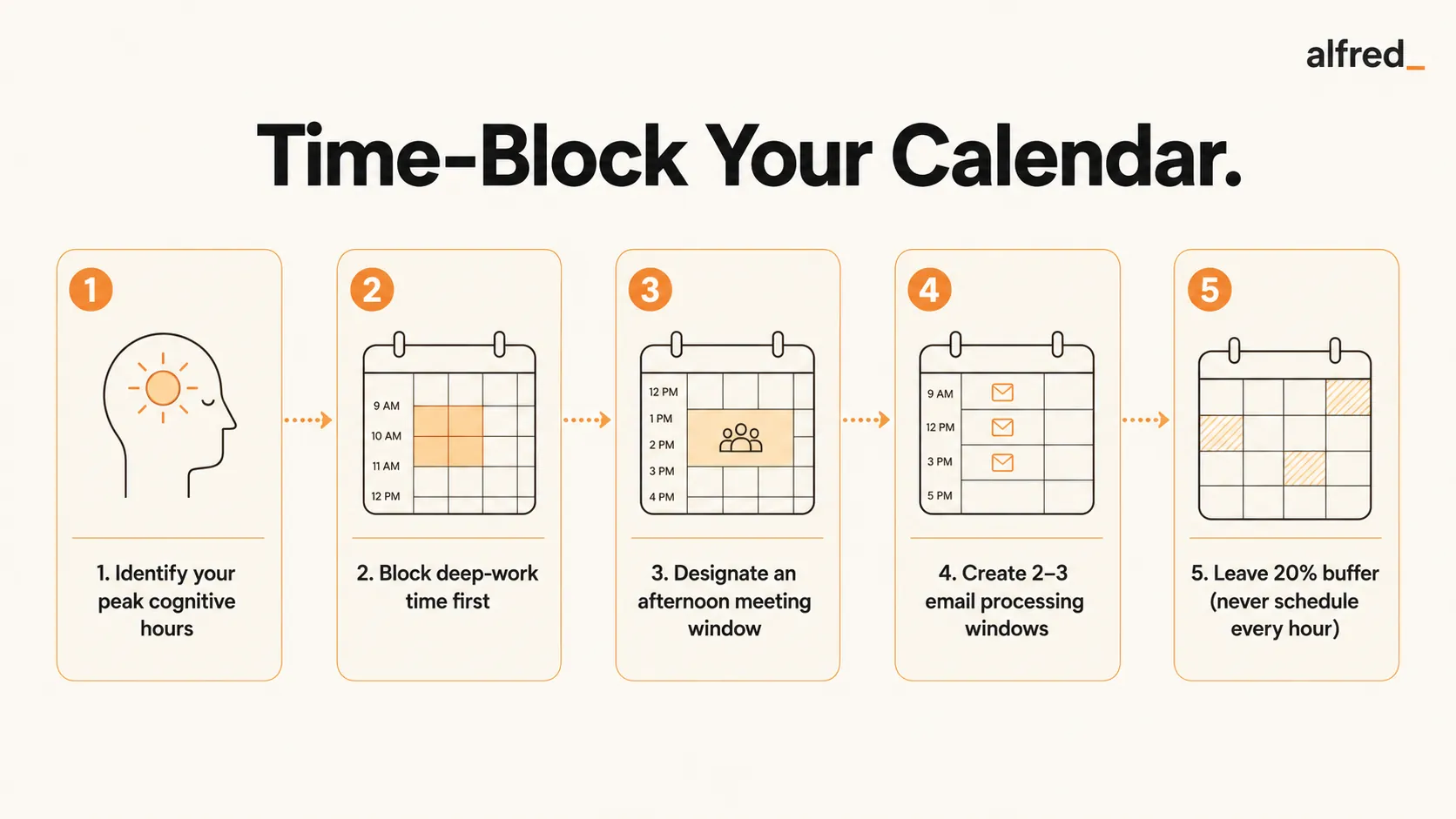
1. Identify Your Peak Cognitive Hours
Determine when you feel mentally sharpest. For most people this is mid-morning, 9:00 to 11:30 AM, before decision fatigue accumulates. Some people have a secondary peak in late afternoon. These peak hours are reserved exclusively for deep work. Everything else gets scheduled around them, not the reverse.
2. Block Deep Work Time First
Before adding anything else to your calendar, add your deep work blocks. These are non-negotiable 90-minute minimum windows. Label them specifically: not “deep work” but “draft Q2 strategy memo” or “review contract,” so the block has a purpose, not just a label. Newport calls this the most important calendar decision you make each day.
3. Designate an Afternoon Meeting Window
Following Graham’s office hours principle, carve out an afternoon window (say, 1:00 to 4:00 PM) where all meetings live. Decline or reschedule meeting requests that fall outside this window. This keeps your mornings intact. The initial friction of moving meetings is paid once; the benefit of protected mornings is paid every day thereafter.
4. Create 2-3 Email Processing Windows
Designate specific, named times for email: 8:30 AM (pre-deep work scan), 12:30 PM (midday), and 4:45 PM (end of day). Outside these windows, email stays closed. This is not discipline; it’s architecture. You’re removing the decision of whether to check email by making it explicit when you check it. alfred_’s morning brief means your morning window takes 5 minutes instead of 45.
5. Leave 20% Buffer: Never Schedule Every Hour
This is the step most people skip, and it’s why most people’s time-blocked plans fall apart by 10 AM. Buffer is not wasted time. It’s the resilience that keeps the rest of your blocks intact when the inevitable Q1 fires arrive. Without buffer, one urgent request cascades into the collapse of your entire day’s plan. With it, you absorb the disruption and keep moving.
Before and After: What a Time-Blocked Day Looks Like
Before Time Blocking
- 8:00 AM: Open email. Start triaging. Lose 45 minutes.
- 8:45 AM: Start working on a project. Meeting at 9:30.
- 9:30 AM: Meeting. Another at 11:00.
- 12:00 PM: Lunch. Return to email. More meetings at 2:00.
- 5:00 PM: Day is over. Important project untouched.
Deep work accomplished: 45 minutes (fragmented, shallow)
After Time Blocking
- 8:30 AM: Email processing window (15 min via alfred_ morning brief).
- 8:45 AM: Deep work block begins. 90 minutes, uninterrupted.
- 10:15 AM: Break. Second deep work block: 75 minutes.
- 12:00 PM: Lunch + midday email window (15 min).
- 1:00–4:00 PM: Meetings, shallow work, collaboration.
- 4:45 PM: End-of-day email window. Shutdown ritual.
Deep work accomplished: 2 hours 45 minutes (focused, high-quality)
When the Plan Gets Disrupted, And It Will
Newport is explicit: time blocking is a plan, not a prison. The question isn’t whether your time-blocked day will get disrupted. It will. The question is what you do when it does.
The answer is not to abandon the plan. It’s to create a new plan for the remaining hours. Take two minutes, look at what’s left in the day, and explicitly reassign the remaining blocks. You’re not failing at time blocking when you revise mid-day. You’re practicing it correctly. The failure is letting the disruption turn the rest of the day into an unplanned, reactive state.
Drucker’s principle applies directly here: “effective executives do first things first.” When a block gets disrupted, the question for the revised plan is what is now most important with the time that remains, not what was scheduled before the disruption. Collins’s 20 Mile March adds a useful frame: even on disrupted days, you march. You just revise what you’re marching on. The discipline is in always having an explicit plan, even when the original plan has been superseded.
Time Blocking + alfred_
The limiting factor for most people’s email processing blocks is volume. If your inbox contains 80 emails by morning, a “15-minute email window” is a fantasy. It takes 15 minutes to open and triage the first ten.
alfred_ handles email triage continuously, so that when your email processing window opens, the inbox contains only the emails that genuinely require you. The noise (newsletters, notifications, automated updates, CC chains that don’t need a response) is already handled. What remains is the signal: the emails that need a decision, a reply, or an action.
The morning brief arrives at your designated morning email window. Instead of 45 minutes of inbox scanning, you spend 5 minutes reviewing what actually matters. This makes the email processing blocks in your time-blocked calendar genuinely viable, not aspirational. The blocks stay the size you plan them to be, which is the foundation everything else depends on.




