

You want to open your laptop in the morning and know what matters.
Not scroll through 121 overnight emails, three calendars, and a task list trying to assemble the picture yourself. Not spend 90 minutes triaging before you’ve had coffee. Just, sit down, see what needs you, and start doing real work.
That is what an AI daily briefing delivers. alfred_ is built around this exact use case: a morning brief that surfaces what needs your attention across email, calendar, and tasks, with draft replies ready for the messages that need them.
- AI morning brief Definition
- a morning summary generated by AI that surfaces the items requiring your attention across email, calendar, and tasks, with reasoning for why each matters and drafts prepared for replies, so you start the day with situational awareness, not triage.
The Morning Problem Nobody Fixed Until Now
Your mornings are broken by math you can’t solve with discipline.
The average office worker receives 121 emails per day. Roughly 76% are noise, newsletters, CC threads, automated notifications, marketing. The remaining 24% matters. But without something that separates signal from noise, you open your inbox and see 121 undifferentiated messages, any of which might need you today.
85%
of employees receive work email outside standard work hours
40%
of employees check their email before 6 AM, a sign the 'always-on' workday has crept into the earliest hours
70%
of a typical CEO's working time is spent sub-optimally, with nearly 30% lost to email alone, a strong case for starting the day briefed rather than buried
The overnight flow makes it worse. 85% of employees receive after-hours email. 60% receive it multiple times per week. After-hours email volume has grown 42%. By the time you wake up, 50-100 new messages are waiting, and your first 90 minutes go to triaging them instead of doing the work you were hired for.
“I just want to open my laptop in the morning and know what actually matters today.”
That is the ask. Not inbox zero. Not a better filter. A briefing.
Briefing vs. Digest: The Distinction That Matters
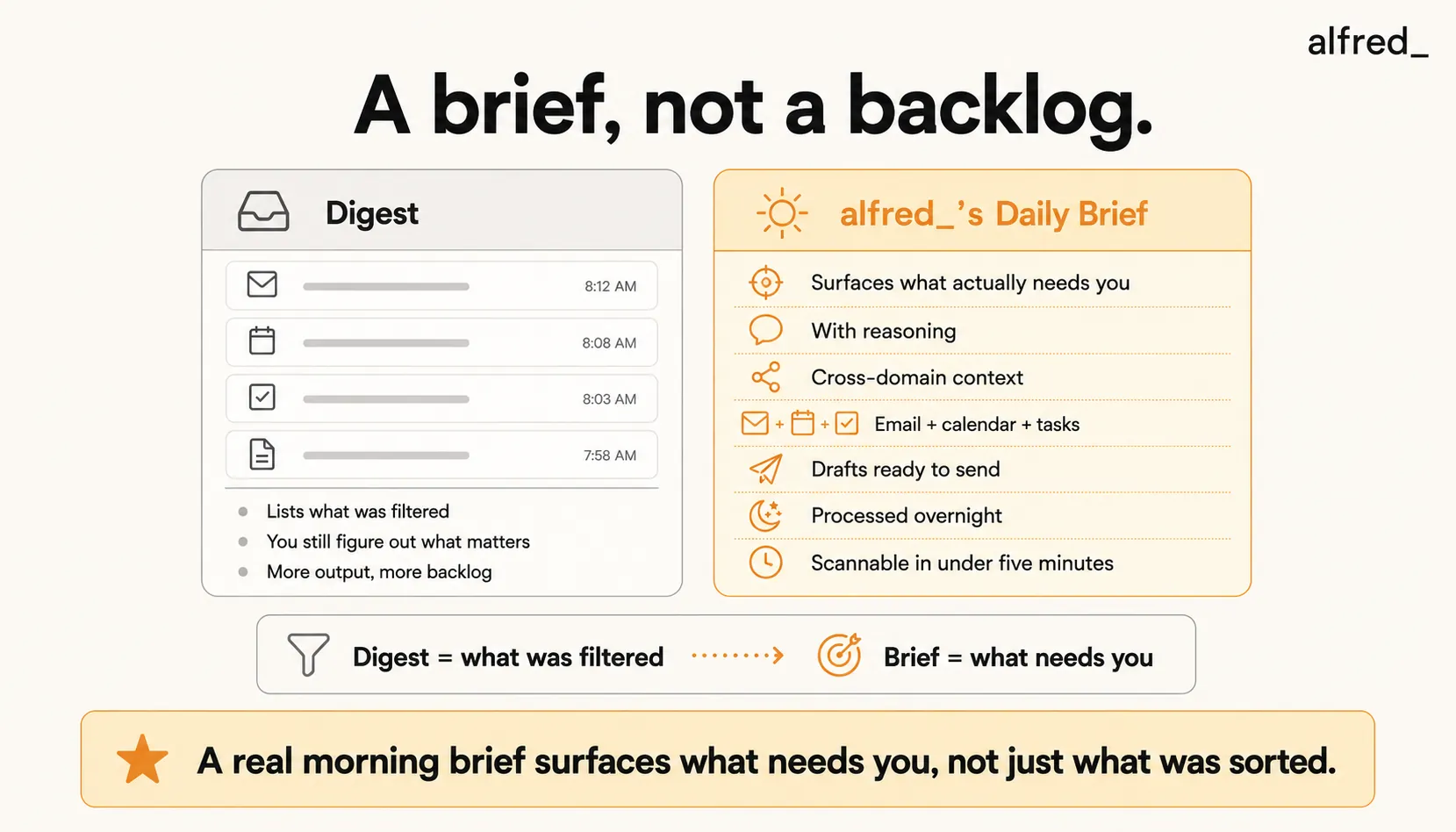
Most “daily email” tools deliver a digest. alfred_ delivers a briefing. The difference is the whole point.
A digest tells you what the tool filtered. A briefing tells you what you should do.
- Digest (SaneBox Daily Digest): “Here are the 47 emails I moved to SaneLater. Did I miss anything important?”
- Briefing (alfred_ morning brief): “Here are the 6 things that need your attention today. Here’s why each matters. Here are drafts for 3 of them. The other 115 emails were handled.”
That distinction is why digests leave you tired and briefings leave you oriented. A digest is a receipt of what was sorted. A briefing is a decision aid.
What Makes a Briefing Actually Useful
Five things separate a real briefing from a glorified inbox summary.
1. Reasoning, Not Just Summarization
“Email from Sarah about Q4 review” is a summary. “Sarah wants your input on Q4 numbers before the Thursday board meeting, she flagged this as blocker-level” is reasoning. Reasoning tells you why the item matters and what happens if you don’t act.
2. Cross-Domain Context
Your email, calendar, and tasks are interconnected. A briefing that only reads email misses the connections. alfred_’s morning brief surfaces things like:
- “You have a board meeting at 2 PM. Three unread emails from board members reference it. Your prep task is overdue.”
- “Client X emailed at 11 PM. You have a call with them at 10 AM. Here’s the context from the last thread.”
No single-domain tool can make that connection because it doesn’t see the whole picture.
3. Drafts Ready to Send
A briefing that identifies 6 items needing replies but leaves you to write all 6 replies didn’t save you much time. alfred_ prepares drafts for the items needing responses, using your writing voice from your sent folder. You review, edit if needed, send.
4. Works Overnight
The whole point is to have the brief ready when you wake up. That means the system has to process overnight email, not wait for you to open it. alfred_ reads your inbox as mail arrives, triages inbound mail, drafts replies, and has the brief assembled before your morning alarm.
5. Scannable in Under 5 Minutes
If you don’t have time for the brief, it fails. A good brief is the top 5-10 items, each with a one-line summary and a one-line reason. The full detail is a click away. You should be able to leave it with full situational awareness in the time it takes to drink coffee.
The Landscape: Digests, Briefings, and Everything In Between
Here’s how the current tools compare, ordered by how close each comes to a real briefing.
| Tool | Morning brief | Includes drafts | Cross-domain | Overnight processing | Price |
|---|---|---|---|---|---|
| Gmail Priority Inbox | Partial (sort only) | No | No | Passive | Free |
| SaneBox Daily Digest | Digest of what was filtered | No | No | Yes (filters only) | $7-36/mo |
| Shortwave | No explicit brief | Yes (per email) | Email only | Passive | $30-120/mo |
| Motion Daily Plan | Calendar + tasks summary | No | No email awareness | Yes | $19-$29/mo |
| Sunsama | Manual daily planning tool | No | No | No (you plan manually) | $25/mo ($20/mo annual) |
| Google CC 'Your Day Ahead' | Yes, with drafts | Yes | Yes (Google only) | Yes | Experimental |
| alfred_ | Yes, full brief with reasoning | Yes | Email + calendar + tasks | Yes | $29.99/mo |
SaneBox is the most common “digest” tool and a useful noise reducer, but its Daily Digest is a record of what was moved to SaneLater, not a brief of what matters. It tells you what you didn’t need to read, not what you should read.
Shortwave reduces visual overwhelm with AI bundling and can draft replies via Ghostwriter, but it doesn’t produce a morning briefing. You still open your inbox and scan.
Motion produces a solid daily plan for calendar and tasks, but has no email awareness, so it won’t surface the overnight email from your biggest client that changes your day.
Google CC “Your Day Ahead” is the most promising vendor experiment and conceptually closest to a real briefing. Two limits: it’s experimental, and it’s Gmail/Workspace-only. For Outlook users, it’s a non-starter.
alfred_ is an AI executive assistant for your email and calendar: it triages your inbox, drafts replies, tracks what needs a response, and manages your calendar. It is purpose-built for the briefing use case. It reads email content (not just headers), connects to your calendar and task list, processes the overnight flow, and delivers a morning brief with drafts ready. It works with both Gmail and Outlook. What is in the morning text and when it arrives is in The morning brief by SMS.
What a Morning Actually Looks Like With a Morning Brief
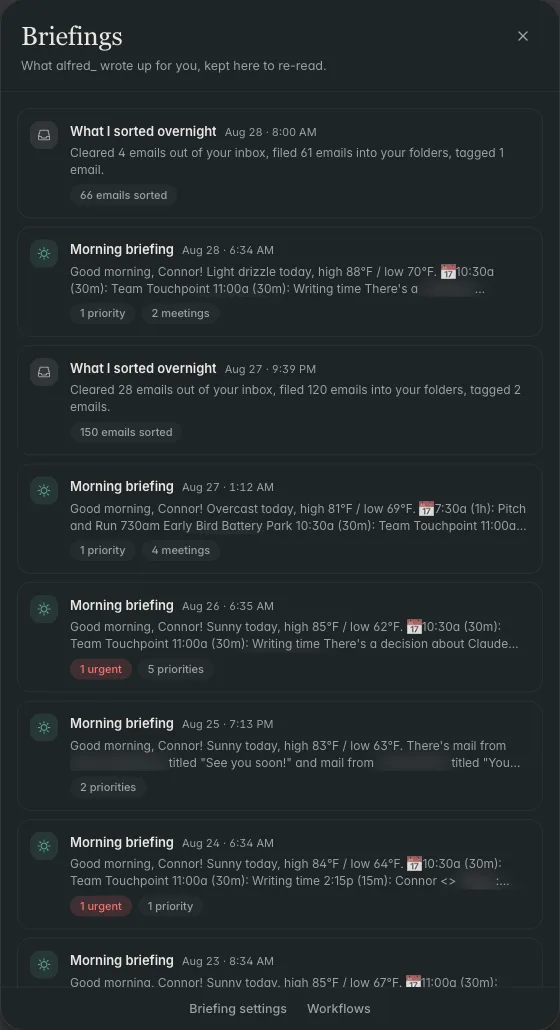
You open your laptop at 8:15. The brief is already there.
Top of the brief, what needs you today:
- Client proposal follow-up, Sarah asked for pricing clarification. Draft ready, pulling from your previous proposal pricing. Review, send.
- Board prep, Q4 deck is due Thursday. Last edit was Tuesday. Your notes from yesterday’s strategy call are linked. Block 90 min this morning.
- Commitment due. You told Chen on Monday you’d send the hiring rubric by end of week. Draft prepared from your last similar email.
- New urgent email, Vendor escalation overnight from an account manager. Brief summary of the thread. Draft reply ready.
- Meeting at 2 PM, Partnership sync. The thread is linked. Three action items from last meeting still open, listed.
- Task overdue, Expense report from last week. One-click to mark complete or defer.
Below the brief, what was handled:
- 47 newsletters archived
- 12 automated notifications logged
- 8 CC threads summarized (no action from you needed)
- 4 meeting confirmations auto-accepted per your rules
- 43 marketing emails filtered
Total time in email to start the day: 12 minutes. Decisions made: 6. You did not scan. You did not scroll.
The rest of your morning is available for the work you were actually hired to do.
The Economic Logic: Why a Briefing Compounds
The cost of not having a briefing isn’t just the 90 minutes of morning triage. It’s the decision fatigue that degrades your judgment for the rest of the day.
28%
of the work week the average knowledge worker spends reading and answering email, more than a full working day every week
$29,000/employee/year
Cost of unproductive meetings per employee at a 100-person company, much of it compounded by the triage and prep cycle before each one
65% to ~0%
Favorable parole rulings fell from about 65% at the start of a session to near zero by its end, then reset after a break, the canonical demonstration that decision fatigue degrades judgment
The math on alfred_ at $29.99/month is not close. If the morning brief saves you 45 minutes per morning, which is conservative based on current behavior. You reclaim roughly 180 hours per year. At any billing rate above $15/hour, the tool pays for itself in the first month.
But the compounding value isn’t in the hours saved. It’s in the quality of the hours that remain. A morning that starts with a brief instead of 121 decisions leaves more of your brain available for the work that actually moves your business.
Who Needs an AI Morning Brief
AI daily briefings are built for people whose mornings are a choke point. That usually means:
- Founders and CEOs managing investor, customer, and team email simultaneously
- Consultants and partners juggling multiple client relationships across many threads
- Executives coordinating across teams with heavy inbound volume
- Anyone processing 75+ emails per day whose first hour of work is currently lost to triage
If you get under 30 emails per day and your morning is already calm, you probably don’t need a briefing. If your morning feels like putting out fires before you’ve tried to start anything, you do.
What alfred_’s Morning Brief Does Not Do
To stay honest about scope:
- It does not auto-send emails on your behalf without review. Drafts are prepared; you approve.
- It does not negotiate scheduling with external parties (that’s not a core alfred_ capability today).
- It does not replace your judgment on high-stakes items. It surfaces them with reasoning; the decision is yours.
What it does, consistently: save you 45-90 minutes of morning triage, catch the items that would otherwise slip, and replace a reactive start with a briefed one.
The Summary
An AI daily briefing surfaces what matters across email, calendar, and tasks, with drafts ready, so you start the day oriented instead of overwhelmed.
alfred_ delivers this, works with Gmail and Outlook, processes overnight email, and uses OAuth 2.0 with AES-256 encryption and no model training on user data.
The difference between opening your laptop to 121 decisions and opening it to 6 items with context is the difference between a reactive morning and a briefed one. That difference compounds across a year.
You don’t want a digest. You want a brief.




