

The short answer: the best AI assistant for Outlook in 2026 is alfred_ (23/25 on our Outlook scorecard, from $29.99/month; the other tools scored 18 or lower). alfred_ is the best choice if you want your Outlook inbox and calendar kept track of without leaving Outlook or buying the full M365 bundle.
Microsoft Outlook remains the default email client for enterprise professionals, powering over 400 million active accounts across Microsoft 365. With Copilot now embedded across the M365 suite, the obvious question is whether you still need a standalone AI assistant for Outlook. The honest answer: yes, if you want someone keeping track rather than waiting to be asked. Copilot is an assistant you ask; alfred_ is an assistant that reports back. It flags what needs your answer, tracks follow-ups, manages your calendar, and sends a morning brief, built for email management without requiring the full M365 suite tax.
| Tool | What it does on its own | Email + calendar | Price | Who uses it |
|---|---|---|---|---|
| alfred_ | Flags what needs your answer, tracks follow-ups, manages calendar, morning brief; with email drafting enabled, prepares replies for your review | Both, Outlook and Gmail, without switching clients | From $29.99/mo or $299.99/yr | Outlook users whose replies and follow-ups slip |
| Microsoft 365 Copilot | Inbox prioritization on request; drafts and summaries when asked | Email + calendar, inside M365 | $30/user/mo add-on; $21/user/mo Copilot Business (under 300 seats) | Orgs already paying for M365 who want AI across the suite |
| Superhuman | Split Inbox and Auto Labels; drafts on demand | Email; calendar view | $33/mo Business annual, $40 monthly | Speed-first emailers willing to leave the Outlook client |
| Fyxer | Labels inbound mail and pre-writes drafts | Email; meeting notes on higher tiers | $37/mo Pro annual, $49 monthly | People whose only bottleneck is writing replies |
| SaneBox | Moves low-priority mail to Sane folders by header | Email only | $7-$36/mo | Cheapest passive filtering inside Outlook |
| Boomerang | Send-later and reply reminders | Email; basic meeting scheduling | Free, up to $49.98/mo | Scheduling sends and nudges |
| Hiver | Assigns and routes shared-inbox mail | Email; team analytics | $25-$85/user/mo | Teams running a shared mailbox in Outlook |
alfred_ is the best choice if you want an assistant for Outlook email and calendar that tells you what needs you before you log in, and lets you answer by text. Executives comparing the broader category should see our best AI chief of staff tools test.
Is Copilot Already Enough?
Before paying for anything, answer this honestly, because for some Outlook users Microsoft’s own AI is an option and we would rather say so up front. Copilot is enough if: your organization already licenses it (so its marginal cost to you is zero), your email volume is manageable and your real pain is summarizing long threads and drafting replies faster, and you value one vendor across Outlook, Teams, Word, and Excel more than depth in any single app. Copilot is not enough if: you open Outlook to 80+ new messages and the work you want gone is the deciding, which needs attention, what did I commit to, which sent threads are still unanswered, or you want a briefing waiting before you log in. Copilot is an assistant you ask; nothing in the M365 bundle works your inbox before you start your day. That second group is who the standalone tools below exist for, and why this page scores them side by side.
How We Tested
Each tool was evaluated against the same five-pillar rubric (scored below) across the surfaces Outlook users actually live in: new Outlook for Windows, Outlook on the web, and mobile. Because every tool here connects at the account level (OAuth) or inside M365 itself, behavior is consistent across clients; where a tool has client-specific quirks (Superhuman replaces the client entirely) the review says so. alfred_ is our product and our daily driver on a Microsoft 365 mailbox; competing tools were assessed from trials where offered and their documented capabilities, with every price re-verified against vendor pricing pages in August 2026. We build alfred_ and it ranks first here, so the disclosure and the per-pillar scores are laid out for you to discount us.
Here is how seven Outlook-compatible AI tools compare in detail.
Quick Scorecard: 7 AI Assistants for Outlook Scored Out of 25
We scored each tool on five pillars (1–5 each, total /25): Outlook integration depth (works with desktop, web, mobile; respects M365 security), Email triage (auto-prioritizes inbound), AI drafts (voice-matched replies), Task extraction (commitments captured from messages), Low setup friction (works without IT approval or M365 bundle).
| Tool | Score /25 | Outlook | Triage | Drafts | Tasks | Setup |
|---|---|---|---|---|---|---|
| alfred_ | 23 | 5 | 5 | 4 | 5 | 4 |
| Fyxer | 18 | 5 | 4 | 4 | 1 | 4 |
| Superhuman | 18 | 5 | 4 | 4 | 1 | 4 |
| Microsoft Copilot | 16 | 5 | 2 | 5 | 1 | 3 |
| Boomerang | 13 | 4 | 2 | 3 | 0 | 4 |
| SaneBox | 13 | 4 | 4 | 0 | 0 | 5 |
| Hiver | 12 | 4 | 3 | 2 | 0 | 3 |
Why alfred_ scores 23/25: It flags what needs your answer, suggests to-dos, and works as a standalone OAuth-connected layer on top of Outlook (desktop, web, mobile). Loses one point on drafts because email drafting is a setting you turn on (with it enabled, alfred_ prepares replies for your review), and one point on setup because connecting Microsoft 365 OAuth takes 3–5 minutes and may need IT awareness in regulated orgs. Microsoft Copilot is broader across M365 but doesn’t flag what needs you or suggest to-dos without a prompt, which is why it scores 16/25 on this rubric.
Quick Comparison: 7 AI Assistants for Outlook
| Tool | Price | Who uses it | Key Limitation |
|---|---|---|---|
| alfred_ | From $29.99/mo or $299.99/yr | Keeping track of Outlook email and calendar | No Word or Excel integration |
| Microsoft Copilot | $30/user/mo add-on to M365 ($21 Copilot Business) | AI across the entire M365 suite | Does not flag what needs you unprompted; no morning brief |
| Superhuman | $33–$40/mo | Speed-focused power emailers | Requires switching to Superhuman's client |
| SaneBox | $7–$36/mo | Cheap passive inbox filtering | No AI drafts or task extraction |
| Boomerang | Free–$49.98/mo | Send-later and follow-up reminders | AI features are basic |
| Hiver | $25–$85/user/mo | Shared inbox for teams | Not designed for individual email management |
| Fyxer | $37–$49/mo | AI email writing and summaries | No task extraction or daily briefing |
Deep Dive: Each Tool Reviewed
alfred_: from $29.99/month or $299.99/year
alfred_ is an AI assistant for client-facing teams, and each person on the team gets their own. It connects to Outlook via OAuth 2.0 and does the same things it does for Gmail users. It reads each email as it arrives, flags the ones that need your answer, finds the replies you’re waiting on when you ask, and suggests to-dos for you to accept. Each morning, you receive a brief by email or text with what needs you, the meetings ahead and the tasks due. On a team, everyone gets their own assistant on one bill ($49.99 a seat a month; see alfred_ for teams).
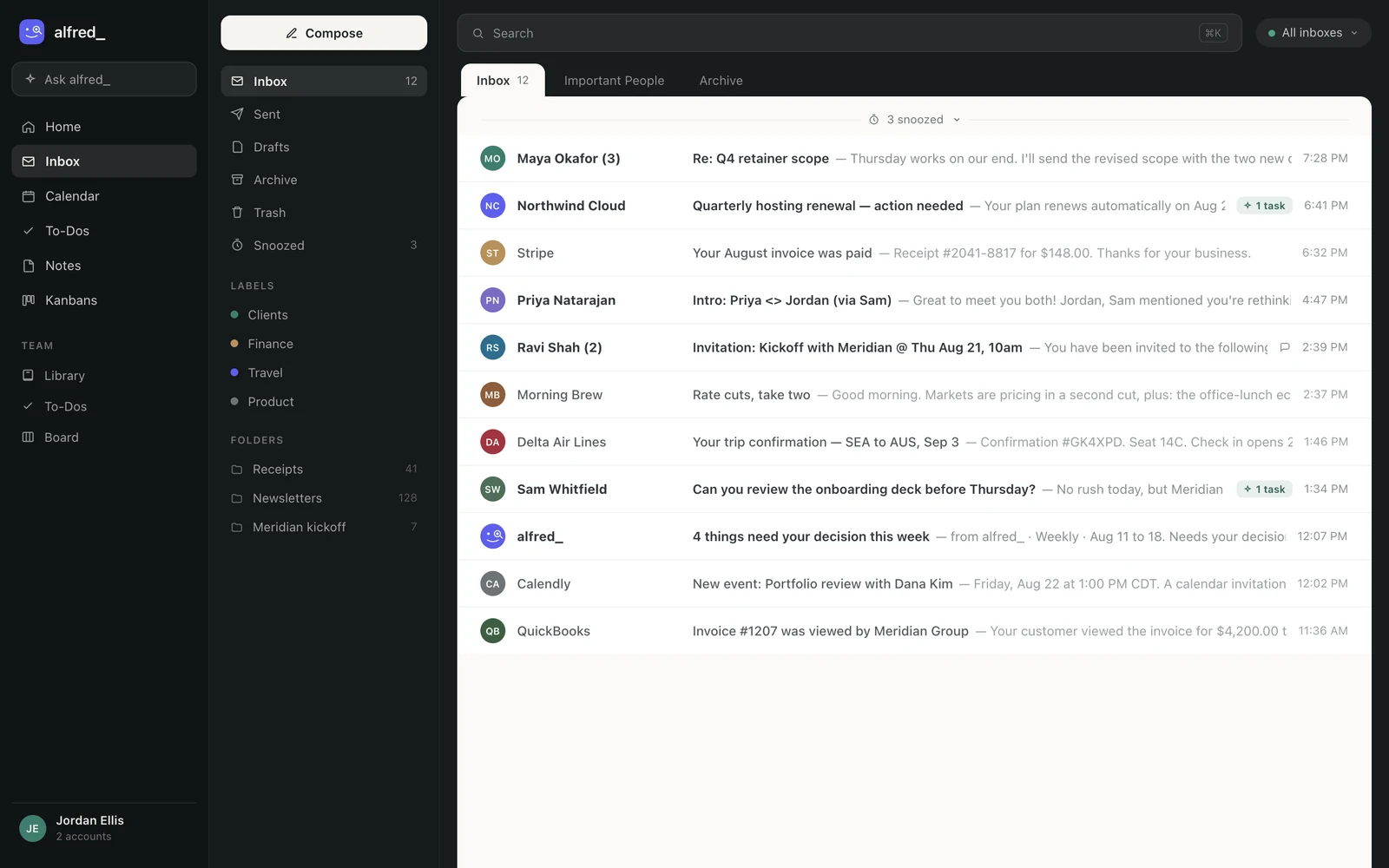
It works at the account level, whichever Outlook client you use, and a Gmail address can share the same list. Shown with sample data.
Setup for Outlook and Microsoft 365 mail and calendar is in Connect Outlook / Microsoft 365.
For Outlook users, this matters because Microsoft’s own AI offering (Copilot) is reactive rather than proactive. Copilot waits for you to ask it to do something. alfred_ keeps track without being asked. By the time you open Outlook in the morning, you already know what needs your answer and what your day holds.
alfred_ uses AES-256 encryption and does not train on your data. Plans start at $29.99/month, about the same as adding Copilot at $30/user/month on top of an existing M365 subscription, and it does a job Copilot does not attempt: keeping the list of what is waiting on you.
Microsoft Copilot: $30/user/month (M365 add-on), $21/user/month Copilot Business
Copilot is the 800-pound gorilla in this space. It requires a Microsoft 365 subscription plus an additional $30/user/month for the Copilot add-on; since late 2025 Microsoft also sells a Copilot Business SKU at $21/user/month (promotional pricing lower through 2026) for organizations under 300 users, and bundles it into Business Standard and Premium tiers. Its breadth is the point: it works across Outlook, Word, Excel, PowerPoint, Teams, and OneNote. In Outlook specifically, it can summarize long threads, draft replies, catch you up on missed conversations, and search across your mailbox using natural language.
The strength is integration depth. You can ask Copilot to draft an email based on a Word document, pull data from Excel into a Teams message, or summarize meeting recordings. No standalone tool matches this cross-application capability.
The weakness for email specifically is that Copilot is not purpose-built for inbox management. It does not flag which emails need you without being asked. It does not extract tasks. It does not deliver a daily briefing. It does not track follow-ups. Every action requires your prompt. For professionals receiving 100+ emails daily, Copilot makes you faster at processing email but does not reduce the cognitive load of deciding what to do with each message.
Superhuman: $33–$40/month
Superhuman added Outlook support in 2023 and, after the 2025 Grammarly acquisition and rebrand, now sells Superhuman Mail inside its Business plan at $33/month billed annually or $40 month-to-month. The core value proposition is speed, split inboxes, keyboard shortcuts, read statuses, and snooze, plus AI-powered “Instant Reply” that adapts drafts to each recipient’s communication style.
Superhuman is a keyboard-driven client that replaces Outlook, with per-recipient voice adaptation in its drafts.
The tradeoff is significant: you must leave Outlook entirely. For enterprise users embedded in Microsoft’s ecosystem, with shared mailboxes, compliance requirements, and IT-managed configurations, switching to Superhuman’s client may not be feasible. At $33–$40/month on top of existing M365 costs, it is also a premium add-on.
SaneBox: $7–$36/month
SaneBox works quietly alongside Outlook, sorting incoming messages into folders like SaneLater, SaneNews, and SaneBlackHole. It requires minimal setup and no change to your workflow. At $7/month, it is the cheapest option for reducing inbox clutter.
SaneBox is a filter, not an assistant. It does not draft replies, extract tasks, or provide any form of AI-generated content. For Outlook users whose primary problem is volume, too many newsletters, notifications, and low-priority messages cluttering the primary inbox, SaneBox at $7/month is the low-cost option.
Boomerang: Free–$49.98/month
Boomerang was one of the first email productivity tools for Outlook and Gmail. Its core features are send-later scheduling, follow-up reminders, and basic AI writing assistance via “Respondable.” The free tier offers limited send-later functionality, while paid plans add AI features and more scheduled messages.
Boomerang’s AI capabilities are basic compared to modern tools. The writing assistant provides suggestions rather than full drafts, and there is no triage or to-do suggestion. Boomerang remains useful for its send-later and snooze features, but it has not kept pace with the AI capabilities of newer competitors.
Hiver: $25–$85/user/month
Hiver turns Outlook (and Gmail) into a shared inbox for teams. It adds assignment, collaboration, and analytics features directly inside your email client. For customer support teams or operations teams managing a shared mailbox, Hiver is purpose-built.
Hiver is not designed for individual email management. It does not triage your personal inbox, draft replies to your individual messages, or extract tasks from your email. If you are looking for a personal AI assistant, Hiver solves a different problem entirely.
Fyxer: $37–$49/month
Fyxer provides AI-powered email drafting and summarization for both Outlook and Gmail. It learns your writing style over time and produces drafts that match your tone. Thread summaries are clean, and it can organize labels and folders.
The limitation is scope. Fyxer focuses exclusively on email writing and organization. There is no task extraction, no daily briefing, and no follow-up tracking. At $37–$49/month, you are paying more than alfred_ for fewer features. Fyxer is for users whose sole bottleneck is writing email responses.
How to Set Each One Up in Outlook (And What IT Will Ask)
No page ranking for these queries actually tells you how to install anything, so here is the part your IT department will ask about. All third-party tools here connect through Microsoft’s own OAuth flow, meaning they never see your password and admins can review or revoke access in the Microsoft Entra admin center.
alfred_ (5 minutes, account-level):
- Sign up at get-alfred.ai and choose “Connect Microsoft account.”
- Approve the Microsoft OAuth consent screen (mailbox + calendar scopes). In organizations that restrict third-party apps, your admin grants consent once in Entra ID.
- That’s it: alfred_ works at the account level, whichever Outlook client you use. Data is AES-256 encrypted and is not used to train models.
Microsoft Copilot (licensing, not installation): Copilot appears in Outlook automatically once your organization assigns you a license ($30/user/month add-on, or the $21 Business SKU under 300 seats). There is nothing to install; the work is procurement.
SaneBox (10 minutes, server-level): connect your Microsoft 365 account on sanebox.com; it works by moving mail between folders, so it functions in every client with no add-in.
Superhuman (a real migration): Superhuman replaces the Outlook client entirely. Install its desktop/mobile apps, connect your M365 account, and plan a day of adjusting; shared mailboxes and some IT-managed configurations are not supported.
Fyxer / Boomerang / Hiver (add-in or OAuth): Fyxer connects by OAuth like alfred_; Boomerang and Hiver install as Outlook add-ins from Microsoft AppSource, which some tenants require an admin to approve.
One honest privacy note that applies to every tool including ours: whatever you connect can read your mail. The questions to ask any vendor, and the answers for alfred_, are: is access OAuth-scoped (yes), is data encrypted at rest (AES-256, yes), is your mail used to train models (no), and can your admin revoke access centrally (yes, via Entra).
Answering Outlook Email by Text
Copilot and the email apps help once you’re in Outlook. alfred_ also works when you’re not: when an email needs your answer, it texts you in iMessage (RCS or SMS on Android). Text back what to say, it writes the reply in the Outlook thread, and a 👍 sends it from your own address.
alfred_: Nina Brooks at Brooks Insurance Group asks if Tuesday’s renewal call can move to 2pm.
You: yes, 2pm works
alfred_: Here’s the reply to Nina: “Hi Nina, 2pm Tuesday works. I’ll update the invite.” Send it?
You: 👍
Illustrative exchange. Names in this post are invented.
Why alfred_ Is the Best AI Assistant for Outlook
Copilot is broad: it helps across Word, Excel, Teams and Outlook when you ask. It doesn’t keep track of your inbox for you.
alfred_ does. It connects to Outlook with Microsoft sign-in, flags the emails that need your answer, keeps the replies you owe, finds the replies you’re waiting on when you ask, suggests to-dos, manages your Outlook calendar and sends a morning brief, and it texts you when an email needs you, so you can answer from anywhere. It works with up to six Outlook and Gmail accounts plus IMAP, and needs no Copilot license.
alfred_ plans start at $29.99 a month, and teams are $49.99 a seat on one bill. For organizations already on Microsoft 365 Copilot, the two work side by side: Copilot for cross-app AI inside Office, alfred_ for keeping track of email and calendar.




