

You tried ChatGPT for email. The drafts were technically correct and obviously AI.
Over-formal greetings. Qualifiers you’d never use. A closing that didn’t match your actual sign-off. By the time you rewrote the draft to sound like you, you’d spent more time than if you’d just written the reply from scratch. Which defeats the whole point.
alfred_ learns your writing voice from your sent folder, adapts per recipient, and drafts emails that read like you wrote them. Review, tweak a word if needed, send. Minutes faster per email, hours faster across a day.
66%
Average productivity gain from generative AI across business tasks, averaged across three controlled studies, Nielsen Norman Group
59%
More business documents per hour for professionals using AI drafting assistance, Nielsen Norman Group
65%
Reduction in average writing time for graduate students using generative AI, Carnegie Mellon Heinz College
Why Generic AI Drafts Fail
The problem with ChatGPT-style email drafting isn’t that the AI is bad. It’s that “professional email” is not one thing.
You write differently to your CEO than to your best vendor. You write differently to a new client than to someone you’ve worked with for five years. You write differently when you’re giving good news than when you’re pushing back. Your signature is different for external vs. internal emails. You use emojis with one friend and never with anyone else.
A generic draft ignores all of that. It gives you the median email shape, polite, thorough, slightly over-formal, regardless of who you’re writing to. When you send it, the recipient feels a small friction: this doesn’t sound like them.
“After I switched to ChatGPT for email, three separate people asked if something was wrong. The drafts read as stiff and it showed.”
Voice matching solves this by learning your actual patterns, per recipient, from your sent history.
What Voice Matching Actually Learns
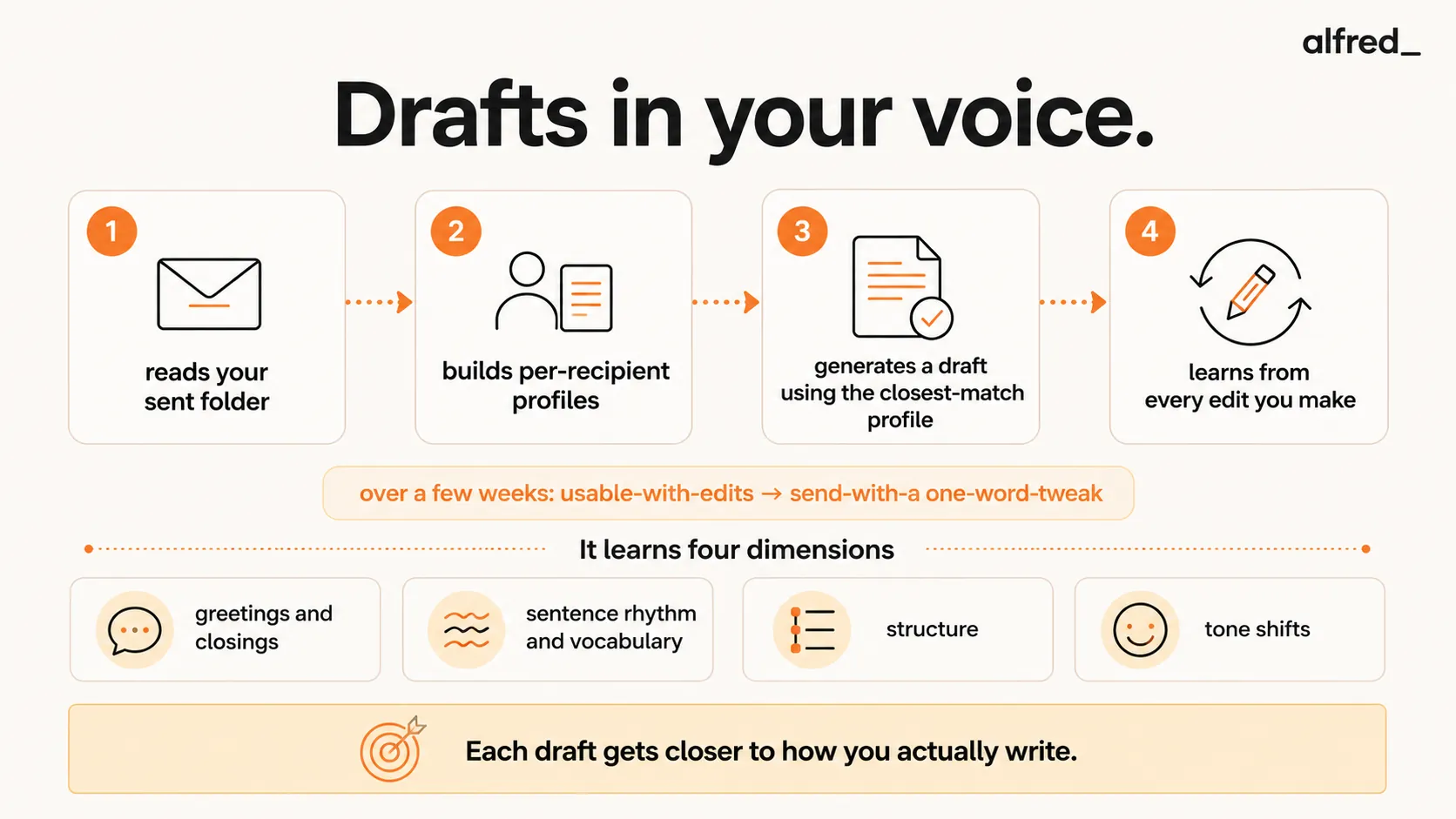
Deep voice matching observes four dimensions of your writing.
1. Greetings and Closings Per Recipient
“Hi Sam,” vs “Hey Sam” vs “Sam, “ vs just diving into the reply. Your greeting choice encodes a lot about the relationship, and it changes across contacts. Per-recipient voice matching gets this right automatically; single-profile tools force a compromise.
2. Sentence Rhythm and Vocabulary
You have phrases you actually use. “Circle back.” “Let me know.” “Quick question.” “Happy to jump on a call.” The cadence and vocabulary of your writing is distinctive, voice matching captures it from analysis of 200-500 of your sent emails.
3. Structure
Short bullets? Flowing prose? TL;DR at the top? You have a default structure for different types of replies, and it changes across relationships. Voice matching learns these structural patterns.
4. Tone Shifts
Good news, bad news, quick updates, thorough explanations. Your tone shifts across these. Voice matching tracks these shifts so that a draft for “here’s why the project is delayed” reads different from a draft for “thanks for sending the proposal.”
How alfred_ Handles Voice Matching
The flow:
- Read sent folder. On first connection, alfred_ analyzes your recent sent emails to build an initial voice model.
- Per-recipient profiles. For recipients you email frequently, alfred_ builds specific profiles, different greetings, different lengths, different tones.
- Draft generation. When a new email arrives, alfred_ generates a draft using the most relevant profile (specific recipient, or closest match if new contact).
- Learn from edits. Every time you edit a draft, alfred_ captures the pattern. Change a greeting repeatedly? The new greeting becomes default. Shorten paragraphs consistently? Future drafts are shorter.
- Exclusions. Sensitive contacts (HR, legal, certain personal contacts) can be excluded from auto-drafting.
Over the first 2-4 weeks, drafts shift from “usable with edits” to “usable with a one-word tweak” for most relationships. The approve, edit or discard flow is documented in Drafts in your voice.
The Landscape: Voice Matching Tool Comparison
| Tool | Voice learning depth | Per-recipient | Reads sent folder | Gmail + Outlook | Price |
|---|---|---|---|---|---|
| Superhuman Instant Reply | Deep | Yes | Yes | Gmail + Outlook | $30-40/mo |
| Shortwave Ghostwriter | Moderate | No (single profile) | Yes | Gmail only | $30-$120/seat/mo |
| Spark 'My Writing Style' | Moderate | Limited | Yes | Gmail + Outlook | Free-$20/mo |
| Fyxer | Moderate | Limited | Yes + meetings | Gmail + Outlook | $22.50-50/mo |
| ChatGPT (with prompts) | None (manual approx.) | No | Only if you paste | Manual | $20/mo |
| Notion AI | Workspace writing style | No | No | Docs only | $20-24/mo |
| alfred_ | Deep | Yes | Yes | Gmail + Outlook | $29.99/mo |
Superhuman Instant Reply works for pure voice matching in email. Deep per-recipient learning, strong UI, widely loved. Trade-offs: $30-40/mo, email only, no task or cross-domain integration.
Shortwave Ghostwriter is a Gmail-only voice-matcher, now paid-only with plans starting at $30/seat/mo (Business) after the old $7 Personal tier was discontinued. Good single-profile learning. Two limits: Gmail only (no Outlook), and single voice profile rather than per-recipient adaptation.
Spark’s “My Writing Style” learns from your sent history and drafts in your voice. Solid free/cheap option. Less deep than specialist tools.
Fyxer learns voice from sent emails and meeting transcripts. Moderate depth. Smaller user base; less refinement.
ChatGPT with a custom system prompt is a workable manual approximation. You paste examples, set instructions, and get generic-but-tone-shifted output. It doesn’t observe your actual sent folder, doesn’t update as you write, and doesn’t do per-recipient matching. Better than nothing, not as good as native voice matching.
Notion AI learns writing style for docs in your workspace. Useful for SOPs and team content; not a replacement for email voice matching.
alfred_ does deep per-recipient voice matching, priced below both Shortwave and Superhuman’s premium. The differentiator: alfred_’s voice matching is integrated with triage, task extraction, and the morning brief, so the draft you send is informed by full context, not just the one email in front of you.
Why Voice Matching Is More Than a Nice-to-Have
Generic drafts cost you in three ways:
1. Wasted time. A draft you have to rewrite is worse than no draft. Voice matching cuts editing from paragraphs to words.
2. Relationship friction. Recipients notice when your emails suddenly sound different. At scale, dozens of contacts, hundreds of emails per week. It’s a subtle trust hit.
3. Sending hesitation. If you don’t trust the draft, you don’t use the tool. Most AI email tools die this death in the first month. Voice matching is what keeps the tool useful past the first month.
alfred_ is priced where the math works regardless of your hourly rate. Even 30 seconds saved per draft across 20 drafts per day is 10 minutes daily, and voice-matched drafts save more than 30 seconds each for most users.
A Real Example
Email arrives from a client you work with weekly:
Hey, quick one. Can we push the check-in from Thursday to Friday? Something came up on our side.
Generic AI draft (ChatGPT default):
Dear [Client],
Thank you for reaching out. I understand that something has come up on your end, and I appreciate you letting me know in advance.
Friday works for me. I will update my calendar accordingly and send a new invite shortly.
Please let me know if there’s anything specific you would like to cover when we meet.
Best regards, [Name]
alfred_ draft (voice-matched, per-recipient):
No problem, Friday works. Sending updated invite now.
[Your sign-off]
The generic draft is technically correct. It’s also four times longer, uses your legal name instead of your first, and has a tone that doesn’t match how you write to this person. Voice matching produces the second version automatically.
Who This Matters For
- Anyone sending 20+ emails per day where voice consistency with recipients matters
- Sales and account managers where tone friction hurts relationships
- Founders and executives who communicate across very different contexts (investors, team, customers) in a single day
- Consultants switching between many client voices, where per-recipient matching pays off most
If you send fewer than 10 emails per day and tone is rarely an issue, voice matching is nice but not essential. If email is where your work actually lives and how you come across matters, it’s one of the most valuable features in the category.
What alfred_ Does Not Do
Honest scope:
- alfred_ does not send emails without review by default. You see the draft, you send.
- alfred_ does not match voice in languages you don’t actively use. Multilingual voice matching works best where you have substantial sent history in each language.
- alfred_ does not replace your judgment for sensitive communications. For hard conversations, it drafts a starting point; you finalize.
It does one thing very well: makes drafting feel like reviewing, not writing.
The Summary
Generic AI drafts read like AI. Voice-matched drafts read like you.
alfred_ learns your writing voice per recipient from your sent folder, drafts replies that match your greetings, vocabulary, structure, and tone, and improves continuously from your edits. With Gmail and Outlook support, it’s priced below Superhuman’s premium voice matching while including triage, task extraction, and the morning brief.
A draft that sounds like you takes seconds to send. A draft that sounds like AI takes five minutes to rewrite. Voice matching is where AI email tools either earn their cost or don’t.




