

Most people’s work day happens in three places. At the desk, with a keyboard. On the phone, in the gaps. And in a text thread, when there is one free thumb and no patience for an app.
An assistant that lives in only one of those is one more thing to remember to open. The question is not really “which apps does it have”. It is whether the thing you ask at 9 AM at your desk is the same thing you can follow up at 2 PM from a car park.
What “works everywhere” has to mean
| What to check | Why it matters | How to test it |
|---|---|---|
| Same accounts behind every surface | An answer on your phone should come from the same email and calendar as the one at your desk | Ask "what's on tomorrow?" in two places and compare |
| Text without an app | The moment you most need it is the moment you will not open an app | Text it from the lock screen |
| Context that carries | You should not re-explain who your accountant is on each device | Tell it something on the web, ask about it by text |
| The same rule on sending | A send from a text should be checked the same way as one from the web | Ask it to email someone by text and see what comes back |
How alfred_ handles each surface
alfred_ is an AI personal assistant for work. You connect your email and calendar once, and every surface works from those same accounts.
On the web. Home shows the list of what needs you, your calendar and your to-dos, with a chat box to ask about any of it.
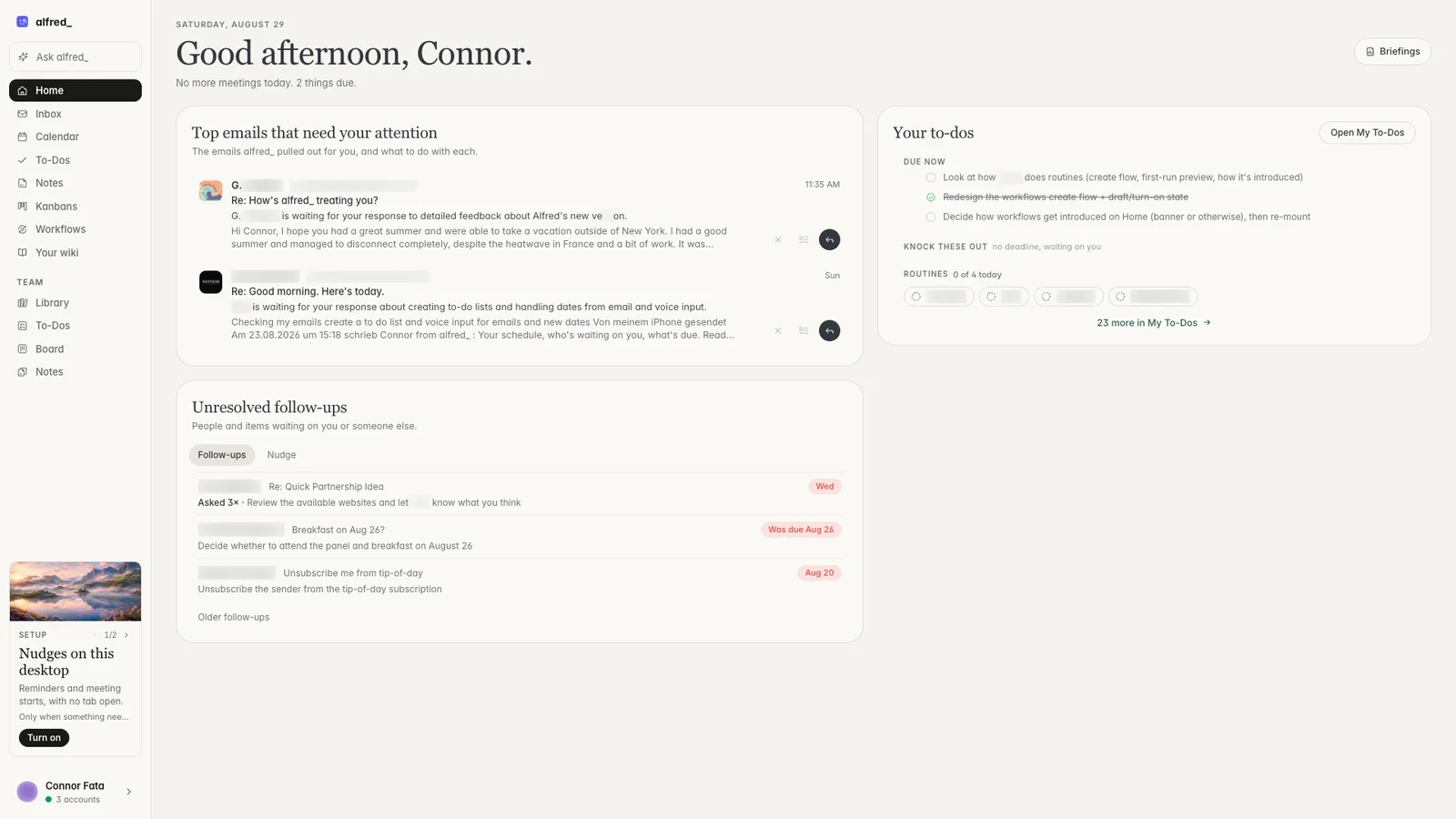
Home on the web. Shown with sample data.
On iPhone. The app has the same list, your calendar and the same chat.
By text. You text alfred_ like you would text a person, over iMessage, RCS or SMS, on iPhone or Android, with nothing to install. Ask what is on tomorrow, whether someone replied, or what a thread said. Add a to-do, set a reminder, add a meeting. It also texts you: a reminder before each meeting, a text when an email you care about lands, and your day each morning, each of which you can turn on or off.
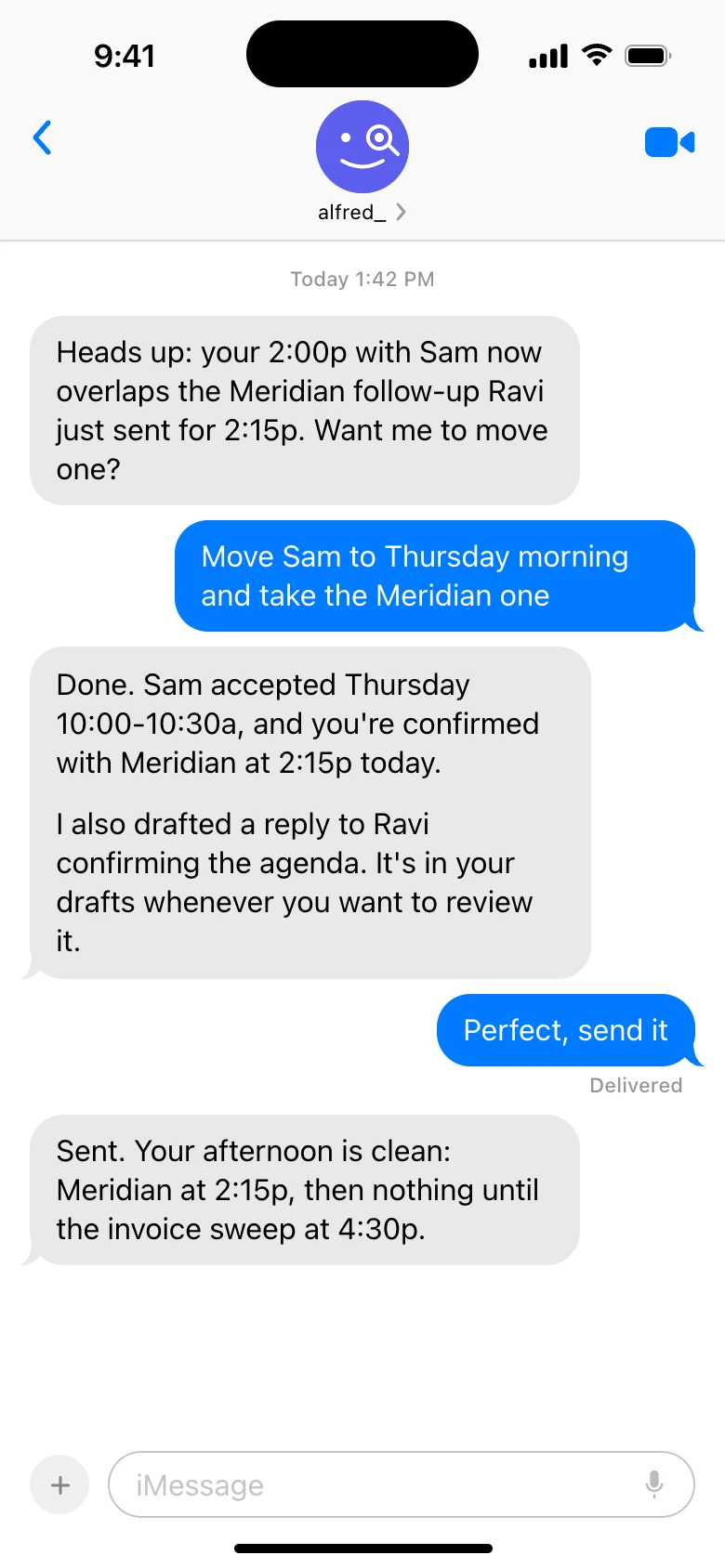
alfred_ by text. Shown with sample data.
In Claude and ChatGPT. Connect alfred_ and ask about your email, calendar and to-dos from the AI you already use.
What carries across
Three things are the same wherever you ask, because they belong to your account and not to a device:
- The list. What needs you is one list across up to six Gmail, Outlook and IMAP accounts. Answer a thread in Gmail on your laptop and it comes off the list on your phone.
- Your calendar and to-dos. A to-do you text in is on the web a moment later.
- What you told it. Tell it something once, such as who handles your invoices, and it keeps it. You can see and correct what it knows on your wiki.
And one rule is the same everywhere: nothing is sent without you. An email you ask for by text comes back for you to check first.
How the general AI apps compare
ChatGPT, Claude and Gemini all have good web and phone apps, and they keep your chat history across devices. Two differences matter for work:
- They are not connected to your work email and calendar unless you set up a connector, so out of the box they answer from what you paste in.
- You cannot text them like a contact. You open the app.
If what you want is a thinking partner on every device, they are excellent. If what you want is your own email and calendar on every device, including a text thread, that is a different job.
What it does not do
The app is on iPhone; on Android you use the web and text. Text is best for short asks, and a long thread is easier to read in the app. alfred_ does not take calls or join meetings. Plans start at $29.99 a month with a 7-day free trial. More is on the text assistant page and the Ask page.




