

The short answer: the best AI personal assistant for work in 2026 is alfred_ (23/25). alfred_ is the best choice if the work you want kept track of is email and calendar: it flags what needs your answer, tracks who still owes you a reply, manages your calendar and sends a morning brief, from $29.99/month.
An assistant you have to prompt is a tool. An assistant that reports to you every morning is staff.
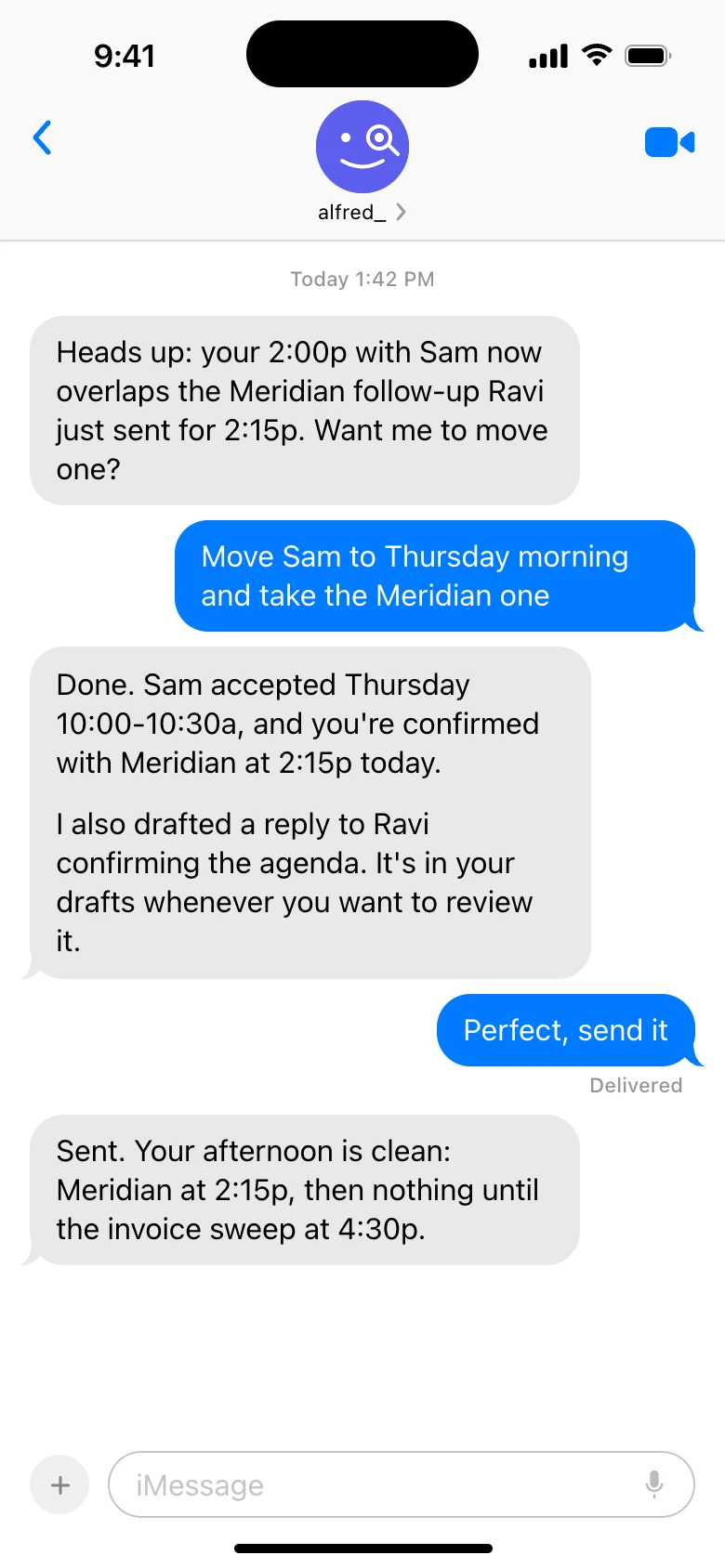
Delegation by text: alfred_ flags a conflict, reschedules on one instruction, and drafts the follow-up. Shown with sample data.
| Tool | What it does without being prompted | Email + calendar | Price | Who uses it |
|---|---|---|---|---|
| alfred_ | Flags what needs your answer, tracks replies owed and replies you're waiting on, manages calendar, sends a morning brief; with email drafting enabled, prepares replies for your review | Gmail + Outlook, both | From $29.99/mo or $299.99/yr | Professionals with 50+ emails a day whose replies and follow-ups slip |
| Lindy AI | Routines you set up in a sentence run on a schedule: daily brief, email drafts, meeting notes | Yes, on the schedule you set | $29.99/mo Plus (3,000 credits), $99.99/mo Pro | Teams that work in Slack |
| ChatGPT Plus | Nothing continuous; answers when prompted, remembers facts you tell it | No inbox or calendar access | $20/mo | Research, writing, code, brainstorming |
| Claude Pro | Nothing continuous; answers when prompted, Projects hold documents | No inbox or calendar access | $20/mo | Long-form writing and deep analysis |
| Google Gemini | Summaries and drafts inside Gmail and Docs when invoked | Gmail + Google Calendar only | Free, $19.99/mo Pro, $99.99/mo Ultra | Google Workspace-native users |
| Microsoft Copilot | Thread summaries and drafts inside Outlook and Teams when invoked | Outlook + Microsoft 365 only | $30/user/mo plus M365 license | Enterprise Microsoft 365 shops |
Choose alfred_ if you want your email and calendar kept track of and a brief waiting when you wake up.
- AI Personal Assistant Definition
- software that handles personal and professional work through natural language. The category splits into always-on assistants (alfred_, connected to your email and calendar and working without prompting), on-demand AI (ChatGPT, Claude, Copilot, Gemini, powerful when invoked, idle when not), and consumer assistants (Siri, Alexa, Google Assistant, voice-first, smart home). For the work that actually consumes most professionals' days, email, calendar, tasks, the always-on tier is the one that keeps track for you.
Why “Personal Assistant” Now Means One Thing First: Inbox
The average knowledge worker spends 11.7 hours a week on email (ElectroIQ, 2025). That’s nearly a third of the workweek processing 121 emails a day (Radicati Group, 2024), most of which don’t require your brain, just your attention. Add 23 minutes to refocus after each interruption (Gloria Mark, UC Irvine) and the leverage math is brutal.
- 11.7 hours/week on email, almost a third of your workweek
- 121 emails/day, each requiring a micro-decision
- 85% of professionals receive work email outside business hours
- $21,000+/year in lost productivity at average professional salaries
This is the job most people are actually hiring an AI personal assistant for: keep track of the inbox continuously, so the workday starts with decisions instead of sorting. Tools that wait for you to ask don’t solve this problem. They just speed up individual tasks. Tools that read your email as it arrives do.
$4.84 billion
Projected size of the AI personal assistant market in 2026, up from $3.4B in 2025
alfred_ is the best choice for the work that actually consumes your day
The deciding split is always-on vs on-demand. alfred_ reads your email as it arrives, flags what needs your answer, tracks the replies you owe and the replies you're waiting on, manages your calendar (events, scheduling, reminders, meeting prep), and sends a morning brief, across Gmail and Outlook, without you prompting it. On-demand AI like ChatGPT and Claude is useful on the side for thinking work, but it idles between uses.
Best for
- Executives, founders, and professionals with a full inbox and a full calendar
- Anyone using Gmail or Outlook whose replies and follow-ups slip
- Professionals who want an always-on assistant without becoming a workflow engineer
Not for
- Users whose primary need is research, code, or general-purpose thinking
- Pure consumer use cases, voice commands, smart home
Quick Scorecard: 12 AI Personal Assistants Scored Out of 25
We scored each tool on five pillars (1–5 each, total /25): Always on (works without prompting), Email (handles your inbox as a workflow), Reasoning (research, writing, analysis quality), Memory (remembers you across conversations and time), Low setup friction (works out of the box).
| Tool | Score /25 | Always on | Reasoning | Memory | Setup | |
|---|---|---|---|---|---|---|
| alfred_ | 23 | 5 | 5 | 4 | 5 | 4 |
| ChatGPT Plus | 16 | 1 | 1 | 5 | 4 | 5 |
| Claude Pro | 16 | 1 | 1 | 5 | 4 | 5 |
| Google Gemini | 16 | 2 | 3 | 4 | 3 | 4 |
| Saner.ai | 15 | 3 | 2 | 3 | 3 | 4 |
| Mem.ai | 15 | 2 | 1 | 3 | 5 | 4 |
| Microsoft Copilot | 14 | 2 | 3 | 4 | 3 | 2 |
| Personal AI | 13 | 2 | 0 | 3 | 5 | 3 |
| Siri | 11 | 2 | 0 | 2 | 2 | 5 |
| Google Assistant | 11 | 2 | 0 | 2 | 2 | 5 |
| Amazon Alexa | 9 | 2 | 0 | 1 | 1 | 5 |
| Lindy AI | Not re-scored | - | - | - | - | - |
Why alfred_ scores 23/25, the highest on this list: Top marks on always-on and email (the central job a personal assistant is hired for), strong reasoning (applied directly to your email and calendar rather than offered as a chat box), and memory that is put to use: alfred_ keeps the list of what is open across your accounts, remembers what you tell it, and follows the rules you set. Loses one point on raw conversational reasoning (Claude and ChatGPT still lead for ad-hoc questions and long-form writing) and one on setup (3–5 minutes to connect Gmail or Outlook).
What Is an AI Personal Assistant? The Always-On Split That Decides Everything
Every AI personal assistant falls into one of three buckets. The bucket matters more than the brand.
Always-on assistants work continuously in the background. They read your inbox, flag what needs you, track what you’re waiting on, and send a brief each morning, without you prompting them. alfred_ is the main example built around this loop. Lindy runs scheduled routines once you set them up.
On-demand AI is powerful when you invoke it. ChatGPT, Claude, Copilot, Gemini. You ask, you get a brilliant answer, you close the window. Idle between uses. No persistent access to your inbox or calendar. Excellent for research, writing, code, and reasoning. Not assistants in the recurring-workflow sense; they’re conversation partners.
Consumer assistants (Siri, Alexa, Google Assistant) handle voice-first personal tasks, timers, smart home, quick searches. They have shallow access to email and calendar but don’t engage with professional workflows.
For most professionals searching “AI personal assistant,” the right primary tool is always-on. ChatGPT or Claude is a useful complement at $20/month, not a substitute, because they help with thinking work but don’t compound on the daily admin grind. The test for an always-on assistant is simple: did it tell you something you would otherwise have missed?
The 7 Best AI Personal Assistants, Reviewed in Depth
1. alfred_: The Always-On Pick
Price: plans from $29.99/month or $299.99/year; teams $49.99 a seat a month, on one bill | Works with: Gmail, Outlook | Score: 23/25
alfred_ is an AI assistant for client-facing teams: each person on the team gets their own AI personal assistant. It keeps track of the replies you owe and the replies you’re waiting on, manages your calendar, prepares you for meetings and sends a morning brief, across Gmail and Outlook. Eight things it does:
- Reads your inbound email via OAuth 2.0 with AES-256 encryption. Does not train on user data.
- Flags what needs your answer by reading the content of each email, not binary “important vs not.”
- Tracks the replies you’re waiting on, so a sent email with no answer does not disappear.
- Manages your calendar: creates and updates events, helps with scheduling, sends reminders, and surfaces meeting prep, with email and calendar connected so context carries across.
- Suggests to-dos from email, which you accept before they are added.
- Sends a morning brief by email or text with what needs you, the meetings ahead and the tasks due.
- Prepares replies for your review when email drafting is enabled. You review and send.
- Reads Slack, Teams and your CRM. Connect Slack or Microsoft Teams and it shows who is waiting on an answer from you there. Connect HubSpot or Salesforce and it looks up the contact, deal or account behind an email.
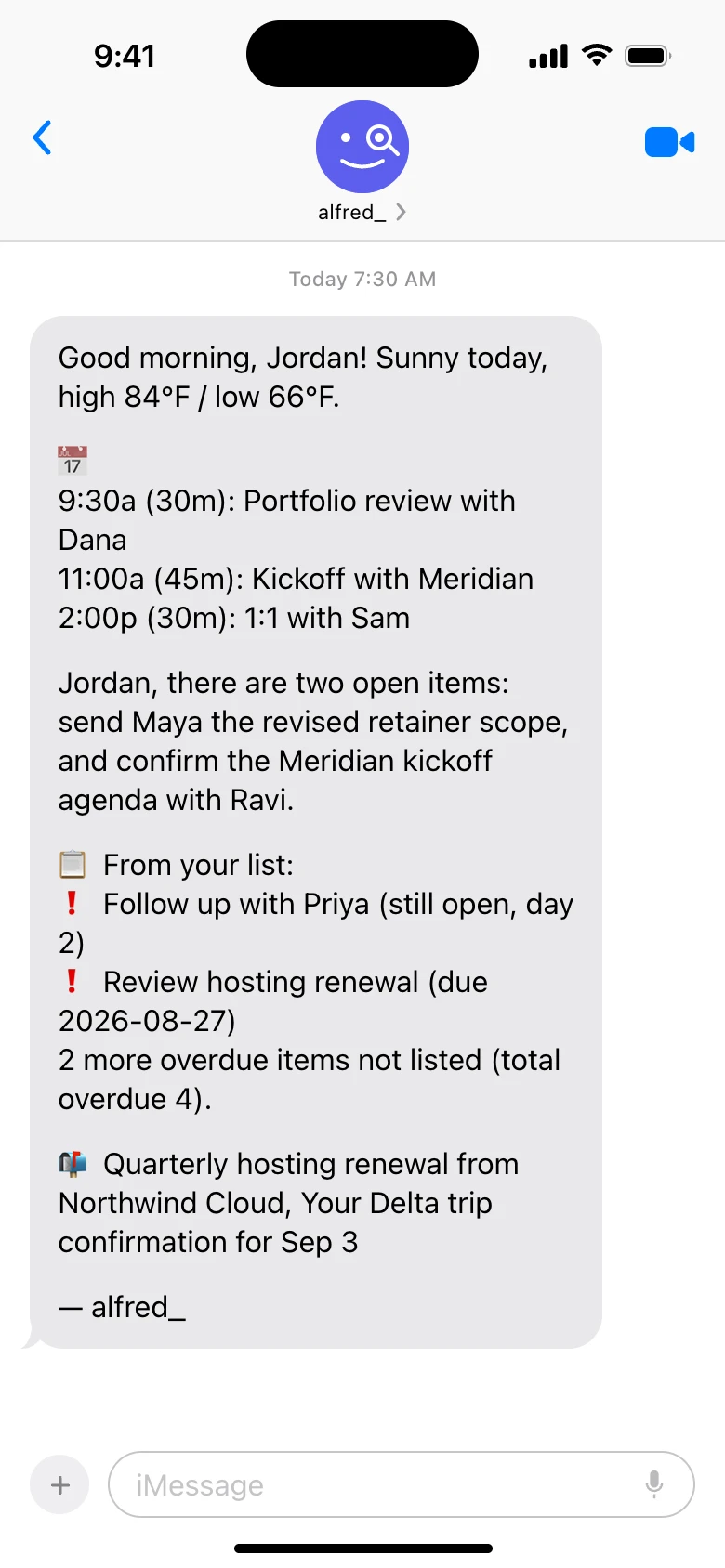
The morning brief arrives as a text before the day starts: calendar, open items, what is overdue, and what landed in the inbox. Shown with sample data.
The result: you start the morning knowing what needs you and who still owes you an answer, instead of scrolling to find out.
Pros: Always on, keeps track without prompting. Email and calendar together. Works by text, on iPhone and from Claude and ChatGPT. No training on user data. Cons: Not a voice assistant. Not for research or code. Manages your calendar but isn’t a pure auto-scheduling optimizer (use Motion/Reclaim if you want automatic time-blocking), and doesn’t do meeting notetaking (pair with Fathom/Granola for notes if needed). Best for: Professionals with high email volume (50+/day) whose replies and follow-ups slip.
Keep client work from slipping through the cracks
alfred_ is an AI assistant for client-facing teams. Each teammate gets help with email, calendar, replies and follow-ups.
2. Lindy AI ($29.99/mo): An AI Teammate in Slack
Price: $29.99/month Plus, 3,000 credits ($99.99/month Pro, 15,000 credits) | Works with: 1,000+ integrations | Score: not re-scored
Lindy now describes itself as an AI teammate. It works in Slack, iMessage and email, connects to more than 1,000 tools, and runs routines you describe in a sentence on a schedule: a daily brief, a weekly report, meeting notes after each call, a draft when an email needs a reply.
The cost is metering: a credit allowance (3,000/month on Plus, with everyday tasks costing 2-250 credits each) that a busy inbox can exhaust mid-month. The sticker matches alfred_’s $29.99, but heavy email use usually lands on Pro at $99.99. Our earlier score for Lindy (17/25) was for its previous agent-builder product, so we have removed it rather than guess at a new one.
What it offers: Scheduled routines, meeting notes and email drafts from Slack. 1,000+ integrations. Cons: Everything it does uses credits. Built around a team in Slack rather than one person’s inbox. Who uses it: Teams that work in Slack.
3. ChatGPT Plus ($20/mo): On-Demand AI for General Thinking
Price: Free tier (limited) / Plus $20/mo / Pro $200/mo | Works with: Web, mobile, desktop apps | Score: 16/25
ChatGPT is the most versatile on-demand AI available. It researches topics, writes content, analyzes data, generates code, handles complex reasoning, when you prompt it. GPT-4o powers the free tier with usage limits; Plus unlocks higher limits; Pro adds unlimited access to the most capable models.
The critical limitation for personal-assistant use: ChatGPT has no persistent access to your email, calendar, or task list. Every interaction requires opening the app and prompting. It cannot triage overnight email, maintain context between sessions (except via Memory, which stores facts you tell it), or surface what needs you today.
Pros: Best general-purpose AI. Widely integrated. Memory feature for personalization. Strong for research, writing, analysis, code. Cons: No continuous email access. Requires prompting for every task. Uses interactions for training by default on consumer accounts. Who uses it: Research, writing, coding, brainstorming. Useful alongside an always-on assistant, not as a replacement for one.
4. Claude Pro ($20/mo): On-Demand AI for Depth
Price: Free tier (limited) / Pro $20/mo / Max $100/mo / Team $25/seat/mo | Works with: Web, mobile, desktop, Claude Code | Score: 16/25
Claude, built by Anthropic, is the preferred on-demand AI for professionals who need long-form writing, deep analysis, and nuanced reasoning. Claude Opus 4.x and Sonnet 4.x are widely regarded as best-in-class for complex thinking tasks requiring depth.
Claude’s “Projects” feature creates persistent workspaces with uploaded documents. Claude Code is the leading AI developer tool. For personal-assistant use, Claude shares ChatGPT’s core limitation: no continuous access to email, calendar, or task list. It’s an on-demand thinking partner.
Pros: Best-in-class for long-form writing and complex analysis. Projects for document workspaces. Strong privacy posture. Cons: No continuous email access. Requires prompting. Nothing runs without a prompt. Who uses it: Long-form writing, complex analysis, nuanced professional communication, coding. Useful alongside an always-on assistant.
5. Google Gemini (Free–$99.99/mo): In-App AI for Google Workspace
Price: Free / Pro $19.99/month / Ultra $99.99/month | Works with: Google Workspace | Score: 16/25
Gemini is Google’s AI, deeply integrated with Workspace. Google AI Pro ($19.99/month) adds Gmail summaries, Docs drafting, and Calendar integration. Google AI Ultra ($99.99/month) adds access to the most capable models.
Like Copilot, Gemini is ecosystem-locked. Excellent inside Google Workspace. Doesn’t work with Outlook/Exchange. Requires invocation per task, nothing runs without a prompt.
Pros: Deep Workspace integration. Improving rapidly. Gemini Advanced models are competitive. Cons: Google-only. Not always-on, invocation required. No cross-platform support. Who uses it: Google Workspace-native users who want AI inside Gmail and Docs at the time of use.
6. Saner.ai (Paid tiers): The ADHD-Focused Assistant
Price: Paid tiers (see site) | Works with: Task and planning workflows | Score: 15/25
Saner positions itself as “your Jarvis” for people with ADHD, an AI personal assistant that handles task capture, reminders, daily planning, and gentle accountability. Traditional productivity tools assume you already have executive function; Saner builds AI scaffolding around the parts of attention that don’t come naturally.
The product is task-and-planning first. Strong on frictionless capture and on tone. It doesn’t shame you for missed items the way most task managers implicitly do, and on the daily review/plan loop that ADHD professionals tend to lose without external structure.
Pros: ADHD-optimized UX, low-friction capture, daily review and planning, neurodivergent-aware design. Cons: Email is summary-level only, no proactive inbox triage, no voice-matched drafts, no commitment extraction from email content. Pricing is on the website, not transparent at a glance. Best for: ADHD professionals who need executive-function support. Pairs cleanly with alfred_ for the email + brief layer.
7. Microsoft Copilot ($30/user/mo + M365): In-App AI for Microsoft 365
Price: $30/user/month + Microsoft 365 license ($12.50–$22/user/month) | Works with: Outlook, Word, Excel, Teams | Score: 14/25
Copilot is an AI layer embedded across Microsoft 365 apps. In Outlook, it summarizes threads and drafts replies. In Word, Excel, and Teams, it helps within each app. Value is real if your workflow lives entirely in Microsoft 365.
Limitations: Copilot only works inside Microsoft apps, requires an active M365 subscription, and still requires invocation per task. Total cost per user is $42–$52/month. It’s not always-on. It assists when asked.
Pros: Deep Microsoft 365 integration. Enterprise-grade security and compliance. Works in Outlook for email. Cons: Total cost $42–$52/user/mo. Microsoft ecosystem lock-in. Not always-on, invocation required. No cross-domain morning brief. Who uses it: Enterprise Microsoft shops with existing M365 licenses and power users in Outlook/Teams.
Other Tools to Know (Not Direct Replacements)
Five more tools come up frequently when professionals search “AI personal assistant,” but each solves a different problem than an always-on work assistant. Worth knowing what they’re for so you can spot the mismatch.
| Tool | Category | What It Actually Does | Why It's Not on the Main List |
|---|---|---|---|
| Mem.ai | AI second brain | Auto-organized notes, natural-language search across everything you've saved | Knowledge layer, not a work workflow assistant, pair with alfred_ if you want both |
| Personal AI | AI identity platform | Persistent voice and memory that compound over time, often for branded AI | Identity tool, not productivity, doesn't manage email, calendar, or tasks |
| Siri | Apple consumer assistant | Voice-first personal tasks: timers, HomeKit, calls, music, weather | No email understanding, no contextual draft replies, consumer architecture |
| Google Assistant | Android/Google consumer assistant | Voice + search + smart home + light productivity | Shallow calendar and email access; not built for professional workflows |
| Amazon Alexa | Smart home assistant | Lights, locks, thermostats, Amazon commerce, voice control | Essentially zero professional workflow capability; Alexa for Business was discontinued |
These aren’t bad products. They’re built for a different job, making your home smarter, capturing notes for later, owning your AI identity. For the recurring professional workflow that “AI personal assistant” search intent usually means, you need a different category of tool.
The Specialists: Six More Tools People Shortlist Against These
The other names that show up in this comparison are single-surface specialists. Each is good at exactly one slice of assistant work; none runs the whole loop. Prices verified against vendor pricing pages, August 2026.
| Tool | The one job it does | Price | Pair or replace? |
|---|---|---|---|
| Motion | AI project + task scheduling: auto-plans your task list onto your calendar | $19/seat/mo Pro AI (7,500 AI credits) | Pair, it plans work time; it does not touch email |
| Reclaim.ai | Calendar defense: habits, focus time, smart rescheduling | Free Lite, $10-$22/user/mo paid | Pair, calendar only; see our Reclaim pricing breakdown |
| Superhuman | An email client for people who process mail themselves | $33/mo Business annual ($40 monthly) | Replace only if you want speed, not delegation |
| Notion AI | AI inside your workspace docs: Q&A, agents, meeting notes | Requires Notion Business, $20/seat/mo | Pair, it knows your wiki, not your inbox |
| Perplexity | AI research with live citations | Free, Pro from $20/mo | Pair, it answers questions; it holds no context on your day |
| Otter.ai | Meeting transcription and recaps | Free 300 min/mo, Pro $8.33/user/mo annual | Pair, meetings only; nothing before or after them |
If you find yourself assembling three of these to approximate one assistant, price the stack honestly: Motion + Superhuman + Otter runs about $60/month and still leaves triage, follow-up tracking, and the morning brief to you.
AI Work Assistant vs AI Personal Assistant: Which Are You Actually Shopping For?
The searches “AI work assistant” and “AI personal assistant” get used interchangeably, but they describe two different bars. A personal assistant helps with anything you ask: trip planning, gift ideas, a recipe, a quick answer. Nearly every tool on this list clears that bar, including the free ones. An AI work assistant has a harder job description: it must plug into the systems your job actually runs on, email, calendar, tasks, and produce work output you would otherwise do yourself, on the job’s schedule rather than when you happen to prompt it.
That second bar is where the field thins out. ChatGPT and Claude are used for work tasks but hold no connection to your work systems. Copilot and Gemini connect to the systems but only act when invoked. An AI work assistant in the full sense, one that opens your workday with what needs you already listed and your meetings in view, is what alfred_ is built to be. If “work assistant” is the phrase you searched, the scorecard’s Always on and Email columns are the two that answer it.
Searched a different phrase? Each has its own page with the tasks behind it: AI assistant for work, AI powered assistant, virtual assistant for business and AI assistant for business. For a whole team, where everyone gets their own, see alfred_ for teams.
How We Tested
We evaluated each AI personal assistant on five dimensions: how much it does without being prompted (always on), what it actually delivers for email and calendar (functional depth), whether it learns from your specific patterns over time (adaptation), what it costs against the time it saves (ROI), and how much hand-holding the setup required (friction). We tested across Gmail and Outlook, ran each tool for at least one week, and ranked tools that operate continuously above tools that wait for your prompt. Consumer assistants were graded against the bar they actually serve, quick voice tasks and smart home control, not against always-on work assistants.
How to Pick the Right AI Personal Assistant
If email is eating your day and replies keep slipping: alfred_. It keeps track of email and calendar continuously without prompting. Works across Gmail and Outlook.
If you need on-demand thinking AI alongside an always-on assistant: ChatGPT Plus or Claude Pro ($20/mo each). Best for research, writing, code, and brainstorming. Useful alongside alfred_, not as a replacement.
If your workflow is Microsoft 365-native and you already have licenses: Microsoft Copilot ($42–$52/mo total). In-app assistance is valuable if you live in Outlook, Word, Excel, Teams.
If your workflow is Google Workspace-native: Google AI Pro ($19.99/mo). Gemini inside Gmail and Docs.
If you’re an ADHD professional whose biggest friction is executive function: Saner.ai pairs cleanly with alfred_, Saner handles the scaffolding, alfred_ handles the inbox.
The honest take: For most professionals, the question isn’t “which AI personal assistant”. It’s “which assistant handles the work that actually consumes my day.” If email is the bottleneck, alfred_ (from $29.99/month) is where we would start. An on-demand AI like ChatGPT or Claude is worth adding at $20/mo for thinking work, but it doesn’t replace what an always-on assistant does.
A chat assistant helps when you ask. A personal assistant keeps the list when you don't. See what’s slipping →
Our Take
“Personal assistant” covers three distinct product categories that shouldn’t share a name:
- Always-on AI assistants (alfred_), keep working without prompting. $25–100/mo. This is what most people are actually shopping for.
- On-demand AI (ChatGPT, Claude, Copilot, Gemini), powerful when prompted, idle when not. $20–50/mo. Best as a complement, not a primary.
- Consumer assistants (Siri, Alexa, Google Assistant), voice-first, personal convenience, smart home. Free. Different job entirely.
The category visitors search for when they type “best AI personal assistant” is overwhelmingly the first one. They want an assistant that keeps track of their inbox, not a chatbot they have to prompt. For that job, alfred_ is the best choice. On-demand AI like ChatGPT or Claude is worth pairing alongside for thinking work, but it doesn’t keep the list the way an always-on assistant does.




