

The Short Answer
If what you want is a summary of the whole inbox before you open it, alfred_ (from $29.99/month), which we build, is the best choice. For in-client thread summaries, Superhuman ($40/month, Business plan) summarizes threads as you process email, Shortwave ($30/seat/month for Business, or $24/seat/month billed annually) does the same for Gmail users, and Google Gemini is the free option. alfred_ sends a morning brief of which emails need your answer and who still owes you a reply, and prepares a draft reply for your review when email drafting is enabled.
But summaries alone only solve half the problem. Knowing what an email says is useful. Knowing which emails need you is what stops things slipping.
The Problem: 2.6 Hours and 5.5 Minutes Per Email
The average professional spends 2.6 hours per day on email, according to McKinsey research. A separate study found that the average time spent per email, reading, comprehending, deciding, and responding, is 5.5 minutes. For a 40-message thread, reading from top to bottom can consume 15-20 minutes just to understand where the conversation stands before you can contribute.
Email summaries solve the reading problem. A 40-message thread becomes a 3-sentence digest: who said what, what was decided, and what remains open. That 15-minute read becomes a 30-second scan. Multiply across a dozen long threads per day, and summaries can save an hour or more of reading time.
But here is what summary tools often miss: the next step after reading is responding. If you summarize a thread in 30 seconds but still spend 5 minutes drafting a reply, you have saved reading time but not response time. The combination of summary plus draft reply is where the real productivity gain lives. You scan the summary, review the draft, edit if needed, and send, a complete workflow in under two minutes per thread.
That is the lens through which we evaluate these seven tools: not just how well they summarize, but how close they get you to done.
Quick Comparison: 7 Email Summary Tools
| Tool | Price | Summary Style | Draft Replies | Works With | Key Limitation |
|---|---|---|---|---|---|
| alfred_ | From $29.99/mo | Morning brief of the whole inbox; thread summaries on request | Yes, on request | Gmail, Outlook | Not an email client |
| Superhuman | $40/mo (Business) | In-client per-thread | Yes, Instant Reply | Gmail, Outlook | Requires client switch, AI on Business tier |
| Shortwave | $30–$120/mo ($24–$100 annual) | In-client per-thread + AI search | Yes, Ghostwriter | Gmail only | Gmail only, no proactive triage |
| Spark +AI | Free–$20/mo | In-client per-thread | Yes, +AI compose | Gmail, Outlook, IMAP | AI quality below competitors |
| Microsoft Copilot | $30/mo add-on | In-client Outlook summaries | Yes, draft assistance | Outlook/M365 only | $30 on top of M365 subscription |
| Google Gemini | Free–$19.99/mo | On-demand per-thread | Yes, Help Me Write | Gmail only | Reactive, must trigger per thread |
| Mailbutler | Free–$14/mo | Summary + task extraction | Limited | Gmail, Outlook, Apple Mail | Smaller AI model, less accurate |
Deep Dive: Each Tool Reviewed
alfred_: from $29.99/month
alfred_ is an AI assistant for client-facing teams, and each person on the team gets their own. It keeps a list of the replies you owe, finds who you’re still waiting on when you ask, manages your calendar and sends a morning brief, across Gmail and Outlook. It does not wait for you to open an email thread and ask for a summary. It reads your email as it arrives, works out which messages need your answer, and puts them in a brief each morning, by email or text.
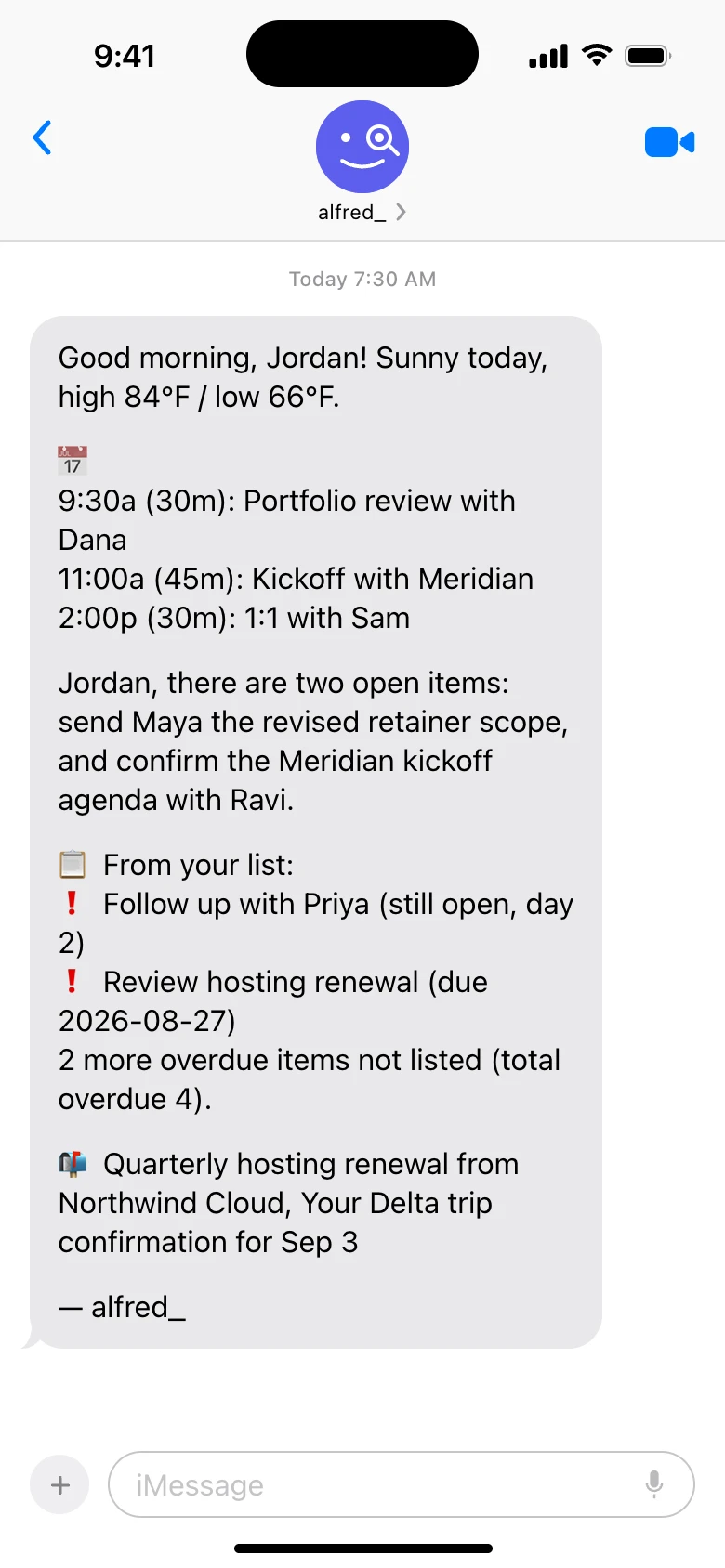
The inbox-level summary in practice: one morning text covering calendar, open items, and what arrived overnight. Shown with sample data.
The brief works at the level of the inbox, not the thread. It leads with what needs you, then the meetings ahead and the tasks due. When you want the detail of one thread, ask alfred_ and it summarizes that thread: the key points and what is still open.
Where alfred_ fits is the step after the summary. The emails that need your answer stay on your list until you reply. If you want help, ask for a draft, review it and send it. For complex replies, you start from a draft rather than a blank compose window.
| Superhuman | Shortwave | alfred_ | |
|---|---|---|---|
| Summarizes a thread on demand | Yes | Yes | Yes |
| Summarizes the whole inbox without being asked | No | No | Yes, every morning |
| Drafts the reply | Yes (Instant Reply) | Yes (Ghostwriter) | Yes, with email drafting enabled |
| Tracks what still needs a response | Yes | No | Yes |
| Requires switching email client | Yes | Yes | No |
| Providers | Gmail, Outlook | Gmail only | Gmail, Outlook |
| Price | $30–$40/mo | $30–$120/mo | from $29.99/mo |
The tradeoff is that alfred_ is not an email client. You still open Gmail or Outlook to send the actual replies. The morning brief is your starting point, not your entire workflow. For professionals who want to know what needs them before they open the inbox, alfred_ starts at $29.99/month, about $10 less than Superhuman’s Business plan.
Superhuman: $40/month (Auto Summarize)
Superhuman’s Auto Summarize generates a one-line summary at the top of every email thread as you scroll through your inbox. Long threads are instantly digestible without expanding them. Combined with Instant Reply, which generates draft responses adapted to each recipient’s communication style, Superhuman offers a strong summary-to-reply workflow. Note that Auto Summarize and Instant Reply now live on Superhuman’s Business plan ($40/month, or $33/month billed annually), not the cheaper Pro tier.
The summary quality is excellent. Superhuman’s AI captures the thread’s key points concisely, and the Instant Reply drafts are among the options available for tone matching. The experience is seamless because everything happens inside Superhuman’s fast, keyboard-driven client.
The limitation is that Superhuman summaries are reactive. You process your inbox from top to bottom, and summaries appear as you go. There is no prioritized morning briefing that tells you which threads matter most. You still decide processing order. At $40/month for the Business plan that unlocks Auto Summarize and Instant Reply, Superhuman is also among the most expensive mainstream options on this list. If you value speed and in-client polish above all else, Superhuman’s summaries work. If you want proactive prioritization, it falls short.
Shortwave: $30–$120/month ($24–$100 annual)
Shortwave provides AI summaries directly inside its Gmail client. Thread summaries appear automatically, and the “Ask AI” feature lets you query your inbox in natural language, “What did Sarah say about the project timeline?” The Ghostwriter feature drafts replies in your voice.
Shortwave no longer has a permanent free plan, just a 14-day free trial, so it is less accessible for casual testing than it once was. The Business plan ($30/seat/month, or $24/seat/month billed annually) is the cheapest paid tier and unlocks full AI features, team inboxes, and priority support. Premier ($45/seat/month, $36 annual) and Max ($120/seat/month, $100 annual) raise AI usage limits, AI search history, and per-search thread limits. Summary quality is solid, and the natural language search is a standout feature that competitors have not matched.
The main limitation is that Shortwave is Gmail-only, Outlook users are out. Like Superhuman, summaries are reactive and in-client. There is no overnight triage or proactive morning briefing. For Gmail users who want strong AI features inside their client, Shortwave is an option, with a 14-day trial for testing before you commit.
Spark +AI: Free–$20/month
Spark offers thread summaries and AI-powered compose features across Gmail, Outlook, and IMAP accounts. The free tier includes basic email management. The Plus plan ($8.25/month billed annually, or $10/month billed monthly) adds AI writing and summaries. The Pro plan ($16.58/month billed annually, or $20/month billed monthly) adds advanced AI features and team collaboration.
Spark’s AI summaries are functional but a step below Superhuman and Shortwave in accuracy and nuance. The summaries occasionally miss important details in complex threads or oversimplify multi-party conversations. The +AI compose feature generates draft replies, though the drafts tend toward generic professional language rather than matching your personal voice.
Spark’s strength is price and compatibility. At $8.25/month annually on the Plus plan, it is the cheapest paid option with both summaries and AI drafting. It also works across email providers, which Shortwave does not. For budget-conscious users who want basic AI email features without committing to a premium tool, Spark is a reasonable starting point.
Microsoft Copilot: $30/month add-on
Microsoft 365 Copilot adds AI capabilities across the entire Microsoft suite, Word, Excel, PowerPoint, Teams, and Outlook. In Outlook, Copilot can summarize long email threads, highlight action items, draft replies, and catch you up on conversations you missed.
The summary quality in Outlook is good, particularly for enterprise contexts where threads involve multiple stakeholders and formal communication. Copilot understands Microsoft’s ecosystem natively, so it can reference Teams conversations and SharePoint documents alongside email threads.
The critical detail is pricing: the Microsoft 365 Copilot enterprise add-on costs $30/month per user on top of an existing Microsoft 365 subscription. (Microsoft now also offers a Copilot Business add-on at $21/user/month on annual billing for organizations under 300 users.) If your organization already pays $14-$22/month per user for M365, the enterprise add-on brings the total to $44-$52/month per user. For email summaries alone, that is expensive. The value proposition depends on using Copilot across the full Microsoft suite, not just Outlook. If email is your primary concern, alfred_ (from $29.99/month) provides a morning brief, follow-up tracking and, with email drafting enabled, replies prepared for your review, without the M365 prerequisite.
Google Gemini: Free / $19.99/month
Gemini is built into Gmail for Workspace users. Click the Gemini icon on any thread, and it generates a summary. The “Help me write” feature assists with drafting replies. The free tier provides basic functionality; the Google AI Pro plan ($19.99/month) adds advanced capabilities and longer context windows.
For a free tool, Gemini’s summary quality is surprisingly good. It captures the essential points of most threads accurately and concisely. Help me write generates serviceable drafts, though they lack the personalization of Superhuman’s Instant Reply.
The limitation is that Gemini is entirely reactive. You must click on each thread and request a summary individually. There is no batch summarization, no proactive prioritization, and no morning briefing. At 50+ emails per day, clicking Gemini on each thread adds up to a significant time investment. Gemini is best as a supplement for occasionally long threads, not as a systematic email management approach.
Mailbutler: Free–$14/month
Mailbutler offers email summaries, task extraction, and smart compose features as a plugin for Gmail, Outlook, and Apple Mail. The AI reads incoming emails and generates summaries with extracted action items. Smart Compose helps draft replies.
Mailbutler is a solid mid-tier option that works across multiple email clients. The task extraction feature, pulling action items directly from email threads, is useful for project-oriented professionals. Summary quality is adequate for most business email, though it lags behind the larger AI models used by Superhuman, Shortwave, and Google.
Mailbutler offers a free Starter plan, a Professional plan at $9/month, and a Smart plan at $14/month with full AI features (the Smart Summarize feature lives on the Smart tier). Apple Mail support is a differentiator that no other tool on this list offers. The limitation is AI accuracy, Mailbutler’s smaller model occasionally misses key details or produces summaries that require verification against the original thread.
Can AI Summarize Emails You’ve Already Read?
Yes, and this is the use case most summary tools quietly ignore. Every tool above will summarize an unread thread. The harder problem is catching up on mail you have read: the thread you skimmed on your phone between meetings, marked as read by accident, and never actually handled.
Three ways to recap read email, from manual to automatic:
- On-demand, per thread. Gemini in Gmail and Copilot in Outlook summarize any thread you open, read or unread. Good for “where did this 40-message thread land?”, useless for “what did I read this week and not deal with?” because you have to remember which threads to ask about.
- Search-driven recap. Shortwave’s Ask AI answers questions across your whole inbox (“what did Sarah say about the timeline?”), which works on read mail too. You still have to know what to ask.
- Automatic recap. alfred_’s morning brief is built on what needs action, not on read status. A thread you opened but never answered stays in the briefing until it is handled, and threads where you are still owed a reply are tracked the same way. Read-but-unhandled is exactly the state where follow-ups die, and it is the one state the read/unread badge cannot show you.
If your question is “can I get a summary of my read emails?”, the honest answer is: any on-demand tool can, one thread at a time; only a proactive assistant recaps them for you.
How to Set Up AI Email Summaries in 4 Steps
- Pick your layer. Decide whether you want summaries inside your email client while you process (Superhuman, Shortwave, Gemini, Copilot) or a briefing before you open the inbox at all (alfred_). This one choice eliminates most of the list.
- Connect over OAuth and check the data terms. Every credible tool connects to Gmail or Outlook without your password. Before authorizing, confirm the tool does not train models on your mail and note its retention policy.
- Run it against one real workday. Compare the AI’s summaries to five threads you already know cold: a scheduling thread, a multi-party decision, a vendor negotiation, a long FYI, and something sensitive. Accuracy on mail you understand is the only benchmark that matters.
- Wire summaries to action. A summary you read and then re-type into a reply saved you nothing. Use draft replies (Instant Reply, Ghostwriter, or a reply alfred_ prepared for your review) so the summary leads straight to the response.
How We’d Set It Up
If you want summaries and nothing else: Google Gemini (free) for occasional thread summaries directly inside Gmail. Total: $0.
If you want summaries plus fast processing: Superhuman ($40/month, Business plan) for in-client summaries with Instant Reply. Best for power emailers who value speed.
If you want the whole inbox summarized before you open it: alfred_ (from $29.99/month) for a morning brief of what needs your answer and what your day holds. Best for professionals whose replies and follow-ups slip.
If you are locked into Microsoft 365: Copilot ($30/month add-on) makes sense if you will use it across Word, Teams, and Excel too. For email only, alfred_ (from $29.99/month) does not need the M365 add-on.




