

Around half of professionals expect a reply to a work email within 24 hours. For inbound sales and customer inquiries, the stakes are higher: companies that reply within one hour of receiving a query are 60 times more likely to qualify the lead than those who wait 24 hours or longer (Harvard Business Review). The gap between “fast enough” and “too slow” is narrower than most professionals realize, and the consequences are not always visible.
The research on email response behavior reveals a pattern: emails are most likely to be acted on in the first few minutes of being read. People who open an email and don’t reply immediately are significantly less likely to reply at all without an external trigger: a follow-up from the sender, a reminder on a task manager, or accidentally reopening the thread. This is not laziness; it’s how human attention and memory work under concurrent demands.
60x more likely to qualify
Companies that reply to inbound queries within one hour are 60 times more likely to qualify the lead than those who wait 24 hours or longer. Separately, responding within one hour meets the email expectations of 88% of consumers surveyed.
Why You’re Slow on Email (It’s Not What You Think)
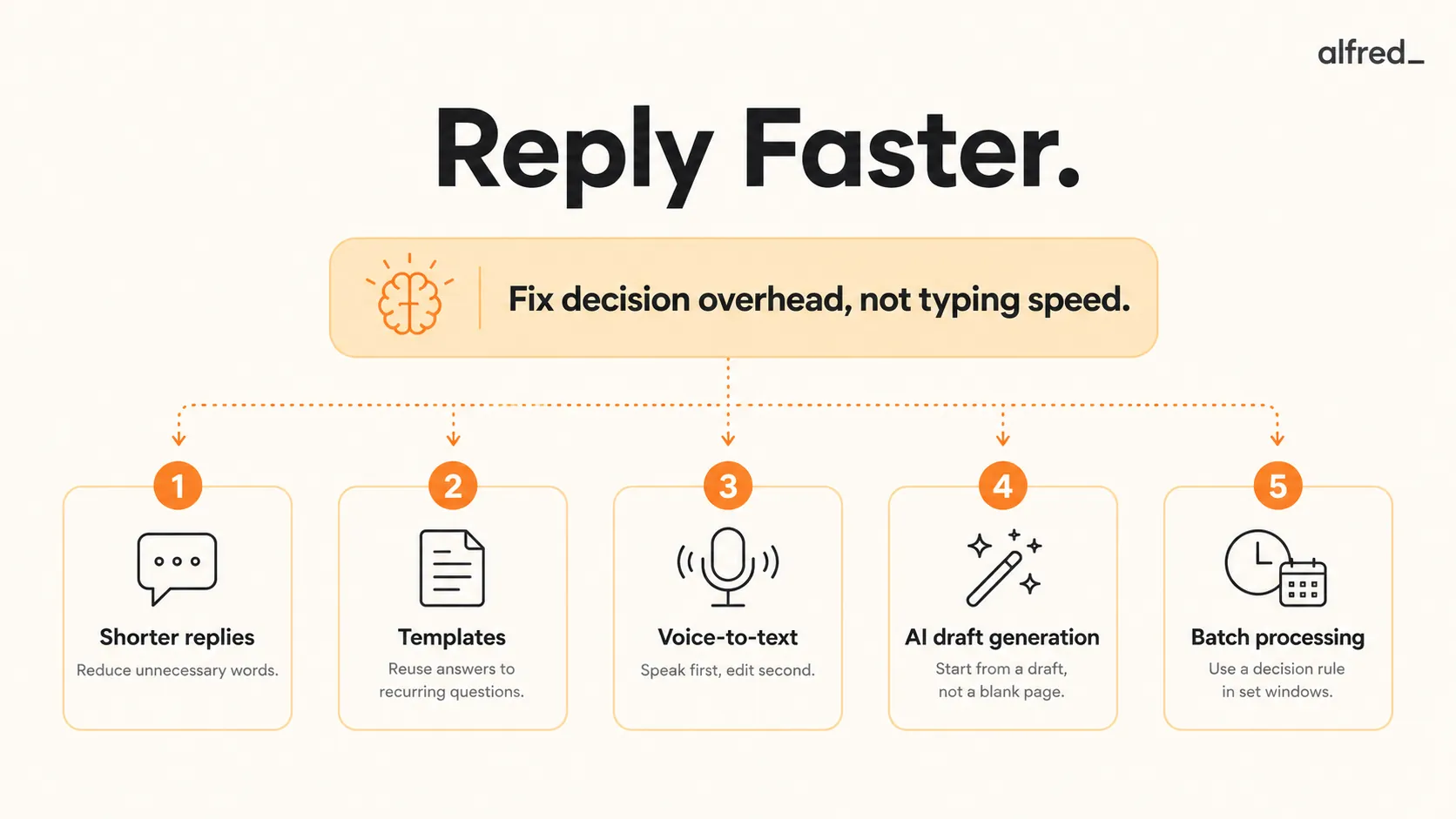
The conventional advice for faster email (keyboard shortcuts, a cleaner inbox, batching) addresses the surface problem. The root causes of slow replies are psychological, and fixing them requires different interventions.
Decision overhead. Before you compose a reply, you are making multiple decisions: what to say, how to say it, what to include or exclude, what tone to strike. These micro-decisions are invisible but costly. Each one requires working memory and creates a small opportunity for avoidance. When the topic is complicated or the sender is someone you have a nuanced relationship with, the decision overhead multiplies, and the blank-page problem gets worse.
Perfectionism. The email that “needs to be exactly right” before sending often never gets sent. This is particularly common with high-stakes emails: a response to a client complaint, a follow-up on a delayed project, an email to someone with authority over your career. The desire to get the email right delays it indefinitely, which is usually worse than sending an imperfect but timely reply. Done is almost always better than perfect for professional email.
Emotional avoidance. Some emails create friction not because they’re complicated to answer, but because the conversation behind them is uncomfortable. An email from a difficult client, a team member who’s underperforming, a situation with unresolved tension: these emails get re-read without being replied to, multiple times a day, consuming attention without producing a response. The underlying friction is not an email problem; it’s a relationship problem that surfaces in the inbox.
Context-switching cost. “I’ll deal with this after I finish what I’m doing” is a rational thought that often leads to the email never being answered. The finish-point rarely arrives; when it does, the email requires re-reading to re-establish context; and by then three newer emails have arrived that also need attention. The context-switching cost of returning to an email you’ve already read is often higher than the cost of replying immediately.
Five Techniques That Address the Actual Bottleneck
1. Shorter Replies
The five-sentence email movement (brief.email) normalizes concise replies: the idea that a professional email can and should be limited to five sentences. The format: one sentence of context, one sentence of the core point, one to three sentences of detail or action, one sentence of closing. The cultural acceptance of short emails has shifted significantly since 2020. The pandemic-era shift to async communication made brevity more normal, not less professional.
The practical insight: most emails you’re laboring over don’t require the length you’re giving them. A project status email that takes you 20 minutes to compose often conveys the same information in five sentences. The length isn’t adding value. It’s adding composition time and making the email harder to parse. Shorter replies are faster to write and faster to read, which means they generate faster follow-up responses.
2. Templates for Recurring Questions
A significant portion of your email volume is responses to recurring question types: meeting requests, status inquiries, pricing questions, introduction requests, policy clarifications. Every time you write one of these from scratch, you’re recreating a response you’ve written five times before. Canned responses (saved reply templates) eliminate this duplication.
Gmail’s canned responses (in Settings under Advanced) and Outlook’s Quick Parts allow you to save and insert templates with two or three keystrokes. The investment: one hour to identify your 10 most common reply types and draft a template for each. The return: that same hour saved every week, indefinitely. The templates should be lightly personalized before sending (a name, a specific detail), but the structure and core content don’t need to be rewritten.
3. Voice-to-Text
Speaking is three to four times faster than typing for most people. Voice-to-text transcription (built into iOS, Android, and Windows) is now accurate enough for professional email composition with minimal editing. For replies where you know what to say but composition feels laborious, speaking the reply removes the blank-page resistance. You’re not staring at a cursor, you’re talking through a reply the way you would in conversation.
The workflow: open a reply window, switch to voice input, speak the reply naturally, review and lightly edit for written register (voice transcription tends toward spoken phrasing; a quick pass smooths this), send. Total time for a medium-complexity reply: 2–3 minutes versus 10–15 for typed composition. The technique is underused specifically because it feels unusual, but the accuracy of modern voice transcription makes the hesitation unwarranted.
4. AI Draft Generation
The blank-page problem (the gap between knowing what to say and starting to type it) is precisely what AI draft generation addresses. An AI email assistant reads the thread, infers the appropriate response based on the sender relationship and the question asked, and produces a draft in seconds. You move from “compose from scratch” to “review and edit,” which is a fundamentally different and faster workflow.
What AI does well: tone-matched drafts based on thread history, structuring a reply to address each question the sender raised, producing professional-register prose quickly. What AI gets wrong: relationship subtext (the nuance in how you communicate with a specific client that only you carry), cultural register differences in high-stakes situations, emotional calibration for difficult conversations. For routine professional email (status updates, scheduling, information requests, acknowledgments), AI drafts are excellent starting points. For the 10–15% of emails that require genuine relationship judgment, AI provides a structural scaffold that still needs significant human revision.
5. Batch Processing with a Decision Rule
Batch processing (checking email two to three times per day at defined windows) reduces the interruption overhead of continuous monitoring. But batching alone doesn’t make you faster. You still face the decision problem in each window. The addition that makes batching effective for reply speed is a decision rule applied at the time of reading: if the reply takes under two minutes, send it now. If it doesn’t, schedule a specific time to write it and move on.
This rule prevents re-reading the same emails multiple times without acting on them, which is the most common cause of email time inflation. An email you open three times before finally replying has cost you three times the attention of one that you replied to on first read. The two-minute decision rule forces a commitment at the moment of reading: either send now or schedule. Not “maybe later,” not “I’ll think about it.” A committed next action.
When Faster Is the Wrong Goal
For a specific category of emails, replying faster is not better. High-stakes emails (a client complaint that deserves a thoughtful response, a performance issue with a team member, a negotiation email where word choice matters, an investor message where relationships are at stake) are emails where the 30-second draft and send is not the right approach.
The honest calibration: the five techniques above apply to the 85–90% of professional email that is routine, transactional, or logistical. For the remaining 10–15%, the goal is not faster. It is more thoughtful. AI drafts for these emails are starting points requiring significant human review, not finished products. The ability to distinguish between these categories is the core skill that makes faster email possible without sacrificing quality.
The AI Shortcut: From Blank Page to Review-and-Send
alfred_ specifically addresses the blank-page delay: the moment where you’ve read an email, know what to say, but haven’t started composing. alfred_ reads your inbox each morning and surfaces messages that need a response, with a draft already prepared based on the thread context and your communication history with the sender.
The workflow change: instead of opening an email, staring at a blank reply box, and composing from scratch, you open a message that already has a draft reply. You review, adjust for any nuance the AI missed, and send. For routine professional email, this takes 2–5 minutes versus 15–30 for from-scratch composition. Across a workday with 20–30 emails requiring replies, that compression is meaningful: the difference between email consuming two hours of your day and email consuming 45 minutes.




