

An account manager’s week has a rhythm most CRMs do not show. Monday: who owes me something? Every afternoon: who am I keeping waiting? Friday: what changed, and what has gone quiet? None of that is a deal stage. It is a set of checks, done from memory, against an inbox.
Checks done from memory are the ones that slip in a busy week. They are also the easiest work to hand to a schedule, because you already know exactly what you are looking for.
Five checks, as sentences
In alfred_ a recurring check is a routine. You write it the way you would ask a person, and it runs on the schedule you set, reading your email, your calendar and the tools you connect, including HubSpot and Salesforce.
| Check | When | The sentence |
|---|---|---|
| Replies I owe | Weekdays, 5 PM | Every weekday at 5, list the client emails I have not answered. |
| Chase what I'm owed | Monday, 8 AM | Every Monday at 8, tell me what I asked clients for that is still outstanding. |
| Pipeline check | Friday, 4 PM | Every Friday at 4, check my open deals and tell me which have no reply or no next step. |
| Client update | Friday, 5 PM | Every Friday at 5, for each open deal, tell me what changed this week and what needs me. |
| Renewals coming up | Monday, 8 AM | Every Monday at 8, list renewals closing in the next 60 days and when I last heard from each client. |
What a run looks like
A routine does not hand you a dashboard. It hands you a short list with the one or two things that need you marked.


Friday client update · Latest · Today at 5:00 PM
Harbor Facilities: one thing needs you
Checked 38 emails, the HubSpot deal and the Notion project page.
 The deal moved to Contract signedHarbor Facilities · $48,000
 Onboarding checklist is 3 of 8 doneHarbor onboarding · Notion
 Luis sent the signed SOWLuis Ortega · Thursday 10:42 AMNo one answered Karen about the start dateKaren Liu · WednesdayNeeds you
Every run says what it checked and what it found, and that it changed nothing. If a run gets something wrong, reword the sentence and the next run follows it.

Pipeline check · Latest · Today at 5:00 PM
One deal is waiting on you
Checked 9 open opportunities and 38 emails.
 Acme phase two moved to Negotiation$52,000 · Dana KimThe Northwind renewal is in Proposal$64,000 · closes Oct 15Tom asked for the renewal terms. No reply yetTom Reyes · TuesdayNeeds you
The requests that do not reach the CRM
The checks above depend on something a CRM cannot do by itself: reading the inbox. A client who asks for a revised certificate in a reply to an old thread has not created a task anywhere. The request exists only in that email.
alfred_ reads each email as it arrives. If someone is waiting on you, the thread goes on your list and stays there until you answer. That happens whether or not anyone logged anything, which is why the routines find things a CRM report does not.
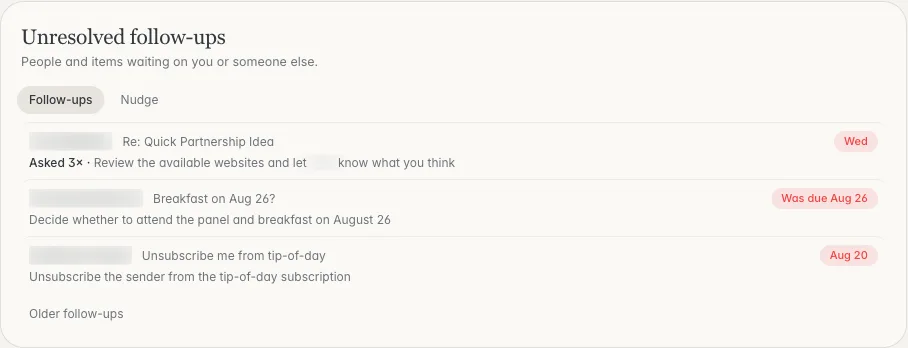
What is waiting on you and what you are waiting on. Shown with sample data.
Acting on what it finds
A routine reports. What you do next is a sentence too:
- “Draft a reply to Karen about the start date.” You review it and send it.
- “Add a to-do to send Tom the renewal terms tomorrow.”
- “Move the Northwind renewal to Negotiation.” The change is shown first and waits for your yes.
How to start
- Connect your email and calendar, then HubSpot or Salesforce from Integrations.
- Pick the one check you skip most often.
- Write it as a sentence on the Routines page and use Test it now.
- Turn it on. Add the next one a week later.
Routines run on the credits in your plan. Plans start at $29.99 a month with a 7-day free trial. More is on the Routines page.



