

The Volume Problem That Willpower Cannot Solve
Every productivity book and email management guide eventually lands on the same advice: be disciplined, process email in batches, unsubscribe from things, keep your inbox clean. The advice is not wrong. The problem is that it assumes a volume of email that humans can actually manage manually.
121
emails sent and received per day by the average business user
At 121 emails per day, even if every single email takes only 2 minutes to process, that is 4 hours of email processing time. Half a workday, every day, just keeping up. The only path to sustainable inbox zero at this volume is automation.
What Inbox Zero Actually Means
There is a persistent misconception that inbox zero means deleting or archiving everything. It does not. Inbox zero does not mean your inbox is empty. It means your inbox contains only emails that have not been processed yet. Your action queue is at zero.
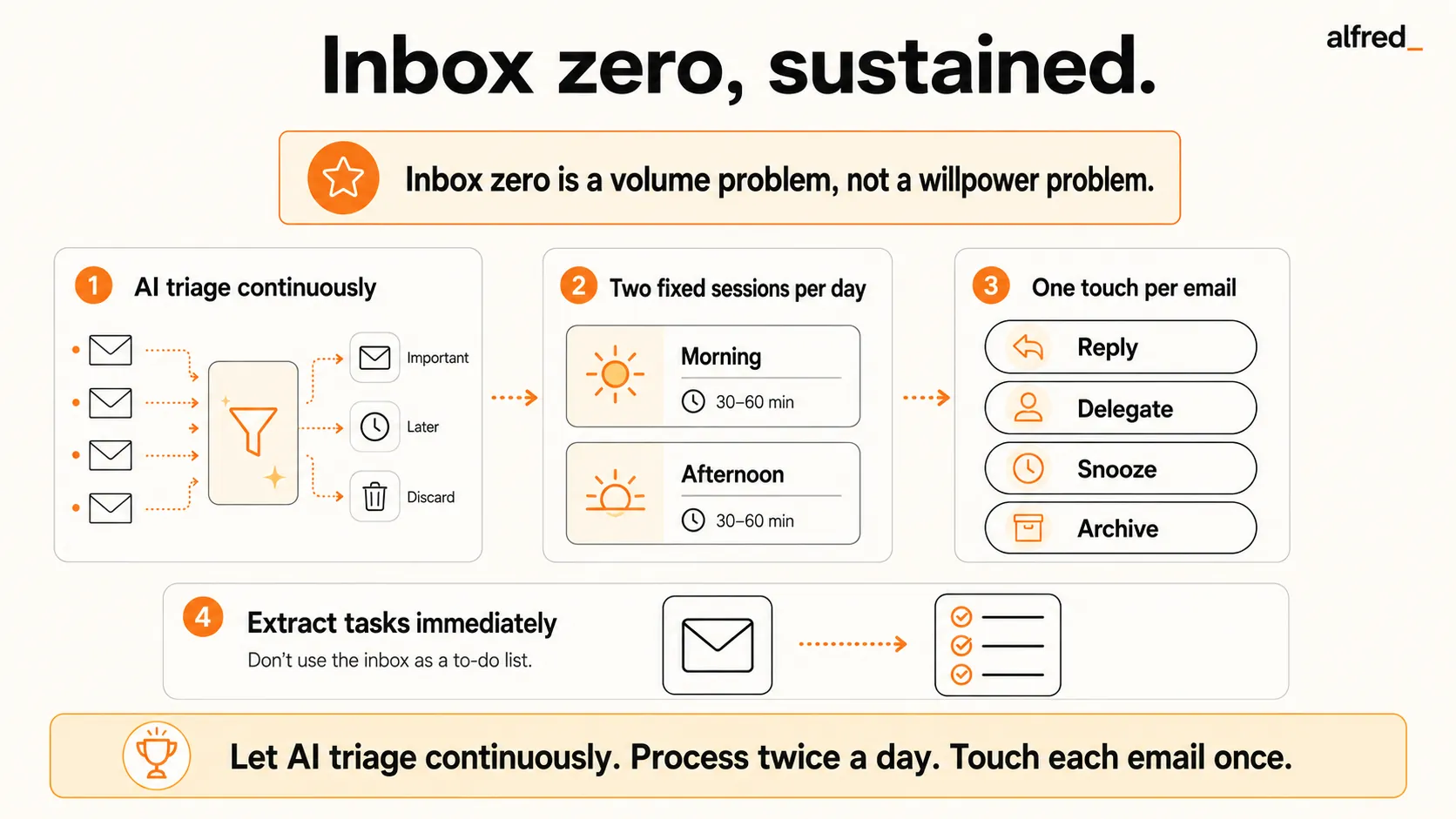
In practice, every email gets one of four outcomes:
The Four Processing Outcomes
- Reply: If the email needs a response and you can write it in under 2 minutes, reply immediately and archive the thread. If it takes longer, draft a reply and handle it in your next email session.
- Delegate: If the email requires action from someone else, forward it with clear instructions and archive it. The task is no longer in your inbox. It is in someone else’s queue.
- Snooze: If the email requires your attention but not right now, snooze it to a specific date and time. It disappears from your inbox and comes back when you actually need to deal with it.
- Archive: If the email is informational only and requires no action, archive it immediately. It is searchable if you ever need it. It does not belong in your inbox.
Your inbox is not a storage system. It is not a to-do list. It is a processing queue, and processed items leave.
Why Inbox Zero Fails Without AI
The inbox zero method works in theory. In practice, it breaks down under real-world conditions for predictable reasons:
- Volume defeats manual processing: At 121 emails per day, even aggressive archiving takes too long to do manually while also doing your actual job.
- Triage is cognitively expensive: Every email requires a decision: important or not? Reply now or later? Delegate or handle? After 40 to 50 decisions, you experience decision fatigue. By afternoon, everything feels urgent or nothing does.
- Systems break under real load: You maintain inbox zero for a week, then you are out sick for two days. You come back to 200 emails and the system collapses. Without automation, any disruption resets you to square one.
- Notifications undo batching: You commit to processing email in batches, then your phone pings and you check anyway. Notification discipline is much harder than it sounds.
Step-by-Step: Achieve Inbox Zero with alfred_
The AI-assisted inbox zero method replaces the continuous email checking cycle with a two-session approach. alfred_ handles the volume automatically between sessions.
Connect alfred_ to your inbox
Sign up for alfred_ and connect your Gmail or Outlook account via OAuth. This takes 60 seconds. From this point, alfred_ handles triage 24/7. Your inbox will never pile up unprocessed again.
Set two email sessions per day
Pick two 20-minute windows and commit to them. Morning and end of day works well: 8:30 to 8:50 AM and 5:00 to 5:20 PM. Outside these windows, close your email client. Disable push notifications on your phone. If something is genuinely urgent, people will call or text.
Process only what alfred_ flagged
Open alfred_, not Gmail. You will see only the emails alfred_ identified as needing your attention, typically 5 to 15 emails, not 60 to 120. Check if alfred_'s draft reply is ready. If yes, review and send. Otherwise: delegate, snooze, or archive. Process every flagged email before ending the session.
One touch per email: reply, delegate, snooze, or archive
The one-touch rule is the core of inbox zero: make one decision per email and execute it immediately. Do not read an email and leave it in your inbox to deal with later. That is how things get missed. Every email gets processed once, in a session, and leaves your inbox.
Declare email bankruptcy if needed, then maintain with alfred_
If your inbox currently has hundreds or thousands of unread emails, do not try to process them all. Archive everything older than 30 days. Process the remaining emails in one focused session. Send a brief note to anyone you think might be waiting. Then connect alfred_ to maintain zero going forward.
Before vs. After: What Inbox Zero With AI Feels Like
Before: Manual Inbox Management
- 7:00 AM: Check phone in bed. 23 new emails. Anxiety.
- 9:15 AM: Processed 15 emails. 16 more arrived. Still behind.
- All day: Checking email every 10 to 15 minutes.
- End of day: 847 unread. Important things missed.
Always behind, always anxious, important things slip through
After: Inbox Zero With alfred_
- All night: alfred_ triages 47 emails. Archives 39, drafts replies for 8.
- 8:30 AM: Open alfred_. morning brief: “8 emails need you.”
- 8:50 AM: Processed all 8. Inbox zero. 20 minutes total.
- 5:00 PM: Evening session. 5 emails. Done in 12 minutes.
40 minutes total, always at zero, nothing important missed
3x/day
limiting email checks to three times a day significantly lowered daily stress in a randomized study
Maintaining Inbox Zero Long-Term
Getting to inbox zero once is the easy part. The daily habits that keep you there require discipline in a few key areas:
Common Inbox Zero Mistakes
- Checking too often: The biggest killer of the system. Checking email 20 to 30 times per day (the average for most professionals) destroys the deep work blocks that make knowledge work productive. Set times, close the tab, enforce it.
- Trying to maintain zero by hand at high volume: This does not scale. If you are getting 100+ emails per day, manual triage to zero is a part-time job. AI triage is the only approach that works at real enterprise email volume.
- Treating your inbox as a task list: Every email that represents a task needs to be converted to a proper task and then archived. Leaving emails in your inbox as reminders means your inbox never reaches zero.
- Not unsubscribing from newsletters: Every newsletter you stay subscribed to adds 3 to 5 emails per week. Twenty newsletters means 60 to 100 extra emails per week. alfred_ handles unsubscribing automatically, but you can also unsubscribe manually. The savings compound over time.




