

You found the email. Three weeks late.
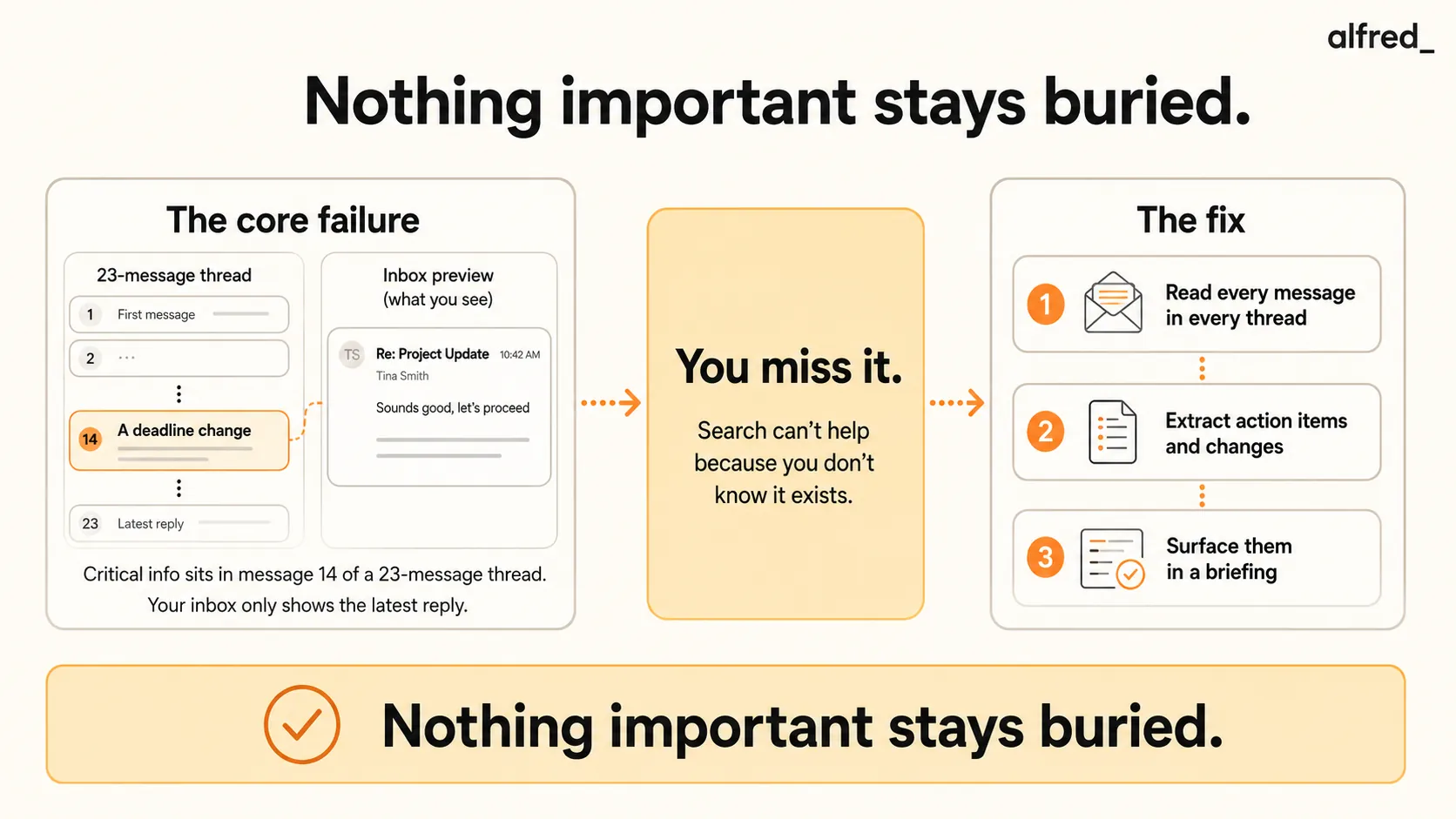
It was not in a separate message. It was not even in a separate thread. It was buried in message 14 of a 23-message reply-all chain about the Henderson project. Someone. You are not even sure who, had changed the deliverable deadline from March 15th to March 8th. The change was mentioned in a single sentence, halfway through a four-paragraph reply, nested between a comment about the budget and a question about the design files.
March 8th was last week. The deliverable is late. And you, who read every email, who prides yourself on responsiveness, who checks your inbox compulsively, had no idea the deadline had moved. Because you did not read message 14. You read message 1, skimmed messages 2-5, and then read message 23, the most recent one, which said “Sounds good, let’s proceed.”
“Sounds good, let’s proceed” with the new deadline that you did not know existed.
“I have 47 browser tabs open. Each one is something I meant to deal with.”
“I use my inbox as a to-do list and it is a terrible to-do list.”
The Information Was There
This is the part that makes it sting. The information was not lost. It was not deleted. Nobody withheld it from you. The deadline change was communicated, clearly, in writing, to everyone on the thread. You were on the thread. The email was in your inbox. You had every opportunity to read it.
You just did not see it. Because seeing it required reading every message in a 23-message chain, and you, along with every other human being on earth, do not read every message in a 23-message chain. You read the first one and the last one. Everything in between is noise until it is not, and by then it is too late.
This is not a failure of attention. It is a structural problem with how email works.
Email threads grow without structure. They start as a simple question: “What’s the timeline for the Henderson deliverables?” They accumulate replies, some substantive, some not. Someone adds context. Someone asks a tangential question. Someone replies-all when they should have replied directly. Someone forwards the entire chain to a new person with “FYI - see below.” By message 15, the thread contains five different sub-conversations, three decisions, two changes, and one action item buried so deep that nobody who was not specifically looking for it would ever find it.
Your inbox shows you the most recent message in the thread. If the most recent message is important, you are fine. If the most recent message is “Thanks!”, which it often is, then everything important that happened before “Thanks!” is functionally invisible.
The Inbox-as-To-Do-List Trap
You do this. Almost everyone does. You use your inbox as a to-do list.
Unread emails are tasks you have not done. Flagged emails are tasks you intend to do. Starred emails are tasks you really intend to do. Emails you have read but not responded to are tasks that haunt you.
The problem: your inbox was not designed to be a to-do list, and it is a terrible one.
A to-do list has priorities, due dates, and status tracking. Your inbox has chronological order and a read/unread binary. A $50,000 client request and a LinkedIn notification have the same visual weight. An action item buried in thread message 14 and a newsletter from a SaaS product you forgot to unsubscribe from occupy the same space in your attention field.
McKinsey found that workers spend 28% of their workweek, roughly 11 hours, reading and answering email. A significant portion of that time is not productive communication. It is re-reading, re-triaging, and re-scanning messages because your inbox provides no way to distinguish between information you have consumed and action you have not taken.
Research suggests that users spend only a few seconds per email during triage. That is enough time to read a subject line and the first sentence of the most recent reply. It is not enough time to scroll through a 23-message thread to find the deadline change buried in message 14.
So you scan. You process. You move through your inbox at the speed the volume demands. And the critical information, the scope change, the deadline shift, the client question that needed an answer by Wednesday, sails past you like a leaf in a river. You were standing right there. You just did not reach down far enough to catch it.
The Cost of Buried Information
Missed deadlines. The Henderson deadline moved from March 15th to March 8th. You found out on March 11th. The deliverable is three days late, and the client does not care that the change was buried in a thread. They communicated the change. You missed it.
Broken commitments. Somewhere in a thread from two weeks ago, your colleague asked you to review a document “before the end of the week.” You did not see the message. The week ended. The document was not reviewed. Your colleague is now doing the meeting prep without your input and wondering why you did not follow through.
Duplicated work. A decision was made in message 9 of a thread you were CC’d on. You did not read message 9. You continued working based on the old plan. When you discover the decision three days later, you have to redo the work. Research from the American Psychological Association shows that task-switching can reduce productive time by as much as 40%, and buried information contributes directly to the rework that drives those losses.
Missed opportunities. A partner mentioned in a thread that they are looking for a vendor for a new project. The mention was casual, two sentences in a longer message about something else. You did not see it. Someone else did. They responded within hours. The opportunity is gone.
Eroded trust. People assume you read your email. When you miss something that was clearly communicated in a thread you were on, the conclusion is not “the information was buried.” The conclusion is “they did not read the email.” And each time it happens, your reliability score drops.
Why Search Does Not Solve This
“Just search for it.” This is the advice people give when you miss something in your inbox. It is useless, for a specific reason:
Search requires you to know what you are looking for.
If you know the Henderson deadline changed, you can search for “Henderson deadline” and find the message. But the whole problem is that you did not know it changed. You cannot search for information you do not know exists. The deadline change was not in the subject line. It was not in the first sentence. It was mentioned once, in the middle of a paragraph, in message 14 of 23. No amount of Gmail search or Outlook search fixes this.
Spark ($0-10/user/month) offers smart inbox features and email categorization. It sorts your email by type. But sorted email is still email you have to read, and the thread with the buried deadline change looks the same in a sorted inbox as it does in an unsorted one.
Shortwave ($30-$120/seat/mo) uses AI to bundle and summarize emails. Better, but summaries of long threads can miss context-dependent details. A summary might say “Discussion about Henderson project timeline and budget.” It does not say “Deadline changed from March 15 to March 8.”
Superhuman ($30-40/month) is fast. Keyboard-driven. Beautiful. You can process email more quickly, which means you spend less time per email. But spending less time per email means you are even less likely to read message 14 of 23. Speed works against depth.
The fundamental problem: all of these tools assume you are the reader. They make reading faster, or they sort what you read, or they help you find things you have read. But the emails you miss are the ones you never read in the first place, because they were buried too deep to notice.
How alfred_ Reads What You Cannot
alfred_ reads every message. Not just the most recent reply. Not just the subject line. Every message in every thread, regardless of depth.
Thread-level comprehension. When a 23-message thread arrives in your inbox, alfred_ does not just show you the latest reply. It reads the entire chain and extracts what matters: decisions made, deadlines set or changed, action items assigned, questions directed at you. The summary is not “Discussion about Henderson project.” The summary is “Deadline changed from March 15 to March 8 (message from J. Park, March 1). Action item: deliverable due March 8.”
You do not need to read message 14. alfred_ already read it.
Action item extraction. Every email thread contains implicit and explicit obligations. “Can you review this by Friday?” is explicit. “We’ll need the updated numbers for the board meeting” is implicit, someone expects you to provide those numbers. alfred_ identifies both types, surfaces them as action items, and tracks them until they are completed or addressed.
Change detection. When a deadline, scope, budget, or decision changes within a thread, alfred_ flags the change specifically. Not as part of a general summary, as a distinct alert. “Scope change: Henderson deliverable now includes Section 4 analysis (previously excluded). Changed by J. Park, March 1.” The change that would have been invisible in a 23-message thread is now impossible to miss.
Priority surfacing, not sorting. SaneBox sorts your email into folders. alfred_ surfaces the information that matters, regardless of where the email sits. A critical deadline change buried in a CC’d thread you would normally ignore gets the same attention as a direct message from your most important client, because the content matters more than the sender or the thread position.
Less than one missed deadline costs you in credibility. Less than one piece of buried information costs you in rework. Less than the ongoing, compounding cost of an inbox that hides the things that matter most.
What Changes
The 23-message Henderson thread lands in your inbox. You see the most recent reply: “Sounds good, let’s proceed.”
But alfred_ has already read the entire chain. Your morning briefing includes: “Henderson project, deadline changed from March 15 to March 8. Changed by J. Park on March 1. Action item: deliverable due in 7 days.”
You know. Before you read a single message in the thread, you know. The deadline change that would have been invisible. That you would have discovered three days late, after the deliverable was already overdue, is now front and center, seven days before it matters.
You stop using your inbox as a to-do list. Not because you developed a new habit. Because you have something that reads the to-do items for you, including the ones buried so deep that no human scanning at a few seconds per email would ever catch them.
The information was always there. Now you can actually see it.




