

You need an executive assistant. You have needed one for a while. Maybe years.
You know this because you have done the math, or at least the rough version of it, the one where you estimate how many hours you spend on email and scheduling and admin and multiply by your billing rate and feel a small wave of nausea. You know this because colleagues with EAs seem calmer, more focused, more in control. You know this because every productivity article you have read in the last three years says the same thing: “Delegate the low-value work.”
You have not hired one.
“What I want is an EA. What I can afford is another subscription I won’t use.”
The reasons you have not hired one are not irrational. They are practical, financial, and based on experience. And they have kept you trapped in a gap, between the help you need and the help you can justify, for long enough that the gap has started to feel permanent.
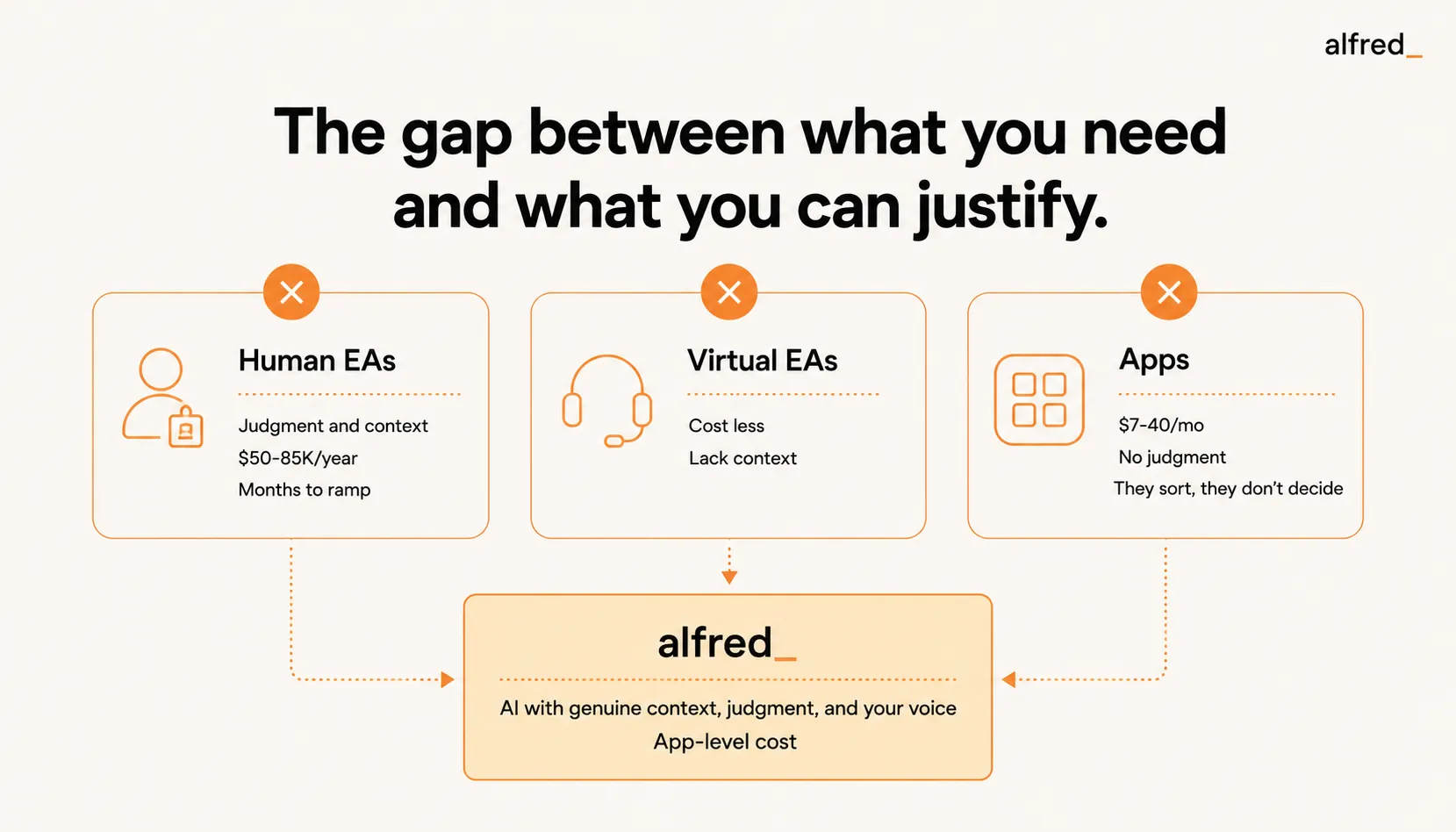
The Cost Problem
A full-time executive assistant in the United States costs $50,000-85,000 per year in total compensation, according to the Bureau of Labor Statistics. In major metro areas, New York, San Francisco, Boston, Los Angeles, the range is $70,000-100,000+ for experienced candidates.
For a partner at a large firm or a C-suite executive at a funded company, this is a standard line item. The ROI is obvious and the budget exists.
For everyone else, solo consultants, small firm principals, agency owners, freelancers, startup founders, $50,000-85,000 is a bet. A fixed cost against variable revenue. A salary to pay during slow months. A relationship to manage, with training, feedback, PTO, and all the overhead of employment.
You have probably looked at the part-time option. A virtual EA for 10-20 hours per week. Companies like Belay, Time Etc, and Prialto offer this at $25-50/hr, or $1,000-4,000/month. More accessible, but still $12,000-48,000 per year. And the part-time nature introduces its own problems.
You have probably also looked at overseas virtual assistants. $5-15/hr. $800-2,400/month for full-time. The cost is manageable. The quality, for email specifically, is usually not. Time zone gaps mean 12-hour delays on urgent communication. Cultural and linguistic nuance, critical for client-facing email, requires extensive training and supervision. The oversight overhead often exceeds the time saved.
At every price point, you hit the same wall: the cost is either too high for the value you can confidently predict, or the quality is too low for the communication that defines your professional relationships.
The Context Problem
Cost is the obvious barrier. Context is the real one.
Even if you found an EA you could afford, the challenge of transferring context is enormous. Your email is not a series of independent messages. It is a web of relationships, histories, commitments, and unwritten knowledge.
You know that when this client says “sounds good” they actually mean “I have concerns but I don’t want to raise them yet.” You know that the meeting invite from your co-founder’s calendar actually conflicts with the standing call with the investor that is not on any calendar. You know that the vendor who sent an invoice is the same vendor whose deliverable was late, and the reply needs to acknowledge both the invoice and the issue without being adversarial.
This context is not documented. It lives in your head. Transferring it to a human assistant takes weeks of active shadowing, constant correction, and ongoing supervision. Industry experience suggests that it typically takes 3-6 months for an EA to reach full effectiveness in a new role, with complex organizations requiring even longer. During that ramp period, the executive spends more time managing the EA than the EA saves.
Most professionals who try delegation give up during this ramp period. The experience feels backwards. You are spending time to save time, but the spending exceeds the saving. So you pull the work back. The EA quits or gets reassigned. And you return to doing everything yourself, now with added conviction that delegation does not work.
The Judgment Problem
Then there is the problem that sits beneath cost and context: judgment.
Apps do not have it. SaneBox sorts email by headers and patterns. It does not know that the email from an unfamiliar address is a referral from your most important client. Superhuman makes email faster but still puts every decision on you. Spark bundles threads but cannot tell the difference between a bundle that needs your immediate attention and a bundle that can wait a week.
Email apps sort, speed up, and organize. They do not decide. They do not draft. They do not understand. They are filing cabinets with better UX.
What you need is not a filing cabinet. You need judgment, the ability to read an email, understand what it means in context, determine the appropriate response, and either handle it or flag it for your attention. This is what good EAs do. It is the reason they are worth $50,000-85,000/year. The judgment is the value.
“I’ve tried every app. They organize my emails. I don’t need organization. I need someone to answer them.”
The apps you have tried and abandoned, and you have tried several, failed not because their features were bad but because they addressed the wrong problem. You do not need a faster, better-organized inbox. You need someone to handle the 60-70% of your email that is important enough to require a response but not important enough to require your response.
The Gap
So here is where you sit:
- Human EAs have judgment and context, but cost $50,000-85,000/year and take months to ramp.
- Virtual EAs cost less but lack context and require supervision that erodes the time savings.
- Email apps cost $7-40/month but have no judgment. They sort and speed up, they do not decide or respond.
The gap between what you need and what is available has existed for years. You need the judgment of a human EA at the cost of an app. You need context without a 6-month ramp period. You need someone who understands your relationships, your calendar, your commitments, and your voice, without the $50K salary that has historically been the price of that understanding.
This gap is why you are still doing it all yourself. Not because you are a control freak or a bad delegator. Because nothing in the market fit between “unaffordable human” and “useless app.”
Closing the Gap
alfred_ costs $29.99/month.
That sentence, on its own, probably triggers the skepticism that every failed subscription has earned. $29.99/month for what? Another inbox sorter? Another email app that promises to change your life and ends up as another icon you forget to open?
Here is what alfred_ actually does, and why it sits in the gap between human EA and email app:
It reads every email. Not subject lines. Not headers. The actual content. It knows what every email says, who it is from, and what it references.
It has context. It knows your calendar. It knows your commitments, the ones documented in email threads, the ones implied by your response patterns. It knows the history of every contact: what you have discussed, what is outstanding, what the relationship dynamics are. It builds this context automatically from your email and calendar data. No training period. No shadowing. No 6-month ramp.
It has judgment. Not human judgment, but not the absence of judgment either. It understands urgency based on content, not just sender reputation. It knows that “we need to discuss the contract” from a client is more urgent than “just checking in” from a vendor. It distinguishes between emails that need your expertise and emails that need a competent response. It makes the triage decisions that a good EA would make, using the same signals a good EA would use.
It drafts replies in your voice. For the 60-70% of emails that are routine, scheduling confirmations, acknowledgments, status updates, follow-ups, alfred_ prepares a draft that sounds like you. Not a template. Not a canned response. A reply that reflects your communication style, references the relevant context, and addresses the specific content of the email.
It tracks everything. Follow-ups that are due. Responses you are waiting for. Commitments you made and commitments others made to you. Deadlines approaching. Threads going cold. A good EA keeps a mental list of everything that is in flight. alfred_ keeps an actual list.
It briefs you. Every morning, you get a briefing: here is what needs your attention, here is why, here are draft replies for the routine items, here are the items that need your judgment. Not 121 emails. A briefing. The same format that a good EA would prepare if they had been managing your inbox overnight.
What $29.99/Month Gets You
The comparison to a human EA is not perfect. alfred_ cannot make phone calls, manage office logistics, arrange travel with the nuanced preferences that come from years of working together, or provide the interpersonal support that makes a great EA invaluable.
But for communication management, which industry surveys suggest constitutes the majority of EA utilization, the comparison holds.
The morning briefing. A human EA would review your inbox before you arrive and prepare a summary: “Three things need your attention, two can wait, I’ve already handled the scheduling back-and-forth with Client X’s office.” alfred_ does this automatically. Every morning. Without being asked.
The draft replies. A human EA would draft responses for your review: “I’ve prepared replies for these five emails, take a look and I’ll send them.” alfred_ does this for every routine email. You review, edit if needed, approve. The 5-7 minutes you would have spent composing each response becomes 30 seconds of review.
The follow-up tracking. A human EA would remind you: “You haven’t heard back from Client Y on the proposal from two weeks ago.” Ask alfred_, or turn on the Chase what I’m owed routine, and it lists these for you. Nothing slips because nothing depends on anyone’s memory.
The calendar awareness. A human EA would know your schedule and prevent conflicts. alfred_ reads your calendar and factors it into every triage decision, every scheduling coordination, every draft reply that involves timing.
A full-time human EA doing all of this costs $50,000-85,000/year.
alfred_ costs $299.99/year on the annual plan.
That is not a typo. The annual cost of alfred_ is roughly what a human EA earns in a day and a half.
The Subscription You Will Actually Use
You have been burned by subscriptions. You know the pattern: sign up during a moment of productivity optimism, use it enthusiastically for two weeks, open it occasionally for two more weeks, forget about it entirely, discover the charge on your credit card statement three months later, cancel with a familiar sense of disappointment.
The reason those subscriptions failed is the same reason the productivity systems failed: they required you to change your behavior. To adopt a new inbox. To learn new shortcuts. To process email differently. To add a step to your workflow.
alfred_ does not require you to change anything. You continue using your existing email. Your existing calendar. Your existing habits. alfred_ works in the background, reading, triaging, drafting, tracking, and surfaces the results in a briefing that takes 5-10 minutes to review.
The subscriptions you abandoned required effort. alfred_ reduces effort. That is the difference between a subscription you cancel and a subscription you cannot imagine canceling.
“I just want to open my laptop in the morning and know what actually matters today.”
That is not an unreasonable want. That is what every executive with a good EA experiences every morning. It is what has been available to people with $50K+ assistant budgets and unavailable to everyone else.
alfred_ is $29.99/month. The gap is closed. The EA you have been unable to afford has been unable to afford because the technology to deliver judgment, context, and voice at scale did not exist until now.
It exists now. And the math, $29.99 versus $50,000, with comparable outcomes for communication management, is not a close call.
You have been doing it all yourself for long enough.




