


There are 147 unread messages across 12 channels. You have 6 DMs. Three threads you were tagged in. A red badge on a channel you muted two weeks ago because it was “too noisy.”
You muted it and you are still checking it.
“I spend more time reading Slack than doing actual work. And the worst part is I can’t tell which messages actually need me.”
If this is your day, you are not bad at your job. You are drowning in a system that was designed to keep you perpetually half-focused on everything and fully focused on nothing.
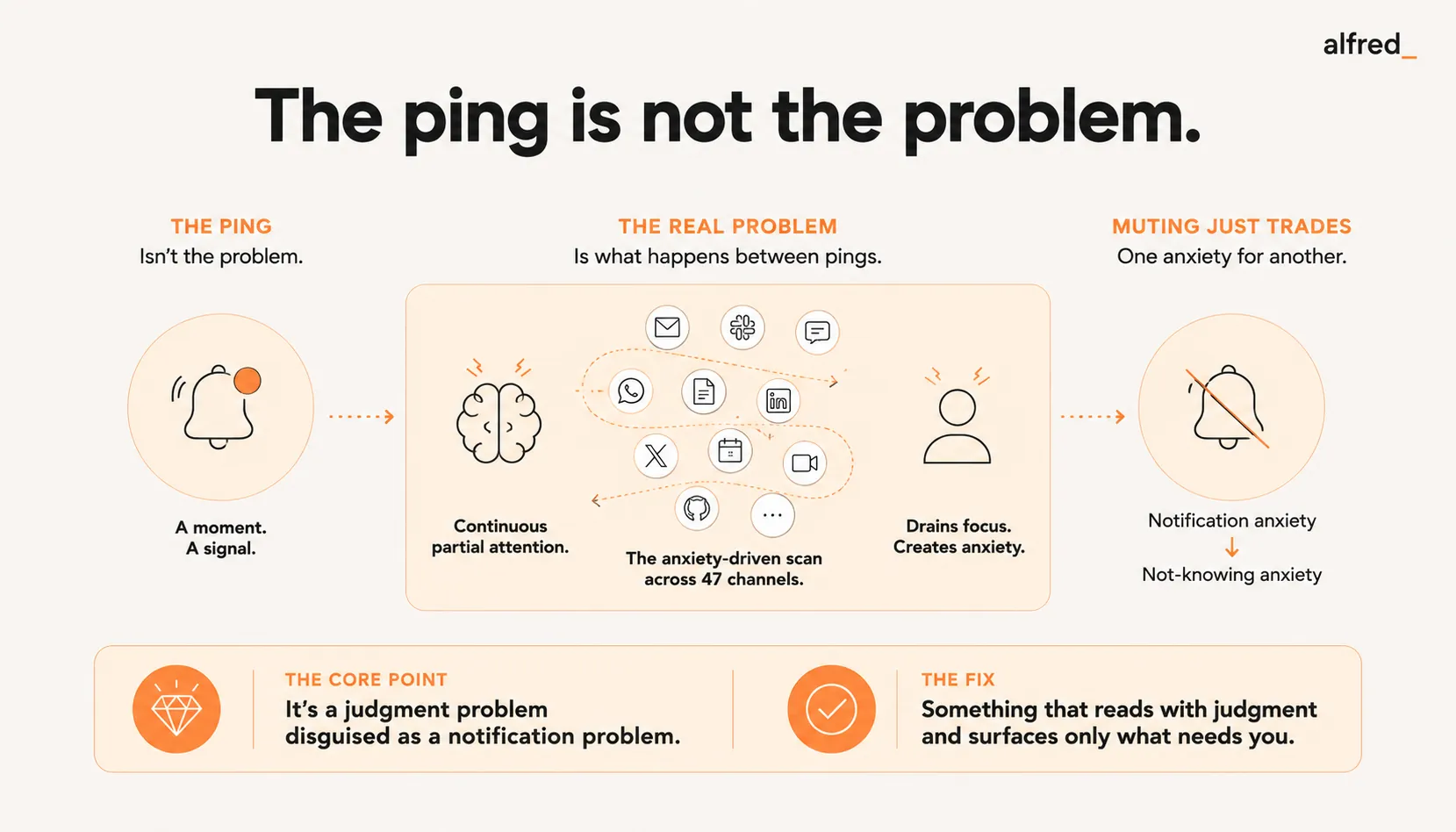
The Ping Is Not the Problem
Here is what most people get wrong about Slack overload: they think the problem is the notifications. So they mute channels. Set Do Not Disturb schedules. Turn off sounds. Customize notification preferences with surgical precision.
And it does not work. Because the ping was never the real problem.
The problem is the uncertainty between pings. The low-level awareness that right now, in one of the 47 channels you belong to, someone might be saying something you need to know. A decision is being made. A question is being asked. A fire is starting. And if you are not watching, you will miss it.
Linda Stone called this continuous partial attention, the chronic, anxiety-driven scanning for what might be more important than what you are currently doing. It is not multitasking. Multitasking is efficiency-motivated. CPA is anxiety-motivated. You are not monitoring Slack to get more done. You are monitoring it because you are afraid of what happens if you stop.
A study by Qatalog and Cornell University found that workers spend 59 minutes per day just trying to find information trapped in different apps and tools. Not reading messages. Not responding. Just switching between apps to track down what they need. That is nearly an hour a day of pure overhead.
And the switching itself has a cost. Research from the University of California, Irvine found that each interruption, including self-interruptions from checking Slack, takes an average of 23 minutes and 15 seconds to recover from. Not to respond to. To recover from. To get back to the depth of focus you were at before the check.
You check Slack 40 times a day. That is 40 recovery cycles. That is your entire workday consumed by the act of monitoring, not the act of working.
The Mute Button Is a Lie
You have tried muting. Everyone has. Here is what happens:
- You mute a noisy channel
- Messages still arrive. You just do not hear them
- The unread count climbs, 12, 34, 67, 100+
- You start wondering what you are missing
- The wondering becomes a background hum
- You open the muted channel “just to skim”
- You are reading every message again
“I muted the channel and then spent more time thinking about what might be in there than I ever spent reading it.”
Muting does not reduce cognitive load. It moves it from your ears to your imagination. The notification was at least informative. It told you something happened. Silence tells you nothing. And your brain fills the silence with worst-case scenarios.
The same dynamic plays out with Do Not Disturb mode. Slack’s DND is supposed to protect focus time. But DND does not tell the people messaging you that your silence is intentional. They do not know if you are focused, offline, or ignoring them. And you do not know if what they sent was trivial or urgent. The uncertainty cuts both ways.
Research from Carnegie Mellon University’s Human-Computer Interaction Institute found that notifications cause a measurable decrease in task performance, not just when you check them, but when you resist checking them. The act of deciding not to check consumes the same cognitive resources as actually checking. Even anticipating a message degrades performance. The knowledge that a message could arrive at any moment keeps your brain in a state of readiness that prevents deep focus.
You cannot think deeply while bracing for the next ping. And you cannot stop bracing unless you trust that nothing important is being missed.
The Channel Problem Is Actually a Judgment Problem
Here is the real issue. You are in 47 Slack channels. Some are critical. Some are informational. Some are social. Some were created for a project that ended six months ago but nobody archived them.
In any given hour, messages arrive across a dozen of these channels. Some are decisions being made that affect your work. Some are people sharing memes. Some are questions only you can answer. Some are questions anyone could answer but you got tagged because someone remembered your name.
You cannot tell the difference without reading them. And you cannot read all of them without losing your entire day to reading.
This is a judgment problem disguised as a notification problem. The fix is not fewer notifications. The fix is something that reads the messages, understands the context, and tells you which ones actually need you.
“My job title says ‘Director of Engineering’ but my actual job is ‘person who reads Slack.’”
The average Slack workspace has hundreds of channels. Enterprise workspaces have thousands. The average user belongs to dozens. Each channel has its own velocity, its own norms, its own level of importance. Threading helps with organization but creates a new anxiety, unread thread counts alongside unread channel counts. You are now monitoring two dimensions of potential urgency instead of one.
Slack Connect, shared channels, cross-team channels, each addition multiplies the monitoring surface. You are not managing notifications anymore. You are maintaining a mental model of a complex communication ecosystem, updating it continuously, and making real-time judgments about where your attention should go.
That is not part of your job description. But it has become most of your job.
What Does Not Work (And Why)
| Approach | Effect on the Overload |
|---|---|
| Mute channels | Trades notification anxiety for uncertainty anxiety. You check manually |
| Set DND hours | Creates gaps of not-knowing that fill with worry |
| Leave channels | Solves the immediate noise; creates FOMO and out-of-loop anxiety |
| Slack sections/sidebar organization | Cosmetic, rearranging noise does not reduce its volume |
| "Check Slack 3x/day" rules | Works if someone else is watching. Otherwise, 3 windows of dread |
| Notification keywords | Catches exact matches; misses context ("this is urgent" vs. actually urgent) |
| alfred_ | Watches your communications with judgment, surfaces what needs you |
Thread-following behavior deserves special attention. Slack threads are supposed to contain conversations within channels, reducing noise for people who are not involved. In practice, once you reply to a thread, you receive notifications for every subsequent reply. If you are active in 15 threads across 8 channels, you have 15 separate notification streams running in parallel. Each one represents a potential re-entry point for your attention. Each one fires independently of your focus state.
You did not sign up for this. You replied to a question three days ago and now you are subscribed to an infinite conversation about vendor pricing.
The Shift: From Monitoring to Trusting
Here is what changes when something with judgment watches for you.
You are writing a document. It requires thought. The kind of thought that takes 30 minutes to get into and 2 seconds to fall out of. Normally, you would have Slack open in a side panel, your eye catching movement in channel after channel, your brain evaluating each flash of text for potential urgency.
Instead, Slack is closed. Not muted, closed. Because alfred_ is watching your communications. It knows who matters. It knows what projects you are on. It knows the difference between “FYI” and “I need your input before 3 PM.” If something genuinely needs you, it surfaces it. Everything else waits.
You write the document in 90 minutes. Last week, the same document took four hours with Slack open.
“I didn’t need fewer messages. I needed someone to tell me which ones actually mattered.”
This is the distinction that matters. The problem was never volume. Slack could send you 500 messages a day and if someone you trusted whispered “only these 4 need you,” the anxiety would dissolve. The noise would become irrelevant background data, not a source of chronic stress.
That is what judgment does. Not filtering by keyword. Not sorting by sender. Understanding context, who sent it, what it references, whether it connects to something you are working on, whether it needs you specifically or just someone, and making a call. The way a great executive assistant would.
The Real Cost
A study by Kushlev, Proulx, and Dunn published in the Proceedings of the 2016 CHI Conference on Human Factors in Computing Systems found that frequent notifications are associated with increased inattention, hyperactivity symptoms, and decreased productivity. The researchers drew a direct line between notification frequency and measurable cognitive degradation.
RescueTime data shows the average knowledge worker checks communication tools every 6 minutes. That is 80 times in an 8-hour day. At 23 minutes of recovery time per interruption, the math is simple and devastating: you do not have any uninterrupted time left. Zero. Your entire day is recovery cycles stacked on top of each other, with fragments of actual work wedged in between.
This is what Slack overload actually costs. Not time spent reading messages. Time spent recovering from having read them. Time spent anticipating the next one. Time spent wondering what is happening in the channels you are not currently looking at.
alfred_ connects to your email and calendar. It watches your communication patterns and learns what matters to you, which people, which projects, which threads carry actual weight. It does not replace Slack. It replaces the anxiety of monitoring Slack. It replaces the 59 minutes of hunting for information across apps. It replaces the 80 daily check-ins driven by fear of missing something.
You were hired to think. To create. To lead. Somewhere along the way, your job became monitoring a feed of messages for ones that might be important. alfred_ gives you your job back.
The pings stop being your problem when something with judgment is listening for you.
Frequently Asked Questions
Why does Slack give me anxiety even when I mute channels?
Muting channels removes the audible ping but not the psychological weight. The unread badge count still climbs. You know messages are accumulating. Your brain treats the growing number as unresolved uncertainty, something in there might need you, and you will not know until you check. Research on workplace telepressure shows that the urge to respond operates independently of actual notification sounds. The compulsion is internal, not external.
How many Slack messages does the average worker get per day?
The average Slack user sends and receives over 200 messages per week, which works out to roughly 40 per day. But message count understates the real impact. A study by Qatalog and Cornell found that workers spend 59 minutes per day just trying to find information across different apps. RescueTime data shows the average knowledge worker checks communication apps every 6 minutes. Each check fragments attention and prevents the deep focus needed for meaningful work.
Does turning off Slack notifications help with focus?
For most people, turning off Slack notifications trades one anxiety for another. You stop being interrupted by pings and start compulsively checking manually, because the not-knowing feels worse than the interruption. Research from Kushlev and Dunn found that limiting email checks to three times per day reduces stress, but completely turning off notifications increases anxiety and FOMO. Without something else providing certainty about what you might be missing, you just self-interrupt more frequently.
How does alfred_ help with Slack and messaging overload?
alfred_ acts as a judgment layer across your communications. Instead of you monitoring every channel, thread, and DM for something that might need attention, alfred_ watches and surfaces only what actually matters, with context about why it matters. You stop context-switching between channels because the important things come to you. The cognitive load of monitoring disappears.
Is Slack notification overload a real productivity problem or just a personal preference?
It is a well-documented productivity problem. Research from the University of California, Irvine found that each interruption costs an average of 23 minutes and 15 seconds to recover from. Research from Carnegie Mellon found that even resisting the urge to check a notification consumes the same cognitive resources as actually checking it. A study published in the Proceedings of the 2016 CHI Conference found that frequent notifications increase inattention, hyperactivity, and decrease productivity. These are measured effects, not preferences.