

A client emailed you two weeks ago. You just found it.
It was not in spam. It was not caught by a filter. It was sitting in your inbox, right there, between a Google Calendar update and a Slack digest, for fourteen days. You scrolled past it. Multiple times. It blended into the noise, and by the time you saw it, the damage was done.
Now you are writing “Sorry for the delay” for the third time this quarter. And each time, it means less.
“Something fell through the cracks again. It was in an email thread from 3 weeks ago.”
The shame is immediate and specific. Not a general “I messed up” feeling, a targeted, precise shame that you, a competent professional who cares about your work, let a client sit in silence for two weeks while the answer was sitting in your inbox the whole time.
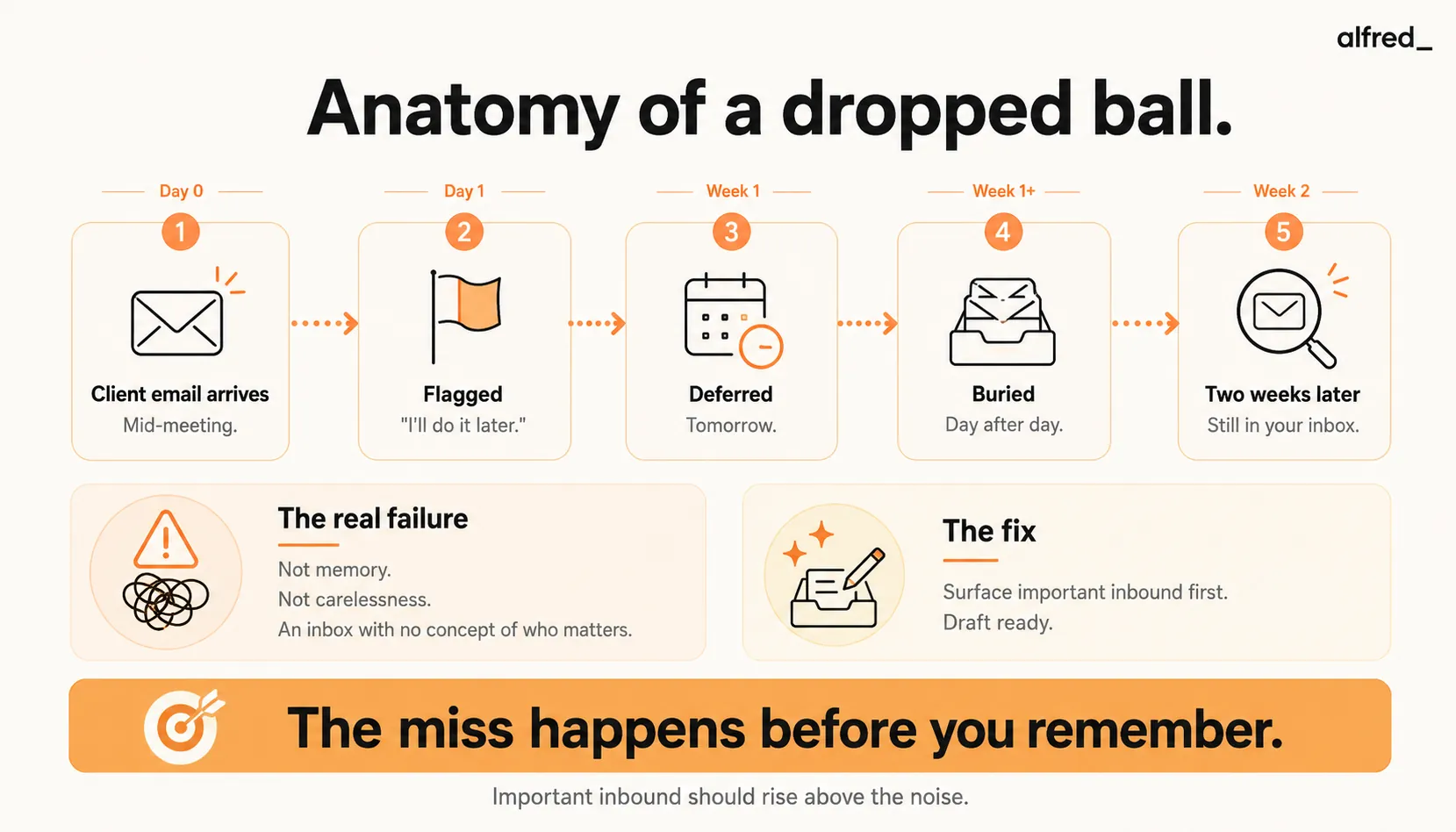
The Anatomy of a Dropped Ball
It never happens the way you think it happens. You imagine dropping the ball means you forgot about the client. That is not it. You remembered. You always remember.
Here is how it actually happens:
Tuesday, 2:47 PM. The email arrives. You are in a meeting. You see the notification preview on your phone. It is from Sarah at Meridian, something about the scope document. You make a mental note.
Tuesday, 4:15 PM. The meeting ends. You open your inbox. There are 23 new messages since the meeting started. You scan them quickly, responding to the easy ones, a yes/no question, a meeting confirmation, an approval that takes one click. Sarah’s email requires thought. You need to pull up the scope document, review the section she is asking about, and draft a considered response. You flag it. “I’ll do this after I finish the Henderson deck.”
Wednesday. You see the flag. You think about it. The Henderson deck takes all morning. After lunch you have back-to-back calls. You will handle it tomorrow morning, first thing.
Thursday. First thing becomes second thing. A fire breaks out with another client. Then it is Friday and responding to a Tuesday email on Friday afternoon feels wrong, she will think you were not paying attention. Monday is better.
Monday. The flag is there, but it has been pushed down by the weekend’s accumulation. New urgent things have replaced last week’s urgent things. The flag is one of eleven flags now, and you cannot remember which one is Sarah’s.
The following Tuesday. You are reviewing your client list before a quarterly sync and realize you never responded to Sarah. One week has become two. The flag has been sitting there for seven business days. You open the email and your stomach drops.
She was asking a straightforward question. The response would have taken four minutes. It has been fourteen days.
What the Silence Communicates
You think the issue is the late response. It is not. The issue is what the silence communicated in the meantime.
To you, the silence was an accident. A casualty of volume. You were not ignoring Sarah. You were overwhelmed, underwater, doing your best with too many demands on too little time.
To Sarah, the silence was a signal. It said: your project is not a priority. Your question does not warrant a timely response. You are not important enough to respond to within 48 hours.
Sarah is not thinking about your inbox volume. She is not thinking about your back-to-back meetings or the Henderson deck. She sent a question. She waited. She is still waiting. And every day that passes without a response, the story she tells herself about your reliability gets worse.
A SuperOffice study found that the average business email response time is 12 hours and 10 minutes, but that average hides a brutal distribution. 62% of companies do not respond to customer service emails at all. For client-facing professionals, the data from Toister Performance Solutions shows that a one-hour response time meets at least 80% of customers’ expectations, and expectations only increase for ongoing client relationships.
You are not competing against perfection. You are competing against the version of yourself that responds in 24 hours. The version that does not let two weeks pass. And right now, you are losing to that version.
The Trust Tax
Every dropped ball pays a trust tax. And trust taxes compound.
The first time. “Sorry for the delay, here’s the info you were looking for.” Sarah is gracious. “No worries, thanks for getting back to me.” The relationship absorbs the hit. This is the danger, because it felt fine, you believe it was fine.
The second time. “Apologies for the slow response.” Sarah responds, but the tone has shifted. Slightly more formal. Slightly cooler. She asks for a timeline on the next deliverable, something she would not have asked before, because she trusted you to deliver on time.
The third time. Sarah does not say anything about the delay. She just responds to the content. But she has started CC’ing her boss on emails to you. Not overtly. Just casually. The relationship has shifted from trust-based to oversight-based.
A Zendesk Customer Experience Trends report found that 61% of customers would switch to a competitor after just one bad experience. For ongoing client relationships, the erosion is slower but equally fatal. The client does not fire you after one dropped email. They fire you after the pattern becomes undeniable, and by then, you have lost the chance to fix it.
The real damage is not the email you missed. It is the five emails you will have to send, perfectly, on time, without a single slip, to rebuild the trust you lost from one.
Why It Keeps Happening
If you have dropped the ball on a client email once, you have dropped it multiple times. This is not a one-off failure. It is a systemic one, and the system is your inbox.
Your inbox does not know who matters. Email arrives in chronological order. A $50,000 client’s project question arrives at the same priority level as a promotional email from a SaaS product you tried once. Your inbox treats them identically. You are the only ranking algorithm, and you are overloaded.
Flagging creates a second inbox. You flag the important emails. Now you have two places to check: your inbox and your flagged folder. The flagged folder grows. You stop checking it. The flags meant to save you become another pile to feel guilty about.
The “I’ll do it later” cascade. Research by Dr. Piers Steel at the University of Calgary, who conducted a meta-analysis of procrastination studies, found that the intention-action gap, the distance between planning to do something and actually doing it, widens as the perceived effort of the task increases. Client emails that require thought, context, and composition are exactly the type of task where the gap is widest. You do not ignore them because they are unimportant. You defer them because they are important enough to require your full attention, and your full attention is never available.
Volume is the root cause. The Radicati Group estimates 121 business emails per day for the average knowledge worker. McKinsey found that workers spend 28% of their workweek on email. At that volume, even a 95% response rate means you are missing 6 emails per day, roughly 30 per week. Some of those are junk. Some are not. And the ones that are not, the client questions, the stakeholder follow-ups, the time-sensitive requests, are the ones that cost you the most.
What People Try (and Why It Fails)
SaneBox ($7-36/month) sorts your email into folders by importance. Client emails stay in your main inbox. But the problem was never sorting. The email was in your inbox. You saw it. You just did not respond.
Superhuman ($30-40/month) gives you a fast, beautiful interface with keyboard shortcuts. You can process email faster. But faster processing does not solve the “this email requires thought and I do not have time for thought right now” problem. The email still gets deferred.
Todoist / Notion (Free-$10/month) let you create tasks from emails. Now you have a task that says “Respond to Sarah - Meridian scope doc.” The task sits in your task list alongside 40 other tasks. It does not get done for the same reason the email did not get responded to: the volume exceeds the capacity.
Inbox Zero systems. You tried. You processed aggressively for two weeks. Every email touched once. Respond, delegate, defer, delete. It worked until a busy week broke the system, and the backlog rebuilt faster than you could clear it.
The pattern: every approach puts the burden of judgment and action on you. And you are the bottleneck.
How alfred_ Stops the Drop
alfred_ does not sort your email. It reads your email. The distinction matters.
Client detection. alfred_ identifies who matters in your inbox, not based on a list you maintain, but based on the patterns of your communication. Frequent contacts, active projects, high-stakes conversations. When an email arrives from a client, alfred_ recognizes it as a priority regardless of when it arrived or how many emails are stacked on top of it.
Surfacing, not sorting. SaneBox moves unimportant emails out. alfred_ brings important emails forward. The difference: with SaneBox, you still need to scan what remains. With alfred_, you get a clear signal, “Sarah at Meridian asked about the scope document 2 days ago. No response sent.” You know exactly what needs attention.
Which client emails haven't I answered?
 Searching Gmail for client emailsChecked Gmail
Gmail
Sarah Chen · Scope document · 2 days ago
Tom Reyes · Northwind renewal quote · 6 days ago
Two are waiting on you. Sarah at Meridian asked about the scope document 2 days ago, and Tom Reyes still needs the Northwind renewal quote.
Which client emails haven't I answered?
Drafted responses. Here is where it changes everything. The reason you did not respond to Sarah’s email on Tuesday was not that you did not see it. It was that the response required 10 minutes of focused composition, and you did not have 10 minutes. alfred_ drafts the response in your voice, referencing the scope document, addressing her specific question. When you have 60 seconds between meetings, you review the draft, adjust one line, and send. Four minutes of work compressed into thirty seconds.
Commitment tracking. If you wrote “I’ll send the revised scope by Friday” in an email three weeks ago, alfred_ remembers. Friday comes, and if the scope has not been sent, it surfaces the commitment. Not a calendar reminder you set for yourself, an automatic extraction from your actual email text. The promises you make in writing become tracked obligations that cannot slip.
Less than the cost of one apologetic lunch you buy a client after dropping the ball. And far less than the cost of losing the client entirely.
Prevent-This Checklist
The dropped-ball pattern is predictable. Use this checklist to stop it from happening again:
- Define your response-time norm publicly. Add one line to your email signature: “I respond within one business day; for urgent items, call or text.” Ambiguity about your cadence is what drives client escalation.
- Turn off email notifications. Continuous interruption drops your actual processing rate. Check 2-3 times per day on a schedule.
- Identify your top-20 client list. Write the names down. These are the people whose emails cannot be buried under newsletters. If you can’t list them from memory, that’s the first problem to fix.
- Use a surfacing tool, not a sorting tool. Sorting (SaneBox) moves noise out. Surfacing (alfred_) brings important inbound forward. Drops happen when important emails stay invisible, sorting leaves them invisible.
- Draft responses at capture time, not at reply time. The reason you deferred Sarah’s email wasn’t time. It was that composing required 10 minutes of cognitive load you didn’t have. alfred_ drafts when the email arrives; you review when you have 60 seconds.
- Check your commitments every week. Every “I’ll send this by Friday” in a sent email is a future dropped ball if it isn’t tracked. Ask alfred_ “what did I promise this week?” or make it a Friday routine, and it lists them from your sent mail.
- Review unanswered client emails every Friday at 4 PM. Weekly cadence. Anything from a client with no response by Friday gets handled before you log off, or gets an explicit “I’ll get you this by Monday” note.
- When you do drop a ball, don’t lead with ‘sorry for the delay.’ Lead with the answer they asked for. Apologize in one line at the end. “Here’s the info on Section 3, [answer]. Apologies for the lag, this should have come Tuesday.”
- Audit quarterly. Once a quarter, search your sent folder for “sorry for the delay” and “apologies for the slow.” Count instances. The count should trend toward zero. If it isn’t, the system isn’t working, fix it before the next client fires you.
Work this checklist in order. The first three are zero-tool, zero-cost. Items 4-6 are where a surfacing tool like alfred_ earns its keep, they’re the structural fixes that hold under stress.
What Changes
The email from Sarah arrives at 2:47 PM on Tuesday. You are in a meeting. You do not see it until 4:15 PM.
At 4:15, alfred_ has already flagged it: “Sarah, Meridian, question about scope document Section 3. Draft response ready.” You open the draft. It references the correct section, answers her question clearly, and matches the tone you normally use with Sarah. You change one word. You hit send.
Four minutes of work, done in forty-five seconds. The response goes out on Tuesday instead of two weeks from Tuesday. Sarah does not CC her boss. The trust holds. The relationship continues.
The things that fall through the cracks? They stop falling through. Not because you became better at email, but because you stopped being the only thing standing between a client’s question and a timely answer.



