

Three weeks ago, an email landed in your inbox. You probably saw it. Maybe you even opened it, skimmed the first paragraph, and thought: I’ll get back to this later.
You didn’t get back to it.
You found out yesterday, when the client sent a follow-up that started with “Just circling back on this…” and your stomach dropped. You scrolled down. There it was. Sitting in the thread. Read. Timestamped. Three weeks old. The whole time, it was right there.
“Something fell through the cracks again. It was in an email thread from 3 weeks ago.”
If that sentence hits different, it’s because you’ve lived it. Probably more than once. The missed follow-up. The buried request. The email that wasn’t urgent enough to act on immediately but was absolutely important enough to matter. And now the moment has passed.
The direct answer: you read it, meant to reply, and didn’t
Reading an email and replying to it are two different moments, and the inbox only tracks the first. Once a message is opened it looks handled: no bold, no unread count. So the fix isn’t reading more carefully. It is a list of the emails still waiting on your reply that doesn’t depend on read status or on you remembering to flag them.
You can build that by hand. In Gmail, star anything you can’t answer now and keep a starred pane next to the inbox (how to set it up). In Outlook, flag it and work from a search folder of flagged mail (how to set it up). Both work as long as you mark every one.
alfred_ does the marking for you:
- It reads each email that asks you for something (a question, a decision, a document) and keeps it on a list on Home, opened or not. Mail from no-reply addresses, newsletters and receipts doesn’t count.
- A thread joins after one working day without your reply, and leaves when you reply, mark it done, archive it, or after 21 days with nothing new on it.
- The same emails are in your morning brief under Waiting on you, at 7 AM by text, and you can ask any time: “what do I still owe Harbor Facilities?”
- When you’re ready, ask for the reply. alfred_ writes it in the thread and it goes when you approve it.
You: anything I read this week and never answered?
alfred_: Two: Priya Shah asked Tuesday whether the March invoice can be split, and Tom Alvarez wants to confirm Thursday’s walkthrough. Want me to draft either one?
Illustrative exchange. The names are invented.
The limit worth knowing. The list holds a thread for 21 days without new activity. For something older, like the email from three weeks ago in the story above, ask: “anything from a client I never answered this month?” Details are in Follow-up tracking, and the other direction, who still owes you a reply, is in the follow-ups guide.
The Shame Spiral Nobody Talks About
Missing an email isn’t a neutral event. It doesn’t feel like “oh well, I’ll respond now.” It feels like failure. Professional shame, they think I’m unreliable. Relational shame, they think I don’t care. And the worst kind, the self-directed kind, I can’t even keep up with basic email.
You send the reply. “So sorry, this got buried.” You overexplain. You add extra enthusiasm to compensate. And somewhere in the back of your mind, you know you’ll do it again next week. Because the conditions that caused it haven’t changed.
Over 73% of workers have missed important emails because they got buried (EmailToolTester). Not because they’re careless. Not because they don’t care. Because 121 emails hit your inbox every single day, and only about 24% of them actually deserve your attention. The other 76% is noise, newsletters, CC chains, automated notifications, and the important stuff drowns in it.
“The worst part isn’t the emails. It’s wondering what’s buried in there that I’ve missed.”
That wondering is its own kind of weight. Psychologists call it the Zeigarnik Effect: your brain holds onto incomplete tasks nearly twice as strongly as completed ones. Every email you read and didn’t act on is an open loop your mind won’t release. But here’s the cruel part, remembering doesn’t mean acting. You carry the weight without getting the resolution.
Why Search Doesn’t Save You
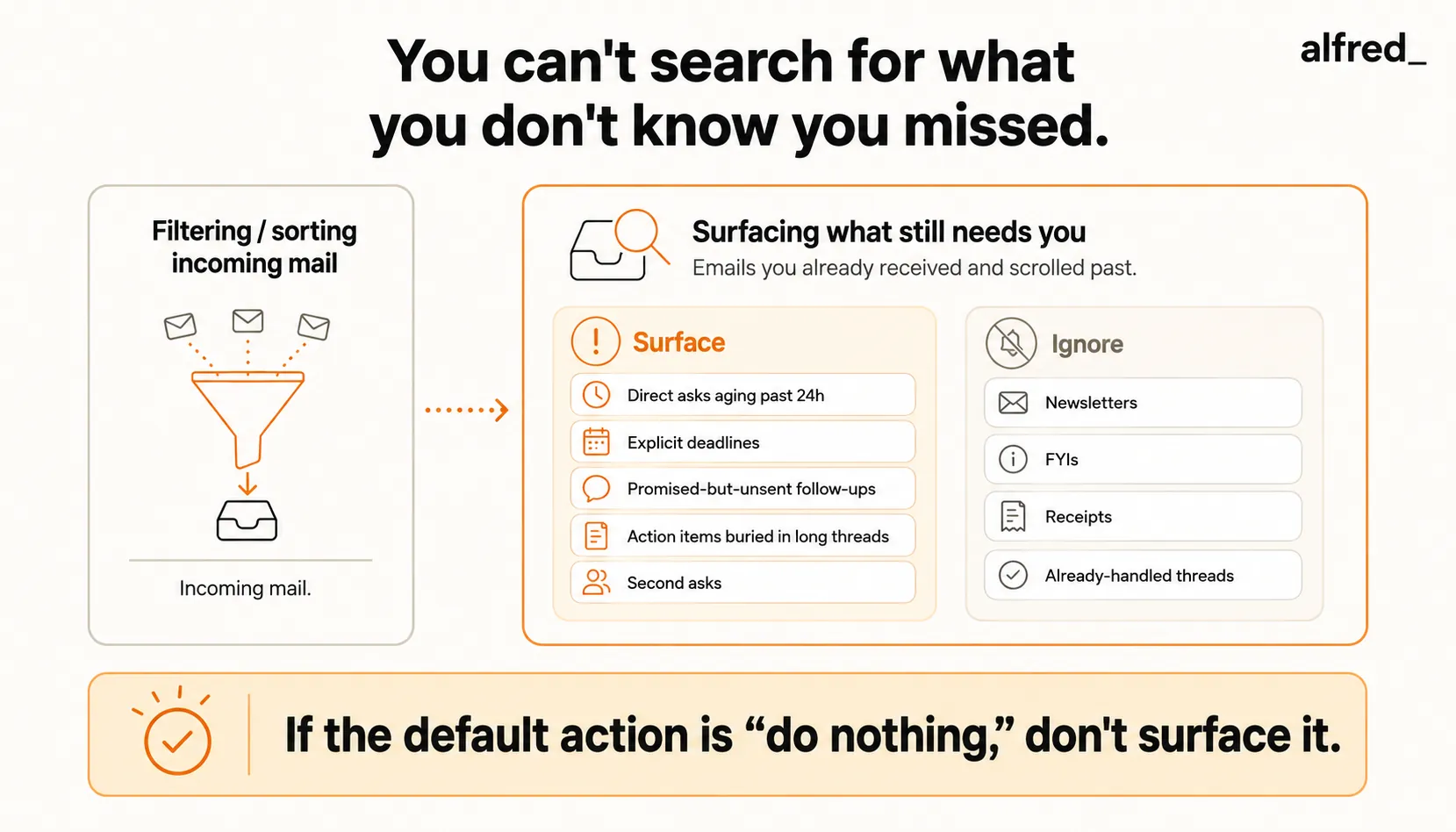
Here’s the thing nobody says out loud: you can’t search for something you don’t know you missed.
Gmail search is powerful. Outlook search works fine. If you know you need to find “the email Sarah sent about the Q3 proposal,” you can find it in seconds. But the emails you miss aren’t the ones you’re looking for. They’re the ones you forgot existed.
- “Show me the email from Sarah about the proposal”, search handles that.
- “Show me the emails I should have responded to but didn’t”. That query doesn’t exist.
This is the fundamental gap in every email system built to date. Search assumes you know what you’re looking for. Filters assume you can predict what matters in advance. Stars and flags assume you’ll correctly identify importance in the moment. Every single one of these puts the burden of attention on you.
And you were doing 40 other things when that email arrived.
The Coping Mechanisms That Make It Worse
You’ve tried the workarounds. Everyone has.
Marking as unread. Now your inbox is a wall of bold text. Everything looks urgent. Nothing is prioritized. You scroll past the important ones just as easily as before, except now they’re camouflaged in a sea of artificial urgency.
Starring everything important. For about three days, stars mean something. By day four, you have 47 starred emails and no ability to distinguish between “review the contract by Friday” and “interesting article to read sometime.” When everything is starred, nothing is starred.
Snoozing emails. Out of sight, out of mind, until it pops back up on Monday morning alongside 40 new emails. Now the snoozed email is competing with fresh urgency. It loses again. You snooze it again. The cycle continues until the deadline passes.
“I’ll get back to this later.” You won’t. You know you won’t. The Zeigarnik Effect means your brain will hold onto it as an open loop, creating low-grade anxiety without creating action. You’ll think about it in the shower. You’ll remember it at 11pm. You won’t reply until someone else reminds you, and by then, the damage is already done.
The Real Cost of What You Don’t See
The financial impact of missed emails is documented and it’s severe.
Following up within one hour of a lead’s email makes you nearly 7 times as likely to qualify the lead (HBR). Lead qualification drops 21x between 5 and 30 minutes. And 35-50% of sales go to whichever vendor responds first. Not the best vendor. Not the cheapest. The first one to show up.
For a 100-person company, miscommunication and missed emails cost upward of $420,000 per year. For a solopreneur billing $200/hour, a single missed follow-up can mean a lost deal worth thousands.
“I missed a follow-up. Lost the deal. It was in my inbox the whole time.”
But the cost isn’t always measured in dollars. Sometimes it’s measured in trust. The client who wonders if you’re reliable. The colleague who stops looping you in because you never responded last time. The reputation that erodes one unanswered email at a time.
How 5 Approaches Handle the Problem
| Approach | Price | Catches What You Already Missed? | Tracks Your Unanswered Emails? | Key Limitation |
|---|---|---|---|---|
| Gmail/Outlook "Important" markers | Free | No | No | Guesses wrong constantly; no follow-up tracking |
| SaneBox | $7–$36/mo | No | Partial (outgoing only) | Sorts incoming mail; can't excavate what's already buried |
| Superhuman | $30/mo | No | Outgoing only | Tells you if they read your email, not if you missed theirs |
| Boomerang | $4.98–$49.98/mo | No | Outgoing only | Brings back your emails if nobody replies; ignores what you missed |
| alfred_ | $29.99/mo | Yes | Yes, incoming and outgoing | Surfaces buried emails, aging threads, and hidden action items |
Gmail and Outlook’s built-in markers
Free. Algorithmic. Wrong a lot. Gmail’s “Important” markers guess based on who you email frequently. New clients? Missed. Forwarded threads? Missed. The CC chain where your name was mentioned on page three? Definitely missed. You learn to ignore the markers, which makes them worse than useless. They create false confidence that important things are being caught.
SaneBox
Strong at sorting incoming email into folders. If a newsletter clutters your inbox, SaneBox catches it. But SaneBox works on arrival. It sorts what comes in. The email you read three weeks ago and didn’t act on? It was sorted correctly. It landed in your main inbox. You saw it. SaneBox did its job. The problem happened after that.
Superhuman
A keyboard-driven email client. “Follow Up” reminders tell you when someone hasn’t replied to your email. Read statuses show if your message was opened. But the bigger problem, the emails you received and forgot to answer, Superhuman doesn’t track. A faster inbox doesn’t catch what you didn’t process at all.
Boomerang
“Boomerang it back if I don’t get a reply.” Good for outgoing accountability. But again, only outgoing. The email that arrived three weeks ago and sat unread in a thread? Boomerang never knew about it. Neither did you, until it was too late.
alfred_
This is where the approach changes. alfred_ doesn’t just sort what’s coming in. It watches your entire inbox, including what you’ve already seen and scrolled past. It tracks response patterns, identifies threads that are aging without action, and flags emails where requests or deadlines are hiding deep in forwarded chains.
The difference isn’t speed or sorting. It’s awareness. alfred_ catches what you missed, not because you searched for it, but because it was watching when you weren’t.
What alfred_ Flags vs. What It Ignores
The value of a surfacing system is in what it chooses not to surface. Too many alerts and you learn to ignore them, the exact problem that got you here. Here’s the explicit logic alfred_ uses to decide what needs your attention and what gets handled without interrupting you.
| Signal | Flagged for you? | Why |
|---|---|---|
| Question directed at you (you = to/cc lead), no reply sent >24h | Yes, surfaced in brief | Direct ask with aging response window, classic missed-email pattern |
| Explicit deadline in body ('by Friday', 'EOD', 'this week') | Yes, surfaced with deadline pill | Deadline extraction triggers time-sensitive flag |
| You promised a follow-up in a sent email that hasn't gone out | Yes, surfaced as pending follow-up | Catches the 'I'll send you X by Friday' you said but didn't do |
| Action item buried in a forwarded chain on page 3 | Yes, surfaced with thread context | Thread depth analysis finds requests hiding in long CCs |
| Thread where someone explicitly asked a second time | Yes, surfaced as escalated | Second ask is the universal 'you missed this' signal |
| Client or high-signal sender, unread >48h | Yes, surfaced as relationship-important | Sender-weight model identifies who matters to you |
| Newsletter, marketing, product notification | No, auto-sorted to low priority | No action expected; does not belong in a brief |
| Calendar invite (already on your calendar) | No, already handled | Duplicate information is noise |
| CC-only thread where you aren't the decision-maker | No, FYI category | Informational, not actionable |
| Automated receipts, confirmations, shipping notices | No, archived to reference | Reference value only; surfaced only via search |
| Thread you've already replied to, awaiting their response | No, tracked silently, no surface | Handled, waiting on them, not you |
| Spam and phishing attempts | No, quarantined | Security layer, not attention layer |
The explicit principle: if the default action is ‘do nothing,’ alfred_ doesn’t surface it. The brief is only the messages where the default action is wrong, where doing nothing would cost you. That’s the design choice that makes the difference between a notification tool you learn to ignore and a briefing you actually trust.
“The things I drop are never urgent enough to remember but always important enough to matter.”
That sentence is the reason surface-level sorting doesn’t work. The emails you miss aren’t spam. They aren’t unimportant. They’re the mid-priority items that sit just below your attention threshold, important enough to matter, not urgent enough to demand action, and eventually invisible because 40 newer emails pushed them out of view.
alfred_ catches those.
What Changes When Nothing Stays Buried
The email you read and forgot? It’s on your list the next working day, and in your morning briefing, until you answer it. The follow-up you promised in an email? Ask “what did I say I’d do this week?” and it’s there. The client thread where a request was hiding on page three of a forwarded chain? alfred_ reads the whole thread, so the ask is on the list.
You stop sending “so sorry, this got buried” replies. Not because you became more disciplined, because something is watching your back for the first time.
alfred_ works with both Gmail and Outlook. No app switching. No new email client. It connects to your existing inbox and does the thing that no other approach does: it catches what you missed before it turns into a crisis.
The background hum, what am I forgetting? what’s buried in there?, goes quiet. Not because you checked everything. Because something else did.
Nothing stays buried. It’s already surfaced.




