

You accepted a meeting without checking your calendar. Again.
The invite came in at 2:14 PM while you were writing a proposal. You saw the notification, “Strategy Sync with Product Team, Thursday 10 AM”, and tapped Accept. It took half a second. You went back to the proposal.
Thursday morning, you open your calendar and see it: Strategy Sync with Product Team, 10:00-11:00 AM. Directly on top of Client Review with Meridian, 10:00-10:30 AM. The client meeting has been on your calendar for two weeks. The strategy sync was a last-minute add. You accepted both. You can attend one.
Now you have to cancel. On someone. And whichever one you cancel, someone is going to think you cannot keep your schedule straight.
“I accepted a meeting without checking my calendar. Double-booked. Third time this month.”
Third time this month. The first time, you laughed it off. The second time, you apologized and blamed a “calendar glitch.” There is no third excuse that does not sound like what it is: you are not checking before you accept.
The Half-Second That Costs You
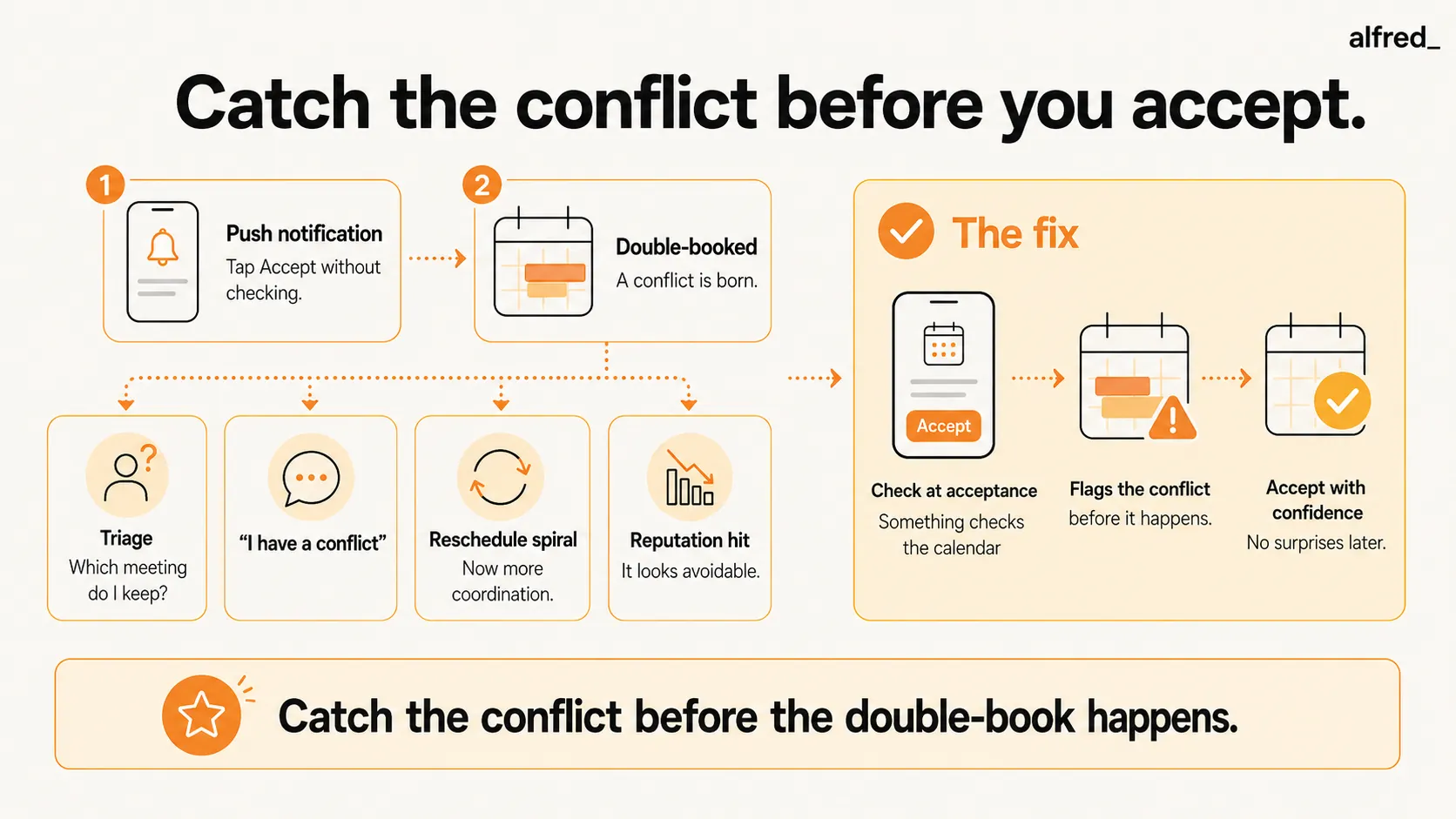
A double-book is born in half a second. The meeting invite arrives as a push notification. You are doing something, writing, coding, thinking, eating lunch. The notification presents two options: Accept or Decline. It does not present a third option: “Check your calendar first.”
So you accept. Because declining requires a reason, and accepting requires nothing. Because the meeting title sounds reasonable and the time slot seems vaguely fine. Because checking your calendar means switching apps, loading the day view, scrolling to the right date, scanning for conflicts, and making a judgment call. That is 30 seconds of effort that your brain, mid-task, will not spend.
Atlassian found that the average knowledge worker attends 62 meetings per month, roughly 15 per week, or 3 per day. A study by Reclaim.ai found that meeting volume increased by 69.7% between February 2020 and October 2021, with the average professional spending 21.5 hours per week in meetings. At that density, your calendar is not a schedule. It is a Tetris board where every new piece has to fit between existing pieces, and you are playing the game from a push notification.
The probability math is straightforward. If you accept 15 meeting invitations per week without checking your calendar, and your calendar already has 10-12 commitments, the chance of at least one conflict per week is overwhelming. It is not a matter of if. It is a matter of which Thursday.
The Cancellation Tax
The double-book itself is bad. What follows is worse.
The triage. You have two meetings at the same time. Which do you keep? The client meeting you have had for two weeks, or the internal strategy sync your VP just scheduled? Neither is cancelable without consequence. You spend 15 minutes agonizing over which one to move, time you could have spent on actual work.
The excuse. “Hi team, I have a conflict at 10 AM on Thursday, can we shift to the afternoon?” You do not say “I double-booked myself.” You say “conflict,” as if it were imposed on you from the outside. Everyone knows what “conflict” means.
The reschedule spiral. The meeting you canceled needs a new time. But your calendar is full. The other attendees’ calendars are full. Finding a new slot requires 4-7 back-and-forth emails or Slack messages. A meeting that was already scheduled now requires 20 minutes of coordination to re-schedule, a tax paid entirely because of a half-second unconsidered acceptance.
The reputation hit. A Doodle survey found that 37% of professionals consider unnecessary or poorly managed meetings the top time-waster at work. Canceling a meeting, especially a client meeting, because you double-booked signals something specific: this person’s calendar is out of control. And calendar control, in professional settings, is a proxy for overall competence. Fair or not, people who cannot manage their schedule are perceived as people who cannot manage their work.
The first double-book is a one-off. The second is a pattern. The third is an identity.
The Mental Overhead Nobody Sees
The visible cost of double-booking is the canceled meeting and the awkward email. The invisible cost is the mental overhead of trying to prevent it from happening again.
After the second double-book this month, you started doing something new: before accepting any meeting, you open your calendar app, navigate to the day, scan for conflicts, then go back to the email or notification and accept. Every invitation now requires 30-60 seconds of cross-referencing instead of a one-tap accept.
This sounds trivial. It is not.
At 15 meeting invitations per week, that is 7-15 minutes per week spent on calendar cross-referencing alone. But the real cost is not the time. It is the interruption. Every invitation that arrives pulls you out of whatever you were doing, forces a context switch to your calendar app, and then requires you to re-enter the work you were doing before. Gloria Mark’s research at UC Irvine found that each context switch costs an average of 23 minutes to fully regain deep focus. Even if the calendar check itself takes 30 seconds, the focus disruption can cost 20 minutes.
So you face a choice: check the calendar every time and accept the constant interruption, or accept without checking and gamble on conflicts. Neither is acceptable. Both are exhausting.
And there is the anxiety layer. After a double-book, your relationship with your calendar changes. You start checking it compulsively, “Did I double-book Thursday? Let me check. What about next Monday?” The calendar, which is supposed to give you clarity, becomes a source of low-grade anxiety. You open it not to see what is coming, but to see what you might have broken.
Why Scheduling Tools Do Not Fix This
Calendly ($0-16/user/month) prevents double-booking for meetings scheduled through your Calendly link. Someone visits your booking page, sees your availability, and picks a slot. The system ensures the slot is open. Problem solved, for that one meeting.
But most meetings are not scheduled through Calendly. They are scheduled through Google Calendar invites, Outlook meeting requests, Slack huddle suggestions, and “are you free at 2?” messages. Calendly has zero visibility into those channels. The double-booking that embarrasses you at work is almost never caused by a Calendly conflict. It is caused by an Outlook invite you accepted from your phone while walking to lunch.
Clockwise optimized your calendar by rearranging meetings to create focus blocks, useful for reducing meeting fragmentation, but it shut down in March 2026 after its team joined Salesforce and pointed users to Reclaim.ai. Even at its peak, it did not prevent you from accepting a new meeting on top of an existing one.
Reclaim.ai ($0-12/user/month) auto-schedules tasks and habits around your meetings. Good for protecting deep work time. Does not intercept the push notification you tap Accept on without looking.
Google Calendar / Outlook conflict warnings. Both Google Calendar and Outlook will show a small warning if you try to accept a meeting that conflicts with an existing event, if you are creating the event through the calendar app. If you accept from a push notification, the warning is buried. If you accept from an email, you may never see it. The warning exists, but it appears at the wrong time and in the wrong place.
The pattern: every scheduling tool assumes you are looking at your calendar when you accept a meeting. You are not. You are looking at a push notification on your phone while doing something else.
How alfred_ Prevents the Double-Book
alfred_ sits between the invitation and the acceptance.
Real-time conflict detection. When a meeting invitation arrives, alfred_ checks your calendar before you do. If the proposed time conflicts with an existing commitment, you get a clear alert: “Thursday 10 AM conflicts with Client Review - Meridian (10:00-10:30).” Not a small warning buried in a calendar app. A direct, unmissable flag that catches the conflict before you tap Accept.
Alternative time suggestions. alfred_ does not just tell you there is a conflict. It tells you when you are free. “Thursday 10 AM is blocked. You have availability Thursday 2-3 PM and Friday 10-11 AM.” Now the response to the meeting organizer writes itself: “Thursday 10 doesn’t work, could we do Thursday afternoon or Friday morning?”
Calendar-aware email responses. When someone emails “Can you meet Thursday at 10?”, before you respond, alfred_ has already checked. It can draft a response that includes your actual availability, so you never commit to a time that is already taken. The “let me check my calendar and get back to you” step, the step you skip because it adds friction, is already done.
Protection of existing commitments. alfred_ understands that a client meeting booked two weeks ago should not be displaced by an internal sync added yesterday. It can flag priority conflicts: “The new Strategy Sync conflicts with a client meeting that has been on your calendar for 14 days. Recommend keeping the client meeting.”
Less than the cost of one embarrassing cancellation email. And far less than the reputation cost of being the person who double-books.
What Changes
The meeting invitation arrives at 2:14 PM. You are writing a proposal. You see the notification.
But before you tap Accept, alfred_ has already flagged: “Thursday 10 AM conflicts with Client Review - Meridian. You have availability Thursday 2-4 PM.”
You respond to the organizer: “10 AM doesn’t work for me, could we do Thursday afternoon?” The response takes 15 seconds. No calendar cross-referencing. No app switching. No conflict.
Thursday morning, your calendar has one meeting at 10 AM and one meeting at 2 PM. You attend both. Nobody gets canceled on. Nobody questions your competence. The proposal you were writing when the notification arrived? You finished it, because you were not pulled into a 20-minute scheduling spiral.
The double-book that would have happened? It did not happen. Not because you became more careful. Not because you started a new habit of checking your calendar. Because something checked it for you, at the moment it mattered, before the half-second acceptance could do its damage.
You are not bad at calendars. You were just trying to manage 62 meetings a month from push notifications. Now you are not.




