

- AI Calendar Assistant Definition
- software that uses artificial intelligence to manage your schedule by auto-scheduling meetings around your priorities, protecting focus time, generating meeting briefs, and optimizing your week. Unlike traditional calendar apps that display your schedule, AI calendar assistants actively shape it.
Why You Need an AI Calendar Assistant in 2026
Your calendar has become the battlefield of your productivity. Meetings have tripled since 2020 (Microsoft Work Trend Index), and the average professional now spends 11.3 hours per week in meetings (Fellow.ai, 2025). That’s not counting the time spent scheduling them, prepping for them, or recovering from them.
- 11.3 hours/week in meetings (Fellow.ai), that’s ~540 hours per year
- Meetings tripled since 2020 (Microsoft Work Trend Index)
- 23 minutes to regain focus after each context switch (Gloria Mark, UC Irvine)
- $25,000+ in lost deep-work productivity per year at average professional salaries
AI calendar assistants solve this by intelligently scheduling meetings, protecting focus blocks, preparing you for upcoming conversations, and optimizing your week around your actual priorities. Here are the 7 best options in 2026.
For pure AI scheduling, Motion leads. For calendar + email + tasks together, alfred_ is the best choice.
Motion is a pure AI calendar tool. It auto-schedules your entire day, dynamically rearranges when plans change, and treats tasks and meetings as equal first-class citizens. alfred_ won't auto-plan your day like Motion, but it is the one option here that also works on your email: it connects your inbox to your calendar, scheduling meetings from email when you ask, preparing you for meetings from your inbox, and tracking the replies you're waiting on. If your problem is bigger than just scheduling and your calendar and inbox are tangled together, alfred_ covers both.
Best for
- Founders and executives who need calendar + email + tasks in one AI
- Professionals wanting AI-generated meeting briefs from email context
- Anyone drowning in both email and meeting overload simultaneously
Not for
- Users who only need pure calendar auto-scheduling
- Teams needing team-wide calendar coordination
The 7 Best AI Calendar Assistants, Ranked
7. Fantastical: For Apple Ecosystem Users
Pricing: $6.99/month or ~$56.99/year (~$4.75/month billed annually) | Free plan available | 14-day free trial
Fantastical is a beautifully designed calendar app, not an AI assistant. Its standout feature is natural language event creation: type “Lunch with Sarah Thursday at noon” and it just works. Fantastical 4.1 (September 2025) added Liquid Glass design for iOS 26 and Apple Intelligence parser integration for complex event creation. Windows support was added in October 2024 with Fantastical 4.0. For users who want a polished calendar across Mac, iPhone, iPad, Apple Watch, and Windows, it delivers.
But Fantastical doesn’t actively manage your schedule. It’s a premium calendar interface, not an AI scheduler.
- Strengths: Beautiful cross-device experience (including Windows), natural language input with Apple Intelligence, calendar sets, affordable pricing
- Limitations: No AI scheduling or automation, no task management beyond basic to-dos
6. Vimcal: A Keyboard-Driven Calendar
Pricing: $20/month ($200/year) | Free trial available
Vimcal markets itself as “the fastest calendar.” It is a keyboard-driven calendar app with a drag-to-share availability feature: highlight open slots and Vimcal generates copy you can paste into an email. It handles time zones for remote teams.
Where Vimcal falls short is depth. It’s a calendar interface, not an AI assistant. Reviewers note that “Vimcal confuses productivity with keyboard shortcuts for every UI component,” and some users report iOS glitches. At $20/month for what’s essentially a calendar skin, the value proposition is narrow unless you schedule 10+ external meetings a week.
- What it has: Keyboard shortcuts, time zone support, drag-to-share availability
- Limitations: No AI scheduling or task management, $20/month for a calendar app feels steep, occasional mobile app bugs, limited integrations beyond calendar
5. Clockwise: Shut Down (Acquired by Salesforce)
Pricing: Was Free / Teams $6.75/user/month | Shut down March 27, 2026
Update: Clockwise was acquired by Salesforce and shut down on March 27, 2026. If you were a Clockwise user, Reclaim.ai offers a switching guide and a 20% discount for Clockwise migrants.
Before its shutdown, Clockwise took a different angle: instead of helping you schedule, it rearranged your existing meetings to create uninterrupted focus time. It analyzed your team’s calendars and clustered meetings together, freeing up longer blocks for deep work. Trusted by 40,000+ organizations, it was genuinely valuable for teams where meeting fragmentation killed productivity. The team-wide calendar optimization technology is likely what attracted Salesforce (probably for their Agentforce/calendar AI efforts).
- Strengths: Was excellent at team-wide calendar optimization and creating focus time blocks
- Limitations: Shut down March 27, 2026. Former users can migrate to Reclaim.ai (team time blocking) or Motion (AI scheduling)
4. Calendly: For External Scheduling Links
Pricing: Free (1 event type) | Standard $10/seat/month (annual) / $12 monthly | Teams $16/seat/month (annual)
Calendly solved one specific problem better than anyone: eliminating the “when are you free?” email chain. Share a booking link, let people pick a time, and it’s on your calendar. For salespeople, consultants, and anyone who books meetings with external contacts, Calendly does this. New AI features include an automatic meeting notetaker, natural language scheduling queries, and AI-powered activity insights.
But Calendly is a scheduling link tool, not a calendar assistant. It doesn’t manage your existing calendar, protect focus time, or prep you for meetings. The free plan limits you to a single event type. Alternatives like Cal.com (open source, with AI phone calls at $0.29/min) and Reclaim.ai are eating into Calendly’s lead.
- Strengths: Best-in-class booking links, massive integration ecosystem, strong free tier, trusted by millions, new AI notetaker
- Limitations: Only handles external scheduling, per-seat pricing adds up, no task or email management
3. Reclaim.ai: Free AI Calendar Tool
Pricing: Free Lite plan | Starter $10/month | Business $12/month | Enterprise $18/month
Reclaim.ai is a free entry point into AI calendar management. Acquired by Dropbox for $40.2M in August 2024 with 320,000+ users across 43,000+ companies, Reclaim has continued operating independently with no pricing changes. The Lite plan includes smart time blocking, habit scheduling, and basic analytics at no cost. Set up a “Deep Work” habit for 2 hours every morning, and Reclaim automatically finds and defends that time as your calendar fills up.
“I switched to Reclaim for personal stuff and I’ve been very happy with it since you can do most things right from Google Calendar.”, u/JoshL31, r/ProductivityApps
Post-acquisition updates include full Microsoft Outlook support and enhanced Focus Time protection. Reclaim is also offering 20% discounts for users switching from Clockwise (which shut down March 27). Where Reclaim struggles is beyond calendar: task management is basic, there are no email features, and scheduling links lack Calendly’s customization. But for AI calendar optimization on a budget, nothing comes close.
- Strengths: Generous free plan, Dropbox-backed stability, habit and focus time scheduling, less aggressive than Motion, works with Google Calendar and Outlook
- Limitations: Basic task management, no email integration, scheduling links lack customization, limited to calendar optimization only
2. Motion: Pure AI Auto-Scheduler
Pricing: Pro AI $19/month monthly, ~$12.73/month annual | Business AI $29/month monthly, ~$19.43/month annual | 7-day free trial
Motion is the most aggressive AI calendar assistant on the market. Add your tasks with deadlines and priorities, and Motion builds your entire day, slotting tasks between meetings, rearranging when things shift, and warning you when deadlines are at risk. Motion raised $60M at a $550M valuation in September 2025 and has pivoted from “AI Calendar” toward an “AI Super App” with AI Employees, Docs, and project management features.
Plans are now “Pro AI” ($19/mo monthly, ~$12.73/mo annual, 7,500 AI credits/month) and “Business AI” ($29/mo monthly, ~$19.43/mo annual, 15,000 credits/month). The complaints are consistent, though: users report that “the AI constantly reshuffles your calendar, making you feel like your schedule is no longer your own.”
“Motion stressed me out more than it helped lol.”, u/TommyRichardGrayson, r/ProductivityApps
“Great app, I’ve been using it for a few months now. The automatic scheduler and the auto moving of unfinished tasks to a different date is a game changer.”, u/No_Scarcity2111, r/productivity
If you trust the AI, Motion delivers. If you want control, look elsewhere.
- Strengths: Most powerful auto-scheduling AI, treats tasks and meetings equally, deadline-aware planning, genuinely rebuilds your day dynamically, $19/mo is competitive
- Limitations: Aggressive rescheduling frustrates many users, 7-day trial isn’t long enough to evaluate, no email management, steep learning curve, mobile apps lag behind web (2.7/5 on Google Play)
1. alfred_: Best for Calendar + Email + Tasks Unified
Pricing: from $29.99/month | Works with Gmail and Outlook
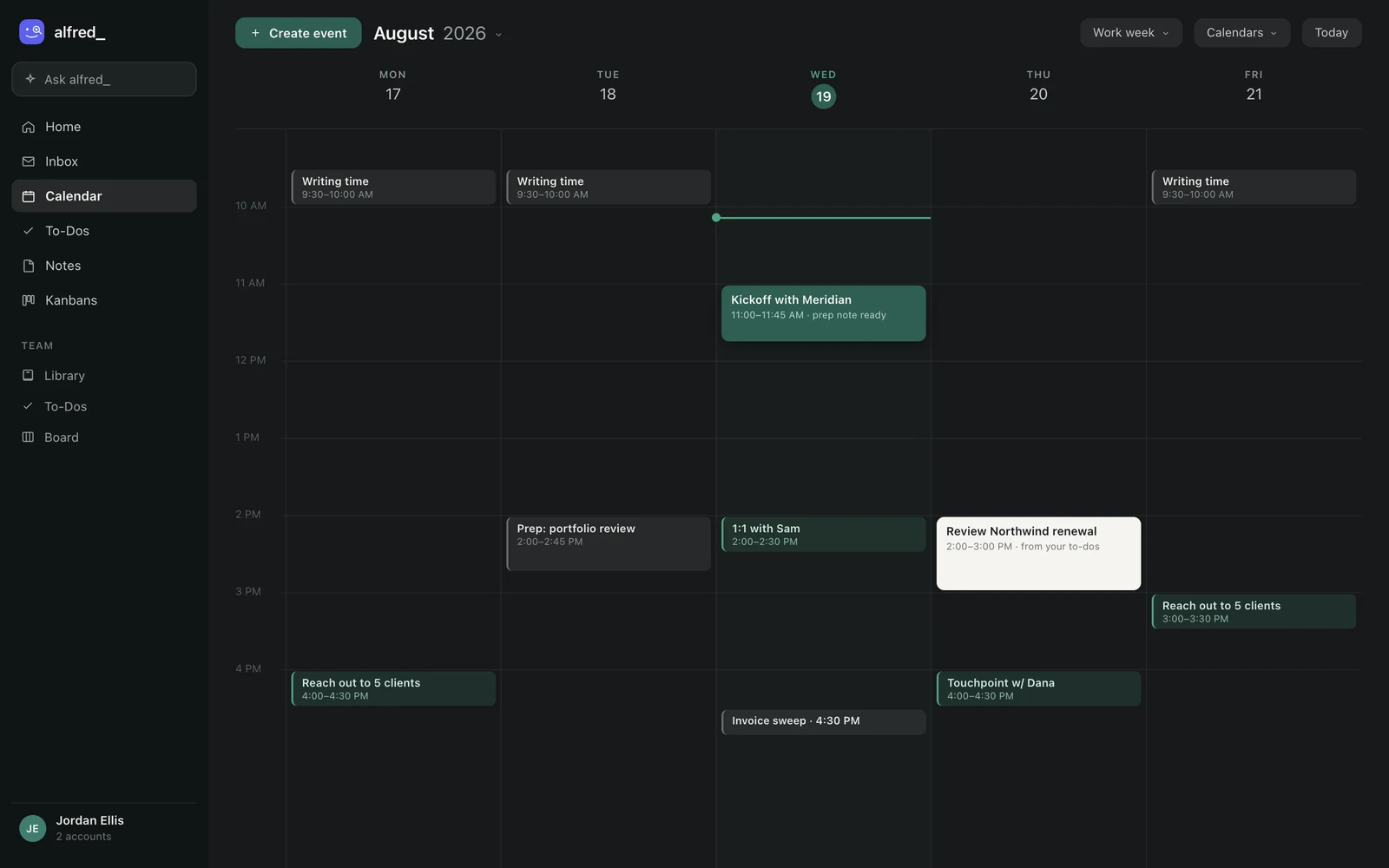
The week view: meetings, writing blocks, and a to-do (“Review Northwind renewal”) placed on the calendar from the task list. Shown with sample data.
alfred_ is an AI assistant for client-facing teams, and each person on the team gets their own. It keeps track of the replies you owe and the replies you’re waiting on, manages your calendar, prepares you for meetings and sends a morning brief. It approaches calendar management differently than every other tool on this list. It is the one option here that also works on your email, and that is the whole point: it connects your inbox to your calendar. Instead of auto-scheduling your day or optimizing meeting placement, alfred_ acts as a delegation layer across your calendar, email, and tasks. It schedules meetings from email when you ask, pulls context from emails to generate meeting briefs, surfaces action items and follow-ups from threads, and connects what’s on your calendar to what’s in your inbox.
Every other tool on this list, Motion, Reclaim, Clockwise, manages your calendar in isolation. alfred_ connects your calendar to your email and task workflow, which is what a human executive assistant actually does. Before a meeting, ask alfred_ for a prep and it pulls together the relevant email threads and notes. When an email needs to become a meeting, alfred_ turns it into one. alfred_ covers a broader workflow than calendar-only tools.
| Motion | Reclaim.ai | alfred_ | |
|---|---|---|---|
| Auto-schedules tasks onto your calendar | Yes | Yes (habits + tasks) | No |
| Protects focus time | Yes | Yes | Yes |
| Reads your email | No | No | Yes |
| Schedules a meeting from an email | No | No | Yes, when you ask |
| Meeting-prep brief from email history | No | No | Yes |
| Tracks replies you’re waiting on | No | No | Yes |
| Drafts replies | No | No | Yes, with email drafting enabled |
| Price | $19/mo | Free to $10/mo | From $29.99/mo |
- Strengths: The one tool here that also works on your email, connecting your inbox to your calendar, schedules meetings from email when you ask, meeting prep from email context, follow-up tracking, delegation model keeps you in control, works with Gmail and Outlook
- Limitations: Won’t auto-schedule your entire day like Motion, not a team calendar optimization tool like Clockwise, newer to market than established players
How to Choose the Right AI Calendar Assistant
The right tool depends on what’s actually broken in your workflow. If the specific thing you want is meetings moved rather than time blocked, read can an AI manage my calendar and reschedule meetings for me first, because that job splits differently from the ones below.
- Just need a better calendar app? Fantastical (~$57/year, now with Windows support) or Vimcal ($20/mo) for a polished interface without AI complexity.
- Need external scheduling links? Calendly is still the standard for booking pages. Cal.com is the open-source alternative with AI phone calls.
- Want AI scheduling on a budget? Reclaim.ai’s free plan delivers real value (now Dropbox-backed).
- Want the AI to plan your entire day? Motion ($19/mo) is the most aggressive auto-scheduler.
- Need calendar connected to email and tasks? alfred_ is the one tool here that bridges all three.
- Optimizing calendars across a team? Clockwise shut down March 27, 2026. Reclaim.ai is an alternative for team time blocking.
Start with the problem, not the tool. If you’re drowning in both meetings and email, a calendar-only solution solves half the problem. For the email side, see best AI email assistants. For professionals who need an AI executive assistant that covers calendar, email, and tasks together, alfred_ is the one tool here that bridges all three.




