

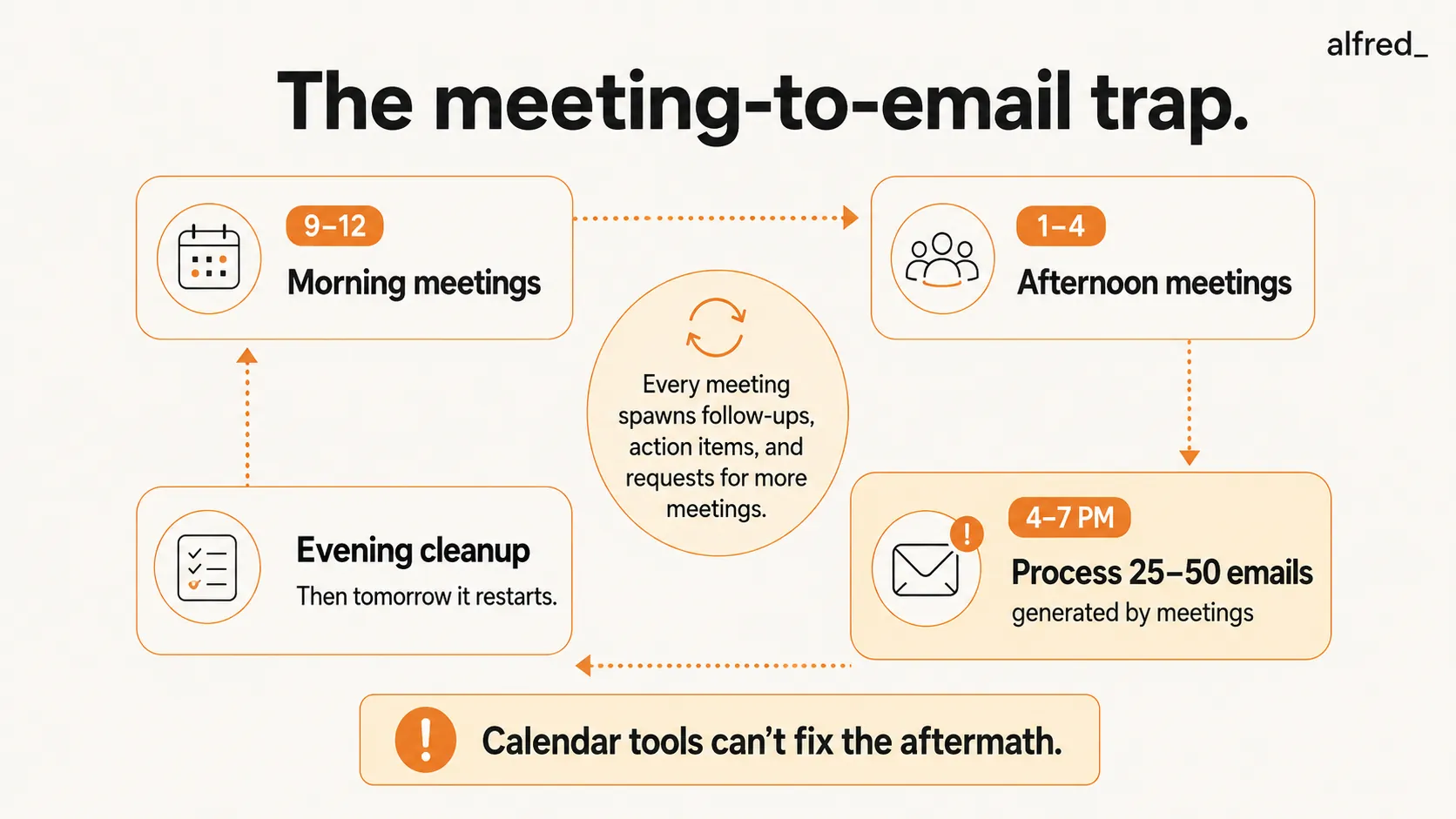
9 AM to 4 PM: meetings. 4 PM to 7 PM: the emails those meetings generated. This is not a schedule. This is a trap.
You are not imagining it. 57% of the average workday is now consumed by meetings, email, and chat, leaving only 43% for actual work (Microsoft 2025 Work Trend Index). The average employee spends 11.3 hours per week in meetings alone. That is 392 hours per year, more than 16 full workdays, or nearly 10 complete workweeks sitting in meetings (Fellow 2024).
And when 78% of workers say they attend so many meetings they cannot get their actual work done (Atlassian 2024), you start to understand why 4 PM feels like the beginning of a second shift, not the end of the first.
The Cycle That Never Breaks
Here is how the trap works:
Morning meetings (9 AM - 12 PM). Back-to-back calls. Each one generates 2-3 follow-up emails and at least one action item. You cannot process these during the meeting, so they pile up.
Afternoon meetings (1 PM - 4 PM). More calls. The follow-up emails from the morning are still unread. The action items are unfulfilled. New follow-ups from afternoon meetings start stacking on top.
The “real” workday (4 PM - 7 PM). You finally open your inbox. 47 unread messages. Half of them are from meetings you attended today, follow-ups, shared notes, scheduling requests for more meetings, “per our conversation” threads. The other half are emails that came in while you were in meetings, each one requiring a decision you did not have time to make at 10:37 AM.
Evening (7 PM - 11 PM). You told yourself you would stop. But there are still 23 emails you did not get to. Your partner is watching something. You are on your phone, thumbing through threads, writing responses you should have sent six hours ago.
Tomorrow morning (9 AM). Meetings again. The cycle restarts.
51% of workers have to work overtime at least a few days a week because of meeting overload. For directors and above, that number climbs to 67% (Atlassian 2024). 5 hours per week are wasted in meetings that accomplish nothing, doubled since 2019 (Asana 2024). That is 260 hours annually, over six full workweeks, in meetings that did not need to happen.
Your Brain on Back-to-Back Meetings
This is not just about time. It is about what happens to your brain.
Microsoft’s Human Factors Lab conducted an EEG study in 2021 that measured brainwave activity during back-to-back virtual meetings. The findings were stark: consecutive meetings with no recovery breaks cause a dramatic spike in stress-related brain activity. Stress accumulates with each meeting. It does not reset between calls. It builds.
Separate research shows it takes 45 minutes to recover focus after an unproductive meeting (Fireflies). And the average knowledge worker faces 275 interruptions per day, one every 2 minutes during core hours (Microsoft 2025). Each interruption costs 23 minutes of refocus time (Gloria Mark, UC Irvine).
So you attend a meeting. Your brain needs 45 minutes to recover. But your next meeting starts in 5 minutes. So you enter it already depleted. The stress compounds. By 4 PM, you are cognitively exhausted, and that is when the “real” work begins.
91% of people daydream during meetings. Surveys suggest 73% do other work during meetings (Fireflies). Not because they are lazy, because their brain is trying to catch up on the work that meetings are preventing.
Why Calendar Tools Alone Do Not Help
If you have looked for help, you have probably found the calendar optimization apps. They are good at what they do. But what they do is not enough.
Reclaim AI (Free - $18/user/month; acquired by Dropbox in 2024) protects focus time blocks and auto-schedules habits. It is genuinely smart about finding gaps in your calendar. But it has zero email features. Your inbox is not its problem.
Clockwise (shut down in 2026) rearranged meetings to create contiguous focus blocks. It was great for teams that wanted to coordinate quiet hours. But even at its peak it offered no email triage, no reply drafting, no inbox intelligence. The follow-up emails from your meetings never cared about your focus block, and its shutdown left those users hunting for a replacement that still does not touch email.
Motion ($19-$29/month) auto-schedules tasks alongside meetings. But it is not an email client. The 47 messages waiting at 4 PM are still 47 messages you have to process yourself.
Calendly (Free - $20/seat/month) handles scheduling links. Useful, but narrow. It solves the “when can we meet?” problem without touching the “I need to process 50 emails from today’s meetings” problem.
The fundamental mismatch: Calendar tools fix WHEN meetings happen. They do not fix WHAT HAPPENS AFTER.
You can block 2 PM to 4 PM for deep work. Reclaim will protect it. Motion will rearrange other meetings around it. But the 47 unread emails from your morning meetings are still waiting. The follow-up drafts are still unwritten. The action items are still buried in threads you have not opened.
The problem is not the calendar. The problem is the aftermath.
The Meeting-to-Email Cascade
Every meeting creates email. This is the part nobody accounts for.
A one-hour meeting with four people generates:
- 2-4 follow-up emails (“Thanks for the call, here’s what we discussed…”)
- 1-2 scheduling requests for the next meeting
- 1-3 action item emails (“Can you send me that document we discussed?”)
- Potentially a shared document, slides, or notes, each triggering a notification
That is 4-9 emails from a single meeting. Multiply that by 5-6 meetings per day, and your inbox has grown by 25-50 emails just from meetings alone, before counting anything else.
It takes an average of 30 emails to schedule a single group meeting (Doodle). Each “can we find 30 minutes next week?” thread becomes its own micro-project of back-and-forth. That is not a calendar problem. It is an email problem that happens to involve a calendar.
68% of workers say they do not have enough uninterrupted focus time (Microsoft 2025). Not because focus time does not exist on their calendar, but because the email from meetings fills every open slot.
Quick Comparison: Calendar Tools vs. Email Tools vs. Both
| What You Try | Monthly Cost | Calendar Help | Email Help | The Gap |
|---|---|---|---|---|
| Reclaim AI | Free–$18/user | Yes, focus blocks, smart scheduling | None | Inbox untouched. Follow-ups pile up. |
| Clockwise | Shut down in 2026 | Was team calendar optimization | None | Gone. Users left to migrate elsewhere. |
| Motion | $19–$29 | Yes, task auto-scheduling | None | Not an email client at all |
| Calendly | Free–$20/seat | Scheduling links only | None | Narrow. Just the "when" question. |
| Superhuman | $30–40 | None | Yes, fast email processing | You still do all the email work. No calendar. |
| alfred_ | $29.99 | Yes, scheduling, conflicts, buffers | Yes, triage, drafts, follow-ups | Both sides. One assistant. |
How alfred_ Handles Both Sides
alfred_ is the one assistant here that treats email and calendar as one problem, because for people with back-to-back meetings, they ARE one problem.
Inbox triage between meetings. The emails that arrive during your 9 AM to 4 PM meeting block are triaged and prioritized in real time. When you finally open your inbox at 4:01 PM, it is not 47 undifferentiated messages. It is “here are the 5 that need you, and here are the drafts I have prepared for them.” The rest is sorted and waiting.
Follow-up drafts written for you. Every meeting generates “thanks for the call” and “here’s what we discussed” emails. alfred_ auto-drafts these in your voice while you are already in your next meeting. By the time the meeting block ends, the follow-ups are written, not on your to-do list, but in your drafts folder, ready to review and send.
Scheduling without the email chain. When someone emails “can we find 30 minutes next week?”, alfred_ handles the back-and-forth. It knows your calendar, your preferences, your timezone, and your buffer requirements. No Calendly link needed. No 30-email thread. The meeting gets scheduled. You get notified.
Calendar intelligence. alfred_ understands your meeting load. It protects buffer time between calls so the stress does not compound. It catches the double-booking before it happens, the one you would have missed because you accepted a meeting invite from your phone while walking between conference rooms. It keeps your schedule from becoming a wall of colored blocks with no gaps.
Post-meeting email at scale. The action items that come out of meetings, “Can you send me that deck?” “Let’s loop in Sarah on this” “I’ll follow up with the vendor”. These are email tasks disguised as meeting outcomes. alfred_ tracks what needs follow-up and drafts the messages so they do not slip into the pile of “things I meant to do but ran out of day.”
One tool, both sides. Email AND calendar, not Reclaim for the calendar plus Superhuman for the email. One subscription for the one problem, which is that meetings and email are the same problem and every other approach treats them as two.
What Changes
The math for a meeting-heavy professional:
- Without alfred_: 7 hours in meetings + 3 hours processing meeting-generated email = 10 hours. Your “real” work starts at hour 11.
- With alfred_: 7 hours in meetings + 30 minutes reviewing alfred_’s triage and drafts = 7.5 hours. Your real work starts at hour 8.
That is not a small difference. That is the difference between working until 7 PM and working until 5 PM. Between overtime every day and going home.
You get to Friday and you actually know what you accomplished this week. Not “just meetings.”




