

Claude and ChatGPT are open on most work screens all day. They rewrite the proposal, think through the pricing change, summarize the contract. Then a client asks where something stands, and you leave the chat, open your mail, search, read, copy, and paste it back in.
MCPs close that gap. MCP (Model Context Protocol) is the open standard both Claude and ChatGPT use to plug into other software; Claude calls an MCP a connector, and ChatGPT lists them in its directory. They work the same way: you sign in once, choose what the AI may do, and it can reach your tools while you talk to it. There are now more than a thousand across the two directories. Most people need a handful.
This list is the ten that matter for a working day, and it starts with the place work actually arrives: your inbox.
How We Picked
We looked for MCPs that are available in both Claude and ChatGPT, so the list holds whichever AI your team uses, and that reach the tools a client-facing team lives in. For each one we asked:
- What can the AI reach? Which accounts, records or files it can read.
- What can it do? Read only, or draft, send, create and update.
- Does anything happen without you? Whether a write waits for your approval.
- Does it cover what is waiting on you? The emails, meetings and requests that slip when nobody is looking.
What each MCP can reach and do comes from its listing in Claude’s and ChatGPT’s directories and its maker’s help pages, read on October 28, 2026. These change often; check the listing before you rely on a detail.
The 10 MCPs at a Glance
| MCP | In Claude | In ChatGPT | What the AI can reach | What it can do |
|---|---|---|---|---|
| alfred_ | Yes | Yes | Every inbox you connect (Gmail, Outlook, IMAP, up to 6), calendars, contacts, to-dos | Reply, forward, send and book after you approve; drafts, to-dos, email rules |
| Gmail, Google Calendar, Google Drive | Yes | Yes (Gmail, Calendar, Contacts) | A Google account's mail, calendar and files | Drafts replies, schedules meetings |
| Microsoft 365 | Yes | Yes (Outlook, SharePoint, Teams) | Work Microsoft accounts: Outlook, OneDrive, SharePoint, Teams | Reads and searches; writes where an admin turns them on |
| Slack | Yes | Yes | Channels and messages you can see | Claude: send messages, create canvases. ChatGPT: reminders, uploads, channel joins |
| Notion | Yes | Yes | Pages and databases | Creates and updates pages |
| HubSpot | Yes | Yes | Contacts, companies, deals, tickets | Claude: some writes, such as leads. ChatGPT: reads |
| Atlassian | Yes | Yes | Jira issues, Confluence pages | Creates and updates Jira issues |
| Linear | Yes | Yes | Issues, projects, cycles | Files and updates issues |
| Canva | Yes | Yes | Your designs | Creates, autofills and exports designs |
| Box | Yes | Yes | Files and folders | Searches and reads files |
The Top Claude and ChatGPT MCPs for Work

alfred_ is a work assistant that keeps track of what is waiting on you, and it connects to Claude and ChatGPT. With it connected, either AI can search every inbox you use in one question (Gmail, Outlook, Microsoft 365 and IMAP, up to six accounts), read a thread in full, check your calendar, find free time, look up a contact and see your to-dos. With your permission it replies, forwards, sends and books from your real address, and it can attach a file from Google Drive, OneDrive or SharePoint.
- Pricing
- plans from $29.99/month; teams $49.99 a seat a month, one bill, 7-day free trial
- Works with
- Claude (claude.ai, Desktop, Claude Code), ChatGPT, Gmail, Outlook, IMAP, Google and Outlook calendars
Why it is first: it covers the place work arrives. A question like “find the latest thread with Becker Logistics about the certificate and tell me where it stands” is answered from your real mail, across every account, inside the chat you already have open. Here is how that goes in Claude with alfred_ connected:
You: Did Tom at Becker Logistics get back to me about the warehouse certificate?
Claude: Yes. Tom replied at 9:52 this morning in your Outlook account: the landlord needs the revised certificate of insurance by noon. You haven’t answered yet.
You: Tell him I’ll have it to him by 11:30.
Claude: Here’s the reply, from your Outlook account: “Hi Tom, got it. I’ll have the revised certificate to you by 11:30. Dana” Send it?
You: Yes.
Claude: Sent.
Illustrative exchange. Names are invented.
- Every account in one question: the AI does not need a separate Gmail MCP and Outlook MCP; alfred_ searches all of them and says which account each thread came from.
- Sends wait for you: sending and inviting show you the message or the invitation first, and that check lives in alfred_ itself, so the AI cannot skip it.
- Things it cannot do: delete an email, cancel an event, remove a to-do, or connect and disconnect accounts. Reading is the default; writing and sending are permissions you grant.
- One account, every way in: the same alfred_ answers in Claude, ChatGPT, on the web, in the iPhone app and by text, so the answers match.
What sets it apart from every other MCP here: it keeps working after you close the chat. More on that below.
Google Workspace
Gmail, Google Calendar and Google Drive
Google's apps are built into both. In Claude, Gmail searches, summarizes threads and drafts replies, Google Calendar manages your schedule, and Google Drive searches, reads and uploads files. In ChatGPT, Gmail, Google Calendar and Google Contacts can be used in chat, and OpenAI's March 2026 release notes added drafting emails and setting up meetings.
- Works with
- Claude, ChatGPT
For work that is waiting on you: each connection reaches Google accounts. If you also have an Outlook or IMAP inbox, those need a separate MCP or are not covered. Drafts land in Gmail for you to send.
Microsoft 365
Claude's Microsoft 365 connector searches SharePoint and OneDrive, reads Outlook email threads, and pulls from Teams chats and meetings. ChatGPT has separate Outlook Email, Outlook Calendar, SharePoint and Teams apps, including shared mailboxes with the right Microsoft permissions.
- Works with
- Claude, ChatGPT
For work that is waiting on you: it needs a work or school Microsoft account; personal outlook.com and hotmail.com addresses cannot connect to Claude’s version. A Microsoft Entra administrator grants consent first, and in Claude, write actions are a separate setting an admin turns on.
Slack
In Claude, the Slack connector searches channels you have access to, fetches messages, sends messages and creates canvases. In ChatGPT, the Slack app searches and answers questions across your messages, threads and channels, and where an admin allows it, sets reminders, uploads files and joins channels.
- Works with
- Claude, ChatGPT
For work that is waiting on you: it covers what was said in Slack. Client email and your calendar are separate apps. In ChatGPT, the Slack app is not available to Plus and Pro users in the EEA, the UK or Switzerland.
Notion
Notion's MCP searches your workspace and creates and updates pages and databases, in both Claude and ChatGPT.
- Works with
- Claude, ChatGPT
For work that is waiting on you: useful for turning a chat into a project page or meeting notes. It holds what you wrote down, not the requests that arrived by email.
HubSpot
HubSpot's Claude connector gives Claude CRM context: contacts, companies, deals, tickets and more, plus some writes, such as creating and updating leads. Its ChatGPT connector reads contacts, companies, deals and tickets, and a HubSpot Super Admin connects it first.
- Works with
- Claude, ChatGPT
For work that is waiting on you: it answers questions about your pipeline. The emails behind each deal still live in your inbox.
Atlassian
Jira and Confluence
Atlassian's Rovo MCP server connects Jira and Confluence (Claude's listing also names Bitbucket and Loom). The AI can summarize work items and pages and create and update Jira issues, within the permissions you already have.
- Works with
- Claude, ChatGPT
For work that is waiting on you: a fit for teams whose work lives in tickets. Admins can limit which AI clients may connect.
Linear
Linear's MCP manages issues, projects and team workflows: the AI can file and update issues from a conversation, in both Claude and ChatGPT.
- Works with
- Claude, ChatGPT
For work that is waiting on you: for product and engineering teams; it tracks the issues you filed, not the client requests that arrive by email.
Canva
Canva's MCP searches, creates, autofills and exports designs from a conversation, in both Claude and ChatGPT. Bulk creation needs an eligible Canva Enterprise plan.
- Works with
- Claude, ChatGPT
For work that is waiting on you: for making the deck or the social post once you know what it says.
Box
Box's MCP lets Claude and ChatGPT search and read the files and folders you can already open in Box.
- Works with
- Claude, ChatGPT
For work that is waiting on you: for teams whose contracts and documents live in Box rather than Google Drive or SharePoint.
What Claude and ChatGPT Do Not Do on Their Own
Every MCP on this list works the same way: you open Claude or ChatGPT, you ask, and the AI reaches into the tool to answer. That is a big step up from copy and paste. But nothing on the list notices that a client wrote at 9:52 and is waiting for an answer by noon while you are in a meeting. Claude and ChatGPT answer when asked.
alfred_ is the one MCP here backed by an assistant that keeps working between chats. The same account you connect to Claude and ChatGPT:
- Reads every incoming email and flags the ones that need your answer.
- Keeps a list of the replies you owe and the replies you are waiting on, across every account.
- Texts you in iMessage, RCS or SMS when a client email needs you. You text back what to say, and a 👍 sends the reply from your own address.
- Sends a morning brief by email or text: what needs you, the meetings ahead, the tasks due.
- Runs routines you describe in a sentence, such as “Every Friday at 3, draft an update for each client from this week’s email.”
- Reads your Slack and Microsoft Teams channels and works with HubSpot and Salesforce in the alfred_ app.
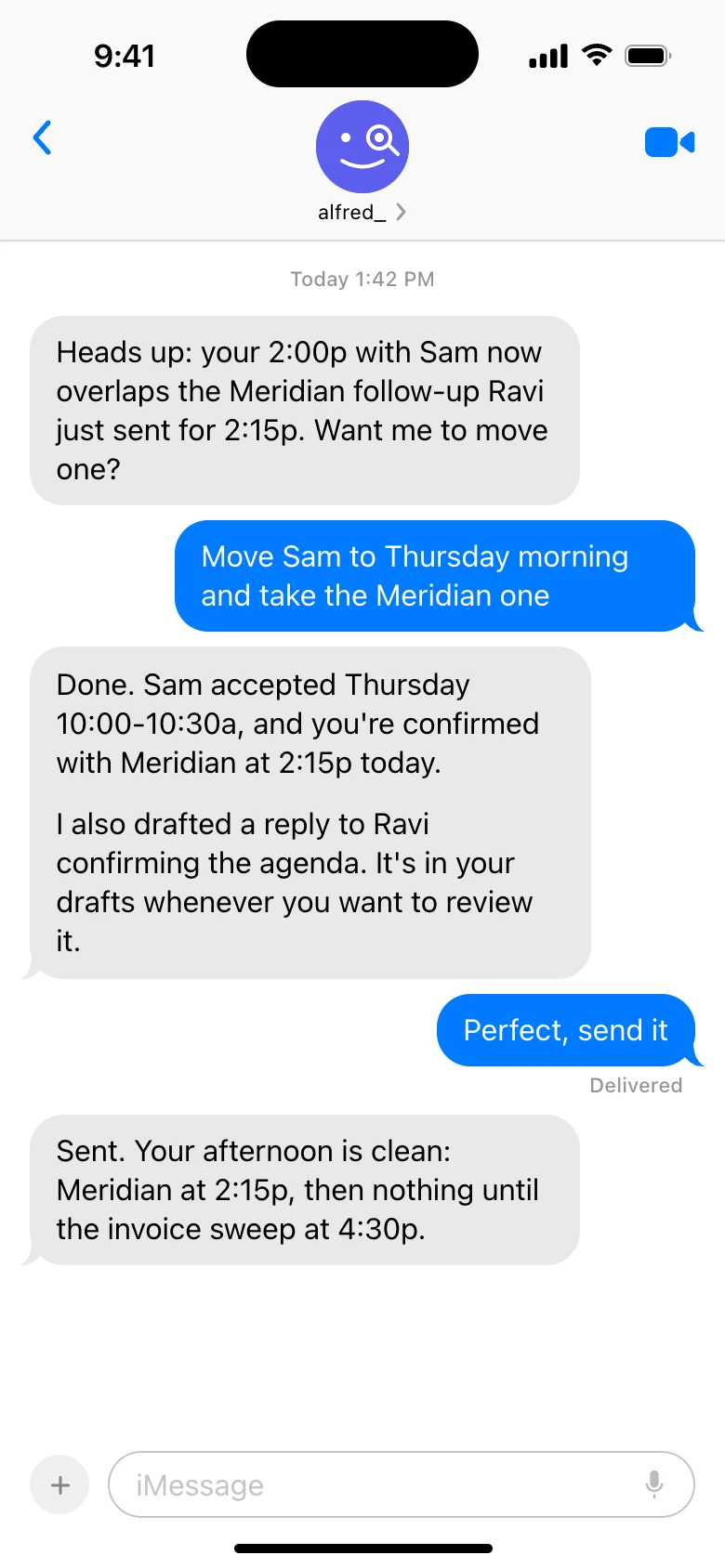
alfred_ by text. Shown with sample data.
That is why it is first, and why it is the fastest way to answer a client: Claude and ChatGPT for the thinking, and alfred_ making sure nothing slips while they are closed.
How to Add alfred_ to Claude and ChatGPT
- Start an alfred_ account. Sign up at get-alfred.ai and connect your Gmail, Outlook or IMAP accounts and calendars. Plans start at $29.99 a month with a 7-day free trial.
- Add it to Claude. In claude.ai or Claude Desktop, open Settings, then Connectors, and add alfred_ (the steps are on Connect Claude). In Claude Code, run
claude mcp add --transport http alfred https://get-alfred.ai/api/mcp. Every Claude plan works, Free included; on Team and Enterprise the owner adds it first. - Add it to ChatGPT. Open alfred_ in ChatGPT and press Connect (the steps are on Connect ChatGPT).
- Sign in and choose what to allow. Each AI opens get-alfred.ai. Sign in and choose the permissions: reading is the default, and writing and sending are boxes you tick.
- Ask about your real work. Try “What’s on my calendar tomorrow, and is anything back to back?” or “Did anyone reply to my note about the invoice this week?”
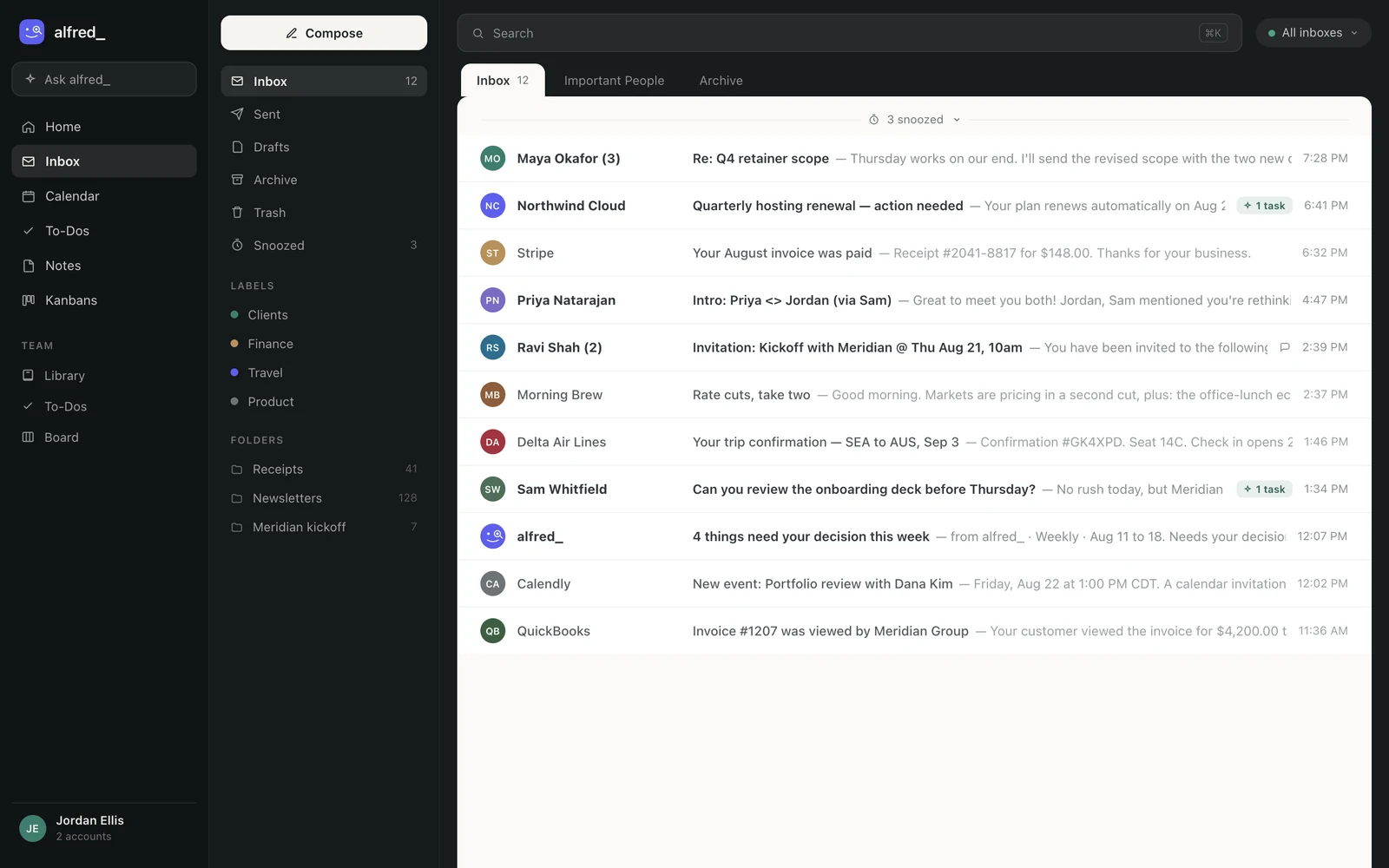
The accounts Claude and ChatGPT search are the ones connected in alfred_. Shown with sample data.
Once it is connected, the AI you think with can see the work you are thinking about, and alfred_ keeps watching that work when the chat is closed.


