

The Promise That Broke
In 2007, productivity writer Merlin Mann stood in front of a Google Tech Talk audience and introduced a concept that would define email culture for nearly two decades: inbox zero.
The idea was elegant. Your inbox is not a filing cabinet. It is a processing queue. Every email should be touched once and moved: reply, delegate, defer, archive, or delete. If you process consistently, your inbox stays at zero. Zero does not mean zero emails received. It means zero emails unprocessed.
Twenty years later, inbox zero is simultaneously one of the most popular and most abandoned productivity concepts in existence. People try it, sustain it for a few weeks, and quit when the time investment becomes unsustainable.
Mann himself walked away from it. In interviews and on his podcast, he acknowledged the irony: he was spending so much time perfecting his email system that the system had become the work. The method designed to free people from email had become another email obligation.
So should you try it? The answer is more nuanced than yes or no.
What Inbox Zero Got Right
The core principles behind inbox zero remain sound, even if the execution method has aged poorly.
Your inbox is a queue, not a storage system. This insight alone changed how millions of people think about email. Before inbox zero, people used their inbox as a combination filing cabinet, to-do list, and reminder system. Messages sat unread for weeks, buried under new arrivals. The queue metaphor was a genuine breakthrough.
Every email deserves a decision. The “touch it once” principle eliminates the worst email habit: opening a message, feeling uncertain, closing it, and reopening it three more times before acting. Forced decision-making at the point of contact is efficient. Research on email management has shown that decisiveness in email processing correlates with lower stress and higher perceived productivity.
Unprocessed email creates ambient anxiety. A 2015 study by Kushlev and Dunn published in Computers in Human Behavior found that limiting email checking to three times per day significantly reduced daily stress. Inbox zero recognized that an overflowing inbox is not just disorganized, it is stressful. Clearing it produces genuine psychological relief.
Separation of processing and doing. Inbox zero distinguished between email triage (deciding what each message requires) and email execution (actually doing the work). This separation remains one of the most valuable productivity concepts in any domain.
What Inbox Zero Got Wrong
The problem is not the principles. It is the math.
The volume problem
When Mann introduced inbox zero in 2007, email volumes were significantly lower than today. At moderate volumes, manual triage takes 15-20 minutes. That is sustainable.
By 2026, the Radicati Group reports the average business professional receives 121 emails per day. Many client-facing professionals receive 150-200+. At 121 emails, manual triage (scan, decide, act, file) takes 2-3 hours. Every single day.
That is not a productivity system. That is a part-time job dedicated to maintaining a productivity system.
The urgency problem
Inbox zero treats all email processing as equal. But not all email is equal. A message from your biggest client about a deadline change and a newsletter about marketing trends both require “processing,” but they operate on fundamentally different timelines and with fundamentally different stakes.
In a 40-email world, you could process everything in order and still get to the urgent items quickly. In a 120-email world, sequentially processing to zero means urgent items might sit behind 80 low-priority messages. By the time you reach them, the window for response has closed.
The perfectionism trap
Inbox zero creates a binary: you either have zero unprocessed emails or you have failed. There is no partial credit. This all-or-nothing framing means one busy day, a long meeting, a day out sick, an unexpectedly heavy email afternoon, destroys the system. Rebuilding from 200 unread to zero feels so daunting that many people simply give up entirely.
Mann recognized this trap in himself. The system meant to reduce email anxiety had created a new form of it: inbox zero anxiety.
The time allocation problem
Here is the most damning critique: the hours spent achieving inbox zero are often worth more spent on other things.
A consultant billing $200/hour who spends 2 hours daily on inbox zero triage is spending $400/day, roughly $8,000/month, on email processing. The same consultant could spend those 2 hours on billable work and earn $400, while paying $29.99/month for a tool that handles the triage automatically.
Inbox zero asks you to trade your most valuable hours for administrative processing. At high email volumes, this trade makes no financial sense.
The Reframe: Zero Uncertainty Instead of Zero Emails
The useful evolution of inbox zero is not about email count. It is about confidence.
Zero uncertainty means: at any given moment, you know exactly which emails need your attention, which are being handled, and which can wait. Your inbox might show 20 messages, but you are not anxious about any of them because every one has been triaged and categorized.
This is what inbox zero was actually trying to achieve. The zero was never the point. The point was eliminating the nagging feeling that something important is buried in your inbox and you are missing it.
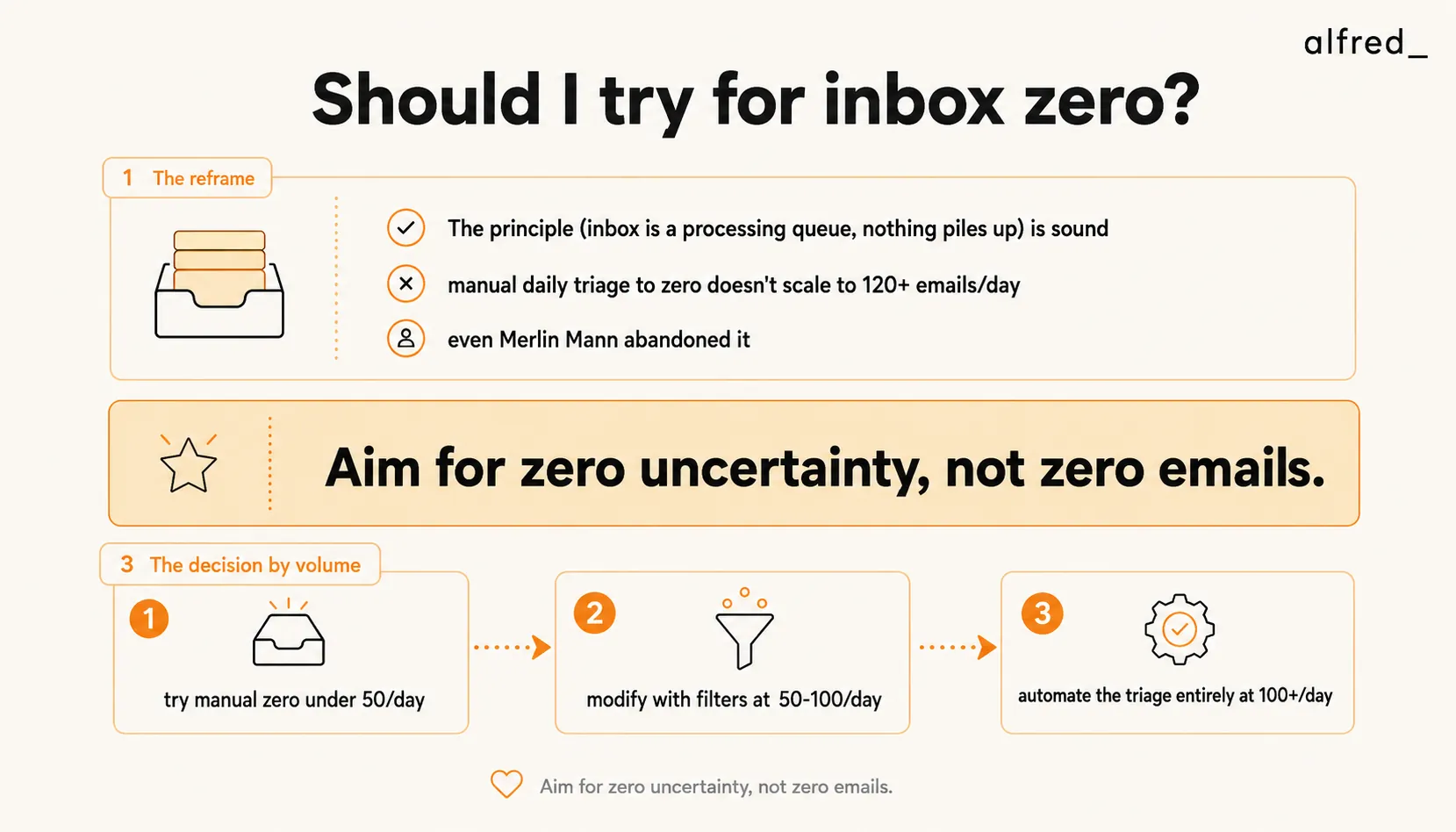
Zero uncertainty does not require processing every email personally. It requires a reliable system that separates “needs your judgment” from “handled” from “can wait.” The system can be manual (if your volume is low enough) or automated (if it is not).
The Decision Framework
Try manual inbox zero if:
- You receive fewer than 50 emails per day
- Your email is mostly low-complexity (scheduling, confirmations, brief exchanges)
- You have 30-45 minutes per day to dedicate to email processing
- You find satisfaction in the clearing ritual (some people genuinely do)
At this volume, manual inbox zero is sustainable and the psychological benefits are real. The triage time is manageable, and the clear inbox provides a genuine sense of control.
Modify the approach if:
- You receive 50-100 emails per day
- You cannot dedicate more than 30 minutes to email processing
- You need to prioritize certain senders or topics over others
At this volume, pure inbox zero is not realistic without significant time investment. Instead, use rules and filters to automatically archive low-priority categories (newsletters, notifications, CC’d threads), and apply inbox zero principles only to the remaining messages. SaneBox ($7/month) automates this filtering step. You practice inbox zero on a pre-filtered inbox of 30-50 messages instead of 100.
Automate it entirely if:
- You receive 100+ emails per day
- Your email includes complex threads requiring nuanced responses
- You bill by the hour or have high-value work competing for your email time
- You have tried inbox zero before and burned out
At this volume, the only sustainable path to inbox zero is automation. AI triage tools process your entire inbox continuously, categorizing, prioritizing, drafting replies, and surfacing only the messages that require your judgment. You achieve functional inbox zero in two 15-minute sessions per day, not because you processed 120 emails manually, but because a system processed them and showed you the 10-15 that need your brain.
Where alfred_ Fits
alfred_ essentially automates the inbox zero workflow.
It triages incoming email continuously, categorizing by urgency and type. It drafts replies for messages that have clear, appropriate responses. It extracts tasks and follow-ups from email threads. And it delivers a morning brief that surfaces only the decisions that require your judgment.
The result is functional inbox zero without the 2-3 hours of manual processing. You open your briefing, review the flagged items, approve or edit the drafted replies, and move on. Your inbox is processed to zero, but you spent 20-30 minutes instead of half your morning.
alfred_ is positioned for the 100+ emails/day professional who has either tried inbox zero and abandoned it or who knows the math does not work manually at their volume.
But here is the honest caveat: if you receive fewer than 50 emails per day, you do not need alfred_ for inbox zero. Manual processing or a simple filter like SaneBox will work fine. Do not pay for automation you do not need.
What Merlin Mann Should Have Said
The insight behind inbox zero was right: unprocessed email creates anxiety, and a system for processing eliminates it.
The execution was wrong: manual processing does not scale to modern email volume.
The updated version: build a system that achieves zero uncertainty about your email. At low volume, that system is your own discipline. At high volume, that system is automation.
Do not aim for zero emails. Aim for zero surprises. Aim for the confidence that nothing important is hiding in your inbox, that everything has been seen, sorted, and either handled or scheduled.
That was always the real goal. The number in the badge was never the point.




