


Todoist has been around since 2007, nearly two decades. In a world of flashy AI productivity tools that launch and die within two years, that longevity says something. Millions of people open Todoist every day, type in a task, and get on with their lives. It works. It has always worked.
But “Is Todoist worth it?” is really asking whether the thing Todoist does, organizing tasks you create, is the thing that actually makes you more productive. For some people, absolutely. For others, the tasks in Todoist are the easy part. The hard part is the 87 emails they have not processed yet.
What Todoist Does Well
Natural language input is best-in-class. Type “Review Q2 budget every Tuesday at 10am #Work p1” and Todoist parses it perfectly, recurring date, time, project, priority, all in one line. No clicking through date pickers or dropdown menus. This sounds like a small thing until you use it daily. It makes capturing tasks nearly frictionless.
The design is genuinely beautiful. Todoist respects your attention. The interface is clean, fast, and consistent across every platform, web, desktop, iOS, Android, browser extensions. There are no feature-tour popups, no upsell banners, no visual clutter. After nearly two decades of iteration, every pixel earns its place.
Cross-platform sync is bulletproof. Add a task on your phone, and it appears on your laptop before you put the phone down. This sounds basic, but many productivity tools still struggle with real-time sync. Todoist nails it. You can trust that your task list is always current, everywhere.
Filters and views are powerful. Custom filters like “overdue & #Work” or “due before: next Monday & p1” let you create exactly the views you need. Combine with labels and you have a flexible GTD-style system without the rigidity of a full project management tool.
Ramble turns voice into structured tasks. Launched in January 2026, Ramble lets you speak naturally, “I need to send the contract to Sarah by Friday and also follow up with Marcus about the Q3 budget next week”, and Todoist creates two separate tasks with the right projects, dates, and priorities. It is surprisingly good at parsing messy human speech into clean task entries.
Karma and streaks create gentle accountability. Todoist tracks your task completion rate and gives you productivity scores. This gamification is subtle enough to motivate without creating anxiety. Completing tasks feels satisfying in a way that checking off items in Notes does not.
What Todoist Does Not Do
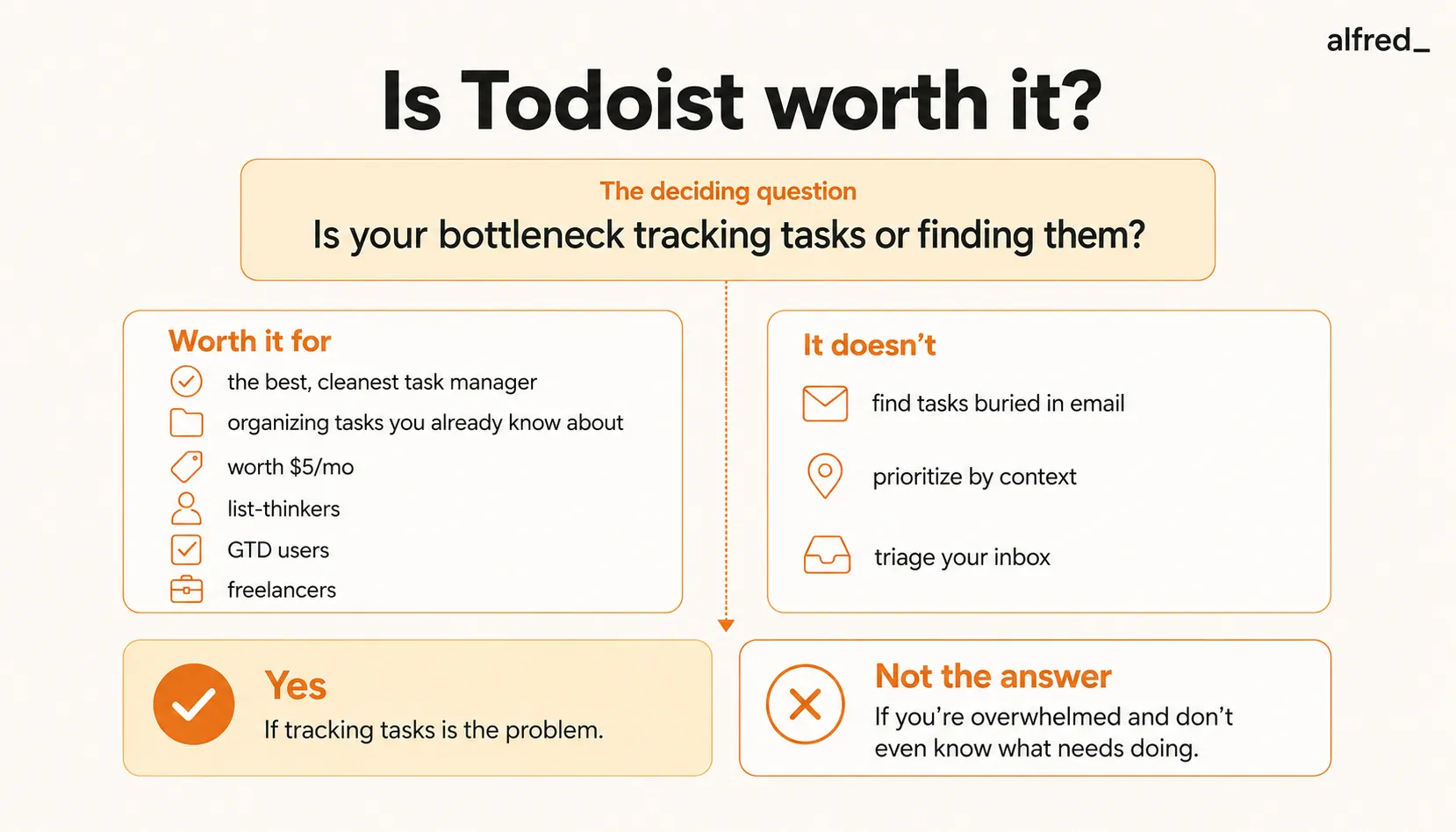
It does not find your tasks. This is the fundamental gap. Every task in Todoist exists because you put it there. Todoist does not read your email and notice that a client asked for a deliverable by Friday. It does not scan your calendar and remind you to prep for tomorrow’s board meeting. It does not extract action items from the Slack thread you skimmed at lunch. If you forget to create a task, it does not exist.
It does not prioritize based on context. Todoist lets you set priority levels (p1-p4), but the prioritization is static. You set it once when creating the task. It does not know that your p2 task is actually urgent now because the meeting it relates to was moved to tomorrow. It does not understand that the “Reply to Sarah” task is more important today because Sarah sent two follow-up emails this morning.
There is no email triage. Your email inbox and your Todoist are separate systems. The Gmail plugin lets you manually convert emails to tasks, but the 90% of emails that need a quick reply, a file, or just acknowledgment. Those still require you to process them one by one. Todoist helps you track work. It does not reduce the work of processing communications.
No daily briefing or morning summary. When you open Todoist, you see your task list. You do not see a synthesis of what happened overnight, what emails need responses, what meetings require preparation, or what follow-ups are overdue. You see items you previously created, sorted by your own rules.
Collaboration is shallow. You can share projects and assign tasks, but Todoist is not a team workspace. There are no comments threads, no workload views, no dependencies, no status workflows. For anything beyond “here is a shared grocery list,” teams outgrow Todoist quickly.
Pricing Breakdown
Todoist updated pricing in December 2025:
- Free: Up to 5 active projects, 5 collaborators per project, basic features. Generous enough for casual use.
- Pro: $5/month (annual) or $7/month (monthly). 300 projects, reminders, calendar feeds, task duration, AI Assistant, auto-backups, activity log.
- Business: $8/user/month (annual) or $10/user/month (monthly). Everything in Pro plus team workspaces, admin controls, team billing, and priority support.
For comparison:
- Apple Reminders is free
- Google Tasks is free
- TickTick is free to $35.99/year (about $3/month, or $5.99 billed monthly)
- Things 3 is a one-time $49.99 (Apple ecosystem only)
- alfred_ is $29.99/month
At $5/month, Todoist Pro is one of the best values in productivity software. The question is not whether $5/month is worth it. It obviously is. The question is whether a task manager, no matter how good, addresses your actual productivity problem.
Who Should Buy Todoist
GTD practitioners and list-oriented thinkers. If your brain works in lists and you follow a Getting Things Done-style methodology, Todoist is the best digital implementation available. Projects, contexts (labels), next actions (filters), and weekly reviews all map cleanly to Todoist’s architecture.
Freelancers juggling multiple clients. If you manage five clients with different deadlines and need a lightweight way to track deliverables without a full PM tool, Todoist’s project-per-client structure works well. The natural language input means you can capture tasks faster than any alternative.
Students and academics. Todoist’s free tier is generous enough for most students, and Pro’s recurring tasks and reminders are useful for assignment tracking. The cross-platform availability means you can add tasks from your phone during lecture and review them on your laptop later.
Anyone who just wants a task list that works. If you are not looking for AI, not looking for automation, not looking for a platform. You just want to write down what you need to do and check it off, Todoist is the answer. It has been the answer for 17 years.
Who Should Not Buy Todoist
Anyone drowning in email. If your problem is not “I forget tasks” but “I have 150 unread emails and I do not know which ones need action,” Todoist does not help. You can manually create tasks from emails, but the triage work, reading, evaluating, deciding, is still entirely on you. Adding Todoist to an overflowing inbox is like organizing your bookshelf while the house floods.
Professionals whose tasks come from other people’s communication. If 70% of your work originates in email, Slack, and meeting follow-ups, the hard part is not tracking tasks. It is identifying them. Todoist assumes you know what needs to be done. If your problem is that commitments are buried in your inbox and you are not sure what you have agreed to, a task manager is downstream of the real issue.
Teams that need project management. Todoist Business is a team task list, not a project management platform. If you need dependencies, Gantt charts, workload balancing, or status workflows, look at Asana, Linear, or Monday instead.
People who want AI to handle the hard part. Todoist’s AI features help you create and organize tasks faster. They do not read your email, identify what matters, draft responses, or brief you on your day. If what you want is less manual work, not just better-organized manual work, Todoist is solving the wrong problem.
Where alfred_ Fits
Todoist and alfred_ solve adjacent but different problems.
Todoist answers: “Where do I track my tasks?” It gives you a beautiful, reliable place to organize what you need to do.
alfred_ answers: “What actually needs my attention?” It reads your email, understands your calendar, identifies what is important, drafts replies to routine messages, and presents you with a Daily Brief each morning that says: here are the three things that matter today.
The distinction is about where work gets stuck. If you know your tasks and just need a place to track them, Todoist is the right tool at a great price. If your problem is upstream, tasks are buried in 150 emails, you have follow-ups you have lost track of, and you are not sure what commitments you made in yesterday’s meetings. That is alfred_’s territory.
At $29.99/month, alfred_ costs more than Todoist Pro. But they are not really competing. alfred_ handles the communication triage layer that generates your tasks. Todoist handles the task organization layer. Some users run both, alfred_ to surface what needs doing, Todoist to track the execution.
But if you have to choose one, ask yourself: is your bottleneck tracking tasks or finding them? If you always know what needs doing but sometimes forget to do it, buy Todoist. If you open your inbox and feel overwhelmed because you do not even know what needs doing, start upstream.
The Verdict
Todoist is worth $5/month for almost anyone who uses task lists. It is the best task manager available at any price, clean, fast, reliable, and thoughtfully designed. After nearly two decades, it has earned that reputation.
But most people asking “Is Todoist worth it?” are really asking “Will this fix my productivity?” And the honest answer is: only if your problem is task organization. If your problem is that you are overwhelmed by communication and you cannot figure out what needs your attention, no task manager will solve that. You need something that operates in the communication layer, not the task layer.
Todoist is an excellent tool for the right problem. Just make sure task tracking is actually your problem.