

You set a reminder to chase the proposal on Thursday. On Wednesday the client replied and signed. On Thursday the reminder fires anyway, and you spend a minute working out that there is nothing to do.
Do that a few times a week and you stop trusting your reminders, which is worse than not having them. What you want is conditional: remind me, unless they already answered.
Why ordinary reminders get this wrong
A calendar reminder, a to-do with a date, a snoozed email and an Outlook follow-up flag all work the same way. They know the date. They do not know the thread. Nothing checks whether a reply arrived before they go off.
A conditional reminder has to look at the thread itself: was there a message from the other person after yours? Only tools that read your mail can do that.
The tools that check for a reply first
| Tool | How it decides | What you do | Works with |
|---|---|---|---|
| Boomerang | You set a time; the email comes back to your inbox only if nobody replied | Choose per email, at send time | Gmail, Outlook |
| Superhuman | Remind Me defaults to "if no reply"; Auto Reminders on Business picks the emails for you | Choose per email, or let it choose | Gmail, Outlook, in the Superhuman app |
| Gmail nudges | Google resurfaces some sent emails it thinks need a follow-up | Nothing | Gmail |
| SaneBox | Sent mail with no answer is filed in a SaneNoReplies folder | Review the folder | Any provider |
| alfred_ | Tracks every thread where you are waiting on someone; a reply takes it off the list | Read the list in your morning brief, or ask | Gmail, Outlook, IMAP |
If you know at send time: a per-email reminder
Boomerang and Superhuman both let you attach “remind me if no reply” to a single email as you send it. Pick three days, and if the thread is still quiet in three days it comes back to the top of your inbox. If they answered, nothing happens.
This is the most direct answer to the question, and for a handful of important emails a week it is all you need. Its limit is the decision. You have to know, at the moment you press send, that this one might go quiet.
If you do not: something that watches every thread
The emails that hurt are usually the ones you did not think to set a reminder on. For those you need a tool that watches all sent mail.
Gmail nudges are built in and free. Gmail will move a sent email back to the top of the inbox with a prompt to follow up. You cannot choose which emails or how long it waits, and there is no list to review.
SaneBox keeps a SaneNoReplies folder of sent mail that got no answer. It is a list, it works with any provider, and you write the follow-ups yourself.
alfred_ is an AI personal assistant for work. It reads your sent and received mail across up to six Gmail, Outlook and IMAP accounts and keeps one list of the threads where you are waiting on someone else, next to the list of replies you owe. When the other person answers, the thread is no longer waiting on them and comes off.
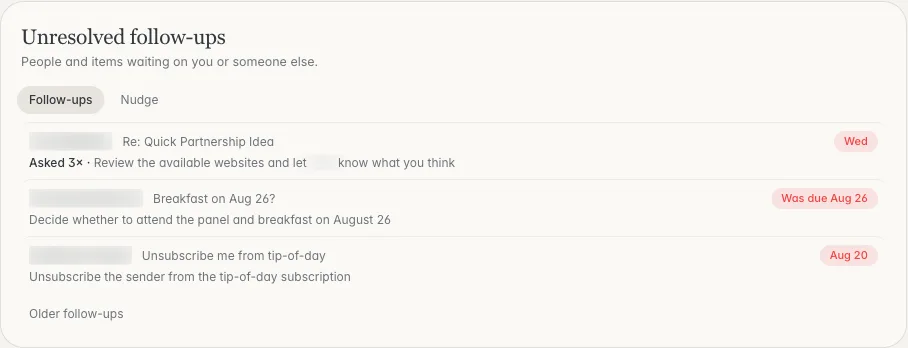
Threads still waiting on a reply, with how long each has been open. Shown with sample data.
You see what is left in two ways. The morning brief, by email or text, includes the threads you are waiting on. And you can ask at any time, on the web, in the iPhone app or by text: “What am I waiting on?”
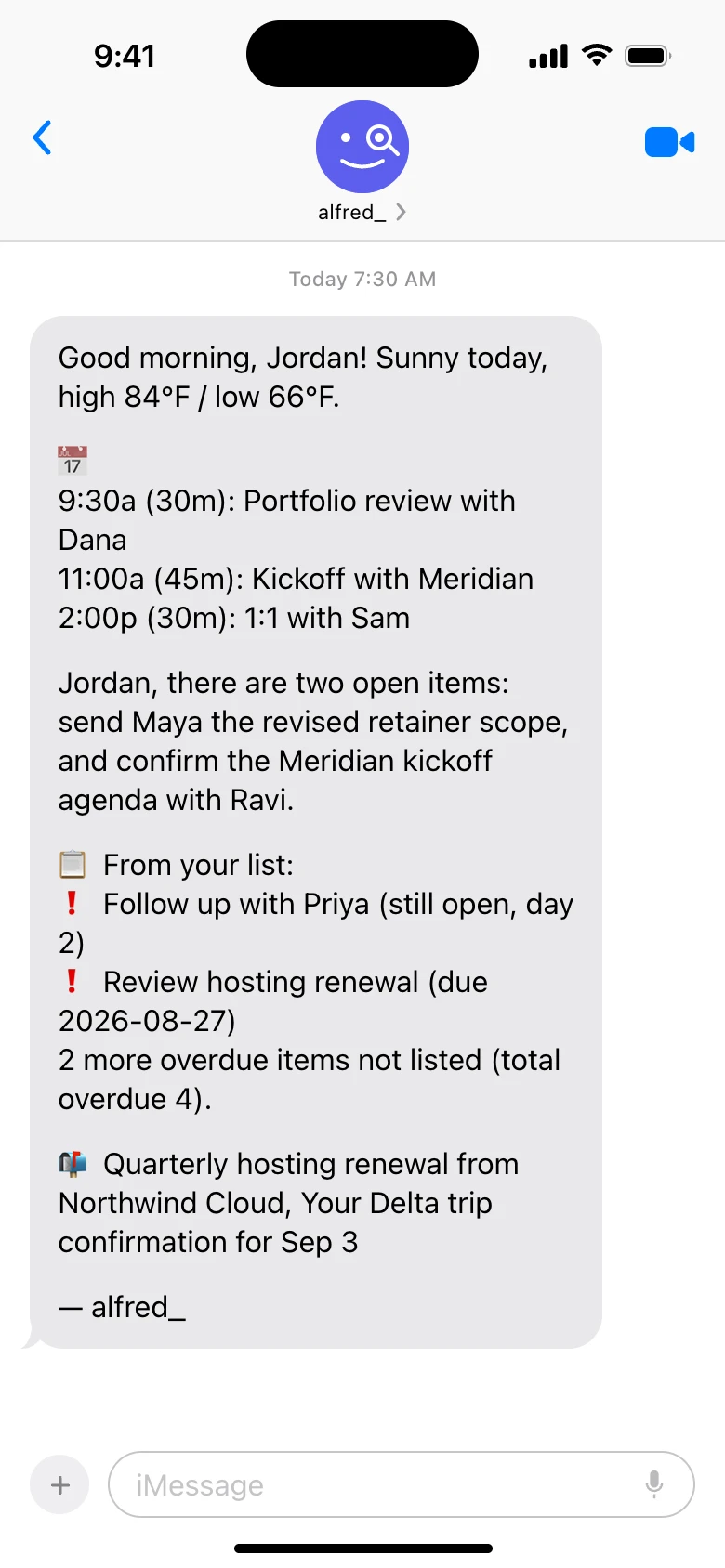
The morning brief as a text. Shown with sample data.
When you want to chase one, ask for a draft, review it and send it yourself.
What alfred_ does not do here
It is worth being exact, because the question asks for reminders:
- It is not a timer per email. You do not set “three days” on a message. You get the list of what is still open each morning.
- It does not chase for you. No follow-up is sent unless you send it.
If a timed ping on one specific email is what you want, Boomerang or Superhuman’s Remind Me is the closer fit. For a weekly list, alfred_ has a ready-made routine called Chase what I’m owed: every Monday at 8 AM, or when you set, it lists what you asked people for that is still outstanding, with a follow-up ready for your OK. Plans start at $29.99 a month with a 7-day free trial. How a thread is judged to be waiting on you or on them is in Follow-ups: threads waiting on a reply.
Which to pick
- A few important emails a week, and you know which: Boomerang or Superhuman’s Remind Me.
- Gmail only, and a rough backstop is enough: leave nudges on.
- You want a folder to review on Fridays: SaneBox.
- You want one list of everyone you are waiting on, across accounts, next to what you owe: alfred_.
A reminder you have to second-guess is noise. The test for any of these is whether, when it tells you to follow up, there is still something to follow up on.




