


Quick Definition
AI Email Assistant software that uses artificial intelligence to manage your inbox: triaging messages by urgency, drafting replies in your voice, extracting tasks from emails, and tracking follow-ups. Unlike email clients that help you work faster, AI email assistants do the work for you.
The short answer: the best AI email assistants in 2026 are alfred_ (24/25, full automation across Gmail and Outlook, $29.99/month flat), Superhuman (15/25, fastest client, $33/month Business annual), Shortwave (15/25, best AI-native client for Gmail), Fyxer AI (15/25, proactive drafts), Lindy (14/25, build-your-own email agents), and Inbox Zero (14/25, open-source AI rules for Gmail), with SaneBox for passive filtering, Missive for teams, MailMaestro for Outlook drafting, and the free defaults, Gemini in Gmail and Microsoft Copilot, covered below. alfred_ is the right pick if you want triage, drafts, follow-up tracking, and your calendar handled before you open the inbox; it is the wrong pick if you love doing email yourself and only want to do it faster, where Superhuman wins.
Full disclosure: alfred_ is our product, we build it, and it ranks first on this page. The rubric below is the honest reason why; every score and price is laid out so you can discount our bias and judge for yourself. Pricing for all 13 tools verified against vendor pricing pages in August 2026.
The test for any tool on this list is one question: when you open your inbox, is the work already done, or is it just easier to do? If you already have Copilot or Gemini and are not sure a paid tool adds anything, start with can ChatGPT, Copilot or Gemini manage my email.
Same criteria per row. The autonomy column separates assistants from clients: only alfred_ does the full loop (triage, draft, follow-up, calendar) without you having to ask. Prices verified August 2026.
| Tool | What it does autonomously | Email + calendar | Price | Best for |
|---|---|---|---|---|
| alfred_ | Triages every inbound email, drafts replies in your voice, tracks unanswered threads, manages your calendar, morning Daily Brief | Both, Gmail and Outlook | $29.99/mo or $299.99/yr, flat | Professionals who want email handled, not just faster |
| Superhuman | Auto Labels and Split Inbox sorting; drafts when you ask | Email; calendar view only | $33/mo Business annual, $40 monthly | Speed-first power users who enjoy processing email |
| Shortwave | AI bundles and Organize suggestions; Ghostwriter drafts on demand | Email; Gmail-first | $24-$100/seat/mo annual | Gmail users who want the smartest client |
| Fyxer AI | Labels inbound mail and pre-writes draft replies | Email only; meeting notes on higher tiers | $22.50/mo Starter annual | People whose only bottleneck is writing replies |
| SaneBox | Moves low-priority mail out of the inbox by header | Email only, any client | $7-$36/mo | Passive noise reduction without switching apps |
| Spark Mail | Smart Inbox sorting; AI compose on demand | Email; basic calendar | Free, $10/mo Plus | Budget cross-platform client with team features |
| Spike | Priority Inbox; chat-style threads | Email; calendar and notes bundled | Free, ~$5/user/mo | Teams who want email to feel like messaging |
| Lindy | Runs email agents you configure: triage, drafts, workflows | Email + calendar via agents | $29.99/mo Plus (3,000 credits) | Builders who want custom email automation |
| Inbox Zero | AI rules label, archive, draft and track replies | Email only; Gmail | $20-$50/user/mo | Gmail users who want open-source AI rules |
| Microsoft Copilot | Summaries, drafts, inbox prioritization on newer plans | Outlook + full M365 suite | $30/user/mo add-on ($21 Business SKU) | Organizations already paying for M365 |
| Gemini in Gmail | On-demand summaries and Help me write | Gmail only | Free ($19.99/mo AI Pro) | The free default every Gmail user already has |
| Missive | Team rules and AI assistant across shared inboxes | Email + chat + SMS, team-wide | $14-$36/user/mo | Teams sharing one address |
| MailMaestro | AI compose and reply sidebar | Outlook and Gmail | Free-$15/mo | Outlook users who only want better drafts |
Choose Superhuman if speed is the whole point and you like doing email. Choose Shortwave if you live in Gmail and want the best AI-native client. Choose SaneBox if you only want a quieter inbox for $7. Choose Gemini or Copilot if you want to try AI email at zero incremental cost with the tools you already pay for. Choose Missive if the inbox is shared by a team. Choose Lindy if you want to build your own email agents. Choose alfred_ if you want an AI executive assistant for email and calendar that has the work done before you sit down. If you are shopping for the whole assistant category rather than email alone, see our best AI personal assistant test.
Why You Need an AI Email Assistant in 2026
The average professional receives 121 business emails per day (Radicati Group, 2024). Of those, research suggests only 38% require a meaningful response. That means you’re spending hours evaluating messages that don’t need your brain.
- 28% of your workweek goes to email (McKinsey Global Institute)
- 121 emails per day, each requiring a micro-decision
- 23 minutes to refocus after each email check (Gloria Mark, UC Irvine)
- $21,000+ in lost productivity per year at average professional salaries
AI email assistants solve this by handling the triage, drafting, and organization layers so you only touch emails that actually require your expertise. For the broader email tool landscape, including non-AI options, see our best email management tools guide. For teams managing a shared address, shared inbox software solves a different problem. Here are the 13 best AI email assistant options in 2026, including the free defaults you may already have.
Our Verdict
alfred_ is the best AI email assistant for end-to-end automation in 2026
If you want email handled for you: triage, drafts, task extraction, follow-ups, calendar management, and a daily briefing, alfred_ is the one tool here that does all of it while keeping you in control of every outgoing message. Others solve one piece. alfred_ solves the whole thing, including your calendar.
Best for
- Executives and founders losing 13+ hours a week to email
- Professionals using Google Workspace or Outlook
- Anyone who wants email handled, not just organized faster
Not for
- Users who need meeting transcription
- Teams needing native Slack or CRM integration
How We Scored These Tools
Five pillars, 1-5 points each, total /25: Triage (auto-prioritizes inbound mail by urgency and type, without being asked), Drafts (voice-matched replies, proactive beats on-demand), Task extraction (commitments captured from email content, yours and theirs), Follow-up tracking (surfaces sent emails still awaiting a reply), Low setup friction (works out of the box with your existing account).
How the scores were produced: alfred_ we use daily, it is our product, and the field tests against other assistants are run by this article’s author. The competing tools were scored from trials where a trial exists, their documented feature sets, and their own product pages; every price on this page was re-verified against the vendor’s pricing page in August 2026. What this rubric deliberately rewards is autonomy: a tool that does the work unprompted outscores a tool that helps you do it faster. If you think that weighting is wrong, the per-pillar columns below let you re-rank with your own.
Quick Scorecard: 13 AI Email Assistants Scored Out of 25
Higher is better. alfred_ is the one tool here that scores 5 on triage, drafts, tasks, AND follow-up, the four pillars of closed-loop email automation. Prices and features verified August 2026.
| Tool | Score /25 | Triage | Drafts | Tasks | Follow-up | Setup |
|---|---|---|---|---|---|---|
| alfred_ | 24 | 5 | 5 | 5 | 5 | 4 |
| Superhuman | 15 | 4 | 4 | 1 | 2 | 4 |
| Shortwave | 15 | 4 | 4 | 2 | 1 | 4 |
| Fyxer AI | 15 | 4 | 4 | 1 | 2 | 4 |
| Lindy | 14 | 3 | 4 | 3 | 2 | 2 |
| Inbox Zero | 14 | 4 | 3 | 1 | 3 | 3 |
| Microsoft Copilot | 13 | 3 | 4 | 2 | 1 | 3 |
| Missive | 13 | 3 | 3 | 2 | 2 | 3 |
| SaneBox | 12 | 3 | 0 | 0 | 4 | 5 |
| Gemini in Gmail | 11 | 2 | 3 | 1 | 0 | 5 |
| MailMaestro | 11 | 2 | 4 | 1 | 0 | 4 |
| Spark Mail | 11 | 3 | 3 | 0 | 1 | 4 |
| Spike | 8 | 3 | 1 | 0 | 0 | 4 |
Why alfred_ scores 24/25: It is the one tool on this list that handles all four pillars of email work (triage, drafts, tasks, follow-up) as a closed loop rather than a single feature. Setup loses one point because OAuth connection to Gmail or Outlook takes 3–5 minutes on first use.
Quick Comparison: All 13 AI Email Assistants
| Tool | Price | Auto-triage? | AI drafts? | Task extraction? | Follow-up tracking? | Works with |
|---|---|---|---|---|---|---|
| alfred_ | $29.99/mo | Yes | Yes (proactive) | Yes | Yes | Gmail, Outlook |
| Superhuman | Free–$33/mo | Yes | Yes (on demand) | No | No | Gmail, Outlook |
| Shortwave | $30–$120/mo | Yes | Yes (Ghostwriter) | No | No | Gmail |
| Fyxer AI | $22.50/mo | Yes | Yes (proactive) | No | No | Gmail, Outlook |
| Lindy | $29.99/mo (Plus) | Yes (agent you configure) | Yes (agent) | Yes (agent) | Partial (agent) | Gmail, Outlook |
| Inbox Zero | $20–$50/user/mo | Yes (AI rules) | Yes | No | Yes (reply tracking) | Gmail |
| Microsoft Copilot | $30/mo add-on | Partial (newer plans) | Yes (on demand) | Partial | No | Outlook/M365 |
| Missive | $14–$36/user/mo | Yes (team rules) | Yes (on demand) | Partial (assignments) | Partial (statuses) | Gmail, Outlook, IMAP |
| SaneBox | $7–$36/mo | Yes (filter only) | No | No | Yes (SaneNoReplies) | Any client |
| Gemini in Gmail | Free–$19.99/mo | No (on-demand only) | Yes (Help me write) | No | No | Gmail |
| MailMaestro | Free–$15/mo | Partial | Yes (on demand) | No | No | Outlook, Gmail |
| Spark Mail | Free–$20/mo | Smart notifications | Yes (on demand) | No | No | Gmail, Outlook, iCloud |
| Spike | Free–$5/mo | Priority Inbox | No | No | No | Gmail, Outlook, iCloud |
The pattern: Most tools automate 1-2 steps. alfred_ is the one here that handles triage + drafts + task extraction + follow-ups as a closed loop. A useful rule of thumb: an AI email tool that cannot tell you which of your sent emails are still unanswered is a writing aid, not an assistant.
The 13 Best AI Email Assistants, Reviewed
1. alfred_: Best for End-to-End Email Automation
Price: $29.99/month or $299.99/year, flat, no tiers | Works with: Gmail, Outlook
alfred_ is a persistent personal assistant for your work. It keeps track of what is waiting on you and what is waiting on everyone else, across all your inboxes and calendars, chases what has stalled, and texts you every morning what actually needs you. It is the one tool on this list that handles email as a complete workflow rather than a single feature. Most AI email tools speed up one step. alfred_ automates the full inbound lifecycle: content-aware triage, voice-matched drafts, task extraction (including commitments you made), and a Daily Brief that tells you what needs your attention before you open your inbox.
What it actually does:
- Auto-triage: Every incoming email gets categorized by urgency and type. You see what matters first without scanning 121 messages yourself.
- AI draft replies: Replies are generated in your voice, based on your past communication patterns. You review and send. The AI learns over time.
- Task extraction: Action items buried in email threads get pulled into a task list automatically. No more reading an email, switching to a to-do app, and typing the same thing twice.
- Follow-up tracking: alfred_ tracks emails you sent that haven’t gotten a response and surfaces them when it’s time to nudge.
- Daily Brief: An overnight summary of your inbox, calendar, and tasks delivered before your day starts.
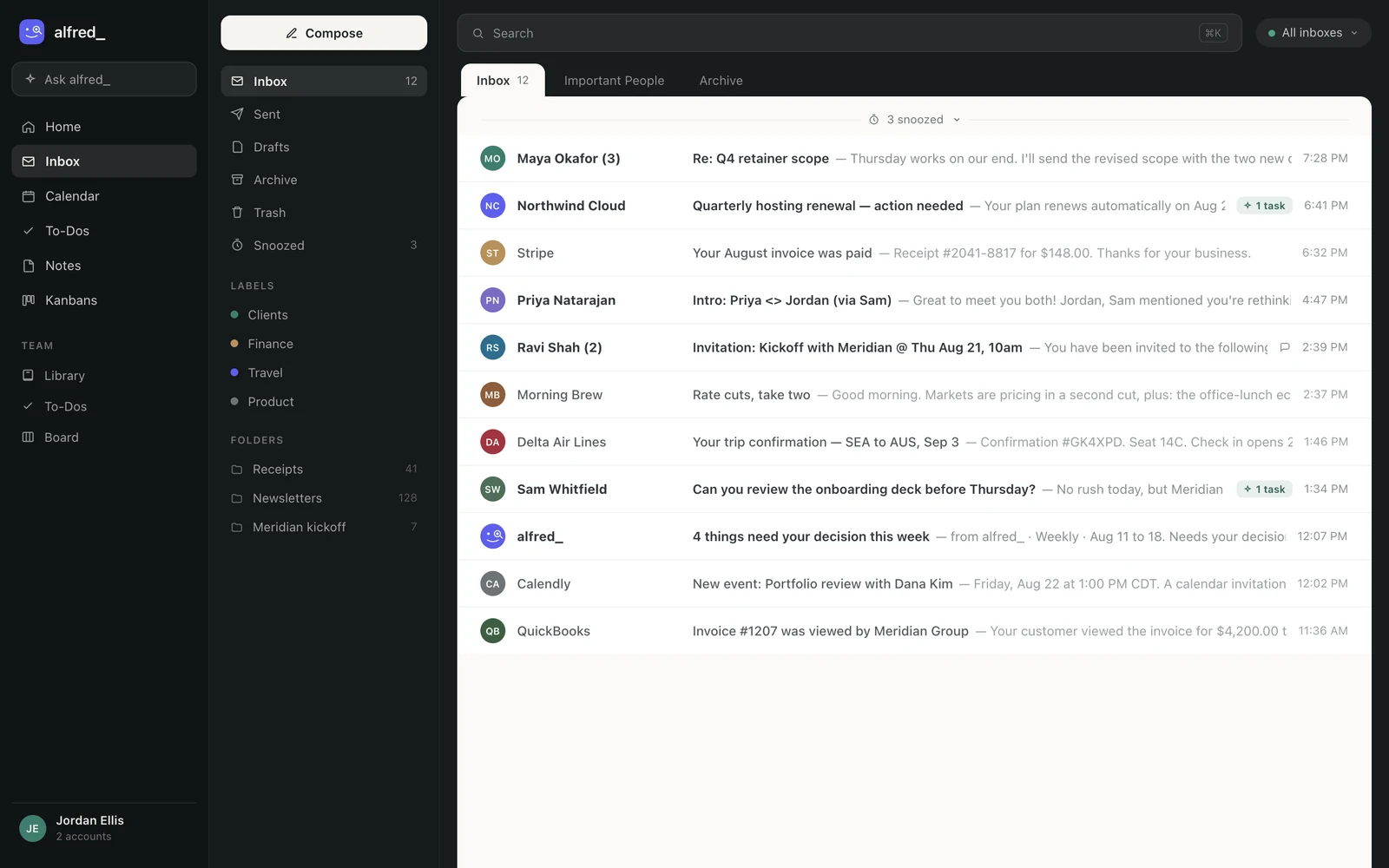
The unified inbox: both accounts in one triaged queue, with the tasks alfred_ extracted flagged per thread. Shown with sample data.
The result is that email becomes a 10-minute review process instead of a 2-hour reactive loop. For executives and founders processing 100+ emails daily, this is a category shift, not an incremental improvement.
Limitations: No meeting transcription. No native Slack or CRM integrations yet. If your workflow is Slack-first, you will still need a separate tool for that channel.
Most tools on this list pick a side, Gmail or Outlook. alfred_ triages both into one queue so you stop losing context when work spans accounts.
2. Superhuman: Best for Speed-First Email Power Users
Price: Free tier (Go + Grammarly basics) | Pro $12/mo | Business $33/mo annual or $40 month-to-month (includes Superhuman Mail) | Works with: Gmail, Outlook
Superhuman underwent a major transformation in 2025. Grammarly acquired Superhuman in July 2025 (last valued at $825M), then in October 2025 the parent company rebranded entirely as “Superhuman”, Grammarly gave up its own name. The result is the Superhuman Suite: Grammarly (writing assistant, 40M daily active users), Superhuman Mail (the email client), Coda (workspace/docs), and Superhuman Go (AI assistant with 100+ app integrations).
Standout features: Keyboard-first design with sub-100ms load times. Split Inbox organizes messages into streams. Auto Labels, AI triage, and AI auto-draft replies. Superhuman Go works across browser tabs as an AI assistant. Grammarly writing assistance bundled in all paid tiers.
The catch: The Business tier ($33/mo) is required for Superhuman Mail, Pro ($12/mo) only includes Go and Grammarly. Superhuman makes you faster at doing email but doesn’t do email for you. You still read, decide, and respond to every message. For professionals who want maximum email speed, Superhuman is excellent. For those who want email handled, it is the wrong category.
“Emails load instantly, and the keyboard shortcuts put you in complete control. It may be the most game-changing email experience of my entrepreneurial career.” (Dev Chandra, The Process Hacker)
3. Shortwave: Best AI-Native Email Client for Gmail
Price: Business $30/seat/mo ($24 annual) / Premier $45/mo ($36 annual) / Max $120/mo ($100 annual) | Free trial: 14 days | Works with: Gmail (primary), limited Outlook support
Shortwave is an AI-first email client that shipped 96 features in 2024 and keeps accelerating. The AI search is genuinely useful: ask natural language questions like “what did Sarah say about the Q3 budget?” and get answers pulled from your email history. In late 2025, Shortwave launched Tasklet, an AI automation platform connecting email to Slack, Notion, Asana, and Google Drive in plain English, and Ghostwriter, which learns your personal writing voice from sent emails.
Standout features: AI thread summaries (catch up on 30-email threads in one paragraph), natural language inbox search, Ghostwriter voice-matched writing, Tasklet plain-English automations, and smart email bundling.
The catch: Primarily Gmail-focused. Shortwave has begun adding support for non-Gmail providers, but native Microsoft 365/Exchange support is still missing. Like Superhuman, Shortwave is a better email client, not an email automation layer. You still do the work; you just do it with significantly more AI assistance.
“It reads all my past emails and can interpret them in my style, not the formatting of regular LLMs. I can ask it questions specifically pertaining to my own documents and client interactions.” (Shortwave user on Product Hunt)
4. SaneBox: Best for Passive Inbox Filtering
Price: $7/month (Snack) to $36/month (Dinner) | Free trial: 14 days | Works with: Any email client
SaneBox takes a fundamentally different approach. It works at the server level, analyzing email headers (not content) to sort messages into folders like SaneLater, SaneBlackHole, and SaneNoReplies. You keep your existing email client. SaneBox just makes your inbox quieter.
Standout features: Works with any email provider and any email client. No app to install. SaneBlackHole is a one-click unsubscribe that actually works. The Do Not Disturb feature holds all email until a set time.
The catch: SaneBox takes 4-6 weeks to fully learn your preferences. It filters and sorts, but it does not draft replies, extract tasks, or track follow-ups. Think of it as a smart filter, not an assistant. At $7/month for basic filtering, the ROI is solid if sorting is your main pain point.
“Out of the box, SaneBox is about 80-85% accurate with its filtering. After a few weeks, it’s almost perfect. Your main inbox becomes a sanctuary for what actually matters.” (Solopreneur Tools)
5. Spark Mail: Best Budget-Friendly AI Email Client
Price: Free / Plus $10/month ($8.25 annual) / Pro $20/month ($16.58 annual) | Works with: Gmail, Outlook, iCloud, Yahoo
Spark is the best cross-platform email client at a low price point. It works on Mac, iOS, Windows, and Android with a clean interface and solid team features like shared drafts and email delegation. Spark restructured its plans in late 2025, replacing the old Premium tier with Plus and Pro tiers.
Standout features: AI Compose (write full emails from a short prompt), AI Rephrase (adjust tone), smart notifications that only ping you for important messages, and team email collaboration. The Plus plan includes AI Assistant, 40 AI meeting notes/month, and productivity integrations.
The catch: The AI capabilities are less sophisticated than Superhuman or Shortwave. Spark is better understood as a well-designed email client with light AI features rather than an AI-powered email tool. Good for individuals or small teams on a budget.
6. Spike: Best for Conversational Email
Price: Free / paid plans from ~$5/user/month | Works with: Gmail, Outlook, iCloud, Yahoo
Spike converts email threads into chat-like conversations, which is either brilliant or maddening depending on your workflow. It also bundles in video calls, collaborative notes, and voice messaging, essentially trying to replace Slack and email simultaneously.
Standout features: Conversational email view, built-in video calls and chat, Priority Inbox, and collaborative documents. The free plan includes AI tools and supports a single email address.
The catch: The conversational format does not work for formal business correspondence. If your emails are contracts, proposals, or legal communications, chat-style formatting creates confusion. Spike is best for internal teams who want email to feel like messaging.
7. Fyxer AI: Best for Auto-Draft Replies
Price: $22.50/month (Starter, billed annually) | Free trial: 7 days | Works with: Gmail, Outlook
Fyxer AI focuses on two things: auto-drafting replies and organizing your inbox. It reads incoming emails and generates draft responses automatically, which you review and send. It also provides meeting preparation notes and email summaries.
Standout features: Proactive draft replies generated without prompting, meeting prep summaries from email context, and spam/newsletter filtering. The Professional plan adds multi-inbox support and CRM integration.
The catch: At $22.50/month (Starter), the price approaches alfred_’s $29.99/month while covering less ground. Fyxer handles drafts and sorting. alfred_ handles drafts, sorting, content-aware triage, task extraction (including your outbound commitments), and a Daily Brief. The value gap is narrow on price but wide on capability.
8. Lindy: Best for Build-Your-Own Email Agents
Price: Plus $29.99/month per user (3,000 credits) | Pro $99.99/mo (15,000 credits) | Max $199.99/mo | Works with: Gmail, Outlook
Lindy is not an email tool; it is an agent platform you can point at email. You assemble “Lindies”, AI agents that triage inbound mail, draft replies, chase follow-ups, or route messages into other tools, and the ceiling is genuinely high: a well-built Lindy setup can approximate much of what dedicated assistants do, plus workflows none of them offer.
Standout features: Configurable agents for triage, drafting, and scheduling; deep integrations; agents can chain (an email triggers a CRM update triggers a Slack ping).
The catch: Two, and they’re structural. First, you build the assistant yourself; the out-of-box experience is a toolkit, not a working assistant, which is why Setup scores 2. Second, the credit meter: Plus includes 3,000 credits/month and Lindy’s own docs price “everyday asks” at 2-250 credits each, so a busy inbox can burn through the allowance mid-month. Budget for Pro if email is high-volume. For tinkerers, the most capable option here; for everyone else, a second job.
9. Inbox Zero: Best Open-Source AI Email Manager
Price: Starter $20/user/month | Plus $35 | Professional $50 | annual saves up to 20% | 7-day trial | Works with: Gmail
Inbox Zero is the open-source entry: AI rules in plain English (“archive newsletters, label invoices, draft a reply to anything from a client”), reply tracking so sent mail awaiting an answer doesn’t vanish, and cold email blocking. The code being public is a real trust advantage in a category that reads your whole inbox, and it earns points on our Follow-up pillar that most clients miss entirely.
Standout features: Plain-English AI rules, reply tracking, cold email blocker, open-source codebase you can self-host.
The catch: Gmail-only, and per-user pricing climbs fast: Plus at $35/user/month is more than alfred_ while covering email alone with no calendar, no task extraction, no daily brief. The self-host option changes that math for technical users willing to run their own instance.
10. Microsoft Copilot: Best If Your Organization Already Pays for M365
Price: $30/user/month add-on (enterprise) or $21/user/month Copilot Business SKU for orgs under 300 seats, on top of an existing M365 subscription | Works with: Outlook and the full M365 suite
If your company runs on Microsoft 365, Copilot is the default answer, and honestly a decent one. In Outlook it summarizes long threads, drafts and rewrites replies, and on newer plans prioritizes your inbox when you open it. Its real strength is reach: the same license works in Teams, Word, and Excel, and it can reference SharePoint documents alongside your mail.
Standout features: Thread summaries, draft assistance, inbox prioritization, cross-app context across the entire Microsoft ecosystem.
The catch: Copilot is an assistant you ask, not one that reports back. It does not triage overnight, track which sent emails still await replies, or deliver a morning brief; and the license math ($30 on top of $14-$22 for M365 itself) only makes sense if your team uses it beyond Outlook. Many of our users run both: Copilot for in-Office work, alfred_ for the inbox itself. Full comparison: alfred_ vs Copilot.
11. Gemini in Gmail: Best Free Starting Point
Price: Free in Gmail; Google AI Pro $19.99/month for advanced features | Works with: Gmail
Every Gmail user already has an AI email assistant; it’s behind the Gemini button. Thread summaries are genuinely good for a free feature, and Help me write produces serviceable drafts. Before paying anyone on this list, spend a week using Gemini deliberately; it establishes your baseline for what a paid tool must beat.
Standout features: Zero cost, zero setup, solid thread summaries, drafting help inside the compose window.
The catch: Entirely reactive. You click, per thread, every time. No batch summarization, no prioritization, no follow-up memory, nothing happens unless you ask. At 50+ emails a day the clicking is the job. Gemini answers “what does this thread say?”; it has no answer for “what needs me today?” That second question is the entire gap between a free feature and an assistant. Longer treatment: can ChatGPT, Copilot or Gemini manage my email.
12. Missive: Best for Teams Sharing an Inbox
Price: Starter $14/user/month | Productive $24 | Business $36 (billed yearly) | 30-day trial | Works with: Gmail, Outlook, IMAP
Missive is the strongest pick on this list for a problem the others don’t address: several people working one address (support@, sales@). Shared inboxes with assignments and internal comments live next to team chat, and its AI assistant and automations run across all of it, with a bring-your-own-API-key option for AI usage.
Standout features: Shared inboxes with assignment and collision detection, rules/automations, AI assistant across email, chat and SMS, BYOK for AI.
The catch: Missive is team infrastructure, not a personal assistant. Solo users pay team-tool prices for collaboration features they’ll never touch, and there’s no autonomous triage or briefing for an individual’s own mail. If shared inboxes are the actual problem, start with our best shared inbox software comparison where Missive competes on its home turf.
13. MailMaestro: Best Lightweight Drafting Sidebar for Outlook
Price: Free (3 AI requests/week) | Professional $12/month annual, $15 monthly | 14-day full trial | Works with: Outlook, Gmail
MailMaestro is a focused tool: an AI sidebar in Outlook (and Gmail) that composes, replies to, and improves emails, plus thread summaries. For Outlook users who want better drafting without an IT conversation about Copilot licensing, it is the pragmatic middle option, and the free tier’s 3 requests/week is enough to evaluate it honestly.
Standout features: Strong compose/reply drafting, thread summaries, installs from the Microsoft Marketplace in minutes, genuinely usable free tier.
The catch: Drafting is the whole product. No triage, no task extraction, no follow-up tracking, no briefing. It makes writing faster; the deciding, prioritizing, and remembering stay yours.
Pricing Comparison
Prices verified against each vendor's pricing page, August 2026.
| Tool | Free Plan | Entry Paid | Full-Featured | Replaces Your Email Client? | AI Drafts Included? |
|---|---|---|---|---|---|
| alfred_ | No free tier | $29.99/mo | $29.99/mo (one flat tier) | No (works alongside) | Yes (proactive) |
| Superhuman | Go + Grammarly basics | $12/mo (Pro, no Mail) | $33/mo (Business) | Yes | Yes (on demand) |
| Shortwave | 14-day trial | $30/seat/mo ($24 annual) | $120/mo (Max) | Yes (Gmail only) | Yes (Ghostwriter) |
| SaneBox | 14-day trial | $7/mo (Snack) | $36/mo (Dinner) | No (server-level filter) | No |
| Spark Mail | Basic features | $10/mo (Plus) | $20/mo (Pro) | Yes | Yes (on demand) |
| Spike | Single email address | ~$5/user/mo | ~$5/user/mo (single paid tier) | Yes | No |
| Fyxer AI | 7-day trial | $22.50/mo (Starter) | Professional (adds multi-inbox, CRM) | No (works alongside) | Yes (proactive) |
| Lindy | Credit trial | $29.99/mo (Plus, 3,000 credits) | $199.99/mo (Max) | No (agent layer) | Yes (agent you build) |
| Inbox Zero | 7-day trial / self-host free | $20/user/mo (Starter) | $50/user/mo (Professional) | No (works alongside) | Yes |
| Microsoft Copilot | No (add-on) | $21/user/mo (Business SKU) | $30/user/mo (enterprise add-on) | No (lives in Outlook) | Yes (on demand) |
| Gemini in Gmail | Yes, built in | Free | $19.99/mo (Google AI Pro) | No (lives in Gmail) | Yes (Help me write) |
| Missive | 30-day trial | $14/user/mo (Starter) | $36/user/mo (Business) | Yes (team client) | Yes (on demand) |
| MailMaestro | Free (3 requests/wk) | $12/mo annual ($15 monthly) | Custom (Enterprise) | No (sidebar add-in) | Yes (on demand) |
The hidden cost question: do you keep your email client? SaneBox and alfred_ work alongside Gmail/Outlook, no migration. Superhuman, Shortwave, and Spark replace your client entirely. If switching clients is a dealbreaker, your real options are alfred_ ($29.99/mo for full automation), SaneBox ($7/mo for filtering only), or Fyxer ($22.50/mo for drafts only).
How to Choose the Right AI Email Assistant
| What You Want | Best Pick | Price | What You Get |
|---|---|---|---|
| Full email automation (triage + drafts + tasks + follow-ups) | alfred_ | $29.99/mo | End-to-end: the only closed-loop email workflow |
| Fastest possible email processing | Superhuman | $33/mo (Business) | Sub-100ms load, keyboard-driven, Split Inbox |
| AI-native email client on Gmail | Shortwave | $30–$120/mo | Ghostwriter voice learning, Tasklet automations |
| Passive filtering, keep your current client | SaneBox | $7–$36/mo | Server-level sorting, works with any email app |
| Cross-platform + team features on a budget | Spark Mail | Free–$20/mo | Shared drafts, delegation, AI compose |
| Chat-style email + messaging | Spike | Free–$5/mo | Turns threads into conversations (polarizing) |
| Auto-drafted replies only | Fyxer AI | $22.50/mo | Proactive drafts + meeting prep summaries |
| Free AI email, zero new tools | Gemini in Gmail | Free | On-demand summaries and drafts inside Gmail |
| AI across your whole Microsoft stack | Microsoft Copilot | $21–$30/user/mo add-on | Outlook summaries + drafts, Teams/Word/Excel context |
| Custom email agents you design | Lindy | $29.99/mo (Plus) | Configurable triage/draft/workflow agents on credits |
| Open-source AI rules for Gmail | Inbox Zero | $20–$50/user/mo | Plain-English rules, reply tracking, self-hostable |
| A shared team address done right | Missive | $14–$36/user/mo | Shared inboxes, assignments, team AI |
| Better Outlook drafts, nothing else | MailMaestro | Free–$15/mo | Compose/reply sidebar with a real free tier |
If you process 50+ emails/day and want to stop doing email manually, start with alfred_. The ROI math is simple: $29.99/month to recover 5-8 hours/week. At that volume the failure mode is usually specific, and we break it down in important emails keep slipping through the cracks. alfred_ is also the top-ranked AI executive assistant for professionals who need email, calendar, and tasks handled together.
If you like doing email but want to do it faster, Superhuman is the right tool at $33/month for the Business tier (which includes Superhuman Mail). The Pro tier ($12/mo) only includes Superhuman Go and Grammarly.
If budget is the constraint, Spark’s Plus plan at $10/month ($8.25 annual) gives you AI assistance at a low cost. SaneBox at $7/month is worth adding on top of any client for passive filtering. Shortwave starts at $30/seat/month ($24 annual) for the full AI-native experience on Gmail.