

Skip to content
Oct '266 min read

Can Claude Send Emails for Me? (Gmail, Outlook and Other Accounts)

From Your Real Address, After You Say Yes.

Yes. With alfred_ connected, Claude can reply, forward and send from your Gmail, Outlook, iCloud or IMAP address, after showing you the message. What Claude's own connectors can send, and how to set it up.

Quick answer

Can Claude send emails for me?

  • Yes, with alfred_ connected: Claude can send a new email, reply in a thread or forward one, from your own Gmail, Outlook, iCloud, Yahoo or IMAP address
  • Every send shows you the message, the recipients and the from address first, and goes out only after you say yes
  • It can attach a file from the email you're forwarding, or from Google Drive, OneDrive or SharePoint
  • It works in claude.ai, Claude Desktop and Claude Code, and the same connection works in ChatGPT

alfred_ is our product. Claude's own connector behavior is as of October 28, 2026.

Claude writes the email. Then you copy it, open your mail, find the thread, paste it in, fix the formatting and press Send. The writing took ten seconds and the sending took two minutes.

Whether Claude can do that last step depends on which account you send from and what you have connected.

What Claude can send on its own

Your accountClaude's own connectorsClaude with alfred_
One Gmail accountSend, reply and forward since August 2026, with approval on by defaultSend, reply and forward, after you approve
Two or more Gmail accountsOne Google account at a timeEvery connected account, from the right address
Microsoft 365 (work)Reads Outlook; writes are a setting an admin turns onSend, reply and forward, including shared mailboxes you can open
Outlook.com, Hotmail, LivePersonal accounts can't connectSend, reply and forward
iCloud, Yahoo, AOL, Zoho, other IMAPNo Anthropic connectorSend, reply and forward
Claude's connector behavior from Anthropic's help center and connector listing, October 28, 2026.

How to let Claude send from your own address

  1. Connect your accounts to alfred_. Gmail and Google Workspace, Outlook (personal or work), iCloud Mail, Yahoo, AOL or any IMAP mailbox. Up to six.
  2. Add alfred_ to Claude. In claude.ai or Claude Desktop, open Settings, then Connectors, and add a custom connector named alfred_ with the address https://get-alfred.ai/api/mcp. In Claude Code, run claude mcp add --transport http alfred https://get-alfred.ai/api/mcp, then /mcp and Authenticate. Step-by-step: Connect Claude.
  3. Tick sending when you sign in. Reading is the default. Sending is its own permission, so you choose it on purpose. Leave it unticked and Claude can still save drafts to your real Drafts folder for you to send yourself.
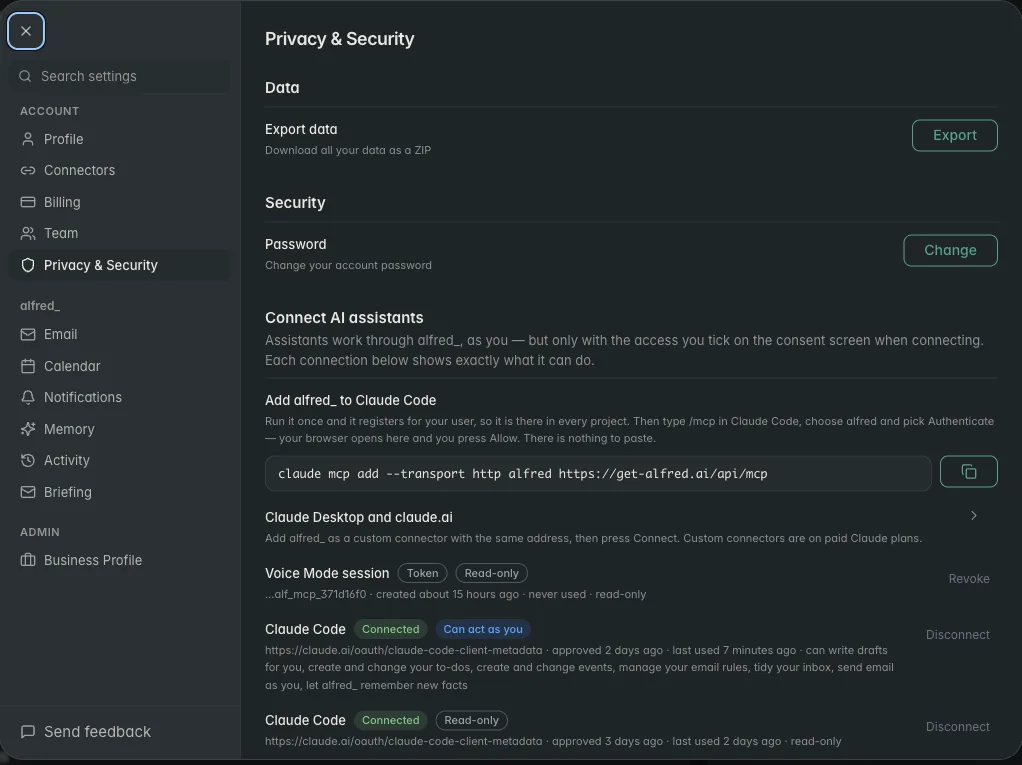
alfred_ settings showing one Claude connection that can act as you and one that is read-only

The same person can have one connection that sends and one that only reads. Shown with sample data.

What a send looks like

You: Forward Maya’s signed contract to accounting@harborpoint.co and say it’s for the March retainer.

Claude: Here’s the forward from your work account, with “Signed contract.pdf” attached: “Hi, forwarding Maya’s signed contract for the March retainer.” To: accounting@harborpoint.co. Send it?

You: Yes.

Claude: Sent.

Illustrative exchange. Names and addresses are invented.

Three things happen that you’d otherwise do by hand: the right thread is found, the attachment rides along, and it goes from the account Maya wrote to. The check before sending lives in alfred_, not in the chat, so Claude can’t talk its way past it.

It can also attach a file from Google Drive, OneDrive or SharePoint (“send Tom the Q3 proposal from my Drive”), or one Claude just made in the chat.

What it won’t do

  • Send without your yes. Every send, reply, forward and invitation is shown to you first.
  • Delete anything. No emails, events or to-dos.
  • Send on its own while you’re away from the chat. Claude acts when you ask.

That last one is where alfred_ itself comes in. It reads every incoming email, keeps a list of the replies you owe, and texts you when a client needs an answer. You text back what to say, and a 👍 sends it from your address.
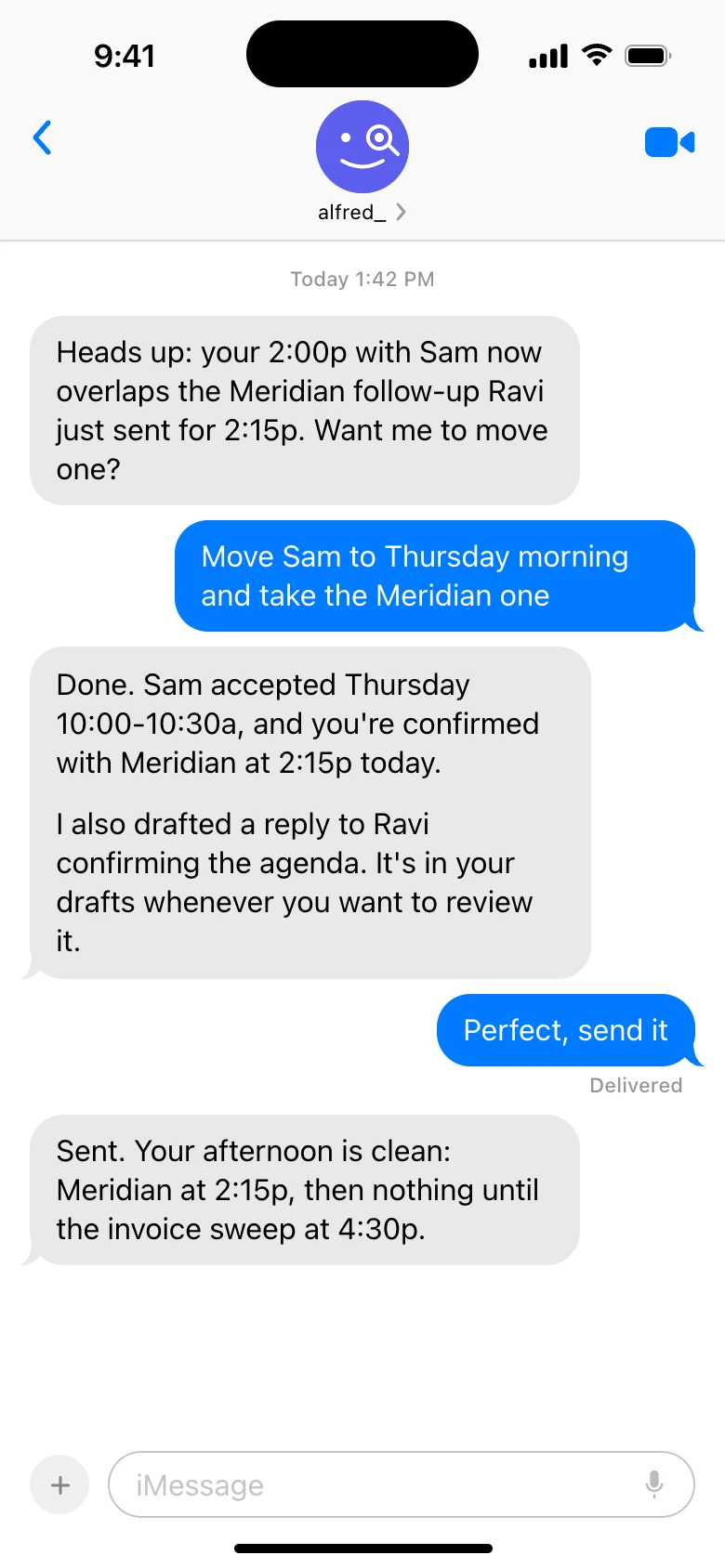
alfred_ in iMessage moving a meeting and sending a drafted reply when told to send it

alfred_ by text, between Claude chats. Shown with sample data.

You need an alfred_ account for any of this. Plans start at $29.99 a month with a 7-day free trial.


Keep client work from slipping through the cracks

alfred_ is an AI assistant for client-facing teams. Each teammate gets help with email, calendar, replies and follow-ups.

See what’s slipping+ more

Frequently asked questions

Can Claude send emails for me?

Yes, with alfred_ connected and sending allowed. Ask Claude to send, reply or forward, and alfred_ shows you the message, the recipients and the from address. It goes out from your own address only after you say yes. It works with Gmail, Google Workspace, personal and work Outlook, iCloud, Yahoo and other IMAP accounts.

Can Claude send emails through Outlook?

With alfred_, yes, from personal Outlook.com and Hotmail addresses and from Microsoft 365 work accounts, including Microsoft 365 shared mailboxes you have access to. Claude's own Microsoft 365 connector is for work accounts only, and its write actions are a setting an administrator turns on.

Can Claude send emails through Gmail?

Yes. With alfred_, Claude sends from any of your connected Gmail accounts after you approve. Claude's own Google connector added sending, replying and forwarding in August 2026 for the one Google account it is signed in to, with approval on by default.

Can Claude send emails automatically?

Claude acts when you ask it in a chat; it doesn't watch your inbox between chats. alfred_ does: it reads every incoming email, flags the ones that need your answer and texts you, and you can reply by text and approve the send with a 👍. Nothing is sent without your approval.

Can Claude delete my emails?

Not through alfred_. The connection has no way to delete an email, cancel an event or remove a to-do. If you allow tidying, it can archive, move and label, and a bulk sweep shows you a count first.

About the authors

Written byPranav MishraAI/LLM Engineer at alfred_

Pranav builds the agents behind alfred_, the systems that watch your inbox and calendar, keep track of what is waiting on you, and surface what actually needs a response. He runs alfred_’s head-to-head field tests against other assistants.

Reviewed byConnor FataFounder & CEO of alfred_

Connor is the founder and CEO of alfred_, focused on making personal assistants accessible to business operators and individuals so they can focus on what matters and what’s important.