

You are the person who holds it together.
Three executives depend on you. Their calendars, their inboxes, their travel, their meeting prep, their follow-ups, their “can you make sure this gets handled?” requests. When they can’t find something, they ask you. When they need something done by end of day, they tell you. When a stakeholder is upset, you’re the one who notices the email first and flags it before it becomes a problem.
You are the executive assistant. You are the safety net. And right now, there is no safety net under you.
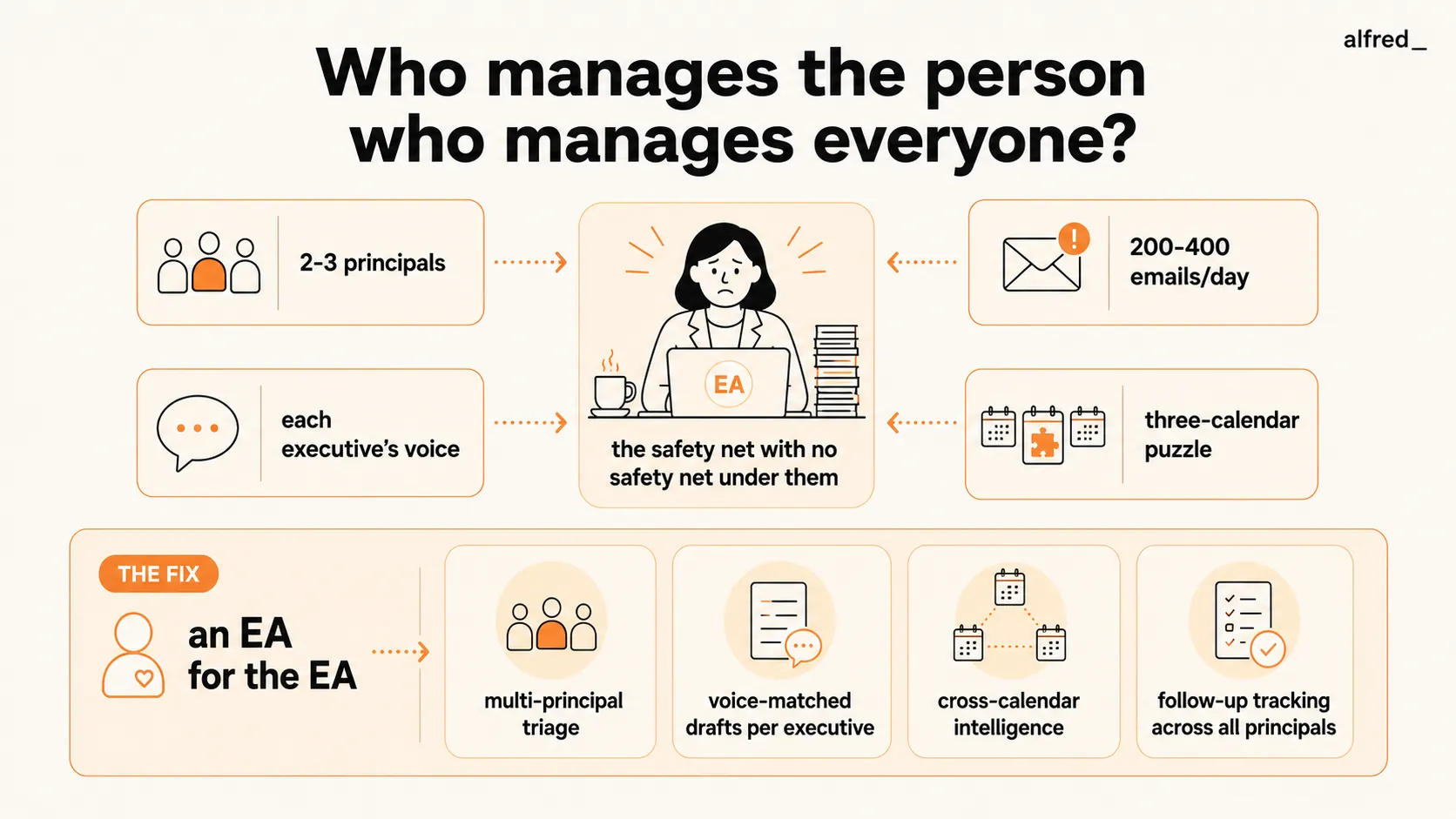
The Overload Nobody Talks About
The entire premise of the EA role is that executives are overwhelmed and need someone to absorb the overflow. What nobody addresses is what happens when the person absorbing the overflow is overwhelmed too.
Industry surveys show that executive assistants spend 3-5 hours per day on email management alone. For EAs supporting multiple principals, that number climbs. If you’re supporting 2-3 executives, you’re triaging 200-400 emails per day across separate inboxes, each with different priorities, stakeholders, and communication styles.
That’s not email management. That’s an air traffic control job with no radar.
“I’m the one who’s supposed to have it together. I’m the one everyone comes to when they’re overwhelmed. But who do I go to?”
The vast majority of executive assistants report workload increases over the past several years without proportional increases in support or compensation. Teams got leaner. Executives got busier. And the EA absorbed the delta.
You went from supporting one executive to supporting two. Then three. Each addition doubled the calendar complexity and the email volume. But your hours didn’t double. Your brain didn’t double. You just started working faster, staying later, and feeling like you’re always one missed email away from a disaster.
The Three-Principal Juggle
Supporting one executive is a full-time job. Supporting three is three full-time jobs crammed into one brain.
The challenge isn’t just volume. It’s context.
Your CEO writes short, direct emails. Two sentences, no greeting, question mark at the end. Your CRO writes detailed, warm, relationship-heavy messages with personal touches. Your VP of Engineering communicates in bullet points with technical specificity. When you’re drafting emails on behalf of all three, and you are, constantly. You need to code-switch between three completely different communication personas, sometimes within the same hour.
Then there’s the calendar. CEO has a board meeting that can’t move. CRO needs a client dinner that conflicts with the CEO’s preferred time for the team offsite planning session. VP of Engineering has a sprint review that overlaps with the CRO’s pipeline review, and both asked you to find time for a joint discussion about the product roadmap.
You’re solving a three-dimensional puzzle where every piece affects every other piece, and new pieces keep arriving via email while you’re still arranging the ones you have.
“I manage three calendars that are all connected but none of them know about each other. And every executive thinks their schedule is the priority.”
The Invisible Complexity
Here’s what people outside the EA role don’t understand: the hard part isn’t scheduling meetings or booking travel. Those are procedural. The hard part is the judgment calls.
Which email from the CEO’s inbox requires an immediate response, and which can wait until after the board meeting? The stakeholder who emailed the CRO, are they being politely persistent or genuinely upset? The VP of Engineering’s report wants to escalate a team issue, should you flag it now or let it come up in the 1:1?
Every email requires you to assess urgency, infer intent, consider political dynamics, and decide on action, across three different executives’ worlds, with three different sets of stakeholders, three different sets of expectations.
Organizational psychology research consistently shows that roles requiring high cognitive load combined with high volume lead to significantly elevated rates of burnout. The EA role is the textbook definition: constant decision-making under time pressure with no margin for error.
And unlike your principals, you don’t have an EA. You don’t have someone triaging your workload, flagging your priorities, drafting your responses. You’re the end of the delegation chain.
What You’ve Tried
You’ve tried every inbox app and calendar tool on the market:
- Superhuman ($30-40/month) makes you faster at processing email. But you’re already fast. The problem isn’t your speed. It’s the volume. Being 20% faster at 400 emails per day still means 400 emails per day.
- SaneBox ($7-36/month) filters low-priority email. But when you’re managing a CEO’s inbox, there’s no “low priority.” Everything is potentially urgent depending on who sent it and when.
- Calendly ($10-16/user/month) handles scheduling for one person. You manage three calendars that interact with each other and with a constellation of stakeholder schedules. Calendly can’t handle the interdependencies.
- Reclaim ($10-18/user/month) auto-blocks focus time. But you don’t need focus time. You need help with the work that fills the time.
None of these tools understand the multi-principal reality. None of them can draft an email in your CEO’s voice while simultaneously tracking the CRO’s follow-ups and scheduling the VP’s sprint review.
What You Actually Need
You need an EA for the EA.
Not another app to learn. Not another dashboard to check. You need something that reads all three inboxes simultaneously, understands the priorities and communication styles of each principal, drafts replies that match each executive’s voice, and surfaces the decisions that require your judgment while handling the work that doesn’t.
You need backup.
How alfred_ Works for Executive Assistants
alfred_ connects to your email and calendar accounts, supporting multiple inboxes for multiple principals, and starts learning immediately.
Multi-principal triage. Your morning brief isn’t a single list. It’s organized by principal and priority. “CEO: Board member replied to comp committee question, needs response today, draft attached. CRO: Client dinner confirmation pending, draft follow-up ready. VP Eng: Sprint review agenda needs your input, summary of last sprint’s notes attached.” You see everything at a glance, organized the way your brain already works.
Voice-matched drafts. alfred_ learns each executive’s communication style separately. The draft email for your CEO is two sentences, direct, with an action item. The draft for your CRO opens with a personal touch, references their last conversation, and includes a warm close. The draft for your VP is bulleted, specific, and technical. You review and adjust, but the heavy lifting, translating intent into each executive’s voice, is done.
Cross-calendar intelligence. When a scheduling conflict arises, alfred_ doesn’t just flag it. It suggests resolutions based on historical patterns. It knows the CEO has rescheduled vendor calls before but never board prep. It knows the CRO prefers in-person meetings Tuesday through Thursday. It knows the VP’s sprint reviews are fixed. You still make the call, but you’re choosing between options instead of building them from scratch.
Follow-up tracking across all principals. The CEO asked you to follow up with the CFO about next quarter’s budget. The CRO needs a response from a partner by Friday. The VP is waiting for a candidate’s references. alfred_ tracks all of it across all principals and flags what’s about to slip. Nothing falls through because you got pulled into a fire drill for a different executive.
After-hours coverage. When the CEO’s East Coast board member emails at 5 AM or the CRO’s London client emails at midnight, you arrive to draft replies ready for review, not a stack of raw emails that each require 10 minutes of context-loading.
The Difference
Without alfred_, a typical day looks like this: you arrive, open three inboxes, spend 45 minutes triaging and prioritizing, draft responses for an hour, handle scheduling conflicts, and by 10 AM you’ve cleared the backlog from overnight. Then the new emails start arriving. By noon, you’re behind again. By 3 PM, you’re triaging on the fly. By 5 PM, you’re drafting the responses you didn’t get to, and the evening emails from your principals start flowing in.
With alfred_, you arrive, review your morning brief for 10 minutes, approve 15-20 draft replies, handle the 5-6 items that need your actual judgment, and you’re done with email by 9 AM. When new emails arrive, alfred_ drafts responses in real-time. You review them in batches throughout the day, 5 minutes here, 10 minutes there, instead of the constant, reactive processing that eats your entire schedule.
The time savings are 2-3 hours per day. But the real savings is cognitive. You stop carrying three executives’ inboxes in your head. You stop lying in bed wondering if you missed something. You stop being the person who absorbs everyone else’s overload without anyone absorbing yours.
Try alfred_.
Everyone deserves someone in their corner. Even the person who’s supposed to be in everyone else’s.




