

Somewhere in your inbox right now, there is an email that matters. A deadline that moved. A client who needs a response. A decision that’s waiting on you. A problem that’s getting worse every hour you don’t see it.
You don’t know which email it is. It arrived sometime between 8 AM and now, mixed in with 47 newsletters, 12 automated notifications, 8 CC’d threads you were looped into for “visibility,” 3 calendar invitations, a company-wide announcement, and a Slack notification that someone replied to a thread from Tuesday.
The important thing is in there. It’s just buried. And you’re drowning in everything else.
“I have more information available to me than any human in history. I’ve never felt less clear about what I should be doing.”
The Paradox Nobody Warned You About
We were promised that more information would lead to better decisions. It seemed logical. More data, more clarity, more insight. The entire knowledge economy was built on this assumption.
The assumption is wrong.
Alvin Toffler warned about this in 1970 when he popularized the term “information overload” in Future Shock. He predicted that the exponential growth of available information would eventually exceed human processing capacity, leading not to enlightenment but to paralysis. Fifty-six years later, the prediction has come true with a precision that’s almost cruel.
The numbers are staggering. Research from UC San Diego’s Global Information Industry Center found that the average American consumes approximately 34 gigabytes of information per day, the equivalent of 174 newspapers. The average knowledge worker sends and receives 121 emails per day (Radicati Group). Add Slack messages, Teams notifications, shared documents, meeting notes, reports, dashboards, and the information volume becomes genuinely incomprehensible.
But here’s the part that should concern you: more information does not produce more clarity. It produces less.
Research by Eppler and Mengis, published in The Information Society (2004), synthesized decades of studies on information overload and found a consistent pattern: decision quality follows an inverted-U curve. Performance improves as information increases, up to a point. Past that point, additional information degrades decision quality, increases decision time, and produces worse outcomes. The curve has been replicated across domains: medical diagnosis, financial analysis, consumer purchasing, strategic planning.
You are past the top of the curve. Way past it.
The Firehose Problem
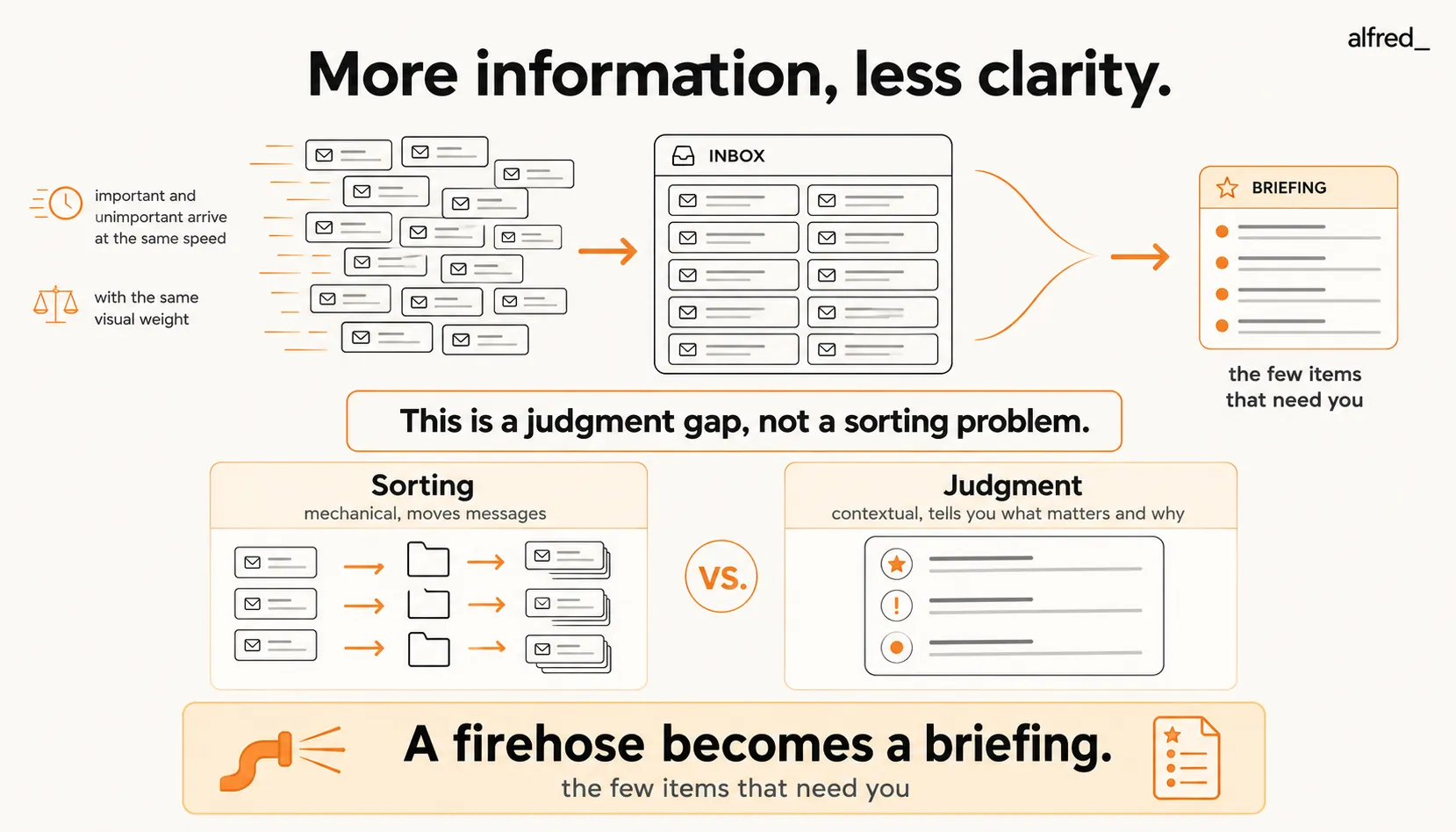
The core issue is deceptively simple: important things and unimportant things arrive in the same places, at the same speed, with the same visual weight.
The email from your biggest client about a contract issue looks exactly like the email from marketing about a blog post draft review. They’re both “unread.” They both have a bold subject line. They both sit in your inbox, one above the other, distinguished only by timestamp. Your email client does not know, and cannot tell you. That one of these is worth $200,000 and the other can wait until next week.
This is the firehose problem. Everything arrives at full pressure. Nothing is filtered for relevance. And the sorting is left entirely to you.
“My inbox is 80% noise. But I have to wade through all of it to find the 20% that matters. And if I miss something in the 80%, it might actually be the 20%.”
The math of this is brutal. If 20% of your incoming messages require action and you send and receive 121 per day, that’s a significant number that matter. To find those, you need to at least scan everything that arrives. At even 30 seconds per message, that’s an hour of pure triage, not responding, not thinking, just scanning to determine what deserves attention. An hour of your day devoted to looking for the work before you can do the work.
And that’s just email. Add Slack (an average of around 90 messages per day for active users), Teams, shared documents, and meeting follow-ups, and the scanning time doubles. You spend your morning triaging. By the time you know what matters, the morning is gone.
The Buried Signal
The worst part of information overload isn’t the noise. It’s what the noise hides.
You’re not afraid of newsletters. You can delete those without anxiety. What keeps you scanning, checking, scrolling is the knowledge that somewhere in the flood, there might be something critical that you haven’t seen yet. A message that slipped past your scan. A thread that escalated while you were in a meeting. A deadline that someone mentioned in paragraph three of an email you skimmed.
This is the dread of the buried signal. Not the volume itself, the uncertainty about what the volume might contain.
Research on “satisficing” versus “maximizing” behavior (Herbert Simon, Nobel Prize in Economics, 1978) describes this dynamic precisely. When the cost of missing a critical piece of information is high, which it is in professional settings, people switch from satisficing (accepting a “good enough” review of available information) to maximizing (attempting to review everything to avoid missing anything). Maximizing is exhausting, time-consuming, and ultimately self-defeating because the volume of information exceeds the capacity to review it. But the stakes feel too high to stop scanning.
“I’m not productive. I’m just constantly triaging. My whole job has become deciding what to look at next.”
This is the shift that information overload produces. You go from doing work to sorting work. The cognitive energy that should be directed at analysis, strategy, creativity, and execution is consumed by the upstream task of figuring out what to analyze, strategize about, create, or execute.
You’re not a knowledge worker anymore. You’re a knowledge sorter.
Why Filters, Folders, and Search Don’t Fix This
The standard advice for information overload comes in three flavors, all of which miss the fundamental problem.
Filters and rules work on keywords and sender addresses. They can reliably catch newsletters, automated notifications, and known noise sources. They cannot distinguish between a routine message from your manager and an urgent escalation from the same person. They operate on form, not meaning. The important email that uses unexpected language or comes from an unfamiliar sender sails right through your carefully constructed filter system.
Folders and labels redistribute the problem. Instead of one overflowing inbox, you have 12 overflowing folders. The scanning task doesn’t decrease. It multiplies. Now you’re checking “Clients” and “Urgent” and “Projects” and “Follow-up” and wondering whether the thing you’re looking for was categorized correctly by the rule you wrote three months ago.
Search works when you know what you’re looking for. It fails precisely when you need it most, when you don’t know what you’ve missed. You can’t search for “the email I haven’t seen that I should have responded to yesterday.” Search requires a query. The overload problem is that you don’t know the right query because you don’t know what’s buried.
“I have 47 Gmail filters. Things still slip through. The filters can’t read the email. They just match words.”
The Judgment Gap
Here’s the truth that the entire email industry has been dancing around for twenty years: information overload is not a sorting problem. It is a judgment problem.
Sorting is mechanical. It moves messages between containers based on rules. Judgment is contextual. It reads a message and understands that this particular email from this particular person, arriving at this particular time, referencing this particular project, requires your immediate attention, while the same message from a different person at a different time would be merely informational.
Filters sort. An executive assistant judges. That’s the difference between a system that moves your newsletters to a folder and a system that tells you: “The proposal response from Acme Corp arrived. They accepted the terms but want to change the timeline. This affects your Tuesday meeting. Here’s a draft reply.”
One reduces noise. The other provides clarity.
SaneBox ($7-$36/month) is a sophisticated sorter. It learns from your email behavior over 4-6 weeks and routes low-priority messages to @SaneLater. This is genuinely helpful. It reduces the scanning volume. But SaneBox does not read your messages. It does not know that the email in @SaneLater from an unfamiliar sender is actually a referral from your best client. It sorts based on headers and patterns, not meaning.
Shortwave ($30-$120/seat/mo) uses AI to bundle and summarize email threads. The summaries are useful for catching up on long conversations. But summaries compress information. They don’t apply judgment about what matters relative to your specific priorities, calendar, and commitments.
Superhuman ($30-$40/month) gives you speed. AI-generated summaries, instant reply suggestions, split inbox. If your goal is to process information faster, Superhuman delivers. But faster processing doesn’t solve the judgment gap. You process 121 emails in 45 minutes instead of 90 minutes. You still processed 121 emails. You still had to decide what mattered.
alfred_ fills the judgment gap. It reads your email and calendar, not just headers, but content. It understands who the sender is relative to your work. It knows that the message about the Acme contract connects to your meeting on Thursday. It knows that the “urgent” subject line from the vendor who marks everything “urgent” isn’t actually urgent. It delivers a daily briefing that doesn’t just reduce noise. It tells you what matters, why it matters, and what to do about it. Draft replies are ready. Non-urgent items are categorized. The 121 messages become the 8 that actually need you.
From Firehose to Briefing
The difference between information overload and information clarity is not volume. It’s structure.
Dozens of emails in a flat inbox is overload. The same messages processed, judged, categorized by urgency, and presented as “here are the 8 things that need your attention today, with context and draft replies” is a briefing. The information didn’t change. The presentation changed from firehose to filtered signal.
This is what executive assistants have always done for senior leaders. Not sort the mail. Read the mail, understand it, and surface what matters. That service has historically cost $60,000-$120,000 per year in salary. alfred_ provides the judgment layer for a tiny fraction of that.
“I don’t need less information. I need someone to tell me which information matters.”
That sentence captures the entire problem. You’re not drowning because there’s too much water. You’re drowning because nothing is telling you where the surface is.
What Changes When Judgment Arrives
The morning shifts. Instead of opening your inbox and scanning 47 new messages while your coffee gets cold, you open a briefing. Five items need your attention. Three have drafts. Two need your input. Everything else is categorized, informational threads you can review later, automated notifications that have been logged, low-priority messages that can wait.
The time you used to spend triaging. That hour of pure scanning, is gone. Not reduced. Gone. The judgment happened while you were asleep. The work that remains is the work that actually needs your brain: reviewing drafts, making decisions, responding to the things that only you can respond to.
The buried signal isn’t buried anymore. It’s on top. With context.
alfred_ replaces the scanning, the sorting, the scrolling, the anxiety of “what am I missing”, with the certainty that nothing has slipped. Not because you reviewed everything. Because something with judgment reviewed everything for you.
The information overload doesn’t stop. The firehose keeps flowing. But you’re no longer standing in front of it, trying to catch the right drops. You’re reading the briefing, doing the work, and letting the system handle the rest.
You were never supposed to process 34 gigabytes of information per day. No human is. The question was always: what would you do if something with judgment handled the rest?
Now you know.




