


There is a fear that does not get talked about enough in productivity discourse: the fear of becoming dependent on a tool.
You sign up for an app. It works. Your inbox is cleaner, your tasks are organized, your calendar makes sense. Weeks pass. Months. The app becomes part of your daily routine. And then a quiet thought arrives: What if this stops working? What if they raise the price? What if the company shuts down? Am I trapped?
This fear is rational. Software companies die. Pricing changes. Features get removed. And rebuilding a workflow you have come to depend on is genuinely painful.
But the fear is also often disproportionate to the reality. What actually happens when you cancel a productivity app is usually less dramatic than what you imagine. And understanding the real consequences, category by category, is more useful than vague anxiety about “dependency.”
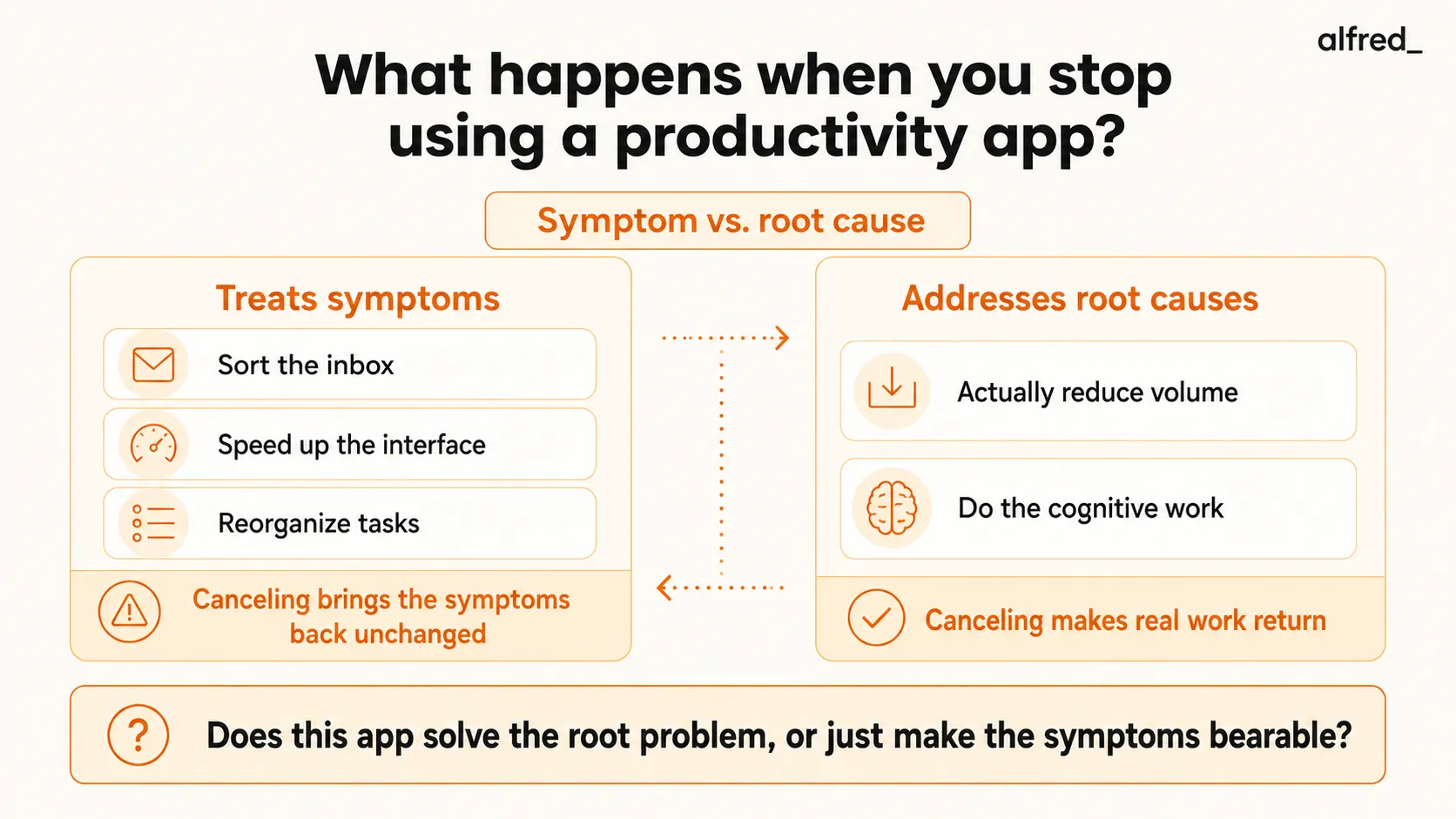
The Symptom vs. Root Cause Framework
Before mapping what happens when you cancel specific tools, there is a framework that makes the analysis much clearer.
Every productivity app either treats symptoms or addresses root causes. This distinction determines everything about what happens when you stop using it.
Symptom treatment: The app makes a problem more bearable without changing the underlying condition. When you cancel, the symptoms return immediately because nothing was fixed. You just stopped taking the painkiller.
Root cause treatment: The app changes the underlying condition. When you cancel, you lose the mechanism that was addressing the cause, but the problem returns more gradually because the system was doing something fundamental.
Here is the uncomfortable truth: most productivity apps treat symptoms. They reorganize the same work. They present the same information more attractively. They add a layer of structure on top of chaos without reducing the chaos. When you cancel, the chaos is still there, unchanged, because it was always there. The app was just a curtain.
A smaller number of apps address root causes. They reduce the actual volume of work. They eliminate decisions rather than organizing them. They do work rather than helping you do work. When you cancel these, the work actually comes back because the app was genuinely absorbing it.
Understanding which category your tools fall into tells you everything about the cancellation risk.
What Actually Happens: Category by Category
If you cancel a filtering tool (SaneBox, Clean Email)
What it was doing: Sorting incoming email into categories. Moving newsletters, notifications, and low-priority messages out of your primary inbox. Reducing visual clutter.
What happens when you stop: Your inbox gets noisier. All the emails that were being routed to @SaneLater and @SaneNews start landing in your primary inbox again. Your notification count goes up. The signal-to-noise ratio drops.
What you don’t lose: No email is lost. No data is deleted. Your email history is untouched. Everything is still in Gmail or Outlook. The tool was sorting your incoming stream, not storing or modifying your data.
How it feels: Annoying for a few days, then manageable. You can replicate most of SaneBox’s basic functionality with Gmail filters, though it takes manual setup and the filters are less sophisticated. Most people either set up manual filters within a week or accept the additional noise and adjust.
The honest assessment: Filtering tools treat symptoms. Your inbox volume was always this high. The tool was hiding part of it. When you cancel, you see the full volume again. Nothing fundamentally changed.
If you cancel a speed tool (Superhuman)
What it was doing: Making your email processing faster through keyboard shortcuts, a responsive interface, split inbox, and AI writing assistance.
What happens when you stop: You go back to Gmail. All your email is still there. Superhuman connects via API and does not store your email separately. Gmail’s built-in features (snooze, schedule send, smart compose, smart reply) still work.
What you don’t lose: Nothing. Your email, contacts, labels, and history are all in Gmail. Superhuman leaves no residue and takes nothing with it.
How it feels: Slower. Noticeably slower for the first week as muscle memory for Superhuman’s shortcuts conflicts with Gmail’s interface. By week two, you have readjusted. Gmail is not as fast, but it is functional. Some users report feeling a sense of relief that they are no longer paying $30/month for what Gmail does at 80% of the speed.
The honest assessment: Speed tools treat symptoms. Your email was always this volume. You were just processing it faster. When you cancel, the processing slows down. But the volume was never reduced, so the fundamental problem (too much email) was never addressed. Canceling Superhuman returns you to a fully functional email experience. Just a slower one.
If you cancel a task manager (Todoist, Asana, Things, TickTick)
What it was doing: Organizing your tasks into projects, priorities, due dates, and categories. Providing reminders. Tracking completion.
What happens when you stop: Your organizational structure disappears. Projects, labels, priority levels, recurring tasks, and the visual layout you built are gone (unless you exported). The tasks themselves, the actual things you need to do, still exist in the real world. You just lose the system for tracking them.
What you don’t lose: Most task managers offer data export (CSV, JSON, or plain text). Export before canceling. Your tasks are not locked inside the tool if you extract them first.
How it feels: Disorienting for the first few days if you relied heavily on the system. The adjustment depends on what you replace it with. Moving to a different task manager is relatively smooth (import the exported data). Moving to no system at all is risky, since the tasks that were being tracked will start slipping without reminders and due dates.
The honest assessment: Task managers are symptom treatment with a twist. They do not reduce the number of tasks you have. They organize existing tasks. But the organization itself has value, since tracking and prioritizing is genuine work that the tool was doing. When you cancel, that tracking work falls back on you (or on sticky notes and memory, which scale poorly). Task managers are one of the few symptom-treatment tools where the symptom treatment is genuinely valuable.
If you cancel a calendar tool (Calendly, Reclaim, Clockwise)
What it was doing: Automating scheduling (Calendly), protecting focus time (Reclaim), or optimizing meeting placement (Clockwise).
What happens when you stop: Scheduling goes back to email chains. Focus time blocks disappear from your calendar. Meetings are placed wherever the next available slot is, without intelligence.
What you don’t lose: Your calendar data lives in Google Calendar or Outlook Calendar, not in the scheduling tool. All existing events remain. You lose the automation layer, not the data.
How it feels: Immediately irritating if you relied on automated scheduling links. The first time you have to coordinate a meeting via a 7-email chain instead of a Calendly link, you feel the loss. Focus time protection disappears gradually as meetings fill the blocks that Reclaim was defending.
The honest assessment: Calendar tools are a mix. Calendly addresses a root cause (the inefficiency of email-based scheduling) by eliminating the back-and-forth entirely. Canceling Calendly means the scheduling problem returns in full. Reclaim and Clockwise treat symptoms (a meeting-heavy culture) by defending blocks, but do not reduce the number of meetings. Canceling them means the meetings expand to fill the space.
If you cancel an AI email assistant (alfred_)
What it was doing: Continuously triaging your inbox. Drafting replies in your voice. Extracting tasks from emails. Tracking follow-ups. Producing daily briefings of what needs your attention.
What happens when you stop: You go back to processing every email manually. The full volume of your inbox lands on you without triage, without drafts, without task extraction. Every email requires you to read it, evaluate it, decide on an action, and execute that action yourself.
What you don’t lose: Your email stays in Gmail or Outlook. Your calendar stays in Google Calendar or Outlook Calendar. alfred_ connects via API and does not store or move your email. All data remains in your primary platforms.
How it feels: Like going from having an assistant to not having one. The transition is noticeable because the tool was absorbing real cognitive work, not just organizing it. The first morning without a daily briefing, when you open your inbox to 47 unprocessed emails instead of a prioritized summary with drafted replies, is jarring.
The honest assessment: AI assistants that operate autonomously are closer to root-cause treatment than most productivity tools. They do not just organize your email differently. They read it, evaluate it, and handle it. When you cancel, the work returns because the tool was genuinely doing the work. This is both the strongest argument for the tool (it provides real value) and the strongest argument about dependency (you notice when it is gone).
The Dependency Question, Reframed
“Am I too dependent on this app?” is a question people ask about productivity tools in a way they never ask about other tools.
Nobody asks “Am I too dependent on my dishwasher?” The dishwasher does real work. If it breaks, you wash dishes by hand. That does not mean you were wrong to use the dishwasher. It means the dishwasher was genuinely useful.
The dependency concern is valid in one specific scenario: when the tool creates the illusion of productivity without actually doing anything. When you feel productive because the app has a beautiful interface and satisfying animations, but your actual output has not changed. When canceling would be painless because, underneath the surface, nothing was different.
If canceling an app would genuinely increase your workload, that is evidence the app was solving a real problem. That is not unhealthy dependency. That is a tool doing its job.
If canceling an app would change nothing except which screen you look at, the dependency was already an illusion. Cancel it. You will not miss it because it was never doing anything.
The Lock-In Spectrum
Not all tools create equal lock-in. Here is the realistic spectrum:
Near-zero lock-in:
- Email tools (Superhuman, SaneBox, alfred_). Your email lives in Gmail/Outlook. The tool is a layer on top. Cancel and the layer disappears. Your data stays.
- Calendar schedulers (Calendly). Your calendar stays in Google/Outlook. The scheduling links stop working.
Low lock-in:
- Task managers (Todoist, Asana), export your data before canceling. The raw tasks transfer. The organizational structure (projects, labels, priorities) does not transfer well.
- AI writing tools, nothing to export. The tool generated text for you. That text exists wherever you put it.
Medium lock-in:
- CRM tools (Salesforce, HubSpot), significant data and workflow investment. Migration is possible but painful.
- Project management (Monday, Jira), years of project history, custom workflows, and team processes are hard to replicate elsewhere.
High lock-in:
- Note-taking apps (Notion, Roam, Obsidian), years of linked notes, databases, relational structures, and organizational hierarchies. Export gives you raw text but destroys the connections that made the system valuable.
- Full-suite platforms (Microsoft 365, Google Workspace), deep integration across email, calendar, documents, storage. Moving ecosystems is a major undertaking.
For email and productivity tools specifically, the lock-in risk is genuinely low. Your data lives in Gmail, Outlook, or Google Calendar. The productivity tool is a layer on top. Cancel the layer and your data remains intact.
The Question You Should Actually Ask
Instead of “am I too dependent on this app?” ask: “Does this app solve the root problem, or does it just make the symptoms bearable?”
If it treats symptoms (sorting your inbox, making your interface faster, organizing tasks you were already tracking), canceling is easy. You go back to the slightly less organized version of the same work. Mildly annoying, not devastating.
If it addresses root causes (actually reducing email volume, eliminating scheduling friction, doing cognitive work you would otherwise do yourself), canceling means the problem returns. That is not lock-in. That is the tool working.
The best productivity tools in either category share one trait: they are honest about what they do. They do not claim to solve your email problem if they only sort it. They do not claim to give you time back if they only reorganize the time you spend. And they make it easy to leave, with data export, standard protocols, and no proprietary data formats, because confidence in the product means not needing to trap users.
The fear of app dependency is understandable. But for the tools worth using, the dependency is a feature, not a bug. You depend on them because they do real work. And if they stopped, you would notice, just like you would notice if any other tool that does real work suddenly disappeared.
The tools you should worry about are the ones you could cancel tomorrow without noticing. Those are the ones that were never doing anything to begin with.
Frequently Asked Questions
Will I lose my data if I cancel a productivity app?
In almost all cases, no. Your email stays in Gmail or Outlook. Task managers offer data export. Calendar data lives in Google Calendar or Outlook Calendar. The only thing you lose is the organizational layer the app provided.
Am I too dependent on productivity apps?
Dependency is only a problem if the tool is not solving a real problem. If canceling an app would meaningfully increase your daily workload, that is a sign the app is solving a real problem, not that you are unhealthily dependent.
What happens to my email if I stop using SaneBox?
Your email returns to its unfiltered state. Newsletters and low-priority messages land in your primary inbox again. No email is lost. Your inbox just gets noisier. The adjustment period is typically a few days.
What happens if I stop using Superhuman?
You go back to Gmail. All your email is still there. Gmail’s built-in features still work. You may feel slower for a week as you readjust, but you are not losing functionality, just speed.
Should I be worried about productivity app lock-in?
Lock-in varies dramatically by category. Email tools have almost zero lock-in. Task managers have moderate lock-in. Note-taking apps have the highest lock-in. Before committing, check data export options and whether the tool uses standard formats.