

The Consolidation Temptation
It usually starts on a Sunday night.
You are looking at your phone and counting apps. Gmail for email. Todoist for tasks. Google Calendar for scheduling. Notion for notes and projects. Slack for messaging. Superhuman for important email. Calendly for booking. A notes app for meeting notes. A time tracker for billable hours.
Nine apps. Nine logins. Nine places where important information might be hiding. Nine tabs to check before you feel caught up.
So you open YouTube, search “Notion setup 2026,” and spend three hours watching someone explain how they replaced every tool with a single Notion workspace. It looks beautiful. It looks organized. It looks like the answer.
Two weeks later, your Notion workspace is a graveyard of half-built databases, your tasks are split between Notion and Todoist because Notion’s task management is not quite good enough, and you are back to nine apps plus Notion.
This cycle repeats across the productivity world with remarkable consistency. The tools change (Notion, ClickUp, Monday, Obsidian, Roam) but the pattern does not.
The All-in-One Argument
The case for consolidation is real, not just aesthetic.
Context lives in one place
When everything lives in one app, you never wonder “where did I put that?” Meeting notes, tasks, project documents, and plans share a single search bar. Cross-referencing is instantaneous. A meeting note can link directly to a project page that links directly to a task. The information architecture is unified.
This matters more than it sounds. Research from Asana found that workers spend 60% of their time on “work about work,” which includes searching for information, switching between tools, and communicating about status. Consolidation reduces the search-and-switch portion significantly.
No integration maintenance
When you use specialized tools, you need integrations to connect them: Zapier workflows, native integrations, IFTTT recipes, or manual copy-paste. Each integration is a potential failure point. Zapier workflows break when APIs change. Native integrations cover 80% of use cases and miss the 20% you actually need. Manual copy-paste is reliable but time-consuming.
A single app eliminates the integration layer entirely. Data flows within one system because it was designed to.
Lower cognitive overhead
There is a real cognitive cost to maintaining mental models of multiple systems. Where do tasks live? Where do I check my schedule? Where are meeting notes? Each tool has its own paradigm, its own navigation, its own shortcuts. Reducing the number of systems reduces the mental load of remembering how to operate each one.
The Specialized Tools Argument
The case for best-in-class tools is equally real.
Depth matters
All-in-one tools are mediocre at everything by necessity. Building world-class email, calendar, task management, note-taking, and project management in a single product requires being world-class at five different problem domains. No company has achieved this.
Notion’s task management is functional but lacks smart prioritization, natural language dates, location-based reminders, and the speed of dedicated tools like Todoist or Things. ClickUp’s document editor is capable but is not as refined as Notion’s or Google Docs. Monday’s reporting is useful but falls short of dedicated analytics tools.
Meanwhile, Superhuman has spent years obsessing over email speed. Todoist has spent years perfecting task capture. Cal.com has spent years refining scheduling. The depth of a specialized tool in its domain almost always exceeds the depth of an all-in-one in the same domain.
Switching costs are real
Moving everything into one app creates a massive dependency. If Notion has an outage, you lose access to your tasks, notes, projects, and planning simultaneously. If Notion changes pricing, you negotiate from a position of total dependence. If a better tool emerges for one use case, extracting that use case from your all-in-one system is painful.
Specialized tools distribute risk. If Todoist goes down, your calendar still works. If you find a better note-taking app, you switch without disrupting your email or tasks.
Different tools serve different thinking modes
Email requires scanning and quick decision-making. Calendar requires visual spatial thinking. Task management requires prioritization and sequencing. Note-taking requires freeform exploration. These are different cognitive modes, and tools optimized for each mode support the thinking better than a generalized interface.
Using Superhuman for email and Todoist for tasks is not just about features. It is about each tool being designed for the specific type of thinking that activity requires.
Why Both Sides Miss the Point
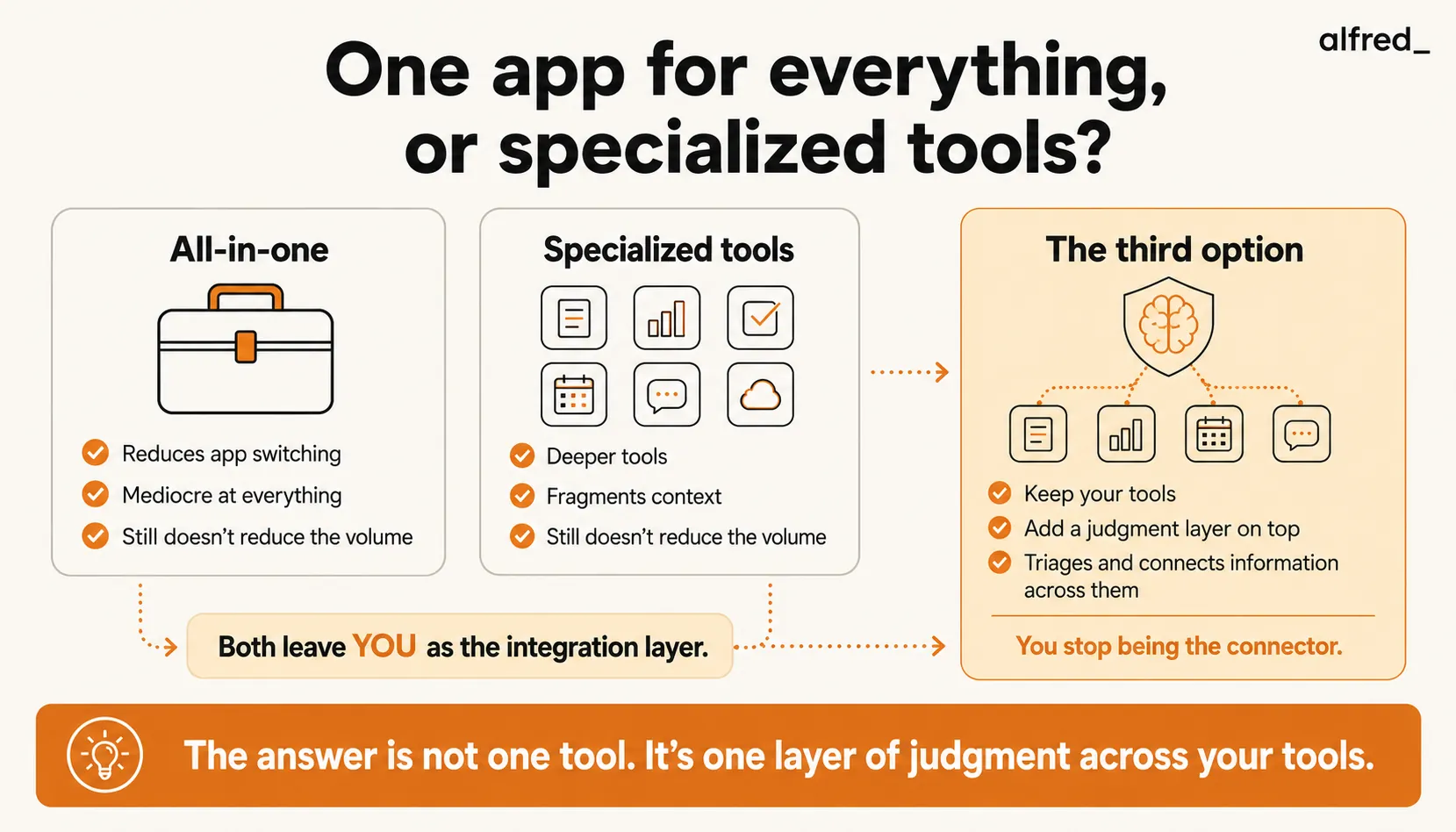
Here is the uncomfortable truth that neither camp acknowledges: the number of apps is not the problem. The volume of information flowing through them is the problem.
Whether you use one app or nine, you still receive 121 emails per day. You still have 23 tasks on your list. You still have 8 meetings on your calendar. You still have 45 Slack messages waiting. Consolidating from nine apps to one does not reduce the volume. It just puts all the overwhelm in a single window.
This is why the productivity tool cycle never ends. People try all-in-one, feel overwhelmed, switch to specialized tools for better handling. Then they feel fragmented, switch back to all-in-one for simplicity. Repeat indefinitely. The tools change. The overwhelm remains.
The problem is not where the information lives. The problem is that a human is the integration layer.
You are the one scanning email and deciding what becomes a task. You are the one checking the calendar and connecting it to email context. You are the one moving information between systems, whether those systems are tabs in Notion or separate apps. The manual judgment work of “what matters, what connects to what, and what do I do next” remains constant regardless of your tool architecture.
The Third Option: A Judgment Layer
Instead of replacing your tools or consolidating them, what if you added something on top that does the connecting for you?
This is the emerging category that neither the all-in-one crowd nor the specialized tools crowd is talking about. A judgment layer sits across your existing tools and handles the work of triaging, connecting, and prioritizing information across all of them.
It reads your email and decides what becomes a task. It checks your calendar and connects meetings to relevant email context. It tracks commitments you have made across email threads and surfaces follow-ups when they are due. It does the “work about work” so you can focus on the work itself.
The judgment layer does not replace your tools. It replaces you as the integration layer between them.
This is conceptually different from integrations. Zapier moves data between tools. A judgment layer decides what data matters and what to do with it. Zapier creates a task when you receive an email. A judgment layer creates a task when you receive an email that actually requires action, and it ignores the 80% of emails that do not.
The Decision Framework
all-in-one
- Your primary need is documentation and project management (Notion’s strong suit)
- You work solo or on a small team where everyone can adopt the same tool
- You spend more time searching for information than processing it
- You value simplicity over depth in any single workflow
- You are willing to accept “good enough” for each use case in exchange for unified search and navigation
specialized tools
- You have specific workflows where depth matters (high-volume email, complex project management, precision scheduling)
- You work with external collaborators who use different tools
- You want the flexibility to swap out any single tool without disrupting the others
- You are willing to invest in integrations or manual processes to connect your tools
a judgment layer on top
- You have already tried both approaches and still feel overwhelmed
- Your problem is not finding information but processing the volume of information
- You spend significant time on the manual work of connecting information across tools: turning emails into tasks, connecting calendar events to email context, tracking follow-ups across threads
- You want to keep your preferred tools but remove yourself as the integration layer
Where alfred_ Fits
alfred_ is a judgment layer, not a replacement for your existing tools.
It connects to your email and calendar and works across them. When an email contains a task, alfred_ extracts it. When a calendar event is upcoming, alfred_ pulls relevant context from email threads. When you make a commitment in an email, ask alfred_ later and it finds it.
alfred_ does not ask you to abandon Notion or stop using Todoist. It handles the connective work between your communication (email, calendar) and your work systems (whatever you use for tasks and projects).
alfred_ is an addition to your existing stack, not a replacement for it. The value proposition is not “use fewer apps.” It is “stop being the person who manually connects information across your apps.”
This is a fundamentally different approach from consolidation. You keep the depth of your specialized tools. You keep the flexibility of a modular stack. You just remove the manual integration work that makes both approaches feel overwhelming.
The Honest Answer
The all-in-one versus specialized debate has been raging for a decade, and neither side has won because neither side addresses the real issue.
All-in-one tools reduce fragmentation but sacrifice depth. Specialized tools offer depth but create fragmentation. Both leave you as the person responsible for processing the volume, triaging the information, and connecting the dots.
The number of apps on your phone does not determine your productivity. What determines your productivity is how much of the “work about work,” the triaging, connecting, and prioritizing, requires your manual effort versus happens automatically.
Use the tools that feel right for how you think. But stop being the integration layer between them. That is work a system should handle, not the person doing the actual work.




