


The Question Nobody Wants to Hear the Answer To
Gmail is free. Outlook comes with your Microsoft 365 subscription. Both work fine. So why would anyone pay $10, $25, or $30 per month for email?
The honest answer: most people should not.
If you get 30 emails a day, use labels and filters, and spend 20 minutes on email each morning, a paid app is a luxury. Gmail handles your workload, Google keeps improving it, and the money is better spent elsewhere.
But that is not the situation everyone is in.
According to a 2023 report from the Radicati Group, the average business professional receives 121 emails per day. McKinsey’s research has consistently found that professionals spend roughly 28% of their workweek on email, which works out to about 11 hours. For people in client-facing roles, sales, consulting, law, finance, and account management, the number skews higher.
At that volume, free email tools do not fail because they are bad. They fail because they were never designed for that throughput. And the gap between “free but slow” and “paid but efficient” becomes a real financial decision.
What Gmail Actually Does Well
Before talking about paid alternatives, Gmail deserves credit.
Gmail’s search is excellent. Threading works well for most conversations. Labels and filters handle predictable routing. The spam filter catches nearly everything. Google’s recent AI additions (smart compose, summary cards, nudges) add convenience without complexity.
For personal email, side projects, or low-volume professional use, Gmail is genuinely one of the best products ever built. It is not outdated. It is not broken. And it costs nothing.
The same applies to Outlook for Microsoft 365 users. Focused Inbox does a reasonable job of separating important messages from noise. Calendar integration is tight. For teams already embedded in the Microsoft ecosystem, Outlook’s free inclusion makes switching hard to justify on features alone.
Where Free Tools Hit Their Ceiling
The limitations of free email emerge gradually, usually somewhere between 50 and 100 emails per day.
Triage becomes the bottleneck. At 30 emails, you can scan subject lines and decide what matters in minutes. At 120 emails, that same scan takes 45 minutes to an hour. Gmail filters help with newsletters and notifications, but they cannot assess whether a client email is urgent, whether a thread requires a reply today, or whether an email contains an action item buried in the third paragraph.
Context switching multiplies. Free email tools do not differentiate between “check this now” and “this can wait.” Everything arrives in the same stream, which means you are constantly interrupted by low-priority messages while trying to find the ones that matter. A University of California Irvine study found that it takes an average of 23 minutes and 15 seconds to refocus after an interruption.
Response drafting stays manual. Gmail’s smart compose can finish a sentence, but it cannot draft a reply that reflects your professional voice, accounts for the full thread context, and includes the right level of detail for the recipient. At high volume, the composition time adds up fast.
Follow-ups fall through cracks. Free tools offer no systematic way to track commitments you have made in email. You either remember, use a separate to-do list, or leave emails unread as reminders (which breaks the triage process entirely).
The Three Types of Paid Email Tools
Paid email tools solve different problems. Understanding the categories helps clarify whether any of them make sense for you.
Speed tools: get through email faster
Superhuman ($30/month) is the flagship example. It is built for velocity: keyboard-driven navigation, split inbox views, AI writing assistance, read receipts, and a design that treats email processing as a workflow to be optimized. Superhuman does not reduce the number of emails you handle. It makes handling each one faster.
Best for: People who want to stay hands-on with email but move through it in half the time. Executives, founders, and deal-makers who want to feel every email but spend less time on each.
Filtering tools: see fewer emails
SaneBox (starting at $7/month) works differently. It sits on top of your existing email client and uses algorithms to sort incoming messages. Important emails stay in your inbox. Everything else moves to a SaneLater folder. You never switch email clients; SaneBox just reduces the noise.
Best for: People whose main problem is volume rather than speed. If 70% of your email is low-priority noise, SaneBox removes it for a few dollars a month. You still handle the important emails yourself, but there are far fewer of them.
AI assistants: handle email for you
alfred_ takes a different approach entirely. Rather than making you faster at email or filtering out noise, it handles the email workflow: triaging your inbox by urgency, drafting replies that match your communication style, extracting tasks from email threads, tracking follow-ups, and delivering a daily briefing of what needs your attention. You review decisions instead of processing messages.
Best for: People whose email volume has crossed the point where doing it all manually, even quickly, is not sustainable. Consultants, freelancers, and professionals who bill by the hour and need their time back.
The Volume-Based Decision Framework
Here is the honest framework, based on email volume and hourly rate.
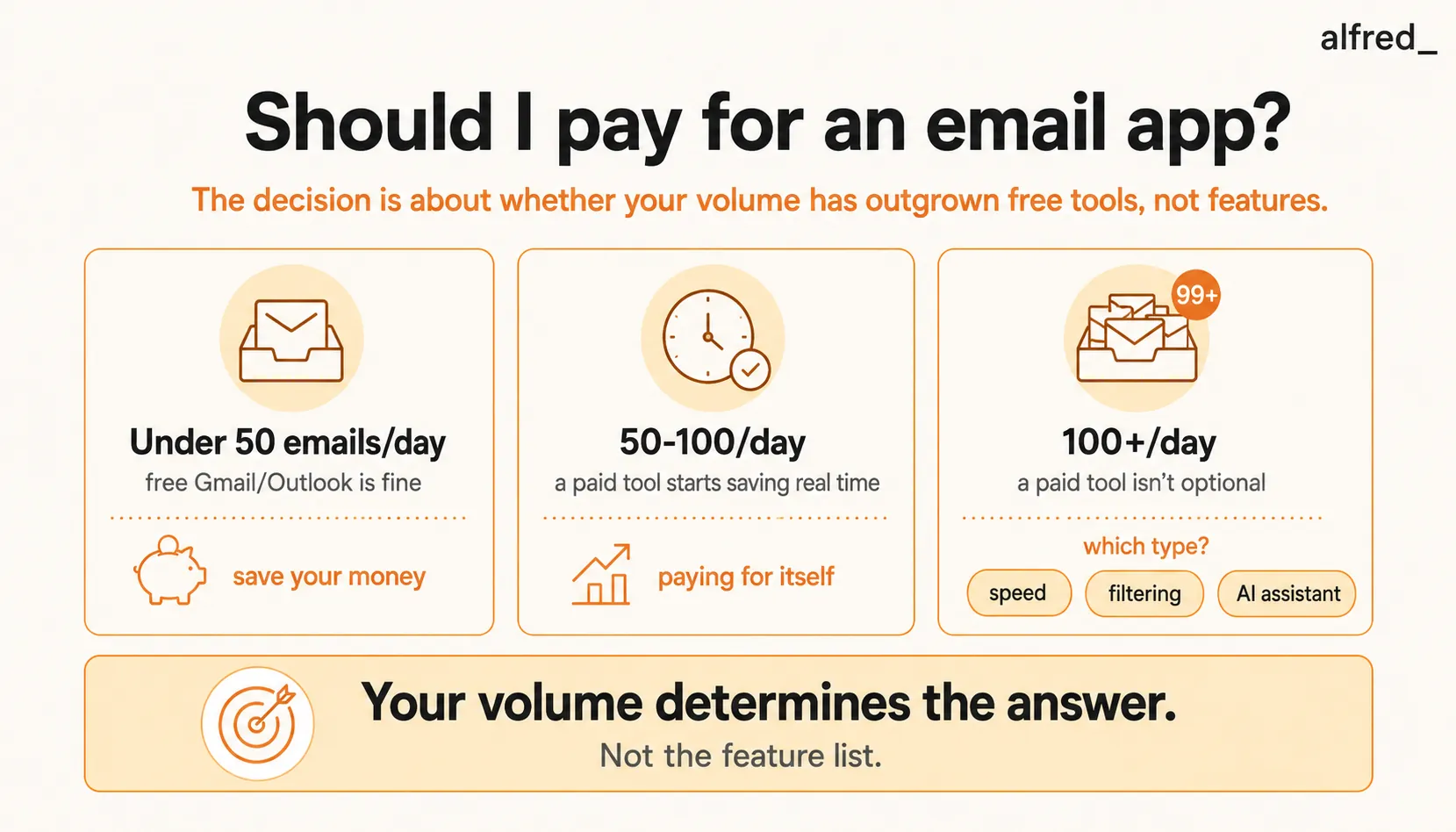
Under 50 emails per day
Recommendation: stay with free tools.
At this volume, you can process your entire inbox in 20-30 minutes. Gmail or Outlook handles it cleanly. A paid app might save you 5-10 minutes per day, which at most hourly rates does not justify even a $5 monthly subscription. Spend the money on something else.
The exception: if those 50 emails are complex (long threads, detailed client communication, lots of follow-ups), a tool like SaneBox at $7/month might be worth it for the filtering alone. But you probably do not need it.
50 to 100 emails per day
Recommendation: a paid tool starts making financial sense.
At this volume, email triage alone takes 30-60 minutes daily. That is 2.5 to 5 hours per week. If your effective hourly rate is above $50, you are spending $125-$250 per week in time on email triage alone, before you draft a single reply.
A speed tool like Superhuman can cut that processing time roughly in half. A filtering tool like SaneBox can reduce the volume you need to process by 40-60%. Either way, you recover at least 1-2 hours per week, which at most professional rates more than covers the subscription cost.
This is the volume range where most people first realize free tools are costing them money.
100+ emails per day
Recommendation: a paid tool is not optional. The question is which type.
At 100+ emails daily, manual triage consumes 1-2 hours every day. Drafting responses adds another 1-2 hours. Follow-up tracking across that volume is essentially impossible without a system. You are spending 10-20 hours per week on email. At $150/hour, that is $1,500-$3,000 per week in opportunity cost.
At this volume, speed tools help but do not solve the fundamental problem: you are still doing all the work, just faster. Filtering tools help but leave you with 40-60 emails that still need manual processing. AI-powered tools like alfred_ address the volume problem directly by handling the work itself.
A $29.99/month tool that recovers even 5 hours per week at $100/hour produces $2,000/month in recovered time. The ROI is not close.
The Calculation You Should Actually Do
Forget feature comparisons. Do this instead:
- Count your daily email volume for one week. Use your email provider’s activity data or just tally for five days.
- Time yourself processing email for three days. Include triage, reading, responding, and any task management that results from email.
- Calculate your effective hourly rate. If you are salaried, divide your compensation by 2,000 hours. If you bill clients, use your billing rate.
- Multiply hours spent on email per month by your hourly rate. This is what email costs you.
- Compare that to the cost of the paid tool you are considering.
For most professionals earning above $75,000 per year and receiving more than 50 emails per day, the math clearly favors a paid tool. The subscription is not an expense. It is the cheapest way to recover your most valuable resource.
Where alfred_ Fits in This Decision
alfred_ is not for everyone, and that is an honest statement.
If you get 30 emails a day and manage them fine in Gmail, alfred_ is more tool than you need. You would be paying for capability you will not use.
If you get 50-80 emails a day, you might be perfectly served by SaneBox ($7/month) to filter noise, or Superhuman ($30/month) to process faster. Both are solid options that address the problem at that scale.
Where alfred_ makes sense is when email has become a significant time sink and you want to stop managing it altogether. At 100+ emails per day, alfred_ triages everything, drafts replies that sound like you, pulls out action items, and shows you a daily briefing of what actually needs your brain. You go from spending 2-3 hours on email to spending 20-30 minutes reviewing decisions.
At $29.99/month, it is priced below Superhuman and positioned for a different problem: not “make me faster at email” but “handle email so I can work on something else.”
The Honest Recommendation
Do not pay for an email app because it looks nice or because a podcast host recommended it. Pay for one when the math says your time is worth more than the subscription.
If you are a student, personal user, or low-volume professional: Gmail is great. Save your money.
If you are a mid-volume professional tired of triage: SaneBox or a speed-focused client will pay for itself in the first week.
If you are a high-volume professional losing hours to email every day: An AI email assistant is not a luxury. It is the most cost-effective hire you can make.
The question is not really “should I pay for email?” The question is: “what is my email costing me right now, and is that more than $25 per month?”
For most people reading this article, the answer is yes by a wide margin.