

A human executive assistant costs between $2,000 and $5,000 per month. A great one is worth every dollar. They know your preferences, anticipate needs, handle scheduling conflicts before you know they exist, and keep the operational machinery of your professional life from grinding to a halt.
The problem isn’t value. It’s access. At $3,000 or more per month, a dedicated EA is a luxury reserved for senior executives at funded companies. Everyone else, founders, directors, team leads, independent professionals, handles their own email, schedules their own meetings, and watches follow-ups slip through the cracks because there’s no one watching the other end.
AI executive assistants promise to fill that gap. Not all of it, no AI is going to pick up your dry cleaning or read the room in a sensitive negotiation. But the 80% of EA work that’s information processing, scheduling logistics, email triage, and follow-up tracking? That’s exactly what AI is built for. At 1% of the cost. For a deeper look at the category, see what is an AI executive assistant and our AI executive assistant landing page.
How We Tested
We evaluated each option against the job description of a working EA: does it triage the inbox, draft communication you would actually send, keep the calendar coherent, catch commitments before they slip, and brief you without you having to ask? Software tools were assessed on those five duties from hands-on use (alfred_ is our product and our daily driver; the field tests against competing tools are run by this article’s author), from vendor trials where offered, and from each vendor’s documented feature set. Human EA services were assessed on their published pricing, commitment terms, and service model. Every price on this page was re-verified against the vendor’s own pricing page in August 2026. Full disclosure: we build alfred_, and it ranks first; the comparison tables lay out prices and limitations side by side so you can discount our bias.
Quick Comparison: 10 Options, Software and Human
| Tool | Price | Best For | Key Limitation |
|---|---|---|---|
| alfred_ | From $29.99/mo | Email, calendar, and follow-up tracking | AI-only, no human backup |
| Lindy.ai | $29.99/mo+ (credits) | Custom AI agent workflows | Complex setup, credit-based pricing |
| Motion | $19/seat/mo (Pro AI) | AI task planning onto your calendar | Projects and schedule only, no inbox |
| Reclaim.ai | Free-$22/user/mo | Calendar defense: focus time, habits | Calendar only, needs a separate task manager |
| Microsoft Copilot | $21-$30/user/mo + M365 | AI inside Outlook, Teams, Word, Excel | Assists when asked; nothing autonomous |
| Notion AI | $20/seat/mo (Business) | AI agents over your docs and wiki | Knows your workspace, not your inbox |
| Superhuman | $33/mo (Business, annual) | Fastest manual email processing | You still do the email yourself |
| Athena | $3,000/mo | Full-time dedicated human EA | 12-month commitment, premium price |
| Belay | ~$42-46/hr | US-based fractional human EA | Expensive, hourly model |
| Time Etc | ~$36-39/hr | Task-based virtual assistant work | Hourly billing, no AI intelligence layer |
Deep Dives
alfred_
alfred_ targets the core of what makes an EA valuable: keeping your email, calendar, and commitments from spiraling into chaos. It keeps track of your inbox and your calendar together. It reads your email, flags what needs your answer, tracks follow-ups, manages your calendar (events, scheduling, reminders, and meeting prep) with your inbox connected to it, suggests to-dos from email, and sends a daily briefing that tells you what needs attention before you start reacting to everything. It is an email and calendar assistant, not a pure auto-scheduling optimizer.
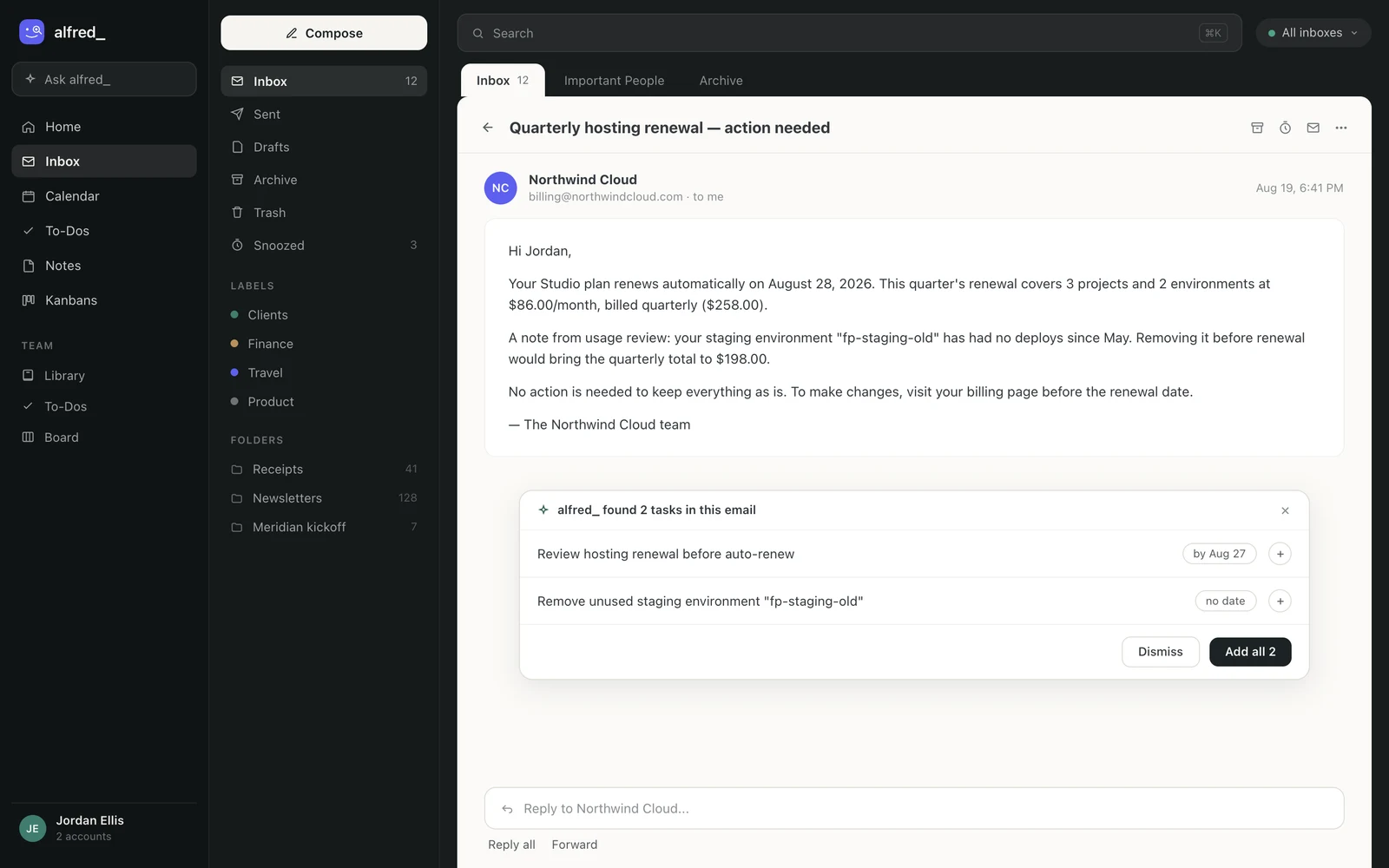
Task extraction in place: alfred_ reads the email, finds the commitments, and offers them as to-dos with due dates. Shown with sample data.
alfred_ costs a fraction of a human EA service. The tradeoff is obvious: it can’t make judgment calls in ambiguous situations, it can’t build relationships with your clients on your behalf, and it can’t handle physical tasks. What it does is the keeping track: what needs you, who still owes you a reply and what your day holds. It does that continuously.
The positioning is deliberate: not a replacement for a $5K/mo human EA, but a way for everyone else to get the 80% of that value they currently go without entirely.
Pros: Covers email, calendar, and follow-ups in one tool. Accessible for individuals. Always on, no scheduling around availability. Cons: AI-only, can’t handle judgment-heavy or physical tasks. No human fallback for edge cases.
See how alfred_ works as your AI executive assistant
Definitional overview, comparison vs hiring a human EA, who it's built for, and what the Daily Brief actually looks like, on a single page.
Lindy.ai: $29.99/mo+
Lindy takes a different approach: instead of a pre-built assistant, you create custom AI agents that handle specific workflows. Email summarization agent, meeting scheduling agent, CRM update agent, each one configured for a particular task. There’s no free plan, just a 7-day trial to test it. The Plus plan runs $29.99/mo per user with 3,000 credits, Pro runs $99.99/mo (15,000 credits), and Max runs $199.99/mo (35,000 credits); an Enterprise tier adds HIPAA compliance and audit logs. Lindy prices work in credits, with everyday asks costing 2-250 credits each, so a busy inbox can clear the Plus allowance mid-month. Prices verified August 2026.
The power here is flexibility. Lindy now supports Gaia Voice Agents (AI that makes and receives phone calls autonomously), 6,000+ integrations, and Agent Swarms (clone agents for parallel execution). If your EA needs are nonstandard, monitoring specific email threads, extracting data from incoming messages and updating a spreadsheet, or auto-scheduling based on complex rules, Lindy lets you build exactly that workflow.
The tradeoff is setup complexity. Lindy isn’t “sign up and go.” You’re building agents, configuring triggers, and designing workflows. As one review noted of Lindy’s now-discontinued free plan, “almost every useful workflow needs premium actions, so the free plan is basically useless.” Lindy has since dropped the free tier in favor of the 7-day trial. Additional credits run $10 per 1,000, so heavy usage can push costs well beyond the base price.
Pros: Highly customizable workflows. 6,000+ integrations. Voice AI phone calls. Agent Swarms for parallel execution. Cons: Requires significant setup and configuration. Credit-based pricing is unpredictable. $29.99/mo base with real workloads often needing Pro. No free plan.
Motion: $19/seat/mo (Pro AI)
Motion answers a different EA duty than alfred_: not the inbox, but the plan. Feed it your projects and tasks and it schedules the work onto your calendar automatically, replanning as meetings move. The Pro AI tier at $19/seat/month includes 7,500 AI credits and the docs/notes layer; Business AI at $29 adds capacity planning and Gantt views for teams.
Pros: Genuinely automatic task-to-calendar planning. Strong for deadline-driven work. Cons: Never touches email; a commitment made in a thread doesn’t exist until you enter it. Credit metering on AI features. See alfred_ vs Motion for the full split.
Reclaim.ai: Free-$22/user/mo
Reclaim defends the calendar you already have: recurring habits, protected focus time, smart rescheduling around conflicts, all automatic once configured. The free Lite tier is a real trial; Starter is $10/user/month annual, Business $15, Enterprise $22 for 100+ seats. Worth knowing: Dropbox acquired Reclaim in 2024 and it continues as a standalone product, while its old rival Clockwise announced a shutdown after being acquired by Salesforce, which makes Reclaim the default pick for pure calendar defense in 2026.
Pros: Best-in-class focus-time protection. Honest free tier. Full breakdown in our Reclaim pricing guide. Cons: Calendar only; it needs a separate task manager to feed it and leaves email entirely to you.
Microsoft Copilot: $21-$30/user/mo on top of M365
If your company already runs Microsoft 365, Copilot is EA-adjacent AI you can get through procurement in a week: thread summaries, drafting, and inbox prioritization in Outlook, plus the same license working across Teams, Word, and Excel. The enterprise add-on is $30/user/month; the Business SKU for orgs under 300 seats is $21.
Pros: Enterprise-grade compliance; no new vendor review; cross-app context. Cons: It assists when asked and stops. No overnight triage, no follow-up ledger, no morning brief; the executive is still the assistant. The two can run side by side: Copilot in Office, alfred_ on the inbox.
Notion AI: $20/seat/mo (Business plan)
Notion’s AI agents and Ask Notion query everything your team has ever written, and since May 2025 full AI access requires the Business plan at $20/seat/month. As an EA stand-in it covers the institutional-memory duty: “what did we decide about X?” answered instantly.
Pros: Best-in-class over your own docs; Custom Agents can automate workspace workflows. Cons: It knows your wiki, not your inbox or calendar. Metered credits for Custom Agents ($10 per 1,000). Details in our Notion pricing breakdown.
Superhuman: $33/mo (Business, annual)
Superhuman is what you buy when you want to remain your own EA, but faster: sub-100ms email, Split Inbox, Auto Labels, and AI drafts on demand, now bundled with Grammarly in the Superhuman Suite. At $33/month (annual) it costs more than alfred_ and automates less, but the people it fits, executives who genuinely enjoy processing their own mail at speed, know who they are.
Pros: The fastest email experience that exists. Excellent tone-matched drafts on demand. Cons: Nothing happens without you. No triage while you sleep, no task extraction, no follow-up tracking. alfred_ vs Superhuman covers the head-to-head.
Athena: $3,000/mo
Athena provides a full-time, dedicated executive partner, a real human working 40 hours per week from the Philippines on US hours. The $3,000/mo covers salary, training, coaching (two calls per month), and a partnership manager who oversees the relationship. Annual commitment required, totaling $36,000/year.
This is the gold standard for dedicated EA service. Your Athena assistant learns your preferences, builds relationships with your contacts, handles nuanced judgment calls, and operates with the kind of contextual intelligence that AI can’t replicate. They handle email, scheduling, travel booking, research, and personal tasks.
The barrier is cost. $36,000 per year is a real budget line item. And the 12-month commitment means you’re locked in even if the fit isn’t right, though Athena’s coaching and management layer is designed to prevent that. If you want to hire your assistant directly later, the buyout fee runs up to $24,000. For executives whose time is worth $500+/hour, the math works. For everyone else, the math is the whole problem.
Pros: Full-time dedicated human assistant. Handles nuanced and judgment-heavy tasks. Builds real relationships with your contacts. Cons: $3,000/mo with 12-month commitment. $24,000 buyout fee if you want to hire directly. Only practical for senior executives.
Belay: ~$2,200/mo+
Belay provides US-based virtual assistants on a fractional model. You get experienced, vetted professionals who handle email, calendar, travel, and administrative tasks. Pricing is customized but typically starts around $2,200/mo for part-time support, working out to roughly $42–46/hour.
The US-based positioning is Belay’s differentiator. If time zone alignment, cultural context, and English fluency are critical, and for many executives, they are, Belay eliminates the uncertainty that comes with offshore EA services. Their assistants are experienced professionals, often with corporate EA backgrounds.
Belay operates on a fractional model, meaning you’re not getting 40 hours per week at their base price. You’re getting a set number of hours that scales with your plan. For someone who needs 10–15 hours of EA support per week, this is reasonable. For someone who needs full-time coverage, the hourly rate makes Belay significantly more expensive than dedicated services like Athena. Contact Belay directly for exact pricing. They customize based on your needs.
Pros: US-based, experienced professionals. Fractional model scales to your needs. No offshore communication gaps. Cons: ~$2,200/mo+ for part-time support. Hourly rate is premium. No AI augmentation layer.
Time Etc: ~$36-39/hr
Time Etc is the task-based approach to virtual assistance. You buy hours (starting around $39/hr for 10 hours, dropping to $36/hr at 60+ hours), get matched with a US or UK-based assistant, and assign tasks as needed. Unused hours roll over on larger packages. No long-term commitment, no setup fee.
For sporadic EA needs, “research flights to Denver,” “schedule these three meetings,” “compile these contacts into a spreadsheet”, Time Etc is the most flexible option. You pay for what you use. The assistants are competent generalists who handle a wide range of administrative tasks.
The limitation is the lack of continuity and depth that a dedicated assistant provides. Your Time Etc assistant may not be the same person each time. They won’t learn your preferences over months of working together the way a dedicated EA does. And at $36-39/hr, the cost climbs fast: 10 hours per week at the 40-hour rate ($37/hr) runs about $1,480/mo. 20 hours per week is nearly $2,960/mo, approaching Athena territory without the dedication.
Pros: No commitment, pay for hours used. Unused hours roll over on larger packages. Flexible for sporadic needs. Cons: ~$36-39/hr adds up quickly with regular use. Lacks dedicated assistant relationship. No AI layer, purely manual work.
How to Choose
Start with two questions: what’s your budget, and what’s the nature of the work?
Under $50/mo: AI assistants are your only realistic option. alfred_ (from $29.99/mo) keeps track of the email, calendar and follow-up core. Lindy.ai at $29.99/mo (credits metered) adds custom workflow automation with 6,000+ integrations and voice AI agents if you need it and are willing to configure it. Motion at $19/mo covers AI task-and-calendar planning; Reclaim from free covers calendar defense.
$2,000–3,000/mo: Human assistants become viable. Belay for fractional US-based support. Athena for full-time dedicated partnership. Time Etc for flexible, task-based work without commitment.
The hybrid approach is increasingly common: use an AI tool for the high-volume, always-on work (email triage, calendar management, follow-up tracking) and a human EA for the judgment-heavy, relationship-dependent tasks. This gives you coverage without the $36,000/year price tag.
The honest truth: most professionals who don’t have an EA don’t need a $3,000/mo human one. They need the 80%, the work that’s predictable, repetitive, and context-dependent, handled reliably for a price that doesn’t require budget approval. For the broader AI assistant landscape, including personal assistants, email tools, and calendar managers, see best AI personal assistants and best AI email assistants.
If a human EA isn't in the budget, the AI side covers the 80%. See alfred_ as your AI executive assistant →
AI Chatbot vs AI Executive Assistant: The Distinction That Sorts This Whole Category
Half the tools marketed as “AI executive assistants” are chatbots with a calendar plugin. The distinction that actually matters:
| AI chatbot (ChatGPT, Copilot, Gemini) | AI executive assistant (alfred_, configured Lindy) | |
|---|---|---|
| When it works | When you prompt it | Continuously, as mail arrives |
| What it knows | What you paste or what it can search | Your live inbox, calendar, and commitments |
| Output | An answer or a draft, on request | A list of what needs you and a morning brief |
| Follow-ups | No memory of what you sent | Tracks sent mail still awaiting a reply |
| The tell | You open it when you need something | It reports to you before you ask |
A chatbot is a brilliant employee who only works when you walk to their desk. An executive assistant owns outcomes on a schedule. Both are useful; only one reduces the number of things you must remember. If a tool’s demo shows someone typing a request into a chat box, it’s a chatbot, however it’s branded.
Can AI really replace a human executive assistant?
Not entirely, and it shouldn’t try to. AI handles the information-processing layer, email sorting, draft generation, calendar conflict resolution, follow-up tracking, daily briefings. Humans handle the judgment layer, reading political dynamics, making discretion calls, building relationships with external contacts, handling sensitive conversations. The question isn’t replacement, it’s coverage. If you currently have no EA support at all, AI covers the 80% you’re missing. If you have a human EA, AI handles the volume work so your human assistant can focus on the high-judgment tasks they’re uniquely good at.
What tasks should I NOT delegate to an AI assistant?
Anything requiring judgment about relationships, politics, or sensitive information. Don’t let AI respond to a frustrated client without reviewing the draft. Don’t automate responses to your board members. Don’t delegate tasks that require reading between the lines of a message, detecting when someone says “fine” but means “I’m upset.” The pattern: if getting it wrong has social consequences, a human should review it. If getting it wrong means a calendar invite has the wrong time, AI handles the correction faster than you could.
Is $25/month really enough for meaningful EA functionality?
It depends on what you’re comparing against. Compared to a $3,000/mo human EA, the feature set is narrower. Compared to doing everything yourself, which is what most professionals actually do, an assistant in that price range that flags what needs your answer, tracks follow-ups and manages your calendar is a real step up. alfred_ plans start at $29.99/month. The value isn’t in matching a human EA feature-for-feature. It’s in having someone keep track where today nobody does.




