

You have 47 browser tabs open. Each one is something you meant to deal with.
One is a client email you opened two hours ago and haven’t answered. One is a Google Doc someone shared that needs comments by Thursday. One is your calendar, because you’re trying to figure out when you’re free next week for a call that was requested in an email you already lost. Three are articles you’ll “read later.” The rest? You’re not even sure anymore.
“I use my inbox as a to-do list and it is a terrible to-do list.”
You know it’s broken. Everyone who does this knows it’s broken. And everyone does it anyway. Because what’s the alternative? Opening Todoist 121 times a day to manually log every action item from every email? That’s not a system. That’s a second job.
Why Everyone Does This (It’s Not Laziness)
Using your inbox as a to-do list isn’t a failure of discipline. It’s a failure of friction.
Think about what happens when an email arrives that needs action. You read it. You recognize it requires something from you. Now you have two choices:
Option A: Leave it unread. Mark it. Star it. Come back to it later. Total time: zero seconds. Zero context switching. Zero cognitive overhead in the moment.
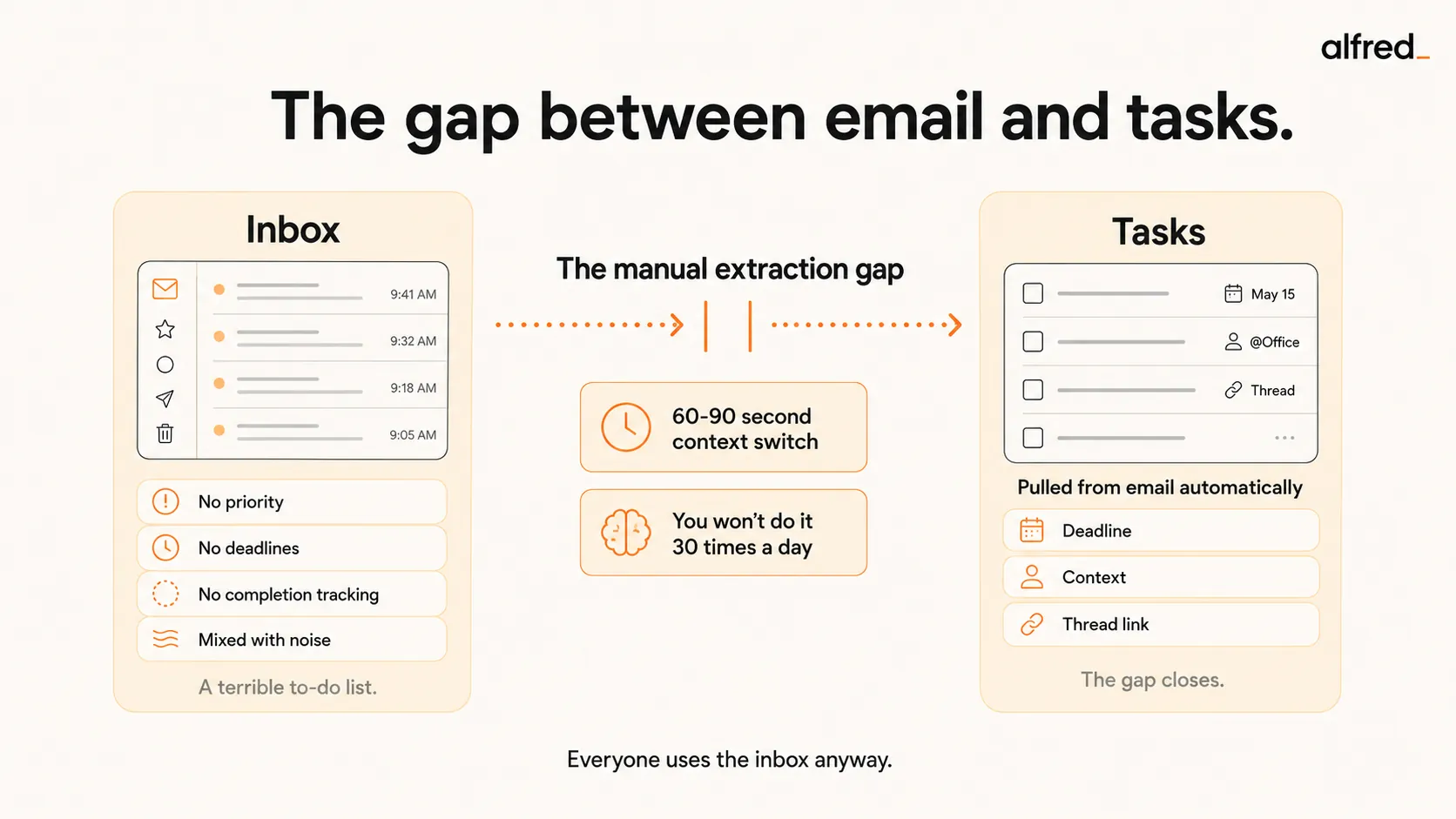
Option B: Open your task app. Create a new task. Type a description that captures what needs to happen. Add the deadline that was mentioned in paragraph three. Link back to the email thread. Set a priority. Close the task app. Return to email. Total time: 60-90 seconds. Full context switch. Repeat 121 times per day.
Nobody does Option B consistently. Nobody. The math doesn’t work. 121 emails per day means 121 micro-decisions about what’s a task, what’s information, and what’s noise. Even if only a quarter of those are actual tasks, that’s 30 task-creation events per day, each one a context switch, each one pulling you out of whatever you were actually doing.
So you do Option A. And your inbox becomes this grotesque hybrid, part communication channel, part task list, part anxiety generator, doing all three jobs badly.
“The mental overhead of ‘I need to respond to that’ is worse than actually responding.”
That’s the Zeigarnik Effect in action. According to Zeigarnik’s original 1927 research, your brain holds onto incomplete tasks nearly twice as strongly as completed ones. Every unread email sitting in your inbox is an open loop your mind won’t release. You’re not just carrying messages. You’re carrying obligations. And your unread count isn’t a count of messages. It’s a count of things you owe people.
Why Inbox-as-Todo Is a Terrible System
Let’s be honest about why this breaks down, because naming it helps.
No priority ranking. Your inbox sorts by arrival time, not importance. The urgent client request from 9am is now 47 emails deep, buried under CC chains and automated notifications that arrived after it. The thing that matters most is the hardest to find.
No deadlines. “Can you send the revised pricing by Friday?” is hiding in paragraph three of a forwarded thread. There’s no date attached. No alert. No visibility. Friday comes. You missed it. The deadline was technically in your inbox. It just wasn’t anywhere your brain could track it.
No completion tracking. What does “read” mean in your inbox? Does it mean done? Does it mean “I glanced at it during lunch”? Does it mean “I opened it to stop the notification and forgot immediately”? There’s no distinction between processed and merely seen.
Mixed with noise. The action item from your biggest client sits next to a Zoom recording notification, a newsletter you subscribed to in 2023, and three CC chains where you don’t need to do anything. Finding tasks in your inbox is like finding a specific grain of sand on a beach, technically possible, practically exhausting.
Scrolling archaeology. The task you need is somewhere. You remember seeing it. Was it Monday? Was it from the client directly or forwarded by your coworker? You scroll. And scroll. And open threads trying to find the one sentence that contained the actual ask. By the time you find it, 15 minutes have passed and you’ve been pulled into three other threads along the way.
After each email interruption, it takes roughly 23 minutes to refocus on the original task. Your inbox isn’t a to-do list. It’s an interruption machine that has captured your obligations and won’t give them back.
Why Todoist, Notion, and Asana Don’t Fix This
Here’s what every article about “how to stop using your inbox as a to-do list” gets wrong: they recommend task apps as if the app is the problem.
The app isn’t the problem. The gap between email and the app is the problem.
Every task app requires the same thing: you read the email, you identify the task, you move it, you add context. The translation layer between email and tasks is your brain. Your brain is already overloaded. Adding another app to feed doesn’t reduce the load. It increases it.
Todoist + Gmail plugin ($5-$8/month). Clean, fast, well-designed. The Gmail plugin lets you “Add as task” with one click. But the task becomes a line item disconnected from the thread. “Follow up with Sarah”, about what? When? Referencing which conversation? The context lives in the email. The task lives in Todoist. They’re strangers.
Notion ($10-$12/month). Powerful. Customizable. Endlessly configurable. You can build a task database linked to email with custom properties for priority, deadline, status, and project. Many users report it takes about 20 hours to set up properly. Another 5 hours per week to maintain. Most people build the system with enthusiasm, use it for three weeks, and abandon it when the maintenance overhead exceeds the benefit it provides.
Asana ($10.99-$29.99/month). Enterprise-grade project tracking. Email-to-task features exist but feel bolted on. The whole system is designed for teams, shared boards, multi-user workflows, Gantt charts. For one person drowning in personal email, Asana doesn’t reduce what you’re juggling. It adds one more thing to check.
Apple Reminders / Google Tasks (free). Minimal friction, minimal capability. “Follow up with Sarah.” When? About what? The reminder fires and you have zero context. You spend five minutes re-finding the email thread to figure out what you were supposed to do, which is exactly the problem you were trying to solve.
“The things I drop are never urgent enough to remember but always important enough to matter.”
That’s the gap. The task app works fine. The email works fine. The space between them, the manual extraction, the lost context, the discipline required to do it 30 times a day, is where everything dies.
How 5 Approaches Handle the Gap
| Approach | Price | Auto-Extracts Tasks? | Keeps Email Context? | Captures Deadlines? | Key Limitation |
|---|---|---|---|---|---|
| Gmail Tasks sidebar | Free | No, manual | Link only | No | Subject line as task name; no context |
| Todoist + Gmail | $5–$8/mo | No, one-click manual | Link to email | No, manual entry | Still you deciding what's a task, every time |
| Notion | $10–$12/mo | No, manual | If you build it | If you set it up | 20hrs setup, 5hrs/week maintenance |
| SaneBox + Todoist | $12–$44/mo | No, has SaneToDo integration but requires manual setup | Partial | No | Integration exists but doesn't extract action items from email content |
| alfred_ | $29.99/mo | Yes, automatic | Full thread context | Yes, extracted from email | Requires Gmail or Outlook |
Gmail Tasks sidebar
One click to add an email as a task. The task is the email subject line, “Re: Re: Re: Q3 Planning”, with a link back to the thread. No deadline extracted. No context pulled. No priority assigned. Your task list becomes a collection of cryptic subject lines that require opening each email to remember what you’re supposed to do. Better than nothing. Barely.
Todoist + Gmail plugin
More capable. The linked task includes the email body and a direct link. But you’re still the one deciding what’s a task, when it’s due, and how urgent it is, for every email, every day. The gap between email and task narrows, but it doesn’t close. And on the days when you’re in back-to-back meetings and 40 emails pile up? You skip the extraction. The gap reopens. The inbox becomes the to-do list again.
Notion
Build your own system. Email forwarding rules. Custom databases. Kanban views. It’s genuinely powerful, and if you’re the kind of person who loves building systems, you’ll have a great first two weeks. The Notion graveyard is full of beautiful task databases that were abandoned by week three because maintaining the system became its own task.
SaneBox + Todoist combo
SaneBox sorts your email; Todoist holds your tasks. They do offer a direct “SaneToDo” integration that can create Todoist tasks from emails, but it still requires manual setup and doesn’t extract action items from email content, you’re moving whole emails, not pulling out the specific ask buried in paragraph three. Better email plus better tasks doesn’t fix the problem if the extraction is still manual.
alfred_
This is where the approach changes fundamentally. alfred_ reads your email threads and extracts action items automatically. “Can you send the updated deck by Thursday?” becomes a task, with the deadline, the thread link, the sender, and the context, without you lifting a finger.
You don’t decide what’s a task. The AI identifies it. You don’t type the description. The AI extracts it. You don’t set the deadline. The AI finds it in the thread. The gap between email and tasks doesn’t narrow. It disappears, because the extraction happens without you.
What Changes When the Gap Closes
Your inbox goes back to being a communication channel. Messages come in. You read them. You reply to the ones that need a human response. The action items, the “send this by Friday,” the “schedule a call next week,” the “review the attached contract”, are already captured. With context. With deadlines. With links back to the thread.
28% of the average workweek is spent on email. A huge chunk of that isn’t reading or replying. It’s the mental work of figuring out what needs to happen and trying to remember it. When action items extract themselves, that mental load lifts.
“I told myself I’d follow up and I didn’t and now the moment has passed.”
That stops happening. Not because you developed better habits. Not because you finally found the right task app. Because the extraction, the hard part that every other system requires you to do manually, 30 times a day, forever, is handled.
alfred_ works with Gmail and Outlook. Your inbox stays your inbox. Your tasks live where tasks belong. And the 47 browser tabs? You can finally close them.
Your inbox is a communication channel again. Not a terrible to-do list.




