

Let’s start with something important: Superhuman is a good product.
The interface is fast. The keyboard shortcuts are well-designed. The split inbox is genuinely useful. The AI writing features work. The overall experience of using Superhuman to process email is, objectively, better than using Gmail.
This article is not a takedown. Superhuman does what it says it does. The question is whether what it does is what you actually need, and why a significant number of people who sign up eventually decide it is not.
The Churn Pattern
Superhuman does not publish churn rates, so we cannot cite an exact number. But the pattern is observable across Reddit threads, Twitter posts, product review sites, and forums where professionals discuss their tool stacks. There is a consistent arc:
Month 1: Excitement. The onboarding is great. The speed feels transformative. You learn the keyboard shortcuts. You tell colleagues about it. Email feels fast for the first time.
Month 2-3: Competence. You have mastered the shortcuts. You process email quickly. The split inbox keeps things organized. The $30/month feels justified.
Month 4-6: Plateau. The speed gains have fully materialized. You are processing email at peak efficiency. And yet… you are still spending roughly the same amount of total time on email. The inbox is not smaller. The decisions are not fewer. You are just making them faster.
Month 6-12: Questioning. You start doing the math. $30/month for an email client. Gmail is free. Gmail has added snooze, schedule send, and smart compose. Is the remaining gap worth $360/year?
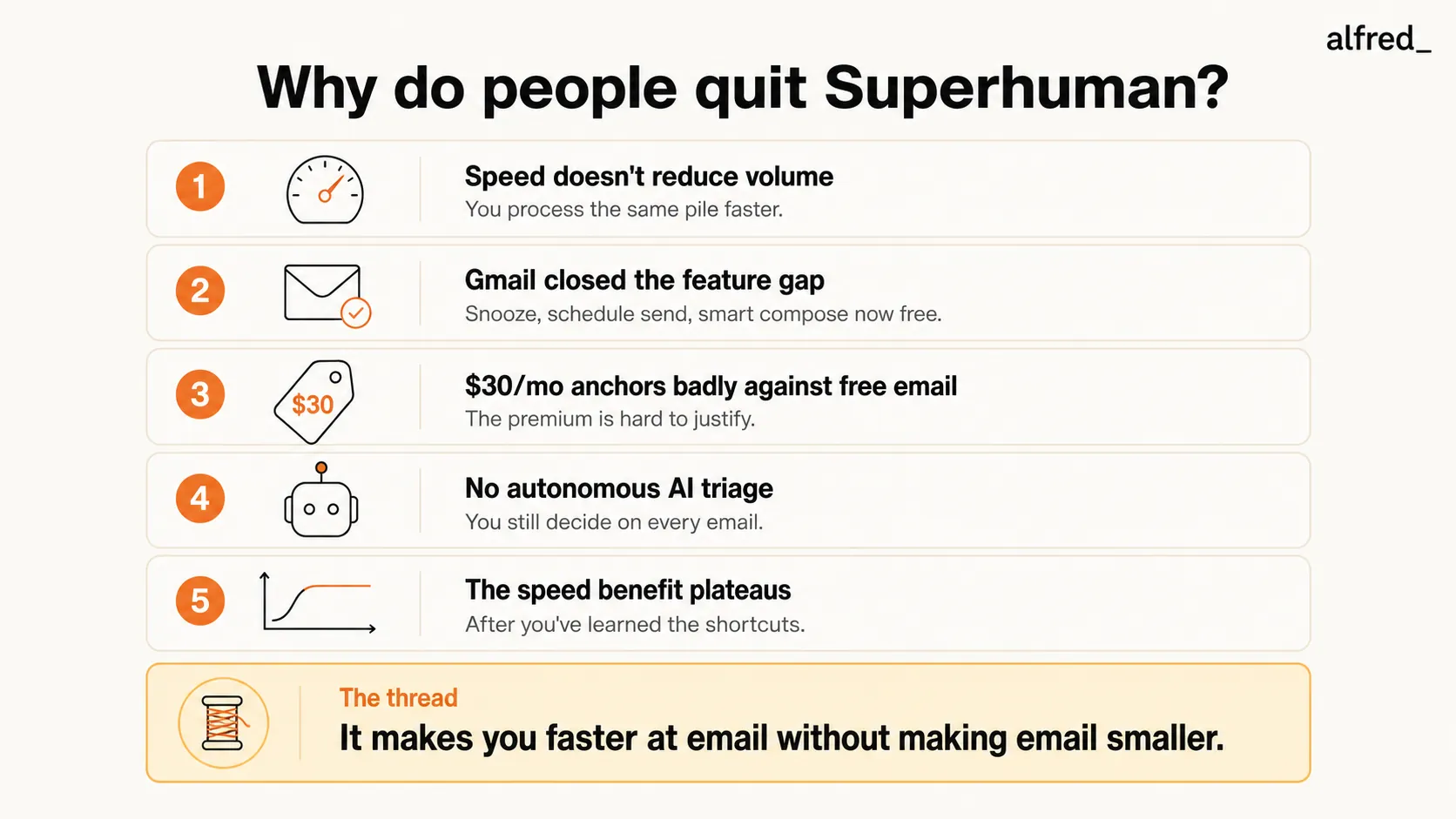
Cancellation: The moment varies, but the realization is consistent: Superhuman made email faster without making it smaller.
Reason 1: Speed Does Not Reduce Volume
This is the fundamental tension in Superhuman’s value proposition, and the most common reason people cite for canceling.
Superhuman makes you faster at processing each individual email. The keyboard shortcuts eliminate mouse movements. The interface loads instantly. Split inbox sorts messages into categories before you start. AI features help you compose replies more quickly.
All of this is real. All of this is well-executed.
But here is the math that eventually catches up: if you receive 150 emails per day, processing each one 30% faster means you spend 70% of the time on 100% of the decisions. You saved time. You did not save cognitive energy. You did not reduce the volume. You did not eliminate the need to read, evaluate, and decide on every single message.
“I was faster at email but I wasn’t spending less time on email. I was just getting through the same pile quicker. The pile was the same size the next morning.”, Common sentiment on Reddit r/productivity
This is not a criticism of Superhuman. It is a description of what speed tools do and do not do. Speed tools optimize throughput. They do not reduce input volume. For many users, the email problem is not “I process email too slowly.” It is “I have too much email to process.”
If your bottleneck is genuinely interface speed. You know exactly what to do with every email and just need the software to keep up, Superhuman is a tool for that. If your bottleneck is the number of emails requiring your attention, speed is the wrong lever.
Reason 2: Gmail Closed the Gap
When Superhuman launched its invite-only beta in 2017, the feature gap between Superhuman and Gmail was significant. Superhuman bundled a set of capabilities into a polished, keyboard-first experience that Gmail either lacked or had not yet brought into its main product:
- Snooze: Remove an email and have it reappear at a specified time. Google Inbox had this since 2014, but Gmail proper added it in 2018.
- Schedule Send: Compose now, send later. Gmail added this in 2019.
- Split Inbox: Separate views for different email categories, a core Superhuman design element.
- Keyboard-first navigation: Every action accessible via shortcut, optimized for speed.
- Read receipts: Know when recipients open your email.
Meanwhile, Gmail was also adding AI features during the same period: Smart Reply (2017), Smart Compose (2018), and Nudges (2018). Gmail has had Undo Send since 2015.
Many of these features are now available in Gmail for free.
What Superhuman still uniquely offers: keyboard-first design philosophy, split inbox, read receipts, a faster and more responsive interface, and a more polished visual design. These are real differentiators. But they are differentiators of degree, not of kind. Gmail can do most of what Superhuman does. Superhuman does it faster and with better design.
For users who signed up for Superhuman because of the polished, bundled experience, watching Gmail close the feature gap naturally triggers a reassessment of whether the $30 premium is still justified.
Reason 3: The Price Anchoring Problem
$30/month does not sound like much in isolation. It is less than a Netflix subscription plus a Spotify subscription. In absolute terms, it is reasonable for a productivity tool.
But Superhuman is an email client. And the anchoring comparison is unavoidable: Gmail is free. Outlook is free (or included with Microsoft 365). Apple Mail is free.
This creates a psychological friction that compounds over time. When Superhuman feels transformative (month 1-2), $30 seems like a bargain. When Superhuman feels normal (month 6+), the comparison to free becomes harder to dismiss.
“I love Superhuman, I just can’t justify $30/month for email when Gmail is right there.”, Common cancellation sentiment
The math works on paper: if Superhuman saves 15 minutes per day and your time is worth $50/hour, that is $250/month in recovered time. But “saved time” only counts if you actually use it productively. And many users report that the time “saved” is immediately reabsorbed into other tasks or simply results in processing email at the same time but with less urgency.
Additionally, Superhuman’s pricing has not changed significantly since launch, while competitors have entered the market at lower price points with comparable or different capabilities. Shortwave offers AI-native email starting at $24 per seat per month (billed annually). alfred_ offers email handling at $29.99/month. The competitive landscape makes $30 for a speed-focused client harder to justify than it was when Superhuman had no real competitors.
Reason 4: No Autonomous AI Triage
Superhuman’s AI features help you write emails faster. They do not help you decide which emails matter.
This is a deliberate design choice. Superhuman’s philosophy is that you are the decision-maker. The tool helps you execute decisions faster. It does not make decisions for you.
For some users, this is exactly right. They want to stay in control of every email decision. They want the tool to assist, not to act.
For a growing number of users, this is the wrong model entirely. They do not want to be faster at 150 decisions. They want to make 30 decisions and have the other 120 handled automatically. They want AI that reads their inbox, identifies what matters, drafts replies to routine messages, extracts tasks, and surfaces only the messages that require human judgment.
Superhuman does none of this. Its AI is activated when you click a button to compose or reply. It does not work in the background. It does not triage. It does not draft proactively. It does not extract tasks or track follow-ups on its own.
The result: Superhuman users still start their day by opening their inbox and processing every message. They do it faster. But they still do it. And for users who wanted to stop doing it, the tool eventually feels like it is solving the wrong problem.
Reason 5: The Speed Benefit Plateaus
Learning curves have a ceiling.
In the first month of using Superhuman, every keyboard shortcut learned is a meaningful speed improvement. “E” to archive. “R” to reply. “J/K” to navigate. “#” to trash. Each shortcut replaces a mouse movement. Each saves 2-3 seconds. Across 150 emails, these seconds add up.
By month three, you have learned all the shortcuts. The speed gains are fully realized. From that point forward, each day with Superhuman is roughly as fast as the previous day. There is no additional learning curve to climb. No new efficiency to unlock.
This plateau effect is natural for any tool that optimizes a manual process. You learn the tool, you reach peak efficiency, and then you are at the ceiling. The only way to go higher is to change the process, not optimize it further.
Some Superhuman users hit this plateau and are satisfied. They are at peak email processing speed and they value that. Others hit the plateau and realize: I was hoping for transformation. What I got was optimization. The optimization is done. And I am still spending too much time on email.
What This Means (Not a Hit Piece)
To be clear about what this article is and is not.
This is not an argument that Superhuman is bad. It is excellent at what it does. If your email problem is interface speed and you value a polished, keyboard-first experience, Superhuman remains an option.
This is an analysis of why people leave. And the pattern is consistent: they leave because what Superhuman does well (speed) is not the same as what they actually need (volume reduction, proactive triage, fewer decisions).
The email tool market has shifted. When Superhuman launched, the primary bottleneck for most professionals was interface speed. Gmail was slow. Search was clunky. Basic features like snooze did not exist. Superhuman solved those problems.
In 2026, the bottleneck has moved. Gmail is fast enough for most users. The features gap has closed. The new bottleneck is volume, cognitive load, and the sheer number of emails demanding decisions. This is not a problem that speed solves. It is a problem that AI triage, drafts prepared for you, and tracked follow-ups solve.
What People Switch To
Based on publicly available discussions, ex-Superhuman users generally move in three directions:
Back to Gmail. A significant portion of cancellations result in users returning to Gmail. They conclude that Gmail’s free features have closed the gap enough that the remaining Superhuman advantage is not worth $360/year. This is especially common among users who adopted Superhuman for specific features (snooze, schedule send) that Gmail now offers natively.
To AI-native email clients. Some users move to tools like Shortwave (starting at $24 per seat per month billed annually) that offer a modern email experience with deeper AI integration. Shortwave’s AI search, email summaries, and writing assistance provide AI capabilities that feel more substantial than Superhuman’s, while maintaining a clean interface.
To AI assistants. A growing number switch to tools like alfred_ that take a fundamentally different approach. Instead of making you faster at processing email, alfred_ processes email for you: triaging, drafting replies, extracting tasks, and surfacing only what needs your judgment. This addresses the root complaint of most Superhuman churners, that speed does not reduce volume, by removing the volume from your plate entirely.
Should You Quit Superhuman?
An honest framework:
Keep Superhuman if: Your email problem is genuinely about speed. You love the keyboard-first workflow. You want to stay in control of every email decision. The $30/month feels proportional to the value you receive. You are not spending more than 90 minutes per day on email despite Superhuman’s speed gains.
Consider switching if: You have been using Superhuman for 6+ months and still feel overwhelmed by email. Your problem is too many emails, not too-slow processing. You want AI to handle routine email so you only deal with what matters. You find yourself questioning the $30/month against what Gmail offers for free.
The question to ask yourself: “Am I paying Superhuman to help me be faster at work I wish I did not have to do?” If the answer is yes, the issue is not Superhuman’s quality. It is the mismatch between what speed solves and what you need solved.
Superhuman does its job. It is just not the right tool for everyone. And recognizing that distinction is not a criticism of the product. It is an honest evaluation of whether the product matches the problem.




