

Spark has been quietly building a loyal following since it launched in 2015. It started as a clean, smart email client for Apple devices and expanded to every platform. Along the way, it added team collaboration features that turned it into something more interesting: a lightweight alternative to expensive team email tools.
Then it added “+AI” to its name and started marketing AI features prominently. This is where the evaluation gets nuanced, because Spark’s strengths and its marketing tell different stories.
Spark Pros: What It Does Well
The free email client is genuinely good. Before talking about paid features, it is worth acknowledging that Spark’s free tier is a full email client at no cost. Smart Inbox automatically groups your email into Personal, Newsletters, and Notifications. The interface is clean and well-designed. Multiple account support works smoothly. If you just need a better email client than the default on your phone or computer, Spark free works.
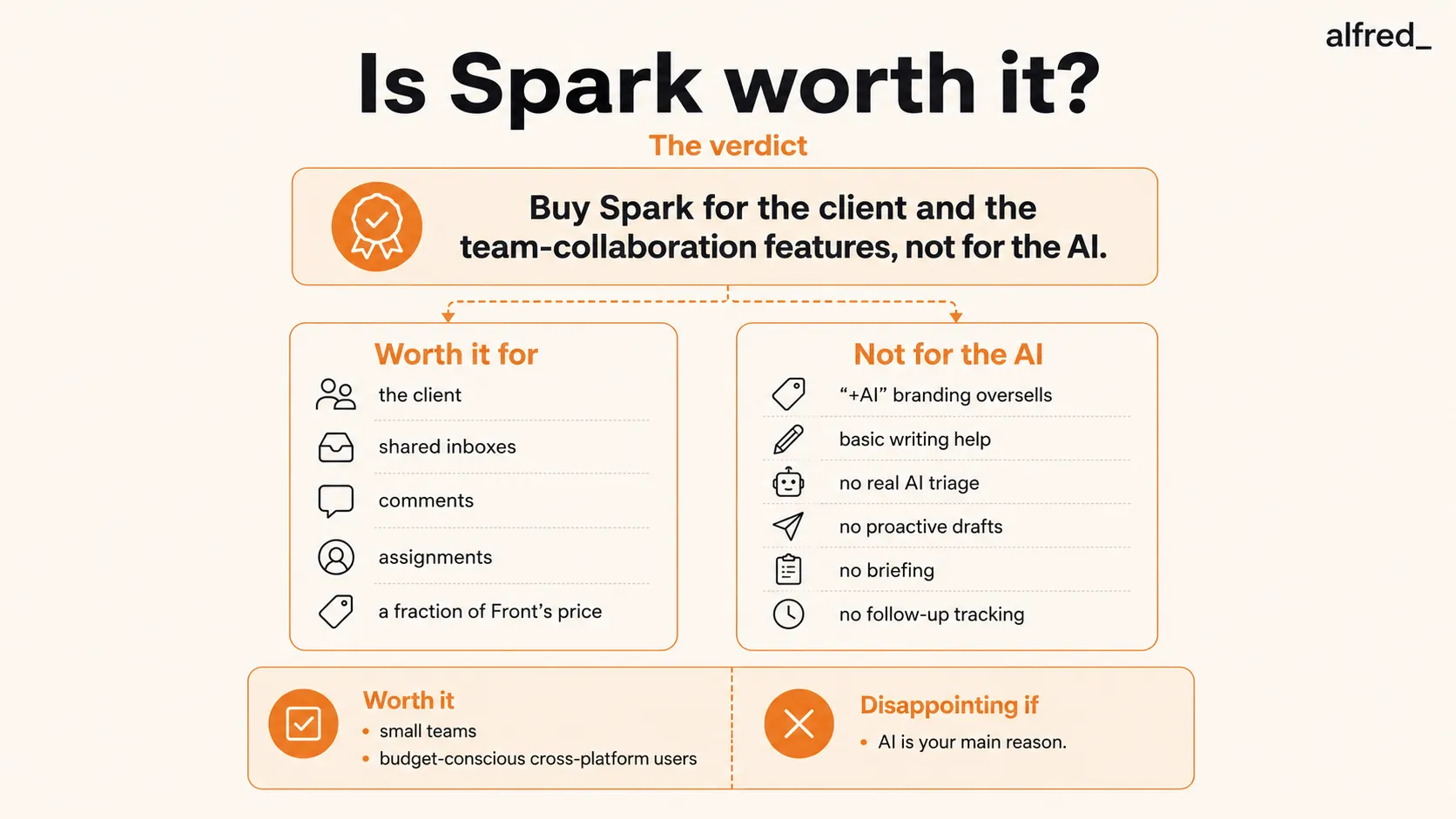
Team collaboration features are the real differentiator. This is what makes Spark worth evaluating seriously. Shared inboxes let multiple team members see and manage the same email account. Internal comments let you discuss an email with your team without forwarding it or switching to Slack. Real-time collaborative drafting means two people can work on the same reply simultaneously. Email assignments delegate specific messages to team members with accountability.
These features exist in enterprise tools like Front ($25+/user/month) and Help Scout ($25+/user/month). Spark offers comparable team collaboration in its Pro plan. For a five-person team, Spark’s pricing is significantly less than enterprise alternatives. The cost savings are real.
Cross-platform support works. Spark works on Mac, iOS, Android, and Windows. It supports Gmail, Outlook, iCloud, Yahoo, and IMAP accounts. You can use Spark with virtually any email provider on virtually any device. This flexibility matters for teams where people use different devices and platforms.
Smart Inbox categorization is useful. Spark’s automatic sorting of emails into Personal, Newsletters, and Notifications is simple but effective. It is not as sophisticated as Superhuman’s Split Inbox or SaneBox’s filtering, but it reduces inbox noise at no cost.
Email scheduling and send later work reliably. Basic but important. You can compose emails and schedule them to send at optimal times. The implementation is clean and reliable across all platforms.
Meeting notes are a nice addition. Spark’s +AI can transcribe and summarize meetings, which is outside the email-only scope but useful for professionals who live in meetings. The summaries are decent, though dedicated meeting tools like Otter.ai or Fireflies provide more depth.
Spark Cons: Where It Falls Short
The AI writing features are underwhelming. This is the elephant in the room. Spark markets “+AI” prominently, but the AI email composition is basic. You give it a prompt, it generates a draft. The draft is generic and does not account for the full thread context well. User reviews consistently describe the AI writing as “fine but not impressive” and “similar to what you’d get from ChatGPT.” For a feature that is the centerpiece of the paid plans, it falls short of expectations.
There is no AI triage. Spark does not read your inbox and decide what is important. It does not evaluate emails based on your calendar, priorities, or relationships. Smart Inbox sorts by category (Personal vs. Newsletter), but it does not sort by importance or urgency within those categories. You still scan every personal email to find the ones that matter.
No proactive draft replies. The AI writes when you ask it to write. It does not proactively prepare responses to routine emails before you even open them. When you sit down to process email, every response starts from zero.
No daily briefing or summary. There is no “here is what happened in your inbox overnight” overview. You discover what needs attention by scrolling through your inbox, the same way you always have. The thread summaries help once you open a specific thread, but there is no bird’s-eye view.
No follow-up tracking. Spark does not automatically notice that you are waiting for a reply from someone, or that a commitment was made in an email thread three days ago with no follow-through. You track follow-ups manually.
No calendar or task intelligence. Emails are emails. Calendar is calendar. Tasks are tasks. They do not inform each other. An email about rescheduling a meeting does not update your calendar. An email containing an action item does not create a task.
Pricing Breakdown
Spark’s pricing structure:
- Free: Core email client, Smart Inbox, one email account, limited AI usage
- Plus: $8.25/month (annual) or $10/month, advanced productivity, Spark +AI with monthly meeting notes, AI Assistant, custom templates
- Pro: $16.58/month (annual) or $20/month, everything in Plus, unlimited meeting notes, read statuses, shared inboxes, advanced team collaboration
- Enterprise: Custom pricing, all Pro features, security controls, dedicated success manager
For comparison:
- Gmail is free
- Apple Mail is free
- Shortwave is $24-36/month (stronger AI features)
- Superhuman is $30-40/month (speed-focused)
- alfred_ is $29.99/month (proactive AI assistant)
- Front is $25+/user/month (enterprise team email)
Spark’s pricing is competitive across the board, especially for teams.
Who Should Buy Spark
Small teams that collaborate on email. This is Spark’s sweet spot. If you have a team of 3-10 people who share inboxes, delegate emails, or need to discuss messages internally, Spark’s Pro plan with team features is a strong value in the market. You get much of Front’s functionality at a fraction of the price.
Budget-conscious individuals who want a modern email client. The free tier is excellent. If you cannot justify $25-30/month for Superhuman or alfred_, Spark free gives you a significant upgrade over default email clients at zero cost.
Cross-platform users. If you switch between Mac, Windows, iOS, and Android regularly, Spark’s consistent experience across platforms is a genuine advantage. Many competitors are limited to specific platforms.
People who want basic AI writing help without premium pricing. If all you need is occasional help composing an email or rephrasing a draft, Spark’s Plus plan at $8.25/month (annual) is an affordable option. The AI is basic, but for occasional use, basic is fine.
Who Should Not Buy Spark
Anyone buying Spark primarily for AI features. If the “+AI” in Spark +AI is your main reason for considering it, you will be disappointed. The AI writing is generic, and there is no AI triage, briefing, or proactive management. Shortwave has better AI at comparable prices. alfred_ has better AI and a fundamentally different approach.
Individual power users who need speed. Spark is not designed for inbox-zero speed runs. If you process 150+ emails per day and want maximum efficiency, Superhuman is faster and more keyboard-optimized. Spark is comfortable, not fast.
Professionals who need AI to manage their email, not just help write it. If you are looking for an AI assistant that reads your inbox, identifies priorities, drafts replies proactively, and gives you a daily briefing, Spark is not that product. It is an email client with an AI writing feature, not an AI assistant with an email client.
Large teams with complex email workflows. Beyond 10-15 users, Spark’s team features start showing their limits. Enterprise teams with routing rules, SLA tracking, and complex workflows need dedicated tools like Front, Zendesk, or Intercom.
What Other Reviewers Say
Our read is not an outlier. Woodpecker’s Spark review cites Spark’s G2 rating of 3.5 out of 5 and lands on the same split verdict: solid client, oversold AI. The most-quoted independent take, a long-term hands-on review titled “An Email Client I Love to Hate,” praises the design while documenting the complaint that recurs across user reviews of Spark 3: performance, slowness and instability that the version 2 faithful never signed up for. If you are evaluating Spark, weight the version 3 reviews over the glowing legacy ones; it is effectively a different product.
Best Spark Alternatives in 2026
If this review talked you out of Spark, the right alternative depends on which half of Spark you wanted. Prices verified August 2026:
- Wanted the speed and polish: Superhuman ($33/month Business, annual) is the premium version of the fast-client idea, with far better AI drafts.
- Wanted AI-native email on Gmail: Shortwave ($24/seat/month annual) builds AI into the client, Gmail only.
- Wanted the team features: Missive ($14-$36/user/month) does shared inboxes, assignments, and comments as its whole job, not a side feature; our best shared inbox software roundup covers the field.
- Wanted email to take less of your day: that is not a client feature at all; see the next section.
Where alfred_ Fits
Spark and alfred_ serve different purposes and can actually complement each other.
Spark is an email client, the place where you read and write email. alfred_ is an email assistant, an AI that manages your email before you open any client.
When alfred_ triages your inbox, drafts replies, and prepares your morning brief, you can review those decisions in whatever email client you prefer, including Spark. alfred_ handles the management layer. Spark (or Gmail, or Outlook, or any client) handles the interaction layer.
The difference is most obvious in what happens before you open your email in the morning. With Spark, your inbox is sorted into categories, and AI tools are available when you start working. With alfred_, your inbox has already been worked through. Routine emails have responses drafted. Your briefing is ready. The emails that need your personal attention have been identified and summarized.
At $29.99/month, alfred_ costs more than Spark’s individual plans but delivers a fundamentally different type of value. You are not paying for a nicer inbox. You are paying for less time in your inbox.
For teams that need both collaboration features and AI management, Spark (for team email workflows) plus alfred_ (for individual inbox management) can be a powerful combination.
The Verdict: Is Spark Mail Worth It?
Spark is a good email client at a great price. The free tier alone makes it worth trying. The team collaboration features are the real story. They bring shared-inbox capabilities to small teams at a fraction of enterprise pricing.
But the “+AI” branding sets expectations that the product does not meet. Spark’s AI features are basic email writing tools, not the intelligent email management that the marketing implies. If AI is your primary reason for evaluating Spark, look at Shortwave for better AI tools or alfred_ for genuine AI email management.
Buy Spark for the client. Buy Spark for the team features. Do not buy Spark for the AI.




