


Monday.com has built its reputation on making work visible. The signature color-coded boards, the drag-and-drop everything, the dashboard widgets that let you build status displays worthy of a mission control room, Monday turns project management into something that looks and feels approachable.
This visual-first approach has fueled impressive growth. Monday is publicly traded, serves 250,000+ customers, and has expanded from project management into CRM, dev tools, and service management under its “Work OS” umbrella.
But “Is Monday.com worth it?” is not about whether it is popular or well-designed. It is about whether visual project management is the thing your team actually needs, or whether your productivity problem sits upstream, in the email and communication chaos that Monday cannot see.
What Monday.com Does Well
The visual interface is best-in-class for accessibility. Monday makes project management approachable for people who find Jira intimidating and Asana confusing. Color-coded statuses, drag-and-drop organization, and templates that work out of the box mean a marketing team can be productive on day one without project management training. This low barrier to entry is Monday’s greatest competitive advantage.
Templates cover almost every use case. Monday offers 200+ templates, marketing campaigns, employee onboarding, content calendars, event planning, IT requests, customer onboarding, sales pipelines, and more. Each template comes with pre-built columns, automations, and views. For teams that do not want to build from scratch, this library is genuinely useful and saves hours of setup.
Dashboards provide executive visibility. Monday’s dashboard builder lets you create real-time status views from multiple boards. Widget types include charts, numbers, timelines, battery gauges, and workload views. For managers who need a “how are we doing?” view without asking the team, dashboards deliver.
Automations are powerful and accessible. Monday’s automation builder uses a sentence-like structure: “When status changes to Done, notify the project lead and move item to Completed group.” You do not need to write code or use complex logic builders. This accessibility means non-technical team members can create their own automations, which increases adoption.
The Work OS expansion creates value for multi-team organizations. Monday CRM for sales, Monday Dev for engineering, Monday Service for IT, having everything on one platform means shared data, unified views, and no integration headaches. For organizations that would otherwise use 4-5 separate tools, consolidation is valuable.
Monday handles structured, visual workflows naturally. Approval chains, status pipelines, and multi-step processes are easy to build and easy to understand. If your team processes marketing requests, HR tickets, or client onboarding flows, Monday’s board structure maps directly to those workflows.
What Monday.com Does Not Do
It does not find work hiding in your email. Like every project management tool, Monday manages work that has been explicitly created in Monday. The email from your client with a change request, the Slack thread where a stakeholder asked for something by Friday, the meeting where your boss said “let’s prioritize this”, none of that appears in Monday automatically. Someone reads the email, recognizes the work, and creates a Monday item.
It does not reduce communication overload. Monday sends notifications (often too many). But it does not read your email, identify important messages, or draft replies. Your morning still starts with processing your inbox before you get to Monday. For many professionals, that inbox processing is the actual time sink, and Monday is invisible to it.
The 3-seat minimum makes it expensive for small teams. You cannot buy a single Monday seat. The minimum is 3, which means a solo user or two-person team pays for an empty seat. On the Standard plan, a 2-person team effectively pays $18/seat/month instead of the advertised $12/seat/month. This pricing structure benefits larger teams and penalizes smaller ones.
Boards can become overwhelming. Monday’s strength, everything is visual and customizable, becomes a weakness at scale. A board with 100+ items and 15 columns is visually dense. Multiple boards with cross-references create complexity. Without discipline, a Monday workspace can become as cluttered as the work it is supposed to organize.
The learning curve for advanced features is steeper than expected. While basic boards are intuitive, Monday’s advanced features, mirror columns, subitems, dashboard formulas, automation logic, require meaningful investment to learn. The gap between “easy to start” and “hard to master” surprises many teams.
Performance slows at scale. Large boards (500+ items) with many columns and automations can slow down noticeably. Some users report lag when loading complex dashboards. Monday has improved performance over the years, but it is not as fast as Linear or even Asana at scale.
Pricing Breakdown
Monday.com’s pricing (all plans require a 3-seat minimum):
- Free: Up to 2 seats, 3 boards. Enough to explore, not enough to evaluate.
- Basic: $9/seat/month (annual) or $12/seat/month (monthly). Unlimited items, 5GB storage, basic views, iOS/Android apps. Minimum: $27/month.
- Standard: $12/seat/month (annual) or $14/seat/month (monthly). Timeline and Gantt views, calendar view, automations (250/month), integrations (250/month), guest access. Minimum: $36/month.
- Pro: $19/seat/month (annual) or $24/seat/month (monthly). Private boards, chart view, time tracking, formula column, automations (25,000/month), integrations (25,000/month). Minimum: $57/month.
- Enterprise: Custom pricing. Advanced security, audit log, HIPAA compliance, advanced analytics.
For comparison (20-person team, annual billing):
- Monday Standard: $240/month
- Monday Pro: $380/month
- Asana Starter: $219.80/month
- ClickUp Unlimited: $140/month
- Notion Plus: $200/month
- alfred_ is $29.99/month per user (different category)
Monday’s pricing is competitive in the mid-tier but gets expensive on Pro, especially when you factor in the 3-seat minimum that inflates costs for small teams.
Who Should Buy Monday.com
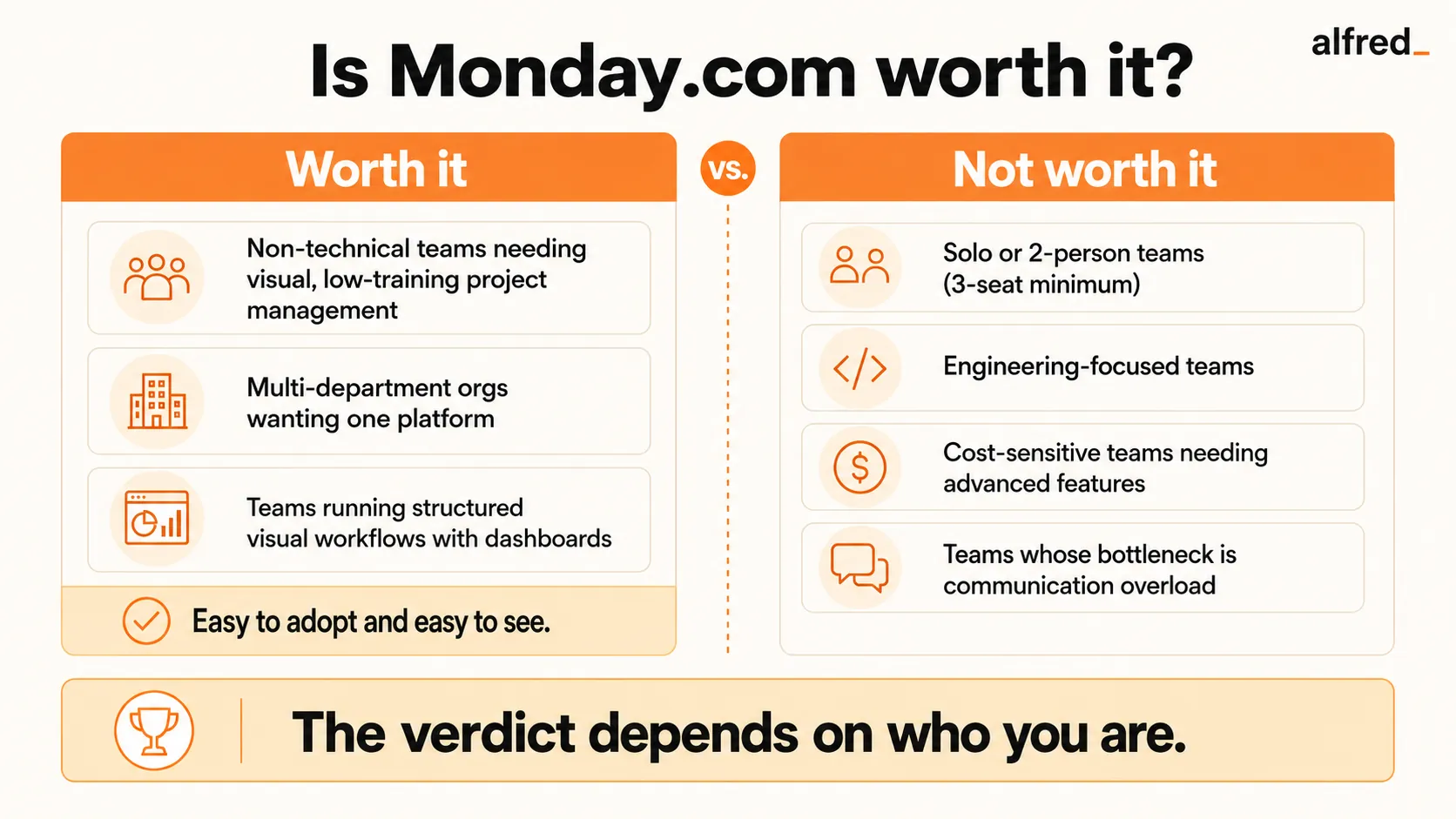
Non-technical teams that need project management. Marketing, HR, operations, and sales teams that find traditional PM tools intimidating will adopt Monday faster than any alternative. The visual interface and template library eliminate the “how do I even set this up?” barrier.
Organizations that want one platform for multiple departments. If you are tired of marketing using Asana, sales using HubSpot, and IT using Jira, all disconnected, Monday’s Work OS vision offers a path to consolidation. Having CRM, project management, and service management on one platform reduces integration overhead.
Teams that run structured, visual workflows. Approval processes, request pipelines, content calendars, and onboarding checklists all map naturally to Monday’s board structure. If your work follows a defined flow with clear statuses, Monday makes that flow visible and manageable.
Companies where dashboards matter. If leadership needs real-time visibility into project status, team workload, and pipeline health, Monday’s dashboard builder is among the best. The visual reporting is more intuitive than Asana’s and more accessible than building custom reports.
Who Should Not Buy Monday.com
Solo users or 2-person teams. The 3-seat minimum means you pay for at least 3 seats regardless of team size. At $36/month minimum on Standard for a 2-person team, there are better options, Asana Starter at $10.99/user or ClickUp Unlimited at $7/user with no seat minimums.
Teams whose bottleneck is communication, not project tracking. If your team spends more time processing email and Slack than managing projects in a tool, Monday does not address the real problem. A beautifully organized board does not help when the inbox is where the chaos lives.
Engineering-focused teams. Monday Dev exists, but engineers generally prefer Linear or Jira. Monday’s visual-first approach does not match engineering’s preference for keyboard-driven, code-integrated workflows. The templates are project-management-oriented, not software-development-oriented.
Cost-sensitive teams that need advanced features. Monday’s meaningful features, automations, integrations, time tracking, formula columns, are locked behind Standard and Pro plans. A team that needs automations pays $12/seat/month minimum, and a team that needs time tracking pays $19/seat/month. These costs add up, and competitors like ClickUp include more features at lower price points.
Where alfred_ Fits
Monday.com and alfred_ operate in completely different layers of knowledge work.
Monday is a team project management platform. It visualizes work, tracks progress, and coordinates teams. It does this with exceptional visual clarity.
alfred_ is a personal communication triage tool. It reads your email, understands your calendar context, identifies what needs your attention, drafts replies to routine messages, and delivers a Daily Brief each morning. It does not manage projects. It manages the information flow that generates project work.
The daily workflow for a Monday.com user often looks like this: open email → process 50-100 messages → identify items that need Monday updates → create or update Monday items → switch to Monday → do the actual work. alfred_ compresses the first three steps. Instead of manually processing your inbox to discover what changed, you get a briefing: the client approved the timeline, the vendor invoice needs sign-off, and two team members replied to your status update.
At $29.99/month, alfred_ is priced per individual user. It is not a Monday replacement. It is a complement that reduces the time between “I opened my laptop” and “I am doing productive work in Monday.” For professionals who spend 60+ minutes per day in email before they even get to their project tool, that time savings is meaningful.
The Verdict
Monday.com is worth it for teams that need visual, accessible project management. The color-coded boards, template library, and dashboard builder make work visible in a way that other tools do not match. For non-technical teams, Monday’s learning curve is the lowest in the category.
But Monday visualizes work that has already been defined. It does not help you discover work hiding in your email, triage overwhelming communication, or reduce the time you spend processing messages before you even open your project tool. For many professionals, that communication processing is the real productivity drain, and no project management tool, no matter how visual, addresses it.
If your team needs to see and manage work visually: Monday delivers.
If your real problem is the email and communication overload that happens before you get to Monday: solve that first.