

The feeling that there is “too much to do” is real. The cause is rarely what it appears to be. It is not usually that you have more work than time. It is that everything is simultaneously active, nothing has been explicitly deprioritized, and your brain is attempting to track all of it at once. David Allen identified this as the open loop problem: every uncaptured, unprocessed commitment sits in working memory generating background anxiety, consuming cognitive resources before you have done anything productive.
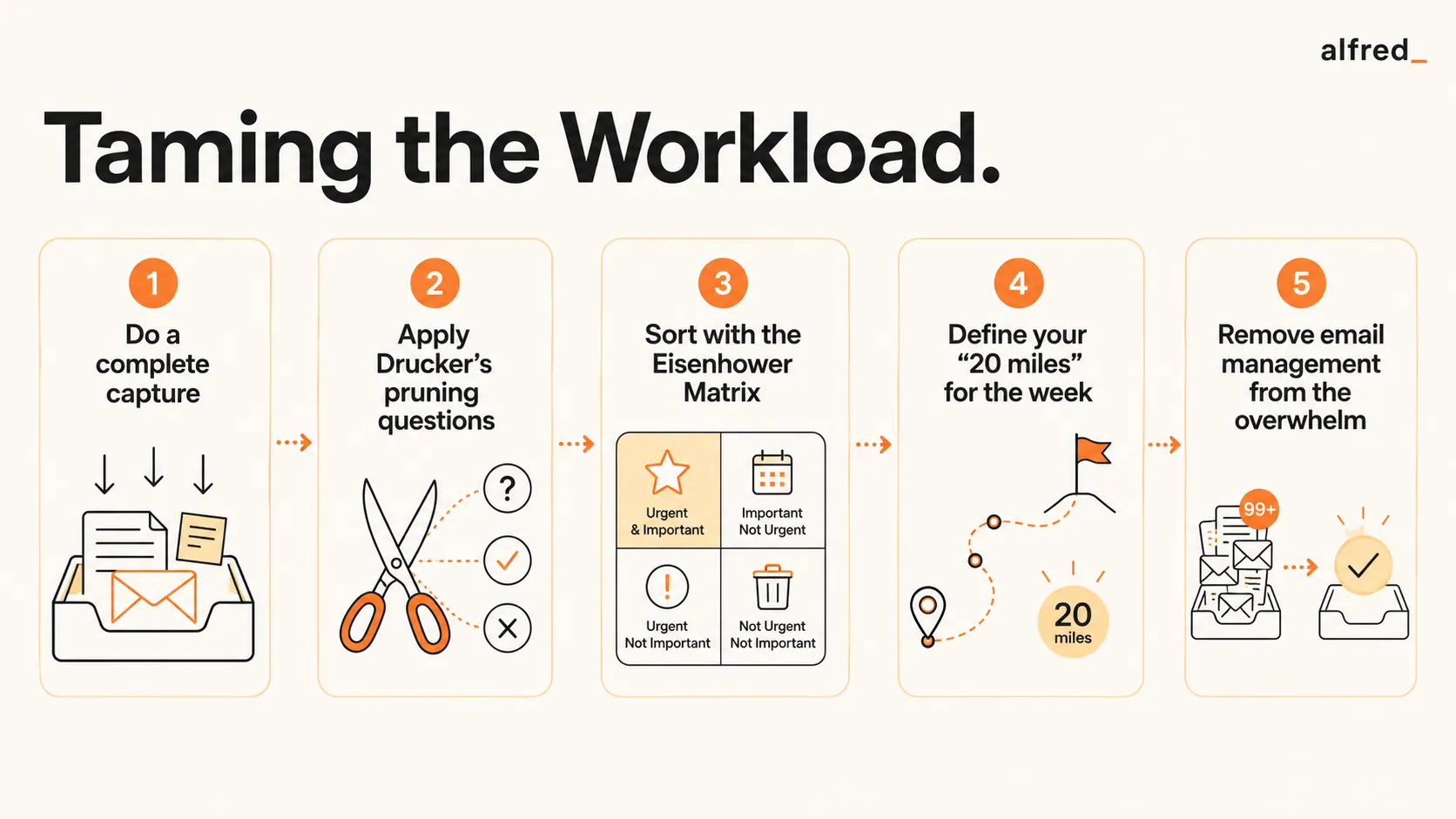
The solution is not to work faster or longer. It is to prune the list ruthlessly, then advance the remaining work with disciplined consistency. Drucker’s pruning, Collins’s stop-doing list, and Grove’s leverage test, applied in sequence, will typically reduce an overwhelming task list by 40 to 60 percent before any additional capacity is required.
The Open Loop Problem
Allen’s diagnosis of mental overwhelm is precise: the brain was not designed to store and track commitments. It generates anxiety proportional to the number of open loops it is asked to manage, regardless of whether those loops are actually urgent or important. When you have 40 tasks mentally active simultaneously, the cognitive load alone is exhausting, before you have done a single thing.
“Your mind is for having ideas, not holding them.”, David Allen, Getting Things Done
Allen’s first intervention is capture: get every commitment out of your head and into a trusted external system. This alone typically produces an immediate reduction in the feeling of overwhelm, not because the work has changed, but because the brain is no longer attempting to track it all simultaneously. Once captured, each item can be evaluated individually rather than experienced as an undifferentiated mass of pressure.
41%
of items on the average to-do list are never completed
iDoneThis, The Busy Person's Guide to the Done ListDrucker’s Pruning: Cut Before You Manage
Peter Drucker’s most underused contribution to time management is not a scheduling system. It is a pruning system. Before managing an overwhelming workload, Drucker’s instruction is to eliminate as much of it as possible. In The Effective Executive, he identifies two questions that should be applied to every item on the list.
“What would happen if this were not done at all?” If nothing would happen, stop doing it. “Could someone else do this just as well, if not better?” If yes, delegate it., Peter Drucker, The Effective Executive
Drucker observed that most executives dramatically overestimate how much of their work is genuinely theirs: work that only they can do, that only they should do. A significant portion of what fills a professional’s day consists of activities that could be stopped without consequence, or delegated to someone better positioned to handle them. Pruning exposes this. The goal is to get to the work that only you can do: the high-leverage, high-contribution work that justifies your position and your salary.
Collins’s Stop Doing List for Workload Reduction
Jim Collins formalized Drucker’s pruning into what he calls the stop-doing list. In Good to Great, Collins writes that “the presence of an ever-expanding to-do list without a robust stop-doing list is a lack of discipline.” The to-do list grows because adding is easy and stopping is hard: stopping requires acknowledging that a past commitment was wrong, or that circumstances have changed enough to justify abandonment.
Collins’s diagnostic question is more ruthless than most people are comfortable applying: “If we were starting from scratch today, would we choose to do this?” Not “is it good?” but “would we actively elect it?” If the honest answer is no, it belongs on the stop-doing list, not the to-do list.
“Good is the enemy of great.”, Jim Collins, Good to Great. The reason your workload is overwhelming is that you have said yes to too many good things that crowd out the great ones.
The quarterly stop-doing review: take your full list of recurring commitments (recurring meetings, standing reports, regular check-ins, habitual tasks) and apply Collins’s question to each one. Everything that fails the test goes on the stop-doing list. This is not laziness; it is discipline. High performers are defined as much by what they stop doing as by what they start.
Grove’s Leverage Test Applied to Workload
Andy Grove’s framework in High Output Management provides a third pruning lens: leverage. Grove defines high-leverage activities as those where one action affects many people, or affects someone for a long period. Low-leverage activities are the inverse: significant time spent for minimal output or impact.
Applied to an overwhelming workload, Grove’s leverage test identifies which remaining items (after Drucker’s pruning and Collins’s stop-doing filter) deserve your personal attention versus delegation or automation. The question is direct: “Is this a high-leverage activity that only I can do?” If the leverage is low, or if someone else could capture it, the item should not be on your personal execution list.
Grove also named the concept of negative leverage: activities that consume time and energy while generating zero or negative output. Attending meetings where you contribute nothing. Arriving at decisions without having prepared. Answering questions that should not be reaching you. Negative leverage activities are even more damaging than low-leverage ones: they actively reduce output while consuming capacity. Identifying and eliminating them is essential workload reduction.
Collins’s 20 Mile March Against the Instinct to Sprint
When facing a backlog, the instinct is to sprint: work longer hours, skip the weekly review, push harder until the backlog is cleared. Collins’s research in Great by Choice shows this is exactly wrong. Companies that sprinted during good conditions and pulled back during bad ones consistently underperformed companies that maintained a consistent pace, their 20 miles, regardless of conditions.
“The march imposes order amidst disorder, discipline amidst chaos, and consistency amidst uncertainty.”, Jim Collins, Great by Choice
Applied to individual workload: define your daily floor: the specific, concrete output you will produce every day regardless of how much is in the backlog. Hit that floor. Stop when you have hit it. Do not sprint. Sprinting produces short-term clearance at the cost of long-term sustainability, and the backlog refills faster than the sprint could clear it. Consistent marching, applied to a pruned list, reduces the backlog without destroying the system.
Step-by-Step: Handle an Overwhelming Workload
1. Do a Complete Capture
Before evaluating or prioritizing anything, get every task, commitment, promise, and open loop out of your head and onto a single list. Allen’s instruction is to capture everything: no filter, no judgment. Every email that needs a response, every project with a next action, every conversation you meant to have, every task you said you would do. The act of capture alone reduces the felt overwhelm by removing the brain’s obligation to track everything simultaneously.
2. Apply Drucker’s Pruning Questions
Go through the list and apply Drucker’s two questions to every item: “What would happen if this were not done at all?” If nothing, stop. “Could someone else do this just as well?” If yes, delegate. Be ruthless. Drucker’s observation is that most executives are doing work that should have been stopped long ago or delegated to someone better positioned. Apply this rigorously and the list typically shrinks by 30 to 50 percent before you have done anything else.
3. Apply the Eisenhower Matrix
For what remains after pruning, apply the Eisenhower Matrix: Q1 (Urgent + Important) gets addressed; Q2 (Not Urgent + Important) gets scheduled; Q3 (Urgent + Not Important) gets delegated; Q4 (Not Urgent + Not Important) gets eliminated. The key discipline: Q3 and Q4 items are not worked. They feel urgent, but their urgency is not connected to importance. Applying the matrix to a pruned list typically reveals that a much smaller number of items genuinely require your personal execution.
4. Define Your 20 Miles for This Week
From your pruned, matrix-sorted list, define the specific outputs you will produce this week: your 20 miles. Not tasks, not activities. Outputs. A delivered report. A decision made. A proposal sent. Set a floor: the minimum you will produce regardless of how the week unfolds. Set a ceiling: do not overcommit when energy is high. Collins’s research shows that consistent adherence to the floor matters more than ambitious ceilings that lead to exhaustion and backsliding.
5. Remove Email Management from the Overwhelm
Email is typically the single largest contributor to the feeling of workload overwhelm, not because it is the most important work, but because it is always present, always expanding, and generates constant urgency signals. Connect alfred_ to handle email triage automatically. The inbox gets processed continuously; your Daily Brief surfaces only what genuinely needs your judgment. Email management is removed from your cognitive load entirely, freeing the attention that was being consumed by inbox anxiety for the high-leverage work that only you can do.
Before and After
Before:
47 active tasks, checking email every 10 minutes for new fires, nothing getting the attention it deserves, ending the week exhausted with the backlog unchanged.
After:
12 tasks after pruning, 3 delegated, 5 eliminated, 4 high-leverage items forming the week’s 20 miles. Email handled automatically. Work feels purposeful and bounded.
When the Workload Is Genuinely Too High
After applying Drucker’s pruning, Collins’s stop-doing filter, and Grove’s leverage test, if the workload still exceeds available capacity, it is a genuine capacity problem, not a prioritization one. This is the conversation that needs to happen with your manager.
Grove’s approach: bring a prioritized list to your manager with a direct question. “These are the ten things currently on my plate. Given my capacity, I can properly execute six of them. Which four should be deprioritized, reassigned, or dropped?” This is not weakness. It is giving your manager the data they need to make a better allocation decision. Grove argues that managers who do not have this conversation are underutilizing their relationship with their own manager, a form of negative leverage at the organizational level.
The key is that you arrive at this conversation having already applied the pruning framework. If you have genuinely eliminated everything that could be stopped, delegated everything that could be delegated, and applied the leverage test to what remains, and the list is still too long, the conversation is credible and actionable. Arriving without that preparation is a capacity complaint, not a prioritization analysis.