

The weekly review is the most skipped practice in productivity. It takes 60 to 90 minutes, time that feels impossible to carve out when the week is already full. But the reason the week is always full, always reactive, always ending with the feeling that nothing important got done, is precisely the absence of a weekly review. The review is the intervention that makes the following week different.
Allen’s argument is structural: the GTD system is built on the concept of a trusted system, a place you can capture all commitments and know with certainty that nothing is slipping. But a trusted system has to be current. An out-of-date system is, in Allen’s words, worse than no system at all, because you believe you have captured everything when you have not. The weekly review is what keeps the system current.
Why the Weekly Review Is Non-Negotiable
David Allen’s foundational insight in Getting Things Done is that the brain generates anxiety about open loops: any commitment that has been made but not resolved. “Your mind is for having ideas, not holding them,” Allen writes. Every open loop occupying working memory is consuming cognitive resources that could be applied to actual work. The weekly review systematically closes all loops that accumulated during the week.
“Your mind is for having ideas, not holding them.”, David Allen, Getting Things Done
For the GTD system to function, Allen specifies that a trusted system must satisfy four criteria: it must be Comprehensive (everything captured), Current (reviewed frequently enough to be reliable), Clear (each item has a defined next action), and Accessible (available when and where you need it). The weekly review is what maintains the Current requirement. Without it, the system satisfies Comprehensive at setup but degrades toward unreliable within days.
The consequence of a degraded system is that you stop trusting it. You start keeping things in your head again. Open loops multiply. Anxiety returns. The weekly review is what prevents this degradation cycle from starting.
76%
of people who wrote down their goals and sent weekly progress updates to a friend achieved them or were at least halfway there, versus 43% who only thought about their goals
What the Weekly Review Actually Consists Of
Allen’s weekly review checklist covers eight distinct areas. Most people who attempt a weekly review skip most of them, which is why their review feels ineffective. The complete checklist:
The Complete GTD Weekly Review Checklist
- 1. Process all physical inboxes and notes to zero: desk, notebook, sticky notes, everything physical
- 2. Process all digital inboxes to zero: email, Slack, notes apps, voice memos
- 3. Review all active projects: confirm each has a defined next action
- 4. Review all next actions lists: mark completed, remove irrelevant
- 5. Review the waiting-for list: follow up on anything overdue
- 6. Review the upcoming calendar (2 weeks): prepare for commitments
- 7. Review the someday/maybe list: activate anything now ready
- 8. Review goals and areas of responsibility: anything to capture?
The most commonly skipped and most important item is Step 3: reviewing every active project to confirm it has a next action. A project without a next action is stalled. It will sit on your list forever generating guilt but no progress. The weekly review is the moment to catch all stalled projects and add a next action to each one.
Collins’s Weekly Planning View
Jim Collins’s 20 Mile March from Great by Choice is primarily a strategy concept: the idea that great companies maintain consistent output regardless of conditions, rather than sprinting when conditions are good and retreating when they are not. But it maps directly onto weekly planning.
The weekly review is the moment you define your “miles” for the coming week: the specific, concrete output you commit to producing, regardless of what the week throws at you. Collins writes that “the march imposes order amidst disorder, discipline amidst chaos, and consistency amidst uncertainty.” The weekly review is how you install that order before disorder arrives, before the fires start, before the urgent emails pile up, before the calendar fills with reactive commitments.
“The march imposes order amidst disorder, discipline amidst chaos, and consistency amidst uncertainty.”, Jim Collins, Great by Choice
The practical integration: during Step 5 of the GTD weekly review (setting key contributions), explicitly define your 20 miles for the week. What are the specific outputs you will produce? Not activities, not tasks. Outputs. A delivered report, a completed proposal, a decision made, a relationship advanced. Name the miles before the week begins.
Drucker’s Contribution Question Applied to the Weekly Review
Peter Drucker’s fundamental shift in The Effective Executive is from busyness to contribution: “What can I contribute that will significantly affect the performance of the institution I serve?” This question should open every weekly review before the checklist begins.
Ask it specifically for the coming week: “What are the three contributions I could make this week that would most significantly affect results?” The answers to this question become your Q2 priority blocks, the calendar reservations that go in first, before meetings, before reactive commitments, before anything else. Drucker’s instruction is that these contributions get scheduled first and treated as non-negotiable. Everything else fills in around them.
The reason most professionals feel they accomplish little of significance is that they never ask this question. They process their week in the order it arrives, which is determined by other people’s priorities, not their own. Drucker’s weekly contribution question is the corrective.
Newport’s Time Blocking Starts with the Weekly Review
Cal Newport’s time-blocking method in Deep Work requires knowing what needs to happen before you can assign every hour a named job. Without the weekly review, you cannot time-block effectively. You are blocking time for a partial picture of your commitments. With the weekly review complete, every active project has a next action, every waiting-for item has been followed up on, and your three key contributions are clear. Now you can time-block from a position of full visibility.
Newport’s sequence for the week: deep work blocks first (same time every day, the rhythmic philosophy eliminates the daily decision of when to go deep), then meeting blocks (consolidated where possible, preferably afternoon), then shallow work windows (email processing, admin tasks), then buffer blocks for inevitable Q1 fires. The weekly review generates the input that makes this sequencing possible.
Step-by-Step: Run a Weekly Review That Actually Works
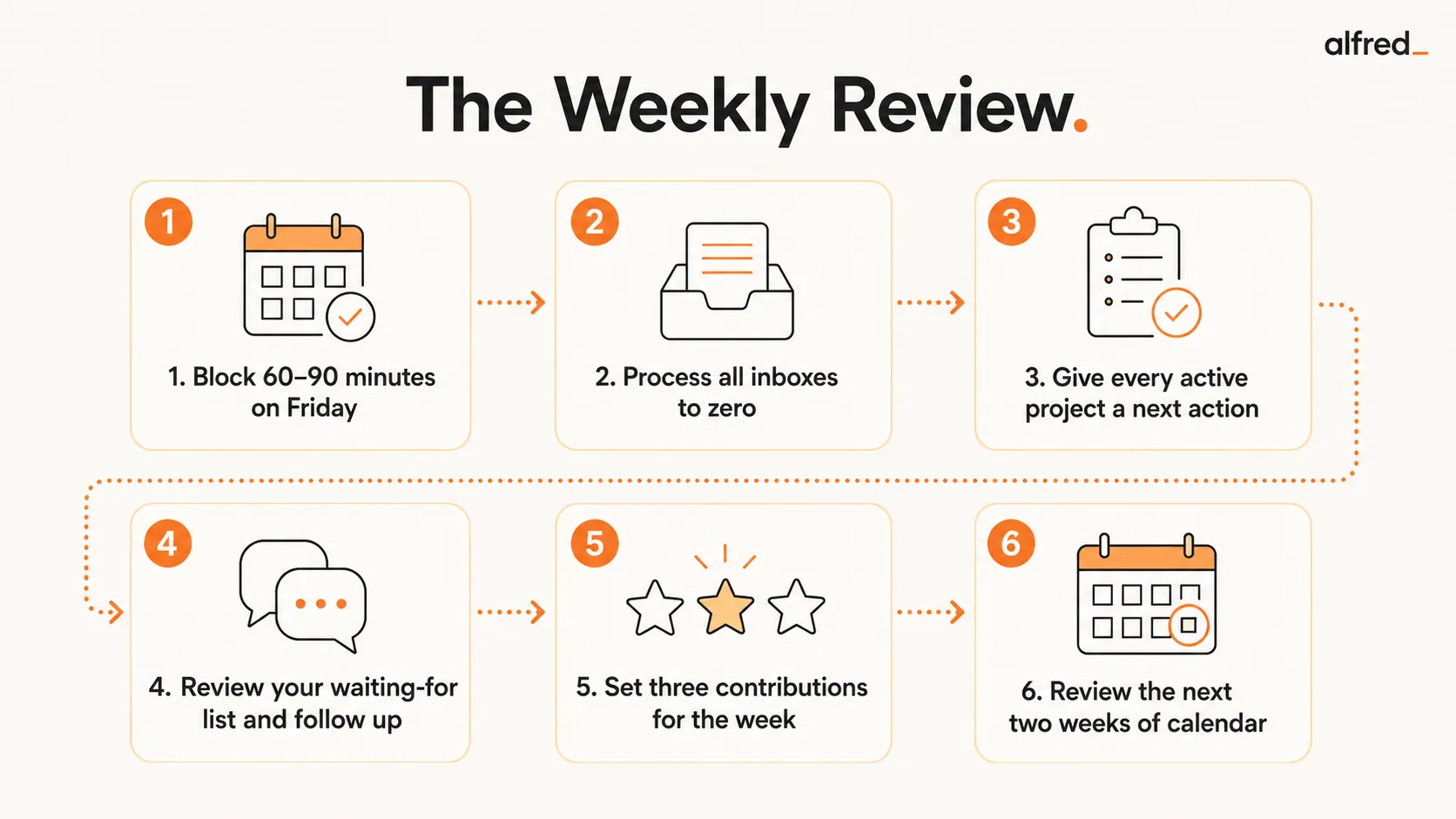
1. Block 60-90 Minutes on Friday Afternoon
Allen recommends Friday afternoon specifically: it closes the previous week cleanly, while the week’s context is still fresh. It primes Monday morning rather than letting it arrive reactively. Schedule it as a recurring non-negotiable appointment. If it is not on the calendar, it does not happen. Newport’s advice applies here: treat your weekly review with the same non-negotiability as a client meeting.
2. Process All Inboxes to Zero
Every inbox: email, physical desk, notes apps, voice memos, Slack, text messages. Allen’s definition of “process” is specific: every item gets a decision. Do it (if under 2 minutes), delegate it, defer it (schedule or add to next actions), or delete it. Nothing is allowed to sit unprocessed. “Inbox is not a to-do list,” Allen writes. Items in an inbox are unprocessed, which means they are open loops generating anxiety.
3. Review Every Active Project for a Next Action
Go through every open project. For each one, confirm: does this project have a clearly defined next physical action? If not, define one now. A project without a next action is stalled regardless of how important it is. This is the most consistently skipped step and the one that generates the most Monday morning paralysis: starting the week with multiple projects that have no defined starting point.
4. Review Your Waiting-For List and Follow Up
The waiting-for list is where dropped balls hide before they hit the floor. Review everything you are waiting on from others. If a response or deliverable is overdue, send a follow-up now (during the review, not later). This is the step that prevents you from discovering on Tuesday that the thing you needed from someone on Friday never arrived. Grove’s principle applies: your output is only as good as the inputs you reliably receive. Managing your waiting-for list is managing your input reliability.
5. Set Your Three Contributions for the Coming Week
Apply Drucker’s question: “What are the three contributions I could make this week that would most significantly affect results?” Write them down explicitly. These are your 20 miles for the week (Collins). Then open your calendar and block time for them before anything else is scheduled. If you cannot find time for your three most important contributions, that is data: your calendar has been captured by other people’s priorities and needs restructuring.
6. Review the Next Two Weeks of Calendar
Look ahead two weeks, not just one. Identify commitments that require preparation: a presentation that needs slides, a meeting that needs a pre-read, a conversation that needs context. Flag anything that conflicts. Identify meetings that can be shortened, declined, or converted to async. The goal is to arrive at Monday morning with no surprises in the coming week, every commitment anticipated, every preparation started.
Before and After
Before the weekly review:
Monday morning arrives reactive. No clarity on what matters. Multiple projects have no next action. Something important is definitely slipping. The week is spent catching up rather than advancing.
After the weekly review:
Monday morning starts with a deep work block on the first key contribution. Every project has a next action. Waiting-for items have been followed up. The week has a defined structure before the first external demand arrives.
The Quick Weekly Review: When You Are Short on Time
Some weeks, 90 minutes is not available. The alternative is not skipping. It is a compressed 20-minute version that preserves the most essential functions.
- 10 minutes: Process all inboxes to zero (at minimum, email and physical desk)
- 5 minutes: Review next week’s calendar: identify any conflicts or preparation needed
- 5 minutes: Set one primary contribution for the week and block time for it
An imperfect weekly review beats no weekly review. Allen’s system degrades without any review; even a 20-minute pass maintains the Current requirement of the trusted system and gives Monday morning at least one anchor of clarity.
How alfred_ Fits Into the Weekly Review
The most time-consuming part of the weekly review is processing the email inbox. For most professionals, email accumulates throughout the week into a backlog that takes 30 to 60 minutes of the review just to sort through. alfred_ removes this bottleneck entirely.
Because alfred_ triages your inbox continuously, archiving noise, flagging what matters, and extracting tasks and waiting-for items, so by the time Friday’s review arrives, your email inbox is already near-zero. The triage has already happened. What remains is only the items that need your judgment.
alfred_’s morning brief also surfaces your outstanding waiting-for threads automatically: the delegations that have not come back, the responses you are expecting, and the threads where your follow-up is overdue. During the review’s waiting-for step, checking alfred_’s task list takes two minutes rather than twenty. The review gets faster, so the activation energy to do it weekly drops significantly.




