

SaneBox has been around since 2010, which in the email productivity space makes it ancient. It has survived because it does one thing and does it well: it moves unimportant emails out of your inbox before you see them.
The question is not whether SaneBox works. It does. The question is whether filtering email is the same thing as managing email. It is not, and understanding that difference is the key to knowing whether SaneBox is worth your money.
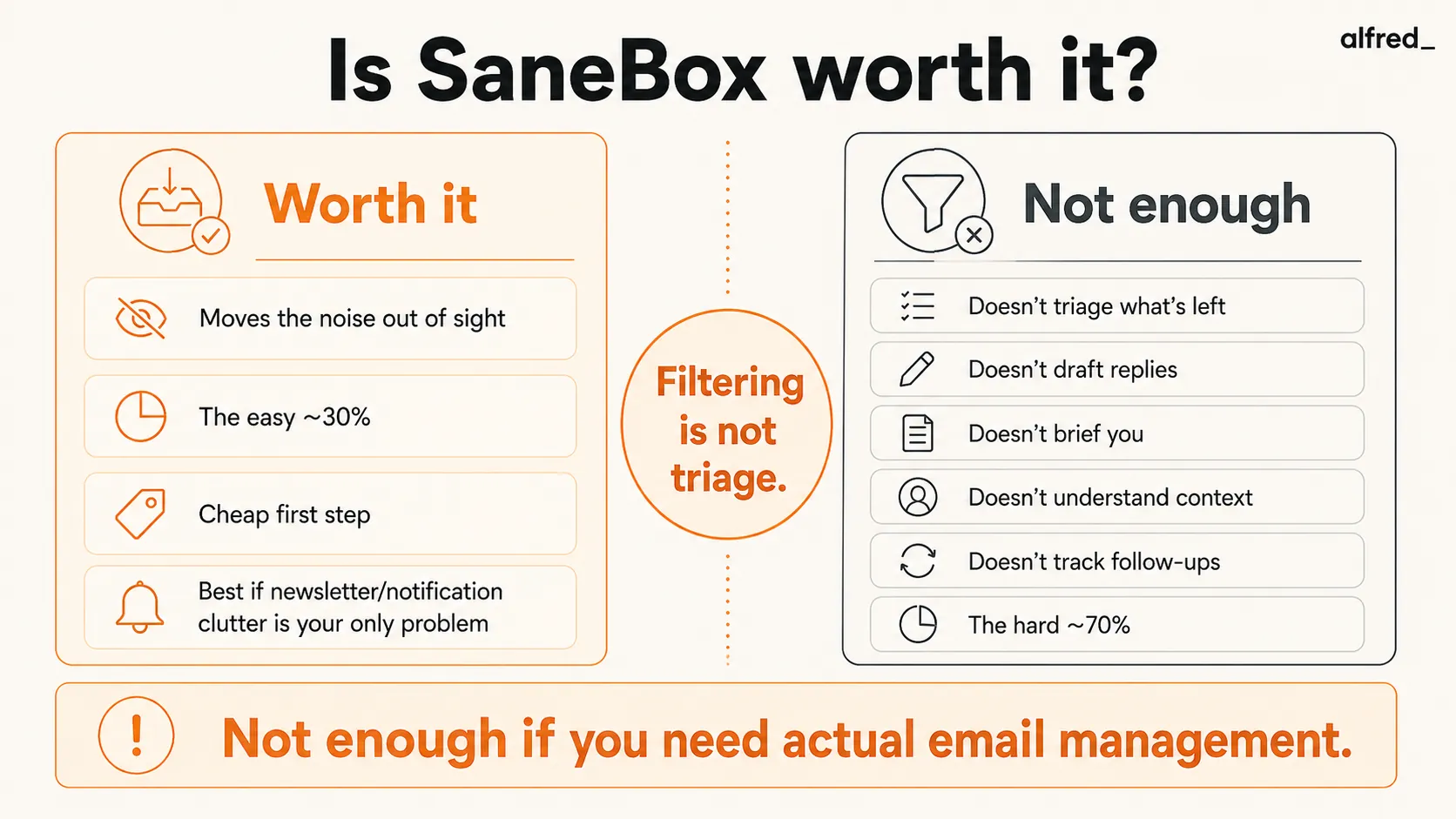
What SaneBox Does Well
It genuinely reduces inbox noise. SaneBox connects to your email account at the server level and analyzes your incoming messages. Emails it determines are unimportant get moved to a SaneLater folder. Newsletters go to SaneNews. Notifications go to SaneNoReplies. Your inbox shrinks by 30-50%, and the emails that remain are more likely to be important.
It works with any email client. Because SaneBox operates at the server level, it works with Gmail, Outlook, Apple Mail, Spark, or any other client. You do not need to switch apps. You do not need to learn a new interface. Your inbox just has fewer emails in it. This is a genuinely underrated advantage, no workflow disruption at all.
Setup takes about two minutes. You connect your email account, and SaneBox starts working immediately. It analyzes your past email history to build an initial model of what is important. You will want to train it over the first week by moving misclassified emails, but the out-of-box accuracy is surprisingly good.
SaneBlackHole is brilliant. Drag an email to the SaneBlackHole folder and you will never see email from that sender again. It is unsubscribe without the unsubscribe link. For persistent spam, marketing lists that ignore your preferences, or senders you never want to hear from, this feature alone might justify the cost.
The price is reasonable. At $7/month for the Snack plan, SaneBox is one of the cheapest email productivity tools on the market. Even the full Dinner plan at $36/month is only expensive if you are comparing it to free alternatives like Gmail filters, which require significantly more manual setup.
It is trustworthy with your data. SaneBox has been transparent about its data practices. It analyzes email headers and metadata (sender, subject, frequency) rather than reading email body content. For privacy-conscious users, this is meaningful.
What SaneBox Does Not Do
This is where many SaneBox reviews get lazy. They list the features, confirm they work, and give it a thumbs up. But the honest evaluation requires asking what happens after SaneBox does its job.
It does not triage what is left. SaneBox removes the noise. But the emails that remain in your inbox, the ones that are actually important, still need to be read, evaluated, and responded to by you. If you get 150 emails a day and SaneBox filters out 50, you still have 100 emails to process manually. That is still a lot of email.
It does not draft replies. After SaneBox filters your inbox, you still compose every response from scratch. There are no AI-drafted replies waiting for you, no suggested responses, no templates pulled from context. You sit down, read the email, and type.
It does not provide a briefing. When you open your email in the morning, SaneBox has cleaned up the noise, but it has not told you what happened overnight. There is no summary of key messages, no prioritized list of decisions needed, no heads-up that three people are waiting for your reply. You discover all of this by reading your inbox.
It does not understand context. SaneBox’s filtering is based on sender patterns and email metadata, not content understanding. It does not know that the email from your client is urgent because your contract expires Friday. It does not know that the newsletter it filtered actually contains a regulatory change that affects your business. It filters by pattern, not by judgment.
It does not track follow-ups intelligently. SaneBox has SaneReminders, which lets you BCC a time-based address to get reminded about an email. But it does not automatically track who owes you a reply, what deadlines are approaching, or what threads have gone quiet. You have to manually set up each reminder.
It does not connect email to your calendar or tasks. An email that says “let’s meet next Tuesday” requires you to manually create a calendar event. An email that contains an action item requires you to manually add it to your task list. SaneBox does not bridge these gaps.
Pricing Breakdown
SaneBox offers three plans:
- Snack: $7/month, 1 email account, basic filtering (SaneLater, SaneBlackHole), a few smart folders
- Lunch: $12/month, 2 email accounts, more smart folders, more features
- Dinner: $36/month, 4 email accounts, all features including SaneReminders, SaneDoNotDisturb, and advanced options
Annual billing saves roughly 20%. Educational and nonprofit discounts are available at 25% off.
For comparison:
- Gmail filters are free (but require manual setup for every rule)
- Outlook Focused Inbox is free (but less customizable)
- alfred_ is $29.99/month (filtering plus triage, drafts, briefing, and follow-ups)
Who Should Buy SaneBox
People whose main problem is newsletter and notification clutter. If your inbox is 40% newsletters, shipping notifications, social media alerts, and automated messages, SaneBox solves that problem efficiently. You do not need AI triage for noise. You need a filter. SaneBox is a good filter.
Privacy-conscious professionals. SaneBox’s approach of analyzing headers rather than reading email content is appealing if you handle sensitive information. It can clean up your inbox without ever reading what is in your emails.
People who love their current email client. If you use Apple Mail, Thunderbird, or any client you do not want to leave, SaneBox is one of the few tools that works behind the scenes without requiring you to switch. This is a real advantage for people with established workflows.
Budget-conscious users who want incremental improvement. At $7/month, SaneBox is the cheapest meaningful improvement you can make to your email experience. If you are not ready to commit to a full AI assistant, SaneBox is a reasonable first step.
Who Should Not Buy SaneBox
Anyone who needs their email managed, not just filtered. If your problem is not noise but volume, legitimate emails from real people that require real responses, SaneBox does not help. It only filters the obvious stuff. The hard work of reading, deciding, and responding is still entirely on you.
People who are drowning in email, not just annoyed by it. There is a difference between “my inbox has too many newsletters” and “I cannot keep up with work communications.” SaneBox solves the first problem. It does not touch the second.
Users who want AI-powered email assistance. If you are looking for AI to help you write replies, summarize threads, prioritize messages by context, or proactively manage follow-ups, SaneBox is not the right category of tool. It is a filter, not an assistant.
People managing multiple high-volume accounts. Even the Dinner plan only covers four accounts. If you manage many accounts or aliases, the per-account pricing adds up, and you still do not get active assistance with any of them.
Where alfred_ Fits
SaneBox and alfred_ overlap in one area: both reduce what lands in your primary inbox. But that is where the similarity ends.
SaneBox filters by pattern. alfred_ triages by understanding.
When alfred_ processes your inbox, it reads your emails, understands the context from your calendar and previous conversations, and makes judgment calls about what matters. Routine emails get draft replies prepared automatically. Your morning brief summarizes what happened and what needs your attention. Follow-ups are tracked without you setting reminders manually.
Think of it this way: SaneBox is a mail sorter that separates letters from junk mail. alfred_ is an assistant who opens your mail, reads it, drafts responses to the routine stuff, flags the important items, and puts a summary on your desk in the morning.
At $29.99/month, alfred_ costs more than SaneBox’s Snack plan but less than the Dinner plan. The value gap is significant. You are not just getting filtering, you are getting active email management.
If SaneBox is working well for you and your only problem was noise, there may not be a reason to switch. But if you tried SaneBox and still feel overwhelmed by what makes it through the filter, that is exactly the problem alfred_ was built to solve.
The Verdict
SaneBox is worth it as a lightweight solution to a specific problem: too much noise in your inbox. It is well-built, reasonably priced, respects your privacy, and works with any email setup. For $7/month, it is hard to argue against trying it.
But SaneBox is a filter, not a solution. It removes the easy 30% of your email problem and leaves the hard 70% untouched. If your inbox stress comes from legitimate emails that need real responses, SaneBox will make your inbox quieter without making your workload lighter.
The honest answer: SaneBox is worth $7-12/month for most people as a first step. It is not worth $36/month when tools like alfred_ offer dramatically more capability for less money. And it is not the final answer for anyone whose email problem goes deeper than clutter.




