


Why Follow-Up Emails Are the Highest-ROI Emails You’ll Write
Most people send one email and wait. That’s not how professional communication works. Decisions require reminders. Busy people need nudges. And proposals that don’t get followed up on simply don’t close.
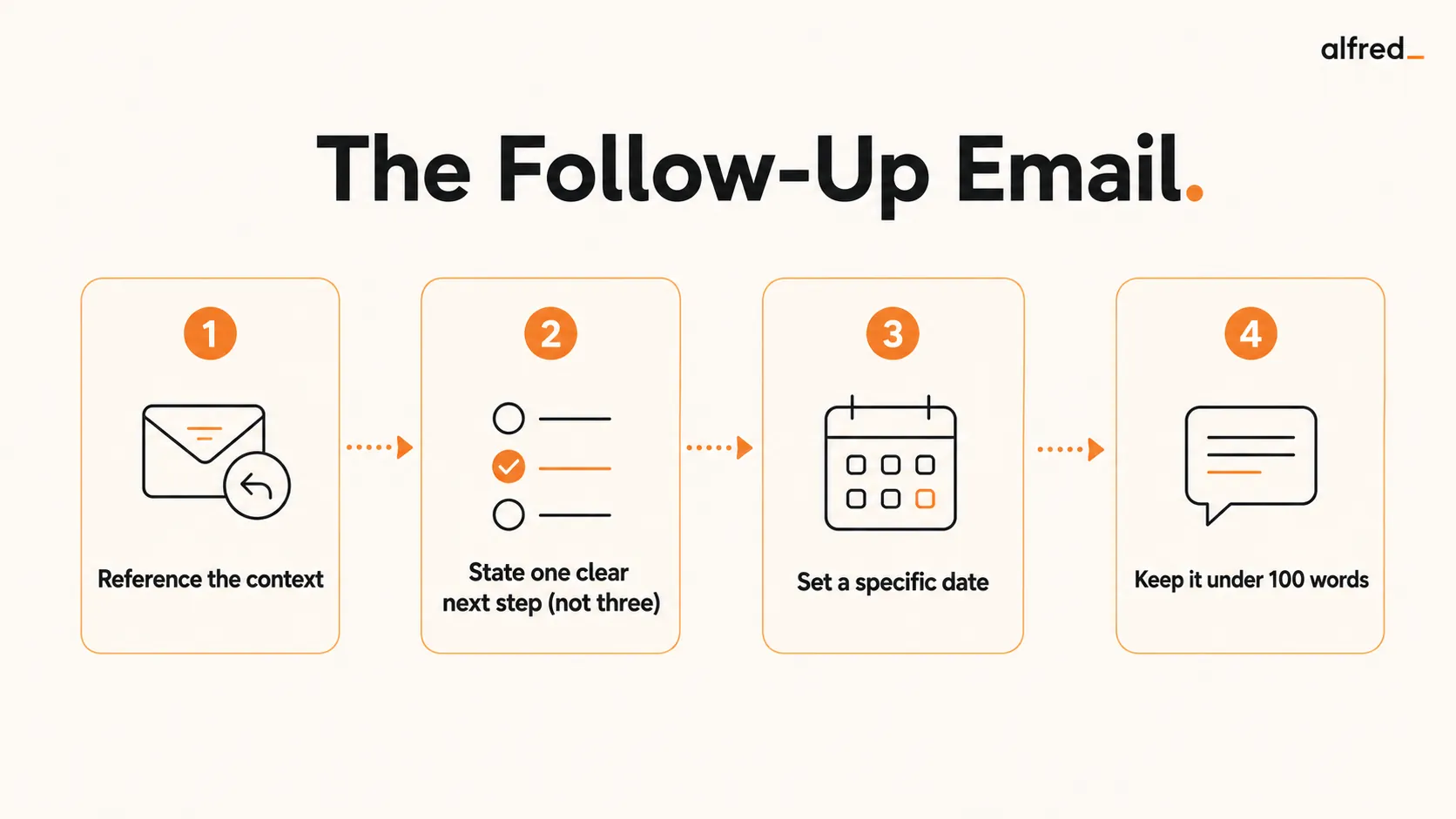
The data on this is unambiguous: follow-up emails outperform initial outreach by a wide margin. A prospect who didn’t respond to your first email isn’t necessarily uninterested. They’re just busy. A client who went quiet after a proposal might be waiting for internal approvals. A recruiter who hasn’t responded to your thank-you note might just have 200 emails in their queue.
The challenge is that most follow-up emails are written poorly. They’re vague, they arrive too late, or they don’t make a clear ask. This guide fixes all three problems.
The Anatomy of an Effective Follow-Up Email
Every effective follow-up email has the same five components. Get these right and your follow-ups will consistently drive responses and action.
Five Components of a Great Follow-Up
- Subject line: Specific and scannable. Reference the meeting name or prior email. Never use “Following up” alone as your subject. It tells the recipient nothing and signals low effort.
- Opening reference: The first line identifies exactly what you’re following up on. “After our call Tuesday about the Q2 campaign…” not “As we discussed…”
- Specific ask or next step: One clear action you want the recipient to take. “Let me know your thoughts” is not an ask. “Can we schedule 30 minutes before March 1?” is an ask.
- Deadline: Give a real date. “By end of week” is better than nothing but “by Friday, February 21” is better still. Specific dates create urgency without being aggressive.
- Short close: One sentence. “Happy to answer any questions” or “Looking forward to hearing from you.” Don’t pad it. Brevity signals respect for the reader’s time.
A follow-up email with all five components should be under 100 words. If it’s longer, you’re probably including information that belongs in a document, not an email.
Follow-Up Email Templates
Copy and adapt these six templates for the most common follow-up scenarios. Each one is under 100 words and hits all five components.
Template 1: Post-Meeting Follow-Up
Subject: Follow-up: [Meeting Name], [Date]

Hi [Name],

Thanks for the time today. Here's a quick recap of what we agreed:

- [Decision 1]
- [Action item | Owner | Due date]
- [Action item | Owner | Due date]

Next step: [One clear next action]. Can you confirm by [specific date]?

Let me know if anything looks off.

[Your name]
Template 2: Sales Follow-Up (After Demo)
Subject: Next steps after your [Product] demo

Hi [Name],

Enjoyed walking through [specific feature] with you today. Based on your
[specific pain point they mentioned], I think [specific outcome] is very
achievable.

I'd like to set up a 30-minute call with [decision-maker] before [date].
Are you available [Day] or [Day] next week?

Happy to send over a summary of the pricing options we discussed in the
meantime.

[Your name]
Template 3: Job Interview Follow-Up
Subject: Thank you: [Role] interview, [Date]

Hi [Interviewer name],

Thank you for the time today. I enjoyed our conversation about [specific
topic discussed]. The challenge you described around [specific problem] is
exactly the type of work I'm most energized by.

I remain very interested in the [Role] position and confident I can
contribute quickly given my experience with [relevant skill].

Please let me know if you need anything else from my end. I'm happy to
connect with any additional team members.

[Your name]
Template 4: Client Proposal Follow-Up
Subject: Re: [Client name] proposal: any questions?

Hi [Name],

I wanted to follow up on the proposal I sent on [date]. I know decisions
like this take time, and I want to make sure you have everything you need.

If anything is unclear or you'd like to adjust the scope, I'm happy to jump
on a 20-minute call this week. I'd love to move forward by [date] to hold
the [start date] slot.

[Your name]
Template 5: After No Response
The most common scenario, and the one people overthink most. Stay warm, stay brief, and give them an easy out. It works because it assumes good faith (they are busy, not ignoring you) and offers a graceful exit.
Subject: Following up on [topic]

Hi [Name],

Just floating this back to the top of your inbox. I know things get busy.
Did you get a chance to look at [specific item] from my last note?

If now is not the right time, tell me and I will check back later.
Otherwise, is [specific next step] still something you want to move on?

Thanks,
[Your name]
Template 6: The Final Nudge (Breakup Email)
When two or three follow-ups have gone unanswered, one clean break-up note often gets a faster reply than another “just checking in.” Counterintuitively, this is one of the highest-converting follow-ups in the list: removing the pressure often prompts the reply that three polite nudges could not.
Subject: Should I close this out?

Hi [Name],

I have reached out a couple of times about [topic] and do not want to keep
cluttering your inbox. I will assume the timing is not right and close this
out for now.

If that is wrong and you still want to move forward, just reply and I will
pick it right back up.

All the best,
[Your name]
Meeting Follow-Ups: Document Decisions, Not Discussion
Meeting follow-ups deserve their own structure because they fail in a predictable way: they document discussion instead of decisions. “We discussed the Q3 budget timeline” captures the conversation. “We decided to push the Q3 deadline from March 15 to April 1” creates accountability. An effective meeting follow-up contains exactly four things:
- Decisions made. List only what was resolved, not what was discussed. If no decision was reached, say so: “We didn’t decide on X; the next step is Y” is itself a documented outcome.
- Action items. One sentence per task, specific enough that the owner doesn’t need a clarifying question to begin. “Send revised contract terms to Legal by COB Thursday,” not “follow up on the contract situation.”
- Explicit owners. Every action item gets one named person. Not “the team,” not “marketing.” When everyone owns something, nobody does. If a task needs several people, name a lead.
- Deadlines. A specific date, not “end of week” or “soon.” An action item without a deadline is an intention, and intentions are negotiable.
If a next meeting was set, include the date, time, and any preparation required.
Meeting Template: Standard Team Meeting
Subject: [Meeting Name]: Decisions & Next Steps ([Date])

Hi [names / team],

Thanks for the time today. Here's a summary for reference.

DECISIONS
- [Decision 1]: We agreed to [specific decision]. This replaces
  [previous state/plan].
- [Decision 2]: We decided to hold off on [X] until [condition].
  [Name] will revisit in the [date] review.

ACTION ITEMS
- [Name]: [Specific task], due [Date]
- [Name]: [Specific task], due [Date]

NEXT MEETING
[Date and time, if applicable]. Agenda items: [brief list].

Questions? Reply here.

[Your name]
Meeting Template: Client Check-In or Sales Call
Subject: Follow-up: [Your Company] / [Client Company], [Date]

Hi [Client name],

Thank you for the time this morning. Summarizing what we covered:

WHAT WE DECIDED
- [Decision 1, framed from client's perspective]
- [Decision 2]

OUR NEXT STEPS
- [Your name]: [Task], by [Date]

YOUR NEXT STEPS
- [Client name or title]: [Task], by [Date]

OPEN ITEMS
- [Item that still needs resolution]: We'll address this by [date/method].

Our next call is scheduled for [date and time]. I'll send a calendar
invite shortly.

[Your name]
Meeting Template: Project Kickoff
Subject: [Project Name] Kickoff: Summary & First Steps

Hi all,

Great kickoff today. Here's the record of what we established.

PROJECT SUMMARY
Goal: [One sentence describing the project objective]
Success criteria: [How we'll know it's done well]
Target completion: [Date]

DECISIONS
- Scope: [What's in / what's explicitly out]
- Owner: [Named project lead]
- Reporting: [How and how often we'll communicate progress]

IMMEDIATE ACTION ITEMS (first two weeks)
- [Name]: [Task], due [Date]
- [Name]: [Task], due [Date]

STANDING MEETINGS
[Cadence, day/time, and format]

OPEN QUESTIONS
- [Question 1]: [Name] to investigate and report back by [Date]

The shared project folder is at [link]. Please confirm you have access.

[Your name]
Step-by-Step: Write a Better Follow-Up Email
1. Reference the Specific Context (Don’t Be Vague)
The biggest follow-up mistake is opening with something generic. “Just checking in” tells the recipient nothing about why you’re emailing or what you want. Be specific:
- Bad: “Just following up on our conversation.”
- Good: “Following up on our Tuesday call about the Q2 campaign strategy.”
- Bad: “Wanted to circle back on the proposal.”
- Good: “Following up on the $45K proposal I sent February 10.”
2. State One Clear Next Step (Not Three)
Follow-ups with multiple asks often get zero responses. When there are three things to do, the reader defaults to doing none of them. The decision of which one to start with becomes its own obstacle. Pick the single most important next step and ask for that one thing only.
- Bad: “Could you review the proposal, introduce me to your CFO, and let me know your timeline?”
- Good: “Can we schedule 30 minutes this week to walk through the proposal together?”
3. Set a Specific Deadline or Date
Vague timing produces vague responses. A specific date creates urgency and makes it easy for the recipient to say yes or suggest an alternative. It also gives you a natural trigger for a second follow-up if they don’t respond by that date.
- Bad: “Let me know when you have a chance.”
- Good: “Can you confirm by Friday, February 21?”
- Bad: “I’d love to connect soon.”
- Good: “Are you available Tuesday or Wednesday this week?”
4. Keep It Under 100 Words
Follow-up emails are not the place for lengthy explanations. If someone didn’t respond to your initial email, a longer follow-up almost certainly won’t help. Brevity signals respect. A tight, direct follow-up is more likely to be read and responded to than a paragraph-heavy recap of everything you’ve already said.
- Aim for 50-100 words total
- No more than 3-4 sentences in the body
- If you need to share details, attach a document
5. Let AI Draft It While the Meeting Is Still Fresh
The biggest reason follow-ups are vague is that they’re written too late. By the time you sit down to write it, the specific decisions and action items have faded. alfred_ solves this by drafting the follow-up automatically the moment your meeting ends:
- Connect alfred_ to your calendar and inbox
- When your meeting ends, alfred_ generates a draft follow-up using the meeting context
- Review in 60 seconds while details are still fresh
- Send it before the next meeting starts
Common Follow-Up Email Mistakes
- Being too vague: “Just following up” without context forces the recipient to remember what you’re talking about. Give them the specific meeting or email you’re referencing in the first sentence.
- Following up too late: A follow-up sent 5 days after a meeting is working against decaying memory and attention. Send within 24 hours for meetings, same day for hot leads.
- No clear ask: “Wanted to check in” is not an ask. Every follow-up should contain one specific, answerable request. If you don’t know what you want, don’t send the follow-up yet.
- Walls of text: A follow-up is not a memo. If your follow-up is longer than 150 words, cut it down. Move details to an attachment if necessary.
- Too many follow-ups: One follow-up is professional. Three follow-ups in three days is harassment. Space them out and read the signals.
Before vs. After: What Changes When AI Drafts the Follow-Up
Before: Writing the Follow-Up Manually
- Day of meeting: Mentally note that you should send a follow-up. Get pulled into other work immediately after.
- Day after: Remember the follow-up. Start to write it. Can’t remember exactly what was agreed on the third action item.
- Draft: Generic recap with vague next steps. No specific deadlines because you’re not sure what was decided.
- Result: Follow-up sent 2 days late, reads as perfunctory, doesn’t drive accountability.
Outcome: Follow-up exists but doesn’t move things forward
After: alfred_ Drafts While Details Are Fresh
- Meeting ends: alfred_ detects meeting completion, begins drafting.
- 2 minutes later: Open alfred_. Draft ready with specific decisions, action items with names, and next steps with dates.
- Review: Read in 60 seconds, add one specific detail from memory, tap Send.
- Result: Follow-up sent same day, specific and actionable, drives real accountability.
Outcome: Follow-up actually moves the project forward
70%
of newly learned information is forgotten within 24 hours without reinforcement, per the Ebbinghaus forgetting curve
Ebbinghaus Forgetting CurveWhen to Send a Follow-Up Email
Timing is almost as important as content. Here’s the guidance for the most common scenarios:
- After a meeting or call: Within 24 hours. Same day is better. The follow-up loses most of its value after 48 hours because everyone’s attention has moved on.
- After a sales demo for a hot lead: Same day, within 2 hours. Strike while interest is highest and you’re still top of mind.
- After a job interview: Same day, within a few hours. A prompt thank-you note signals professionalism and genuine interest.
- After sending a proposal: 3-5 business days if no response. Give them time to read and circulate internally before following up.
- Second follow-up (if no response to first): 3-5 business days after the first follow-up. Keep it shorter than the first one. One sentence is fine: “Just wanted to make sure this didn’t get lost. Any update?”
How AI Makes Follow-Ups Effortless
The best follow-up email is one that actually gets written and sent on time. For most people, the bottleneck isn’t knowing what to write. It’s having the time and mental bandwidth to write it while everything is still fresh.
alfred_ solves this by connecting to your calendar and inbox. When a meeting ends, alfred_ automatically drafts a follow-up using the meeting context: the invite title, attendees, and any prior email threads on the subject. You review the draft in under 60 seconds and send it immediately.
For regular follow-up emails that aren’t meeting-related (sales sequences, proposal follow-ups, client check-ins), alfred_ also monitors your outbox and flags emails that haven’t received a response, suggesting a follow-up draft when the timing is right.
The result: you never forget to follow up. You never write a vague one because you can’t remember the details. And you never spend 20 minutes writing an email that should have taken 2. See also: how to automate meeting follow-ups for the full setup guide.